
第 31 章 项目实战-PC 端固定布局[4]
学习要点:
1.热门旅游区
2.标题介绍区
3.旅游项目区
主讲教师:李炎恢
本章主要开始使用学习用 HTML5 和 CSS3 来构建 Web 页面,第一个项目采用 PC 端固定布局来实现。
一.热门旅游区
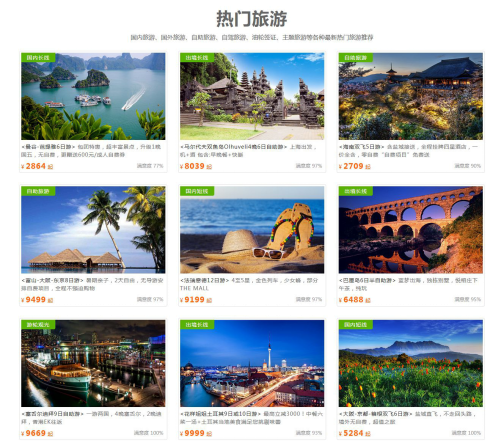
本节课,我们将探讨一下首页最核心的部分,旅游区。这块内容由两个部分组成,一个是大标题,表示热门旅游区域。其次就是旅游项目的图片展示区域。具体如下:
//热门旅游区父元素
<div id="tour">

    ...

</div>
//旅游父元素
#tour {

    width: 1263px;

    height: 1200px;

    margin: 30px auto;

    text-align: center;

}
二.标题介绍区
标题区可以分为大标题和内容,那么<section>就比较适合了。
//标题
<div id="tour">

    <section class="center">

        <h2>热门旅游</h2>

        <p>

            国内旅游、国外旅游、自助旅游、自驾旅游、油轮签证、主题旅游等各种最新热门旅游推荐

        </p>

    </section>

</div>
//标题 CSS
#tour .center {

    text-align: center;

}

#tour .center h2 {

    margin: 10px 0;

    font-size: 45px;

    letter-spacing: 2px;

    color: #666;

}

#tour .center p {

    color: #666;

    margin: 10px 0;

}
三.旅游项目区
项目区是一张图片和一段文本的阐述,共实现 9 个,3x3 排列。
//旅游项目区
<div id="tour">
<section class="center">
<h2>热门旅游</h2>
<p>国内旅游、国外旅游、自助旅游、自驾旅游、油轮签证、主题旅游等各种最新热门旅游推荐</p>
</section>
<figure>
<img src="img/tour1.jpg" alt="">
<figcaption><strong class="title"><曼谷-芭提雅6日游></strong> 包团特惠,超丰富景点,升级1晚国五,无自费,更赠送600元/成人自费券</figcaption>
<div>
<em class="sat">满意度 77%</em>
<span class="price">¥ <strong>2864</strong> 起</span>
</div>
<div class="type">国内长线</div>
</figure>
<figure>
<img src="img/tour2.jpg" alt="马尔代夫双鱼岛Olhuveli4晚6日自助游">
<figcaption><strong class="title"><马尔代夫双鱼岛Olhuveli4晚6日自助游></strong> 上海出发,机+酒包含:早晚餐+快艇</figcaption>
<div>
<em class="sat">满意度97%</em>
<span class="price">¥ <strong>8039</strong> 起</span>
</div>
<div class="type">出境长线</div>
</figure>
<figure>
<img src="img/tour3.jpg" alt="海南双飞5日游">
<figcaption><strong class="title"><海南双飞5日游></strong> 含盐城接送,全程挂牌四星酒店,一价全含,零自费“自费项目”免费送</figcaption>
<div>
<em class="sat">满意度90%</em>
<span class="price">¥ <strong>2709</strong> 起</span>
</div>
<div class="type">自助旅游</div>
</figure>
<figure>
<img src="img/tour4.jpg" alt="富山-大阪-东京8日游">
<figcaption><strong class="title"><富山-大阪-东京8日游></strong> 暑期亲子,2天自由,无导游安排自费项目,全程不强迫购物</figcaption>
<div>
<em class="sat">满意度97%</em>
<span class="price">¥ <strong>9499</strong> 起</span>
</div>
<div class="type">自助旅游</div>
</figure>
<figure>
<img src="img/tour5.jpg" alt="法瑞意德12日游">
<figcaption><strong class="title"><法瑞意德12日游></strong> 4至5星,金色列车,少女峰,部分THE MALL</figcaption>
<div>
<em class="sat">满意度97%</em>
<span class="price">¥ <strong>9199</strong> 起</span>
</div>
<div class="type">国内短线</div>
</figure>
<figure>
<img src="img/tour6.jpg" alt="巴厘岛6日半自助游">
<figcaption><strong class="title"><巴厘岛6日半自助游></strong> 蓝梦出海,独栋别墅,悦榕庄下午茶,纯玩</figcaption>
<div>
<em class="sat">满意度95%</em>
<span class="price">¥ <strong>6488</strong> 起</span>
</div>
<div class="type">出境长线</div>
</figure>
<figure>
<img src="img/tour7.jpg" alt="塞舌尔迪拜9日自助游">
<figcaption><strong class="title"><塞舌尔迪拜9日自助游></strong> 一游两国,4晚塞舌尔,2晚迪拜,香港EK往返</figcaption>
<div>
<em class="sat">满意度100%</em>
<span class="price">¥ <strong>9669</strong> 起</span>
</div>
<div class="type">游轮观光</div>
</figure>
<figure>
<img src="img/tour8.jpg" alt="花样姐姐土耳其9日或10日游">
<figcaption><strong class="title"><花样姐姐土耳其9日或10日游></strong> 最高立减3000!中餐六菜一汤+土耳其当地美食满足您挑剔味蕾</figcaption>
<div>
<em class="sat">满意度93%</em>
<span class="price">¥ <strong>9999</strong> 起</span>
</div>
<div class="type">出境长线</div>
</figure>
<figure>
<img src="img/tour9.jpg" alt="大阪-京都-箱根双飞6日游">
<figcaption><strong class="title"><大阪-京都-箱根双飞6日游></strong> 盐城直飞,不走回头路,境外无自费,超值之旅</figcaption>
<div>
<em class="sat">满意度100%</em>
<span class="price">¥ <strong>5284</strong> 起</span>
</div>
<div class="type">国内短线</div>
</figure>
</div>
//旅游项目区 CSS
#tour {

    width: 1263px;

    height: 1200px;

    /*background-color: #ccc;*/

    margin: 30px auto;

    text-align: center;

}

#tour .center h2 {

    font-size: 45px;

    letter-spacing: 2px;

    color: #666;

    margin: 10px 0;

}

#tour .center p {

    color: #666;

    margin: 10px 0;

}

#tour figure {

    border: 1px solid #ddd;

    display: inline-block;

    padding: 4px;

    border-radius: 4px;

    margin: 15px 12px;

    width: 380px;

    text-align: left;

    position: relative;

}

#tour figure img {

    vertical-align: middle;

}

#tour figcaption {

    color: #777;

    line-height: 1.5;

    letter-spacing: 1px;

    font-size: 14px;

    padding: 7px 0 5px 0;

}

#tour .title {

    color: #333;

    font-weight: normal;

}

#tour .sat {

    float: right;

    font-size: 13px;

    color: #999;

    font-style: normal;

    position: relative;

    top: 5px;

    right: 5px;

}

#tour .price {

    color: #f60;

    font-size: 14px;

}

#tour .price strong {

    font-size: 20px;

    letter-spacing: 1px;

}

#tour .type {

    width: 90px;

    height: 25px;

    line-height: 25px;

    font-size: 14px;

    text-align: center;

    color: #fff;

    background-color: #59b200;

    position: absolute;

    top: 4px;

    left: 4px;

}
第 31 章 项目实战-PC 端固定布局[4]的更多相关文章
- 第 31 章 项目实战-PC端固定布局[1]
学习要点: 1.准备工作 2.创建项目 3.网站结构 4.CSS选择器 5.完成导航 主讲教师:李炎恢 本章主要开始使用学习用HTML5和CSS3来构建Web页面,第一个项目采用PC端 固定布局来实现 ...
- 第 31 章 项目实战-PC 端固定布局[5]
学习要点: 1.底部区域 2.说明区域 3.版权及证件区 主讲教师:李炎恢 本章主要开始使用学习用 HTML5 和 CSS3 来构建 Web 页面,第一个项目采用 PC 端固定布局来实现. 一.底部区 ...
- 第 31 章 项目实战-PC 端固定布局[3]
学习要点: 1.搜索区 2.插入大图 3.搜索框 主讲教师:李炎恢 本章主要开始使用学习用 HTML5 和 CSS3 来构建 Web 页面,第一个项目采用 PC 端固定布局来实现. 一.搜索区 本节课 ...
- 第 31 章 项目实战-PC端固定布局[2]
学习要点: 1.大纲算法 2.section和div 3.结构分析 主讲教师:李炎恢 本章主要开始使用学习用HTML5和CSS3来构建Web页面,第一个项目采用PC端 固定布局来实现. 一.大纲算法 ...
- 第八十六节,html5+css3pc端固定布局,网站结构,CSS选择器,完成导航
html5+css3pc端固定布局,网站结构,CSS选择器,完成导航 页面采用1280的最低宽度设计,去掉滚动条为1263像素. 项目是PC端的固定布局,会采用像素(px)单位. 网站结构语义 在没有 ...
- 第九十一节,html5+css3pc端固定布局,完成首页
html5+css3pc端固定布局,完成首页 此时我们的首页就完成了 首页效果 其他页面我就不做了,原理相同,做其他页面时将头尾css分离调用即可 大纲算法 我们看看大纲算法比较清晰,说明符合规则 h ...
- 第八十九节,html5+css3pc端固定布局,热门旅游取,标题介绍区,旅游项目区
html5+css3pc端固定布局,热门旅游取,标题介绍区,旅游项目区 样式: html代码: <!--主体--> <section class="zhu-ti" ...
- 第九十节,html5+css3pc端固定布局,底部区域,说明区域,版权区域
html5+css3pc端固定布局,底部区域,说明区域,版权区域 完成: HTML代码: <!--尾部--> <footer class="wei-bu"> ...
- 第八十八节,html5+css3pc端固定布局,搜索区,插入大图,搜索框
html5+css3pc端固定布局,搜索区,插入大图,搜索框 设置一个div作为搜索区域 1.宽度为百分之百 2.最小宽度为1263,因为要考虑到手机,等小屏幕缩小后宽度会自适应,导致破坏布局,将最小 ...
随机推荐
- Linux 服务器监控
200 ? "200px" : this.width)!important;} --> 标签:iostat/free/top/dstat 概述 文字主要讲述使用linux自带 ...
- jws.mono脚本安装详解
就在最近两天,最新版本的jws.mono上线了,这个版本除了提供与之前版本拥有的功能外,还额外提供了一个“自动化”的安装脚本,通过执行该脚本,jws.mono将自动快速的安装到指定的目录,同时,通过改 ...
- Mint linux 自定义上下文菜单实现ZIP压缩文件无乱码解压
1. 前提条件 我的Mint Linux 是Thunar文件管理器(默认的). 2. 配置自定义动作 打开Thunar文件管理器,点击菜单“编辑”=>“配置自定义动作”.点击“+”添加一个新的. ...
- 2016苹果春季发布会 iPhone SE发布
配置如下 主屏尺寸:4英寸 主屏分辨率:1336x640像素 后置摄像头:1200万像素 前置摄像头:120万像素 电池容量:1624mAh 核心数:双核 操作系统:iOS 9 核心数:双核 CPU: ...
- Objective-C 工厂模式(下) -- 抽象工厂模式
相比简单工厂模式, 只有一个工厂 能生产的手机也是固定的 抽象工厂模式类似于有很多家工厂, 当用户要买什么手机就创建对应的工厂去生产 比如用户要买iPhone就创建一个Apple工厂来生产手机, 要买 ...
- Underscore.js使用
Underscore 是一个 JavaScript 工具库,它提供了一整套函数式编程的实用功能,但是没有扩展任何 JavaScript 内置对象. 他解决了这个问题:"如果我面对一个空白的 ...
- Oracle 多行转多列,列值转为列名
前段时间做调查问卷,客户创建自定义问卷内容,包括题目和选项内容; 之后需要导出问卷明细,,,,麻烦来咯 于是到网上到处搜索,没有直接结果;于是又找各种相似的,,终于功夫不负有心人 然后最终自己写出来了 ...
- Tips for newbie to read source code
This post is first posted on my WeChat public account: GeekArtT Reading source code is always one bi ...
- 【WP开发】读写剪贴板
在WP 8.1中只有Silverlight App支持操作剪贴板的API,Runtime App并不支持.不过,在WP 10中也引入了可以操作剪贴板的API. 顺便说点题外话,有人会说,我8.1的开发 ...
- 数据结构与算法JavaScript (四) 串(BF)
串是由零个或多个字符组成的有限序列,又叫做字符串 串的逻辑结构和线性表很相似的,不同的是串针对是是字符集,所以在操作上与线性表还是有很大区别的.线性表更关注的是单个元素的操作CURD,串则是关注查找子 ...