
Flume-Replicating Channel Selector 单数据源多出口
使用 Flume-1 监控文件变动,Flume-1 使用 Replicating Channel Selector 将变动内容传递给 Flume-2,Flume-2 负责存储到 HDFS。同时 Flume-1 将变动内容传递给 Flume-3,Flume-3 负责输出到 Local FileSystem。

一、创建配置文件
1.flume-file-flume.conf
配置 1 个接收日志文件的 source 和两个 channel、两个 sink,分别输送给 flume-flume-hdfs 和 flume-flume-dir。
# Name the components on this agent

a1.sources = r1

a1.sinks = k1 k2

a1.channels = c1 c2

# 将数据流复制给所有 channel

a1.sources.r1.selector.type = replicating

# Describe/configure the source

a1.sources.r1.type = exec

a1.sources.r1.command = tail -F /tmp/tomcat.log

a1.sources.r1.shell = /bin/bash -c

# Describe the sink

# sink 端的 avro 是一个数据发送者

a1.sinks.k1.type = avro

a1.sinks.k1.hostname = h136

a1.sinks.k1.port = 4141

a1.sinks.k2.type = avro

a1.sinks.k2.hostname = h136

a1.sinks.k2.port = 4142

# Describe the channel

a1.channels.c1.type = memory

a1.channels.c1.capacity = 1000

a1.channels.c1.transactionCapacity = 100

a1.channels.c2.type = memory

a1.channels.c2.capacity = 1000

a1.channels.c2.transactionCapacity = 100

# Bind the source and sink to the channel

a1.sources.r1.channels = c1 c2

a1.sinks.k1.channel = c1

a1.sinks.k2.channel = c2
2.flume-flume-hdfs.conf
配置上级 Flume 输出的 Source,输出是到 HDFS 的 Sink。
# Name the components on this agent

a2.sources = r1

a2.sinks = k1

a2.channels = c1

# Describe/configure the source

# source 端的 avro 是一个数据接收服务

a2.sources.r1.type = avro

a2.sources.r1.bind = h136

a2.sources.r1.port = 4141

# Describe the sink

a2.sinks.k1.type = hdfs

a2.sinks.k1.hdfs.path = hdfs://h136:9000/flume2/%Y%m%d/%H

#上传文件的前缀

a2.sinks.k1.hdfs.filePrefix = flume2-

#是否按照时间滚动文件夹

a2.sinks.k1.hdfs.round = true

#多少时间单位创建一个新的文件夹

a2.sinks.k1.hdfs.roundValue = 1

#重新定义时间单位

a2.sinks.k1.hdfs.roundUnit = hour

#是否使用本地时间戳

a2.sinks.k1.hdfs.useLocalTimeStamp = true

#积攒多少个 Event 才 flush 到 HDFS 一次

a2.sinks.k1.hdfs.batchSize = 100

#设置文件类型,可支持压缩

a2.sinks.k1.hdfs.fileType = DataStream

#多久生成一个新的文件

a2.sinks.k1.hdfs.rollInterval = 600

#设置每个文件的滚动大小大概是 128M

a2.sinks.k1.hdfs.rollSize = 134217700

#文件的滚动与 Event 数量无关

a2.sinks.k1.hdfs.rollCount = 0

# Describe the channel

a2.channels.c1.type = memory

a2.channels.c1.capacity = 1000

a2.channels.c1.transactionCapacity = 100

# Bind the source and sink to the channel

a2.sources.r1.channels = c1

a2.sinks.k1.channel = c1
3.flume-flume-dir.conf
配置上级 Flume 输出的 Source,输出是到本地目录的 Sink。
输出的本地目录必须是已经存在的目录,如果该目录不存在,并不会创建新的目录。
# Name the components on this agent

a3.sources = r1

a3.sinks = k1

a3.channels = c2

# Describe/configure the source

a3.sources.r1.type = avro

a3.sources.r1.bind = h136

a3.sources.r1.port = 4142

# Describe the sink

a3.sinks.k1.type = file_roll

a3.sinks.k1.sink.directory = /tmp/flumeData

# Describe the channel

a3.channels.c2.type = memory

a3.channels.c2.capacity = 1000

a3.channels.c2.transactionCapacity = 100

# Bind the source and sink to the channel

a3.sources.r1.channels = c2

a3.sinks.k1.channel = c2
二、测试
需要启动 HDFS,由于 flume-file-flume.conf 向另外两个发送数据,即 flume-flume-hdfs.conf 和 flume-flume-dir.conf 为服务端接收数据,需要在 flume-file-flume.conf 之前启动。
cd /opt/apache-flume-1.9.-bin

bin/flume-ng agent --conf conf/ --name a3 --conf-file /tmp/flume-job/group1/flume-flume-dir.conf -Dflume.root.logger=INFO,console

bin/flume-ng agent --conf conf/ --name a2 --conf-file /tmp/flume-job/group1/flume-flume-hdfs.conf -Dflume.root.logger=INFO,console

bin/flume-ng agent --conf conf/ --name a1 --conf-file /tmp/flume-job/group1/flume-file-flume.conf -Dflume.root.logger=INFO,console
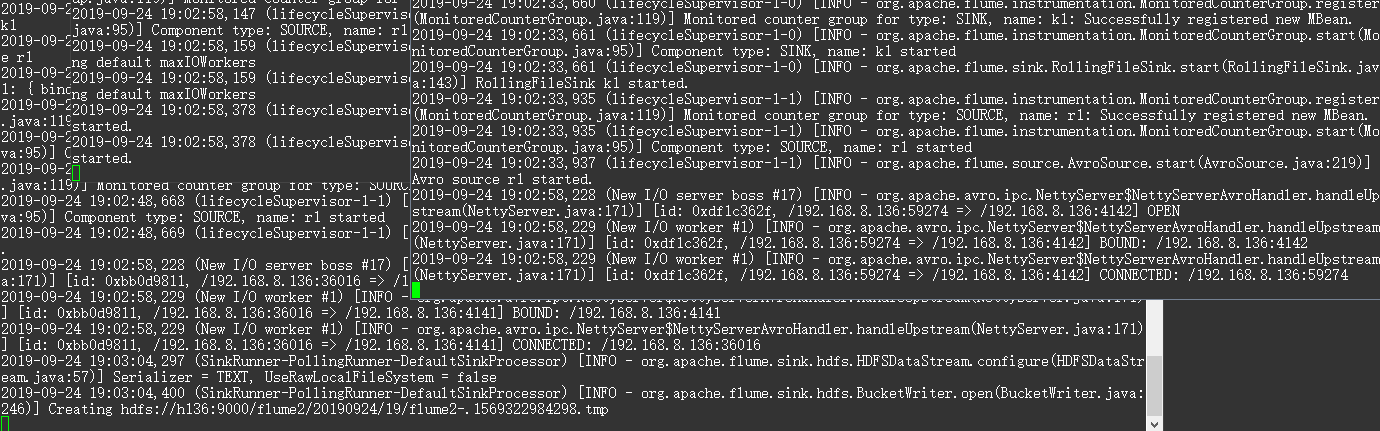
向监听文件追加数据,查看变化。
echo '789qwewqe' >> /tmp/tomcat.log

echo '123cvbcvbcv' >> /tmp/tomcat.log

echo '456jkuikmjh' >> /tmp/tomcat.log


Flume-Replicating Channel Selector 单数据源多出口的更多相关文章
- Flume配置Replicating Channel Selector
1 官网内容 上面的配置是r1获取到的内容会同时复制到c1 c2 c3 三个channel里面 2 详细配置信息 # Name the components on this agent a1.sour ...
- Flume Channel Selector
Flume 基于Channel Selector可以实现扇入.扇出. 同一个数据源分发到不同的目的,如下图. 在source上可以定义channel selector: 1 2 3 4 5 6 7 8 ...
- SpringBoot 集成mongodb(1)单数据源配置
新项目要用到mongodb,于是在个人电脑上的虚拟环境linux上安装了下mongodb,练习熟悉下. 1.虚拟机上启动mongodb. 首先查看虚拟机ip地址,忘了哈~~ 命令行>ifconf ...
- Flume配置Multiplexing Channel Selector
1 官网内容 上面配置的是根据不同的heder当中state值走不同的channels,如果是CZ就走c1 如果是US就走c2 c3 其他默认走c4 2 我的详细配置信息 一个监听http端口 然后 ...
- 关于Flume中Chanel.Selector.header解释
flume内置的ChannelSelector有两种,分别是Replicating和Multiplexing. Replicating类型的ChannelSelector会针对每一个Event,拷贝到 ...
- Flume 学习笔记之 Flume NG概述及单节点安装
Flume NG概述: Flume NG是一个分布式,高可用,可靠的系统,它能将不同的海量数据收集,移动并存储到一个数据存储系统中.轻量,配置简单,适用于各种日志收集,并支持 Failover和负载均 ...
- flume file channel 异常解决
1. 错误提示 -- ::, (SinkRunner-PollingRunner-DefaultSinkProcessor) [ERROR - org.apache.flume.SinkRunner$ ...
- Flume的Channel
一.Memory Channel 事件将被存储在内存中(指定大小的队列里) 非常适合那些需要高吞吐量且允许数据丢失的场景下 属性说明: 二.JDBC Channel 事件会被持久化(存储)到可靠的数据 ...
- NIO的Buffer&Channel&Selector
java的NIO和AIO Buffer position.limit.capacity 初始化 Buffer 填充 Buffer 提取 Buffer 中的值 mark() & reset() ...
随机推荐
- TypeScript入门三:TypeScript函数类型
TypeScript函数类型 TypeScript函数的参数 TypeScript函数的this与箭头函数 TypeScript函数重载 一.TypeScript函数类型 在上一篇博客中已经对声明Ty ...
- 7.使用EXPLAIN 来分析SQL和表结构_1
explain:查看执行计划 使用explain 关键字可以模拟优化器执行SQL查询语句,从而知道MySQL是如何处理你的SQL语句的 分析你的查询语句或是表结构的性能瓶颈 使用explain 可以获 ...
- Dart的导包
Dart中的库主要有三种: 1.我们自定义的库 import 'lib/xxx.dart'; 2.系统内置库 import 'dart:math'; import 'dart:io'; import ...
- Django项目上线的准备工作
settings文件配置 添加上STATIC_ROOT = os.path.join(BASE_DIR, "/static/") 我的配置项目文件的最终 STATIC_URL = ...
- linux入门常用指令2.安装nginx
下载nginx包 nginx-1.10.3.tar.gz 解压 [root@localhost src]# tar -zxvf nginx-1.10.3.tar.gz [root@localhost ...
- new Function()语法
函数的语法: let func = new Function(...args, body); 历史原因,参数也可以以逗号分隔的列表的形式给出,这三个意思相同: new Function('a', 'b ...
- npm 安装指定版本的包
使用 包名@版本号 指定, 例如,安装 Express 3.21.2, $ npm
- LoadRunner(2)
一.性能测试的基本概念 1.并发和在线的区别:并发的压力是一种瞬时压力,一般针对同一类型业务:在线的压力是一段时间的压力,没有并发那么集中. 规律:一般20用户并发产生的压力相当于200用户在线的压力 ...
- IP段的正则表达式
IPv4 prefix格式:比如: 192.168.1.0/24 ^(?=(\b|\D))(((\d{1,2})|(1\d{1,2})|(2[0-4]\d)|(25[0-5]))\.){3}((\d{ ...
- bind支持mysql
最近打算将bind的记录信息存入到数据库中去,网上找了下,原来早有老外写好了mysql-bind的补丁,重新编译bind即可实现bind支持mysql存储.(http://mysql-bind.sou ...