
【JDBC】使用Spring提供的JDBCTemplate通过Statement向MySql数据库插入千万条数据,耗时4m55s,使用insert语句批量插入方式二
这回依然是使用 insert批量插入这种方式
insert into emp(name,age,cdate)
values
('A' , 20, '2019-10-13 00:00:00'),
('B' , 21, '2019-10-13 01:00:00'),
('C' , 22, '2019-10-13 05:00:00')
只是执行SQL的方式由stmt.executeBatch换成了stmt.execute,结果发现速度上几乎一样。
代码如下:
package com.hy.action.jdbc;

import java.sql.Connection;
import java.sql.SQLException;
import java.sql.Statement;
import java.text.MessageFormat;
import java.text.SimpleDateFormat;
import java.util.ArrayList;
import java.util.Calendar;
import java.util.Date;
import java.util.List;

import org.apache.log4j.Logger;
import org.springframework.context.ApplicationContext;
import org.springframework.context.support.ClassPathXmlApplicationContext;
import org.springframework.jdbc.core.JdbcTemplate;

public class BatchJDBCStmtInsert2 {
    private static Logger logger = Logger.getLogger(BatchJDBCStmtInsert2.class);

    public static void main(String[] args) {
        long startTime = System.currentTimeMillis();

        //把beans.xml的类加载到容器
        ApplicationContext applicationContext=new ClassPathXmlApplicationContext("applicationContext.xml");
        JdbcTemplate jt=(JdbcTemplate)applicationContext.getBean("jdbcTemplate");

        // Initialize conn&stmt
        Connection conn=null;
        Statement stmt=null;

        try {
            conn =jt.getDataSource().getConnection();
            conn.setAutoCommit(false);
            stmt = conn.createStatement();

            String ctime="2017-11-01 00:00:01";
            int index=0;

            for(int i=0;i<10000;i++) {
                String insertSql="insert into emp(name,age,cdate) values ";
                List<String> list=new ArrayList<String>();

                for(int j=0;j<1000;j++) {
                    index++;

                    Object arr[]={"'E:"+index+"'",index % 100,"'"+ctime+"'"};
                    String valueSql=MessageFormat.format("({0},{1},{2})", arr);
                    list.add(valueSql);

                    ctime=timePastOneSecond(ctime);
                }

                String sql=insertSql+String.join(",", list);
                stmt.execute(sql);
                conn.commit();
                logger.info("#"+i+" 1000 records have been inserted to table:'emp'.");
            }
        } catch (SQLException e) {
            logger.error("Error happened:"+e);
            try {
                conn.rollback();
            } catch (SQLException e1) {
                logger.error("Can not rollback because of the error:'"+e+"'.");
            }
        }finally {
            try {
                stmt.close();
                conn.close();

                long endTime = System.currentTimeMillis();
                logger.info("Time elapsed:" + toDhmsStyle((endTime - startTime)/1000) + ".");
            } catch (SQLException e1) {
                logger.error("Can not close connection because of the error:'"+e1+"'.");
            }
        }
    }

    public static String timePastOneSecond(String otime) {
        try {
            SimpleDateFormat sdf=new SimpleDateFormat("yyyy-MM-dd HH:mm:ss");
            Date dt=sdf.parse(otime);

            Calendar newTime = Calendar.getInstance();
            newTime.setTime(dt);
            newTime.add(Calendar.SECOND,1);

            Date dt1=newTime.getTime();
            String retval = sdf.format(dt1);

            return retval;
        }
        catch(Exception ex) {
            ex.printStackTrace();
            return null;
        }
    }

     // format seconds to day hour minute seconds style
    // Example 5000s will be formatted to 1h23m20s
    public static String toDhmsStyle(long allSeconds) {
        String DateTimes = null;

        long days = allSeconds / (60 * 60 * 24);
        long hours = (allSeconds % (60 * 60 * 24)) / (60 * 60);
        long minutes = (allSeconds % (60 * 60)) / 60;
        long seconds = allSeconds % 60;

        if (days > 0) {
            DateTimes = days + "d" + hours + "h" + minutes + "m" + seconds + "s";
        } else if (hours > 0) {
            DateTimes = hours + "h" + minutes + "m" + seconds + "s";
        } else if (minutes > 0) {
            DateTimes = minutes + "m" + seconds + "s";
        } else {
            DateTimes = seconds + "s";
        }

        return DateTimes;
    }
}
控制台输出:
INFO [main] - #9990 1000 records have been inserted to table:'emp'.
 INFO [main] - #9991 1000 records have been inserted to table:'emp'.
 INFO [main] - #9992 1000 records have been inserted to table:'emp'.
 INFO [main] - #9993 1000 records have been inserted to table:'emp'.
 INFO [main] - #9994 1000 records have been inserted to table:'emp'.
 INFO [main] - #9995 1000 records have been inserted to table:'emp'.
 INFO [main] - #9996 1000 records have been inserted to table:'emp'.
 INFO [main] - #9997 1000 records have been inserted to table:'emp'.
 INFO [main] - #9998 1000 records have been inserted to table:'emp'.
 INFO [main] - #9999 1000 records have been inserted to table:'emp'.
 INFO [main] - Time elapsed:4m55s.
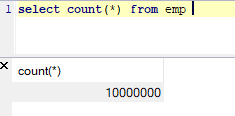
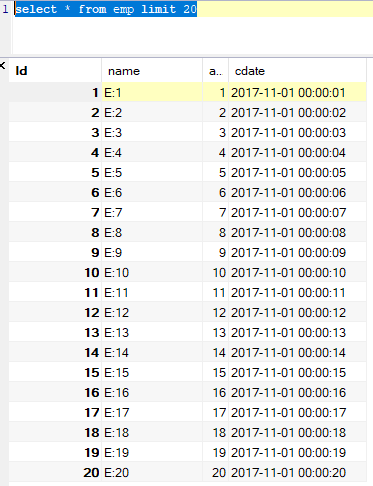
数据库的情况:
下面,就可以写总结了。
--END-- 2019年10月13日15:23:03
【JDBC】使用Spring提供的JDBCTemplate通过Statement向MySql数据库插入千万条数据,耗时4m55s,使用insert语句批量插入方式二的更多相关文章
- 【JDBC】使用Spring提供的JDBCTemplate通过PrepareStatement向MySql数据库插入千万条数据,耗时32m47s,速度提升有限
数据库环境还和原来一样,只是从Statement换成了PrepareStatement,都说PrepareStatement因为预编译比Statement快,但是实际运行真快不了多少. 代码如下: p ...
- 使用JDBC向数据库中插入一条数据
原谅我是初学者,这个方法写的很烂,以后不会改进,谢谢 /** * 通过JDBC向数据库中插入一条数据 1.Statement 用于执行SQL语句的对象 1.1 通过Connection 的 * cre ...
- Spring Boot入门(2)使用MySQL数据库
介绍 本文将介绍如何在Spring项目中连接.处理MySQL数据库. 该项目使用Spring Data JPA和Hibernate来连接.处理MySQL数据库,当然,这仅仅是其中一种方式,你也 ...
- Java使用JDBC连接数据库逐条插入数据、批量插入数据、以及通过SQL语句批量导入数据的效率对比
测试用的示例java代码: package com.zifeiy.test.normal; import java.io.File; import java.io.FileOutputStream; ...
- 使用JDBC(Dbutils工具包)来从数据库拿取map类型数据来动态生成insert语句
前言: 大家在使用JDBC来连接数据库时,我们通过Dbutils工具来拿取数据库中的数据,可以使用new BeanListHandler<>(所映射的实体类.class),这样得到的数据, ...
- JDBC快速入门(附Java通过jar包连接MySQL数据库)
•通过jar包连接mysql数据库 •下载jar包 Java 连接 MySQL 需要驱动包,官网下载地址为MySQL驱动包官网下载,选择适合的jar包版本进行安装 (记得安装的地址,下面导入包时会用到 ...
- spring mvc 插入一条数据 返回该数据的主键编号
import org.springframework.jdbc.core.PreparedStatementCreator; import org.springframework.jdbc.suppo ...
- 使用JDBC向数据库中插入一条数据(第一次修改版)
增加了一个Tools类,放了一些常用的工具 package com.JDBC.java; import java.io.IOException; import java.io.InputStream; ...
- spring boot使用log4j2将日志写入mysql数据库
log4j2官方例子在spring boot中报错而且还是用的是org.apache.commons.dbcp包 我给改了一下使用org.apache.commons.dbcp2包 1.log4j2. ...
随机推荐
- 《数据结构与算法之美》 <02>复杂度分析(下):浅析最好、最坏、平均、均摊时间复杂度?
上一节,我们讲了复杂度的大 O 表示法和几个分析技巧,还举了一些常见复杂度分析的例子,比如 O(1).O(logn).O(n).O(nlogn) 复杂度分析.掌握了这些内容,对于复杂度分析这个知识点, ...
- Linux学习笔记(三)Linux常用命令:链接命令和文件查找命令
一.链接命令 ln -s [原文件] [目标文件] (link) -s意为创建软连接 硬链接和软连接 硬链接的特点: (1)拥有相同的 i 结点和block块,可以看作是同一个文件 (2)可以通过 i ...
- chrome上一些好用的插件
1. Super Auto Refresh Plus - 这个插件可以自动刷新网页 2. 屏蔽百度推广 - 这个插件可以屏蔽百度搜索的推广广告
- python 单例与数据库连接池 及相关选择
单例:专业用来处理连接多的问题(比如连接redis,zookeeper等),全局只有一个对象 单例代码 def singleton(cls): instances = {} def _singleto ...
- JavaScript教程——this 关键字
简单说,this就是属性或方法“当前”所在的对象. 原文地址:https://wangdoc.com/javascript/oop/this.html
- Caused by: com.mchange.v2.resourcepool.TimeoutException: A client timed out while waiting to acquire a resource from com.mchange.v2.resourcepool.BasicResourcePool@1483de4 -- timeout at awaitAvailable(
Caused by: com.mchange.v2.resourcepool.TimeoutException: A client timed out while waiting to acquire ...
- 性能分析之TCP全连接队列占满问题分析及优化过程(转载)
前言 在对一个挡板系统进行测试时,遇到一个由于TCP全连接队列被占满而影响系统性能的问题,这里记录下如何进行分析及解决的. 理解下TCP建立连接过程与队列 从图中明显可以看出建立 TCP 连接的时候, ...
- vector简单使用
在刷ccf题的时候日常做完去网上查看别的同学怎么做的 发现有使用vector后三十几行代码就写出来的,虽然时间复杂度和我一样十几毫秒,but !我看中了它的代码量啊!多么的少啊! 所以百度了vecto ...
- BZOJ 3514: Codechef MARCH14 GERALD07加强版 (LCT维护最大生成树+主席树)
题意 给出nnn个点,mmm条边.多次询问,求编号在[l,r][l,r][l,r]内的边形成的联通块的数量,强制在线. 分析 LCTLCTLCT维护动态最大生成树,先将每条边依次加进去,若形成环就断掉 ...
- HDU 6061 - RXD and functions | 2017 Multi-University Training Contest 3
每次NTT都忘记初始化,真的是写一个小时,Debug两个小时- - /* HDU 6061 - RXD and functions [ NTT ] | 2017 Multi-University Tr ...