
Unity检视面板的继承方法研究 (一)
对于检视面板 Inspector 的面板继承方式对项目来说是很有必要的, 比如一个基类, 写了一个很好看的检视面板[CustomEditor(typeof(XXX))],
可是所有子类的面板无法直接继承这个CustomEditor, 有些人的解决方案是把子类写检视面板的代码独立出来, 然后子类面板直接去调用这些Layout,
非常浪费人力物力.
最近发现有个 DecoratorEditor 脚本, 它实现了对 Unity 自带检视面板的扩展, 看到它实现某个类型的面板Inspector的方法, 就是使用Editor.CreateEditor 这个API
创建了一个相应的Editor, 然后调用它的OnInspectorGUI() 方法来绘制原有面板的, 于是可以从这个地方着手.
从设计上来说 [CustomEditor(typeof(XXX))] 在耦合上并没有太多的耦合, Unity 开发组的想法应该就是一个Editor对应一个组件, 它们对应类型之间的继承关系不应该
互相影响, 保证泛用性和独立性.
原始的Editor脚本和类型是这样的:
基类 :
public class TestBaseClass : MonoBehaviour

{

    public float abc;

}

// 检视面板

[CustomEditor(typeof(TestBaseClass))]

public class TestBaseClassInspector : Editor

{

    TestBaseClass _target;

    private void OnEnable()

    {

        _target = target as TestBaseClass;

    }

    public override void OnInspectorGUI()

    {

        _target.abc = EditorGUILayout.FloatField("基类变量 : ", _target.abc);

    }

}
子类1 :
public class TestCamera : TestBaseClass

{

    public Camera cam;

}

// 检视面板

[CustomEditor(typeof(TestCamera))]

public class TestCameraInspector : Editor

{

    TestCamera _target = null;

    private void OnEnable()

    {

        _target = target as TestCamera;

    }

    public override void OnInspectorGUI()

    {

        base.OnInspectorGUI();

        _target.cam = EditorGUILayout.ObjectField("一次继承变量 : ", _target.cam, typeof(Camera), true) as Camera;

    }

}
子类2 :
public class TestUntiy : TestCamera

{

    public int hahah;

}

// 检视面板

[CustomEditor(typeof(TestUntiy))]

public class TestUntiyInspector : Editor

{

    TestUntiy _target = null;

    private void OnEnable()

    {

        _target = target as TestUntiy;

    }

    public override void OnInspectorGUI()

    {

        base.OnInspectorGUI();

        _target.hahah = EditorGUILayout.IntField("二次继承变量 : ", _target.hahah);

    }

}
TestBaseClass
TestCamera : TestBaseClass
TestUntiy : TestCamera

非常简单的继承关系, TestUnity的检视面板如下, 没有继承关系
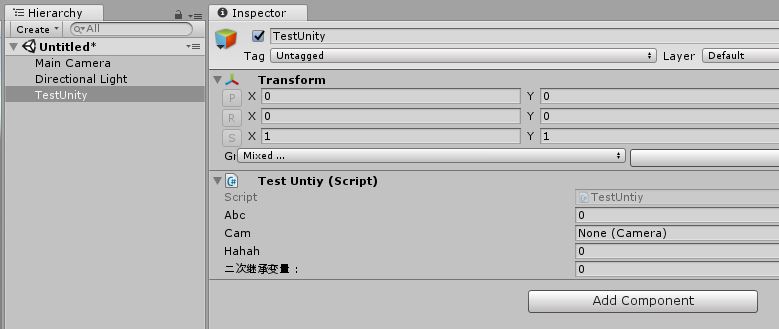
那么在继承的设计上, 也应该遵循Unity的设计原则, 在继承类型 : Editor 以及 base.OnInspectorGUI(); 绘制基类方法上做文章.
如果使用简单的继承比如:
[CustomEditor(typeof(TestCamera))]

public class TestCameraInspector : TestBaseClassInspector

{

    TestCamera _target = null;

    private void OnEnable()

    {

        _target = target as TestCamera;

    }

    public override void OnInspectorGUI()

    {

        base.OnInspectorGUI();

        _target.cam = EditorGUILayout.ObjectField("一次继承变量 : ", _target.cam, typeof(Camera), true) as Camera;

    }

}
会出现很多问题, 如基类的OnEnable方法没有被触发, 基类面板报错等, 所有生命周期都要写虚方法, 每个重写方法都要注意, 很麻烦.
而Editor.CreateEditor创建的Editor是有生命周期的. 创建一个中间类型 InspectorDecoratorEditor, 大家都继承它就可以了, 而绘制基类对象的方法就改为
DrawBaseInspectorGUI<T>(), 这样就能方便地自己定义需要绘制的基类了.
public class InspectorDecoratorEditor : Editor

{

	public static readonly System.Type EndType = typeof(UnityEngine.MonoBehaviour);     // end type dont need show in inspector

	public static readonly System.Type BaseEditorType = typeof(UnityEditor.Editor);     // CustomEditor must inherit from it, filter

	public static readonly BindingFlags CustomEditorFieldFlags = BindingFlags.NonPublic | BindingFlags.Instance;    // flag

	// type cache[Assembly, [scriptType, customEditorType]]

	protected static Dictionary<Assembly, Dictionary<System.Type, System.Type>> ms_editorReferenceScript

		= new Dictionary<Assembly, Dictionary<System.Type, System.Type>>();

	protected List<Editor> m_inheritEditors = null;     // cached editors

	// ctor, use ctor instead Mono life circle, more user friendly

	public InspectorDecoratorEditor()

	{

		CacheEditorReferenceScript();

	}

	#region Main Funcs

	/// <summary>

	/// Cache all CustomEditor in current Assembly

	/// </summary>

	protected void CacheEditorReferenceScript()

	{

		var editorAssembly = Assembly.GetAssembly(this.GetType());      // editor may in diferent assemblies

		if(ms_editorReferenceScript.ContainsKey(editorAssembly) == false)

		{

			Dictionary<System.Type, System.Type> cachedData = new Dictionary<System.Type, System.Type>();

			var types = editorAssembly.GetExportedTypes();

			foreach(var editorType in types)

			{

				if(editorType.IsSubclassOf(BaseEditorType))

				{

					var scriptType = GetTypeFormCustomEditor(editorType);

					if(scriptType != null)

					{

						cachedData[scriptType] = editorType;

					}

				}

			}

			ms_editorReferenceScript[editorAssembly] = cachedData;

		}

	}

	/// <summary>

	/// Draw a Target Type Inspector, call OnInspectorGUI

	/// </summary>

	/// <typeparam name="T"></typeparam>

	protected virtual void DrawBaseInspectorGUI<T>() where T : InspectorDecoratorEditor

	{

		if(m_inheritEditors == null)

		{

			m_inheritEditors = new List<Editor>();

			Dictionary<System.Type, System.Type> scriptEditorCache = null;

			if(ms_editorReferenceScript.TryGetValue(Assembly.GetAssembly(this.GetType()), out scriptEditorCache) && scriptEditorCache != null)

			{

				var baseType = target.GetType().BaseType;

				while(baseType != null && baseType != EndType)

				{

					System.Type editorType = null;

					if(scriptEditorCache.TryGetValue(baseType, out editorType) && editorType != null)

					{

						m_inheritEditors.Add(Editor.CreateEditor(targets, editorType));

					}

					baseType = baseType.BaseType;

				}

			}

		}

		if(m_inheritEditors.Count > 0)

		{

			for(int i = m_inheritEditors.Count - 1; i >= 0; i--)

			{

				var drawTarget = m_inheritEditors[i];

				if(drawTarget && drawTarget.GetType() == typeof(T))

				{

					drawTarget.OnInspectorGUI();   // draw target type only, avoid endless loop

					break;

				}

			}

		}

	}

	#endregion

	#region Help Funcs

	public static System.Type GetTypeFormCustomEditor(System.Type editorType)

	{

		var attributes = editorType.GetCustomAttributes(typeof(CustomEditor), false) as CustomEditor[];

		if(attributes != null && attributes.Length > 0)

		{

			var attribute = attributes[0];

			var type = attribute.GetType().GetField("m_InspectedType", CustomEditorFieldFlags).GetValue(attribute) as System.Type;

			return type;

		}

		return null;

	}

	#endregion

}
修改后的Editor代码如下, 修改的只有继承类以及DrawBaseInspectorGUI<T>函数, 注意这里对于T来说是没有类型检查的, 可是在函数中是有类型匹配的,
就算传入错误类型也是安全的 :
[CustomEditor(typeof(TestBaseClass))]

public class TestBaseClassInspector : InspectorDecoratorEditor

{

    TestBaseClass _target;

    private void OnEnable()

    {

        _target = target as TestBaseClass;

    }

    public override void OnInspectorGUI()

    {

        _target.abc = EditorGUILayout.FloatField("基类变量 : ", _target.abc);

    }

}

[CustomEditor(typeof(TestCamera))]

public class TestCameraInspector : InspectorDecoratorEditor

{

    TestCamera _target = null;

    private void OnEnable()

    {

        _target = target as TestCamera;

    }

    public override void OnInspectorGUI()

    {

        DrawBaseInspectorGUI<TestBaseClassInspector>();

        _target.cam = EditorGUILayout.ObjectField("一次继承变量 : ", _target.cam, typeof(Camera), true) as Camera;

    }

}

[CustomEditor(typeof(TestUntiy))]

public class TestUntiyInspector : InspectorDecoratorEditor

{

    TestUntiy _target = null;

    private void OnEnable()

    {

        _target = target as TestUntiy;

    }

    public override void OnInspectorGUI()

    {

        DrawBaseInspectorGUI<TestCameraInspector>();

        _target.hahah = EditorGUILayout.IntField("二次继承变量 : ", _target.hahah);

    }

}
然后看看检视面板现在的样子, 完美绘制了基类面板:
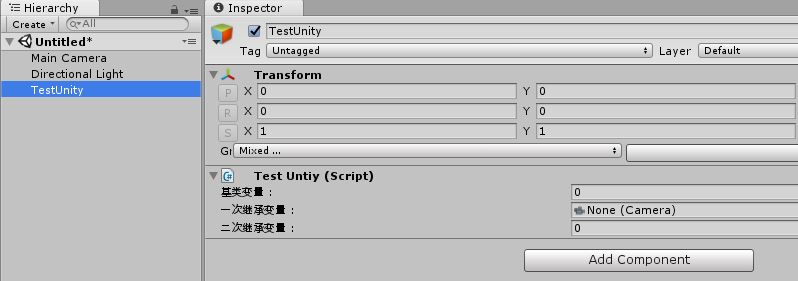
DrawBaseInspectorGUI<T>() 这个绘制基类的请求强大的地方就是可以选择从哪个类型开始绘制, 比如
DrawBaseInspectorGUI<TestCameraInspector>();
换成
DrawBaseInspectorGUI<TestBaseClassInspector>();
那么 TestCameraInspector 这个检视面板就被跳过去了 :

虽然有很多方式能够绘制或者继承子类检视面板, 不过这个应该是个泛用度很高的方案. Over.
Unity检视面板的继承方法研究 (一)的更多相关文章
- Unity检视面板的继承方法研究 (二)
之前做了普通对象的可继承的检视面板类, 现在想要实现对Unity自带的检视面板的继承的话, 要怎样写呢? 万变不离其宗, 仍然是围绕UnityEditor.Editor.CreateEditor 这 ...
- 自定义Inspector检视面板
Unity中的Inspector面板可以显示的属性包括以下两类:(1)C#以及Unity提供的基础类型:(2)自定义类型,并使用[System.Serializable]关键字序列化,比如: [Sys ...
- Unity检测面板旋转值超过180度成负数的离奇bug
问题描述: 无意中在检视面板上对游戏物体的tansform进行旋转,结果发现旋转超过180度成负数的离奇bug 解决方案: 创建个新的unity工程,进行如上操作,一切正常…… 怀疑问题根源是配置出现 ...
- unity3d编辑器——检视面板部分(一)
最近在学习unity编辑器,so,记录总结一下. 以下介绍了一些简单的unity3d检视面板部分的使用技巧. using UnityEngine; using System.Collections; ...
- 继承ViewGroup研究(汇总) 一、二、三
转载过来:为一.二.三版本. 仅供参考: 继承ViewGroup研究(1) --简介和一个小Demo 又翻开一个新篇章了,哈哈,上一回学习的是继承View,关于继承View个人感觉不是那么完美,做技术 ...
- unity中的动画制作方法
Unity中的动画制作方法 1.DOTween DoTween在5.0版本中已经用到了,到官网下载好插件之后,然后通过在项目中导入头using DG.Tweening;即可. 一些常用的API函数 D ...
- [转]UDP/TCP穿越NAT的P2P通信方法研究(UDP/TCP打洞 Hole Punching)
[转]UDP/TCP穿越NAT的P2P通信方法研究(UDP/TCP打洞 Hole Punching) http://www.360doc.com/content/12/0428/17/6187784 ...
- (手写识别) Zinnia库及其实现方法研究
Zinnia库及其实现方法研究 (转) zinnia是一个开源的手写识别库.采用C++实现.具有手写识别,学习以及文字模型数据制作转换等功能. 项目地址 [http://zinnia.sourcefo ...
- JavaScript面向对象继承方法
JavaScript的出现已经将近20多年了,但是对这个预言的褒贬还是众说纷纭.很多人都说JavaScript不能算是面向对象的变成语言.但是JavaScript的类型非常松散,也没有编译器.这样一来 ...
随机推荐
- Html学习之四(页面布局)
<!DOCTYPE html> <html> <head> <meta charset="UTF-8"> <title> ...
- day82_10_31celery的使用
1.缓存 当一些数据需要固定地且频繁访问数据库时,需要使用到接口缓存. 以轮播图为例,每个用户都会访问首页,首页的轮播图长时间不会改变,所以可以使用cache,将固定数据保存到缓存中(redis),第 ...
- 剑指Offer-12.数值的整数次方(C++/Java)
题目: 给定一个double类型的浮点数base和int类型的整数exponent.求base的exponent次方. 保证base和exponent不同时为0 分析: 注意base为0和expo ...
- Office Online Server 在线编辑Office文档,安装部署
Office Online Server部署安装 部署环境 一台windows server2012 (搭建域环境)/多次遇坑之后,强烈建议域环境为server2012 一台windows serve ...
- 使用Docker搭建HttpRunnerManager环境
建立一个HttpRunnerManager的环境需要Mysql,RabbitMQ服务,为简单部署,全部使用Docker 1. 在服务器建立Docker环境 2.建立Mysql容器 docker run ...
- 记录战斗记录你,详解妖尾战斗录像系统[Unity]
.katex { display: block; text-align: center; white-space: nowrap; } .katex-display > .katex > ...
- 有关tab页的
有关tab页的 1.静态的 2.动态的可以删除的 3.删除右侧,左侧,全部,除了自己以外的. 4.多了可以自动伸缩. 5.带shown事件.可以反向影响菜单去.
- gperf heap profiler
前言 gperf tools有很多功能,其中有一个heap profiler,可按函数级别定位分配内存的累积量 原理 gperf tools需要替换libc的malloc库,替换为tcmalloc:t ...
- Vue.js 源码分析(二十四) 高级应用 自定义指令详解
除了核心功能默认内置的指令 (v-model 和 v-show),Vue 也允许注册自定义指令. 官网介绍的比较抽象,显得很高大上,我个人对自定义指令的理解是:当自定义指令作用在一些DOM元素或组件上 ...
- CSS的基础学习
CSS学习 --------学习资源 http://www.csszengarden.com/ CSS语法检查http://jigsaw.w3.org/css-validator/ 配置CSS的方法: ...