
Symantec Backup Exec 报"Access denied to directory xxx" Error Code E0008488
使用Symantec Backup Exec将几台Linux服务器上的RMAN备份收带时,偶尔会遇到作业备份失败的情况,检查Job History,就会发现有“Access denied to directory u05/backup/backupsets" 这类错误,当然实际路径为/u05/backup/backupsets. 另外错误代码为E0008488
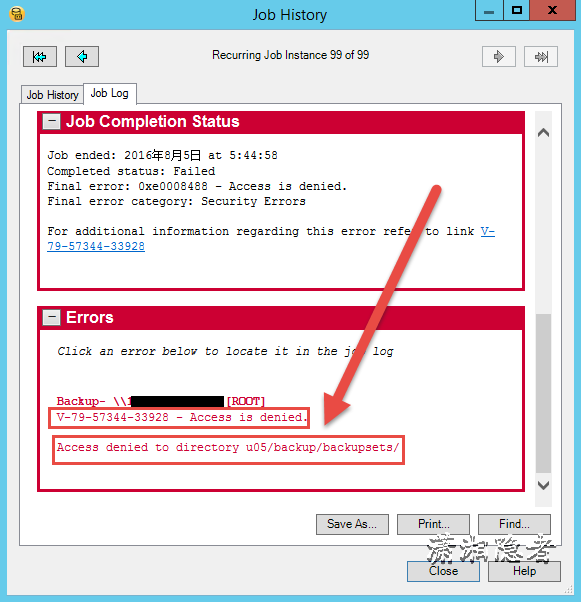
在官方文档" Troubleshooting error "Access is denied" with Backup Exec Remote Agent for Linux/UNIX server (RALUS) backups"这篇文章有下面介绍:
Problem
Troubleshooting error "Access is denied" with Backup Exec Remote Agent for Linux/UNIX server (RALUS) backups.
Error Message
V-79-57344-33928 - Access is denied
or
Error in the job log
Backup -\\<linuxservername>\[ROOT]
V-79-57344-33928 - Access is denied
Access denied to directory home/jdoering/.
V-79-57344-33928 - Access is denied
or
Final error: 0xe0008488 - Access is denied.
Error in the job log
Backup - $$testlab.veritas.com $ [ROOT]
V-79-57344-33928 - Access is denied
Access denied to file p01/orabackup/devp/u01/control01.ctl
V-79-57344-33928 - Access is denied
Solution
The error 0xe0008488 - Access is denied can occur due to following issues with RALUS:
- The Backup Exec Remote Agent for Linux/UNIX Servers is unable to browse directories on remote Linux/UNIX computers with filenames containing non EUC encoded characters.
- Job Fails with "V-79-57344-33928 - Access is Denied" on few folders on SUSE Enterprise Linux 11.
- 0xe0008488 - Access is denied when a backup up of Solaris Snapshot Volume runs.
- The Backup Exec Remote Agent for Linux/UNIX Servers is unable to browse directories on remote Linux/UNIX computers with filenames containing non EUC encoded characters.
The above error occurs because Backup Exec is unable to read the characters in the UNIX/Linux file system that are non EUC encoded. EUC (Extended Unix Code) is a multi byte encoding standard used to represent large Asian character sets.
As a workaround, the Backup Exec Remote Agent for Linux and UNIX Servers (RALUS) config file can be edited so that Backup Exec will override the agent's localization detection and cause it to use an encoding that should allow the Unicode characters to be translated correctly. Perform the following at the remote Linux/UNIX computer:
- Stop the RALUS by executing the command /etc/init.d/VRTSralus.init stop
- The configuration file of the RALUS is ralus.cfg, located in the path /etc/VRTSralus on the remote UNIX/Linux server.
- Open ralus.cfg in a text editor such as vi and locate the following line:
Software\VERITAS\Backup Exec\Engine\RALUS\Encoder=
- Add the following to the above line: LATIN-1. The new line should like this:
- Software\VERITAS\Backup Exec\Engine\RALUS\Encoder=LATIN-1
- Execute the command /etc/init.d/VRTSralus.init start to start the RALUS on the remote Linux/UNIX server.
- Job Fails with "V-79-57344-33928 - Access is Denied" on few folders on SUSE Enterprise Linux 11.
Issue is caused if the customer is or was using GNOME Desktop and has mounted the .gvfs directory in the folder
- Unmount the .GVFS Directory Mount from the folder
Note: GVFS is the virtual filesystem for the GNOME desktop.
- 0xe0008488 - Access is denied when a backup up of Solaris Snapshot Volume runs.
As a workaround, the Backup Exec Remote Agent for Linux and UNIX Servers (RALUS) needs to be restarted after the snapshot has been mounted.
Terms of use for this information are found in Legal Notices.
那么我们来分析一下Symantec Backup Exec 报“Access is denied”错误的几种原因
1:The Backup Exec Remote Agent for Linux/UNIX Servers is unable to browse directories on remote Linux/UNIX computers with filenames containing non EUC encoded characters.
目录/u05/backup/backupsets/,以及/u05/backup/backupsets/下的所有文件名称均不包含非EUC编码字符。也没有使用任何中文字符。那么这个原因可以排除。
2: Job Fails with "V-79-57344-33928 - Access is Denied" on few folders on SUSE Enterprise Linux 11.
我们系统版本为Red Hat Enterprise Linux Server release 5.7 ,不是SUSE企业版本. 但是报的错误信息“V-79-57344-33928 - Access is Denied”跟文档一模一样。 另外桌面系统也确实为gnome,但是找了一下没有找到挂载.gvfs目录。

3:0xe0008488 - Access is denied when a backup up of Solaris Snapshot Volume runs.
As a workaround, the Backup Exec Remote Agent for Linux and UNIX Servers (RALUS) needs to be restarted after the snapshot has been mounted.

关于这个我们这几台确实都设置了Snapshot Volume.因为DR方案使用了paltespin进行复制。看来很有可能就是这个原因造成的。
参考资料:
https://www.veritas.com/support/en_US/article.TECH38357
Symantec Backup Exec 报"Access denied to directory xxx" Error Code E0008488的更多相关文章
- ERROR 1045 (28000): Access denied for user xxx & ERROR 1449 (HY000): The user specified as a definer xxx does not exists
今天在一个修改过权限的MySQL数据库遇到了"ERROR 1045 (28000): Access denied for user 'xxx'@'xxx.xxx.xxx.xxx' (usin ...
- Symantec Backup Exec 2010 安装报 bad ELF interpreter: No such file or directory
在64位的Red Hat Enterprise Linux Server release 6.6上安装Symantec Backup Exec 2010时, 遇到下面错误: # ./installra ...
- Symantec Backup Exec 2012 Agent For Linux安装
Backup Exec 2012 介绍 Backup Exec 2012 是一种为虚拟和物理环境提供保护的集成产品,能够简化备份和灾难恢复,并提供了无可匹敌的恢复功能.借助于强大的 Symantec ...
- Symantec Backup Exec 2010 Agent For Linux安装
以前写过一篇文章介绍过Symantec Backup Exec 2012 Agent For Linux安装安装,今天介绍一下Symantec Backup Exec 2010 Agent For L ...
- Symantec Backup Exec Remote Agent 2010在Redhat Enterprise 6.6上启动问题
在Red Hat Enterprise Linux Server release 6.6 (Santiago)上安装了Symantec Backup Exec Remote Agent 2010后,启 ...
- Symantec Backup Exec备份作业服务器盘符变更
Symantec Backup Exec的备份作业中,如果某个服务器的磁盘更改了盘符,如果不修改备份作业里面的相关配置,就会出现类似下面的错误信息,如下截图所示 因为这台服务器上我们将原先的G盘的盘符 ...
- Symantec Backup Exec 2012 Agent for Linux 卸载
本文介绍一下如何卸载Symantec Backup Exec 2012 Agent for Linx.首先我们来看看Symantec_Backup_Exec2012管理员手册的文档介绍: 卸载 Age ...
- Symantec Backup Exec Agent For Linux防火墙问题
如果在Unix或Linux安装配置好了Symantec Backup Exec Agent For Linux,但是在Symantec Backup Exec服务端无法访问Symantec Backu ...
- Symantec Backup Exec恢复数据库
Insus.NET是使用Symantec Backup Exec来备份数据以及一些服务器文件.下面步骤是怎样恢复一个数据库.当我们数据库有问题,或是想恢复某一天的数据,得需要操作数据恢复Restore ...
随机推荐
- 理清那么多个OO(面向对象)
OOA - Object-Oriented Analysis(面向对象分析) OOT - Object-Oriented Testing (面向对象测试) OOP - Object-Oriented ...
- iOS 阶段学习第九天笔记(内存管理)
iOS学习(C语言)知识点整理 一.内存管理 1)malloc , 用于申请内存; 结构void *malloc(size_t),需要引用头文件<stdlib.h>:在堆里面申请内存,si ...
- ASP.NET MVC 模块与组件(二)——定制图片验证码
本着简洁直接,我们就直奔主题吧! 下面是一个生成数字和字母随机组合的验证码类源代码: using System; using System.Drawing; using System.Drawing ...
- Java项目打包部署war文件
1.选中要打包的项目,右键单击,选择“Export-->WAR File”,在弹出的对话框中选择Destination.Server runtime等选项,点击Finish: 2.可以看到指定目 ...
- 第 14 章 CSS 颜色与度量单位
学习要点: 1.颜色表方案 2.度量单位 主讲教师:李炎恢 本章主要探讨 HTML5 中 CSS 颜色和度量单位等问题,包括颜色的选取方式.相对长度和绝对长度等. 一.颜色表方案 颜色的表现形式主要有 ...
- sp_get_menu函数使用分析
function sp_get_menu($id="main",$effected_id="mainmenu",$filetpl="<span ...
- 【局部特征】ASIFT
由于相机正面白摄物体时,相机的光轴方向可能发生变化,带来扭曲.而SIFT算法虽具有完全的尺度不变性,但不具有完全的仿射不变性,对拍摄角度发生大角度空间变化的图像特征提取有一定的局限性.ASift通过模 ...
- 一种基于annotation的Spring-mvc权限控制方法
简介 本文介绍一种采用annotation来对spring-mvc进行权限控制的方法. 通过枚举类来定义权限项. 将annotation标注到需要控制权限的spring-mvc方法上. 然后,在spr ...
- ubuntu 14.04 解决JavaMelody 图片中文乱码
从windows系统中,copy了MSYH.TTC和MSYHBD.TTC 2个文件到 服务器的%JAVA_HOME%\jre\lib\fonts\fallback 目录中, (如果fallback目录 ...
- sass的四种css编译风格
sass的改变编译风格的语句: sass style expanded assets/sass/style1.sass:assets/css/style1.css 1.nested:默认 #main ...