
Symantec Backup Exec 2010 Agent For Linux安装
以前写过一篇文章介绍过Symantec Backup Exec 2012 Agent For Linux安装安装,今天介绍一下Symantec Backup Exec 2010 Agent For Linux安装,关于赛门铁克的Backup Exec的功能请看下面主要功能和主要优势介绍。有兴趣的可以参考官网介绍:http://www.symantec.com/zh/cn/backup-exec。 现在最新的版本是Symantec Backup Exec 2014.
主要功能
使用单个解决方案保护虚拟和物理环境。
通过与 Microsoft® Volume Shadow Copy Service (VSS) 和 VMware 的 vStorage APIs for Data Protection (VADP) 深度集成,可快速获得虚拟机快照,从而最大限度减少对虚拟主机上 CPU、内存和 I/O 负载的性能影响。
备份至磁盘、磁带和云。
快速、高效的通用恢复功能可在数秒内轻松还原虚拟机、服务器、应用程序、数据库、文件/文件夹或粒度对象。
集成了裸机、物理到虚拟 (P2V) 和虚拟到物理 (V2P) 的恢复功能。
可在整个虚拟和/或物理环境中对数据进行灵活的块级重复数据删除。
可及时自动识别和保护出现的新虚拟机,因此您能确信自己的虚拟机始终获得全面保护。
易于使用的界面设有智能管理面板和直观的向导,为您提供监控功能,方便您根据需要快速跟踪、监控和管理每个备份与恢复作业。
自动验证每一个虚拟机备份的可恢复性。
主要优势
使用单个统一的可伸缩解决方案,既可保护虚拟和物理环境,还可去除那些会增加管理时间、备份作业、复制数据、存储和成本等的相关解决方案。
可实现快速可靠备份,速度相比之前版本几乎提高了一倍*,包括进行 VMware 和 Hyper-V 虚拟机备份以及利用 Backup Exec 重复数据删除技术的备份。
可在任何时间快速恢复您需要的内容,从而显著减少停机时间和数据损失。
可直接从存储高效还原数据,从而简化并加快关键时刻的恢复操作。 无需再浪费宝贵的时间和磁盘空间来增加备份作业,也不需要确定内部情况或搜索特定数据。
可保护更多数据,与此同时,可在利用集成的重复数据删除和归档技术存储备份文件时最大限度减少所需备份时段、网络通信和磁盘空间。
在执行可靠的一致性应用程序虚拟机备份时,可最大限度减少对虚拟主机上 CPU、内存和 I/O 负载的性能影响。
可通过单个管理控制台管理整个备份环境,大大节省时间和成本,并减少复杂性。
安装过程
首先要将Symantec Backup Exec 2010 Agent For Linux的安装包RALUS_RMALS_RAMS-5204.4.tar.gz准备好,上传到Linux服务器,然后解压安装。
1:首先解压安装包。
[root@ceglnx01 client]tar -zxvf RALUS_RMALS_RAMS-5204.4.tar.gz
[root@ceglnx01 client]# ls
installralus messages ramsinst.conf uninstallrams
installralus.cmd perl rmalinst.conf uninstallrams.pl
installralus.pl pkgs scripts uninstallrmal
installrams RALUS64 tools uninstallrmal.pl
installrams.pl ralusinst.conf uninstallralus VxIF
installrmal RALUS_RMALS_RAMS-5204.4.tar.gz uninstallralus.cmd
installrmal.pl RALUSx86 uninstallralus.pl
2: 执行./installralus安装命令
2.1 如下所示,首先会检查system配置是否满足安装要求。
[root@ceglnx01 client]# ./installralus
Symantec Backup Exec Remote Agent for Linux/Unix Servers 13.0.5204
Enter the system names separated by spaces on which to install RALUS: (ceglnx01)
Checking system communication:
Checking OS version on ceglnx01 ....................... Linux 2.6.32-200.13.1.el5uek
Checking system support for ceglnx01 ... Linux 2.6.32-200.13.1.el5uek supported by RALUS
Initial system check completed successfully.
Press [Return] to continue:
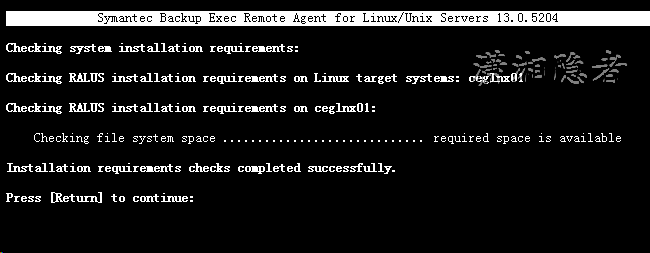
2.2检查RALUS安装的要求是否满足
Symantec Backup Exec Remote Agent for Linux/Unix Servers 13.0.5204
hecking system installation requirements:
hecking RALUS installation requirements on Linux target systems: ceglnx01
hecking RALUS installation requirements on ceglnx01:
Checking file system space ............................. required space is available
nstallation requirements checks completed successfully.
ress [Return] to continue:
Checking for prerequisites .................................................... Done
Checking for Port 10000 ....................................................... Done
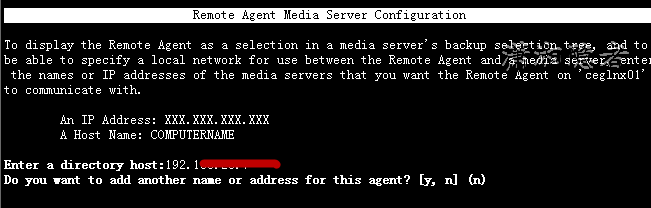
3:配置Symantec Backup Exec Server。包括Backup Exec服务器的地址
Remote Agent Media Server Configuration
display the Remote Agent as a selection in a media server's backup selection tree, and to be able to specify a local network for use between the Remote Agent and a media server, enter the names or IP addresses of the media servers that you want the Remote Agent on 'ceglnx01' to communicate with.
An IP Address: XXX.XXX.XXX.XXX
A Host Name: COMPUTERNAME
ter a directory host:192.168.xxx.xxx
you want to add another name or address for this agent? [y, n] (n)
4:检查beoper用户组是否存在。
Remote Agent Media Server Configuration
Hostnames and/or IP addresses verification for 'ceglnx01':
Address: 192.168.xxx.xxx
Is this information correct? [y, n] (y)
To perform backups, you must have a 'beoper' user group. This user group can be created only if you are not using NIS server. Your system 'ceglnx01' will be scanned to detect a NIS server, group and membership.
Press [Return] to continue:
Checking if system uses NIS server: ............................................ No
The installer will now check your system for the 'beoper' user group and root membership.
Press [Return] to continue:
Checking for 'beoper' user group: ........................................ Not Found
Checking for 'root' user membership in 'beoper' user group: .............. Not Found
You can create 'beoper' user group manually or you can choose to have it created automatically.
Do you want installer to create 'beoper' user group on 'ceglnx01'? [y, n] (y)
Do you want to use specific group ID when creating 'beoper' user group? [y, n] (n)
Creating group 'beoper': ...................................................... Done
Do you want to add the 'root' user to 'beoper' user group? [y, n] (y)
Adding 'root' user to 'beoper' user group: ................................... Done
Press [Return] to continue:
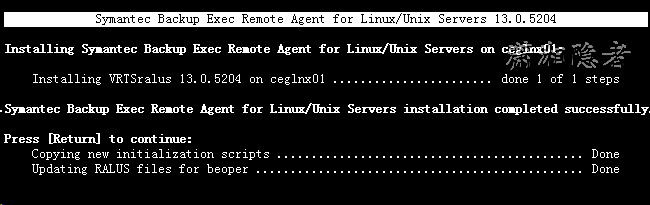
5:安装组件、拷贝脚本。
Symantec Backup Exec Remote Agent for Linux/Unix Servers 13.0.5204
talling Symantec Backup Exec Remote Agent for Linux/Unix Servers on ceglnx01:
Installing VRTSralus 13.0.5204 on ceglnx01 ....................... done 1 of 1 steps
antec Backup Exec Remote Agent for Linux/Unix Servers installation completed successfully.
ss [Return] to continue:
Copying new initialization scripts ............................................ Done
Updating RALUS files for beoper ............................................... Done
Symantec Backup Exec Remote Agent for Linux/Unix Servers 13.0.5204
onfiguring Symantec Backup Exec Remote Agent for Linux/Unix Servers:
Creating configuration files on ceglnx01 ...................................... Done
ou must establish a trust relationship between the media server and the Linux or UNIX computer. Add the remote computer to the User-defined Selections in the backup selections list on the media server. Expand the selection tree to ensure that the trust relationship is validated.
ymantec Backup Exec Remote Agent for Linux/Unix Servers configured successfully.
ress [Return] to continue:

Symantec Backup Exec Remote Agent for Linux/Unix Servers 13.0.5204
onfiguring Symantec Backup Exec Remote Agent for Linux/Unix Servers:
Creating configuration files on ceglnx01 ...................................... Done
ou must establish a trust relationship between the media server and the Linux or UNIX computer. Add the remote computer to the User-defined Selections in the backup selections list on the media server. Expand the selection tree to ensure that the trust relationship is validated.
ymantec Backup Exec Remote Agent for Linux/Unix Servers configured successfully.
ress [Return] to continue:
he response file is saved at:
/var/tmp/vxif/installralus731152223/installralus731152223.response
he installralus log is saved at:
/var/tmp/vxif/installralus731152223/installralus.log
启动关闭服务
[root@ceglnx01 init.d]# /etc/init.d/VRTSralus.init start
Starting Symantec Backup Exec Remote Agent ......
Starting Symantec Backup Exec Remote Agent: [ OK ]
[root@ceglnx01 backupsets]# /etc/init.d/VRTSralus.init stop
Stopping Symantec Backup Exec Remote Agent ...
Stopping Symantec Backup Exec Remote Agent: [ OK ]
配置BE管理服务器
客户端安装成功后,此时虽然可以在“Linux/Unix服务器”以及“用户定义选择项”里面找到刚才的安装Symantec Bakup Exec Client的Linux服务器,但是此时连接这台Linux服务器,需要添加”登录凭据“,然后才能浏览、备份Linux服务器上数据文件。如下所示。


Symantec Backup Exec 2010 Agent For Linux安装的更多相关文章
- Symantec Backup Exec 2012 Agent For Linux安装
Backup Exec 2012 介绍 Backup Exec 2012 是一种为虚拟和物理环境提供保护的集成产品,能够简化备份和灾难恢复,并提供了无可匹敌的恢复功能.借助于强大的 Symantec ...
- Symantec Backup Exec 2012 Agent for Linux 卸载
本文介绍一下如何卸载Symantec Backup Exec 2012 Agent for Linx.首先我们来看看Symantec_Backup_Exec2012管理员手册的文档介绍: 卸载 Age ...
- Symantec Backup Exec 2010 安装报 bad ELF interpreter: No such file or directory
在64位的Red Hat Enterprise Linux Server release 6.6上安装Symantec Backup Exec 2010时, 遇到下面错误: # ./installra ...
- Symantec Backup Exec Remote Agent 2010在Redhat Enterprise 6.6上启动问题
在Red Hat Enterprise Linux Server release 6.6 (Santiago)上安装了Symantec Backup Exec Remote Agent 2010后,启 ...
- Symantec Backup Exec 报"Access denied to directory xxx" Error Code E0008488
使用Symantec Backup Exec将几台Linux服务器上的RMAN备份收带时,偶尔会遇到作业备份失败的情况,检查Job History,就会发现有“Access denied to dir ...
- Symantec Backup Exec(BE)的启停
# /etc/init.d/VRTSralus.init start Starting Symantec Backup Exec Remote Agent ...... Starting Symant ...
- Symantec Backup Exec Agent For Linux防火墙问题
如果在Unix或Linux安装配置好了Symantec Backup Exec Agent For Linux,但是在Symantec Backup Exec服务端无法访问Symantec Backu ...
- Symantec Backup Exec Agent 推送错误Error connecting to the remote computer. Ensure that the computer is available, has WMI enabled and is not blocked by a firewall
如果在Symantec Backup Server上推送Symantec Backup Exec Agent到数据库服务器遇到“"Error connecting to the remote ...
- Symantec Backup Exec部署手册
转载 http://xiaxiaoguo.blog.51cto.com/858884/402810 Symantec Backup Exec部署手册 目录 1.Backup Exec 12.5安装. ...
随机推荐
- iOS 实现类似雷达效果的核心代码
-(void)drawRect:(CGRect)rect { [[UIColor clearColor]setFill]; UIRectFill(rect); NSInteger pulsingCou ...
- Stackoverflow/dapper的Dapper-Extensions用法(二)
之前翻译了Dapper-Extensions项目首页的readme.md,大家应该对这个类库的使用有一些了解了吧,接下来是wiki的文档翻译,主要提到了AutoClassMapper.KeyTypes ...
- 我的Node.js处女作
前言 很高兴我的node.js处女作开发完成了,目前还在优化完善阶段,经历两周的紧张沟通和开发,工作总算搞一段落.选用node.js 一是因为这次的业务逻辑相对来说简单想拿node练练手,二就是相对来 ...
- MongoDB性能优化
一.索引 MongoDB 提供了多样性的索引支持,索引信息被保存在system.indexes 中,且默认总是为_id创建索引,它的索引使用基本和MySQL 等关系型数据库一样.其实可以这样说说,索引 ...
- Nancy之Pipelines三兄弟(Before After OnError)
一.简单描述 Before:如果返回null,拦截器将主动权转给路由:如果返回Response对象,则路由不起作用. After : 没有返回值,可以在这里修改或替换当前的Response. OnEr ...
- ActiveX(三)ActiveX 调用 Js
在上一篇随笔: ActiveX(二)Js 监听 ActiveX中的事件 中,已经可以实现 Js 监听 ActiveX中的事件,至此.Js 和 ActiveX 已经可以实现双向通讯了.但是.这样的实现 ...
- sqlserver附加 mdf、ldf的方法(手记)
exec sp_attach_db 'bookstore','E:\homework\bookstore_Data.MDF','E:\homework\bookstore_Log.LDF' EXEC ...
- SQLServer并发问题,先SELECT后UPDATE,避免并发脏读情况解决
在SQL Server中,需要对数据操作进行先SELECT 之后UPDATE,对于这样的操作,如果出现高并发,可能导致脏读情况的发生.不能保证数据的同步. 解决方案是在事物中对表进行加更新锁: 事务一 ...
- Java IO之字节流
Java中的输入是指从数据源等读到Java程序中,这里的数据源可以是文件,内存或网络连接,输出则是指从Java程序中写到目的地. 输入输出流可以分为以下几种类型(暂时不考虑File类) 类名 中文名 ...
- Hibernate 表映射 主键生成策略与复合主键
主要分析三点: 一.数据表和Java类的映射 : 二.单一主键映射和主键的生成策略 : 三.复合主键的表映射 : 一.数据表和Java类的映射 Hibernate封装了数据库DDL语句,只需要将数据 ...