
Python碎碎念
1. 如何添加路径
主要有以下两种方式:
1> 临时的
import sys
sys.path.append('C:\Users\Victor\Desktop')
2> 永久的
在Linux的配置文件中如/etc/bashrc添加:
export PYTHONPATH=$PYTHONPATH:/home/oracle
2. 如何将Python程序打包为exe文件
1> 下载py2exe文件并安装
http://sourceforge.net/projects/py2exe/files/py2exe/0.6.9/
注意:选择对应的版本和位数,我Windows上的Python版本是64位的,下载32位的py2exe提示找不到对应的python版本
2> 编写测试程序hello.py
print "Hello,world"

raw_input('Press<Enter>')
3> 编写setup.py --名字随意
from distutils.core import setup

import py2exe

setup(console=['hello.py'])
4> 切换到程序当前目录
python setup.py py2exe
最后会在当前目录下生成一个dist文件夹,里面会有一个hello.exe和其它ddl文件,双击hello.exe即可执行。效果如下:

3. 如何捕捉异常
try:

     x=input('Enter the first number: ')

     y=input('Enter the second number: ')

     print x/y

except Exception,e:

     print e
4. win32com模块下载地址
http://sourceforge.net/projects/pywin32/files/pywin32/
因为本机是win8系统,用的是python 2.6.6 AMD64,对应的应选择2.6 64位的,刚开始选择的是pywin32-219.win-amd64-py2.6.exe,安装过程中报“ImportError: DLL load failed: 找不到指定的模块”错误,在网上也没有查到问题原因和解决方案,最后试着选择了pywin32-217.win-amd64-py2.6.exe,竟然是OK了,估计还是版本不兼容。
5. 在执行python ez_setup.py install时报以下错误
使用“”个参数调用“DownloadFile”时发生异常:“在 WebClient 请求期间发生异常。”

所在位置 行: 字符:

+ [System.Net.WebRequest]::DefaultWebProxy.Credentials = [System.Net.CredentialCac ...

+ ~~~~~~~~~~~~~~~~~~~~~~~~~~~~~~~~~~~~~~~~~~~~~~~~~~~~~~~~~~~~~~~~~~~~~~~~~~~~~~~~

    + CategoryInfo          : NotSpecified: (:) [], MethodInvocationException

    + FullyQualifiedErrorId : WebException
解决方法:
当前执行路径中有中文,需将该脚本放到英文路径下。
6. PEP8
https://www.python.org/dev/peps/pep-0008/
7. 如何打印I love you
比较low的写法
words = ['I', 'love', 'you']

a = ""

for word in words:

    a += word + ' '

print a
高级写法
print ' '.join(words)
8. 把'I , love, , you'输出为['I', 'love', 'you']
比较low的写法
words = 'I , love, , you'

word_list = words.split(',')

result = []

for word in word_list:

    if word.strip():

        result.append(word.strip())

print result
高级写法
print [word.strip() for word in words.split(',') if word.strip()]
9. 对字典进行排序
>>> scores={'LiLei': 94, 'lily': 80, 'lucy': 75, 'HanMeimei': 90}

>>> sorted(scores.items(), key=lambda i : i[1], reverse=True)

[('LiLei', 94), ('HanMeimei', 90), ('lily', 80), ('lucy', 75)]
10. 如何只打印字典的key
>>> for k,v in scores.items():

...     print k,v

...

LiLei 94

lily 80

lucy 75

HanMeimei 90

>>> for item in scores:

...     print item

...

LiLei

lily

lucy

HanMeimei
11. 如何打印列表的下标
>>> a  = [1, 2, 3]

>>> for index,item in enumerate(a):

...     print index,item

...

0 1

1 2

2 3
12. 如何对列表进行去重操作
>>> a = [1,2,3,1,1,3,2,1,4,5,6]

>>> list(set(a))

[1, 2, 3, 4, 5, 6]
13. 如何对字符串进行反转
>>> word='hello'

>>> word[::-1]

'olleh'
14. a,b值如何相互替换
a,b = b,a
15. 最大值,最小值,乘积
>>> numbers=[1,2,3,4,5]

>>> max(numbers)

5

>>> min(numbers)

1

>>> reduce(lambda x,y:x+y,numbers)

15

>>> reduce(lambda x,y:x*y,numbers)
16. 如何求1~20每个数的平方
>>> map(lambda x:x*x,xrange(1,21))

[1, 4, 9, 16, 25, 36, 49, 64, 81, 100, 121, 144, 169, 196, 225, 256, 289, 324, 361, 400]

>>> [x**2 for x in range(1,21)]

[1, 4, 9, 16, 25, 36, 49, 64, 81, 100, 121, 144, 169, 196, 225, 256, 289, 324, 361, 400]
17. 判断
if name and langs and info:
等价于 if all((name , langs , info)):
18. 如何安装MySQLdb
pip install MySQL-python
19. PyCharm中设置运行参数
run -> Edit Configuration -> Script parameters
20. 如何将dict转化kwargs
譬如:({'type':'Event'})如何转换为(type='Event')
使用**操作符即可
func(**{'type':'Event'})等价于func(type='Event')
21. Python sort、sorted高级排序技巧
http://www.jb51.net/article/57678.htm
22. Python如果不指定编码方式,默认为ASCII
23. 文件替换
import fileinput

for line in fileinput.input('C:\Users\Victor\Desktop\passwd',inplace=1):

    print line.replace('daemon','Victor')
24. 如何计算一天前0点的timestamp
第一种方法
import datetime

now = datetime.date.today()

one_day_before = now + datetime.timedelta(days = -1)

done_day_before_string=one_day_before.strftime('%Y-%m-%d')

import time

done_day_before_timestamp= time.mktime(time.strptime(done_day_before_string,'%Y-%m-%d'))

print done_day_before_timestamp
第二种方法
today=time.strptime(time.strftime('%Y-%m-%d'),'%Y-%m-%d')

one_day_before_start=time.mktime(today)-24*60*60
25. Python open文件 读写模式说明
r 打开只读文件,该文件必须存在。
r+ 打开可读写的文件,该文件必须存在。
w 打开只写文件,若文件存在则文件长度清为0,即该文件内容会消失。若文件不存在则建立该文件。
w+ 打开可读写文件,若文件存在则文件长度清为零,即该文件内容会消失。若文件不存在则建立该文件。
a 以附加的方式打开只写文件。若文件不存在,则会建立该文件,如果文件存在,写入的数据会被加到文件尾,即文件原先的内容会被保留。
a+ 以附加方式打开可读写的文件。若文件不存在,则会建立该文件,如果文件存在,写入的数据会被加到文件尾后,即文件原先的内容会被保留。
上述的形态字符串都可以再加一个b字符,如rb、w+b或ab+等组合,加入b 字符用来告诉函数库打开的文件为二进制文件,而非纯文字文件。不过在POSIX系统,包含Linux都会忽略该字符。
26. 如何将python字典里面的数据按照原始顺序遍历出来
from collections import OrderedDict

dict_1={1:'a',2:'b',4:'d',3:'c'}

print dict_1

dict_2=OrderedDict()

dict_2[1]='a'

dict_2[2]='b'

dict_2[4]='d'

dict_2[3]='c'

print dict_2
27. Python的全局变量
python中,在文件中非函数和类里写的变量都是全局变量,注意if __name__ == '__main__':这个不是函数,所以这个下面写的变量也是全局变量。在函数中,要引用全局变量,如果只是读取,可以直接使用,无需声明global,但是如果要改动,不声明global的变量被认为是局部变量。
所以建议在函数中,先用global声明该变量,再使用,如果要使用同名的局部变量,那是容易让人误解的,那么最好的办法是先定义这个变量并给一个初值(否则初值为全局变量的值),并做注释,表明是故意使用这个变量的。当然这种方法很不好,最好的是全局变量用大写,或g_开头,其余变量小写,或不用g_开头。
28. 在win7下安装pip install MySQL-python时报如下错误:
Command "C:\Python27\python.exe -u -c "import setuptools, tokenize;__file__='c:\\users\\administrator\\appdata\\local\\temp\\pip-build-em3ubc\\MySQL-python\\set

up.py';exec(compile(getattr(tokenize, 'open', open)(__file__).read().replace('\r\n', '\n'), __file__, 'exec'))" install --record c:\users\administrator\appdata\

local\temp\pip-ujlaiv-record\install-record.txt --single-version-externally-managed --compile" failed with error code 1 in c:\users\administrator\appdata\local\

temp\pip-build-em3ubc\MySQL-python\
解决方法:
在http://www.lfd.uci.edu/~gohlke/pythonlibs/#mysql-python处下载对应版本的MySQL-python包
我是64位操作系统,故下载MySQL_python-1.2.5-cp27-none-win_amd64.whl
29. MySQLdb的相关文章
1> connect方法的参数
http://mysql-python.sourceforge.net/MySQLdb.html
2> 常用API
http://www.runoob.com/python/python-mysql.html
30. 如何生成随机IP
import random,socket,struct

ip = socket.inet_ntoa(struct.pack('>I', random.randint(1, 0xffffffff)))

print ip
31. Python循环字典的三种方式
tel = {'jack': 4098, 'sape': 4139}

for k,v in enumerate(tel):

    print k,v

for key in tel.keys():

    print key,tel[key]

for k,v in tel.iteritems():

    print k,v
32. 元祖的初始化
需在初始化元素后面添加个逗号
>>> tuple1=('hello')

>>> print len(tuple1)

5

>>> tuple2=('hello',)

>>> print len(tuple2)

1
33. match()和search()的区别?
match()函数只检测RE是不是在string的开始位置匹配, search()会扫描整个string查找匹配,
也就是说match()只有在0位置匹配成功的话才有返回,如果不是开始位置匹配成功的话,match()就返回none
34. 判断指定文件是否存在
if os.path.exists(r'/tmp/space_usage_123.txt'):

   os.remove(r'/tmp/space_usage_123.txt')
35. logging模块
# coding=utf-8

import logging

# 第一步,创建一个logger

logger = logging.getLogger()

logger.setLevel(logging.INFO)    # Log等级总开关

# 第二步,创建一个handler,用于写入日志文件

logfile = './log/logger.txt'

fh = logging.FileHandler(logfile, mode='w')

fh.setLevel(logging.DEBUG)   # 输出到file的log等级的开关

# 第三步,再创建一个handler,用于输出到控制台

ch = logging.StreamHandler()

ch.setLevel(logging.WARNING)   # 输出到console的log等级的开关

# 第四步,定义handler的输出格式

formatter = logging.Formatter("%(asctime)s - %(filename)s[line:%(lineno)d] - %(levelname)s: %(message)s")

fh.setFormatter(formatter)

ch.setFormatter(formatter)

# 第五步,将logger添加到handler里面

logger.addHandler(fh)

logger.addHandler(ch)

# 日志

logger.debug('this is a logger debug message')

logger.info('this is a logger info message')

logger.warning('this is a logger warning message')

logger.error('this is a logger error message')

logger.critical('this is a logger critical message')
http://blog.csdn.net/liuchunming033/article/details/39080457
36. 如何引用其它模块
需要在目录中创建一个__init__.py文件,文件内容需引入当前目录中的模块 import t1
[root@node1 python]# ls

t2.py  test

[root@node1 python]# ls test/

__init__.py  __init__.pyc  t1.py  t1.pyc

[root@node1 python]# cat t2.py

#/usr/bin/python

from test import t1

t1.hello()

[root@node1 python]# cat test/t1.py

#!/usr/bin/python

def hello():

   print 'hello,world'

[root@node1 python]# cat test/__init__.py

import t1

[root@node1 python]# python t2.py

hello,world
37. time模块转换图
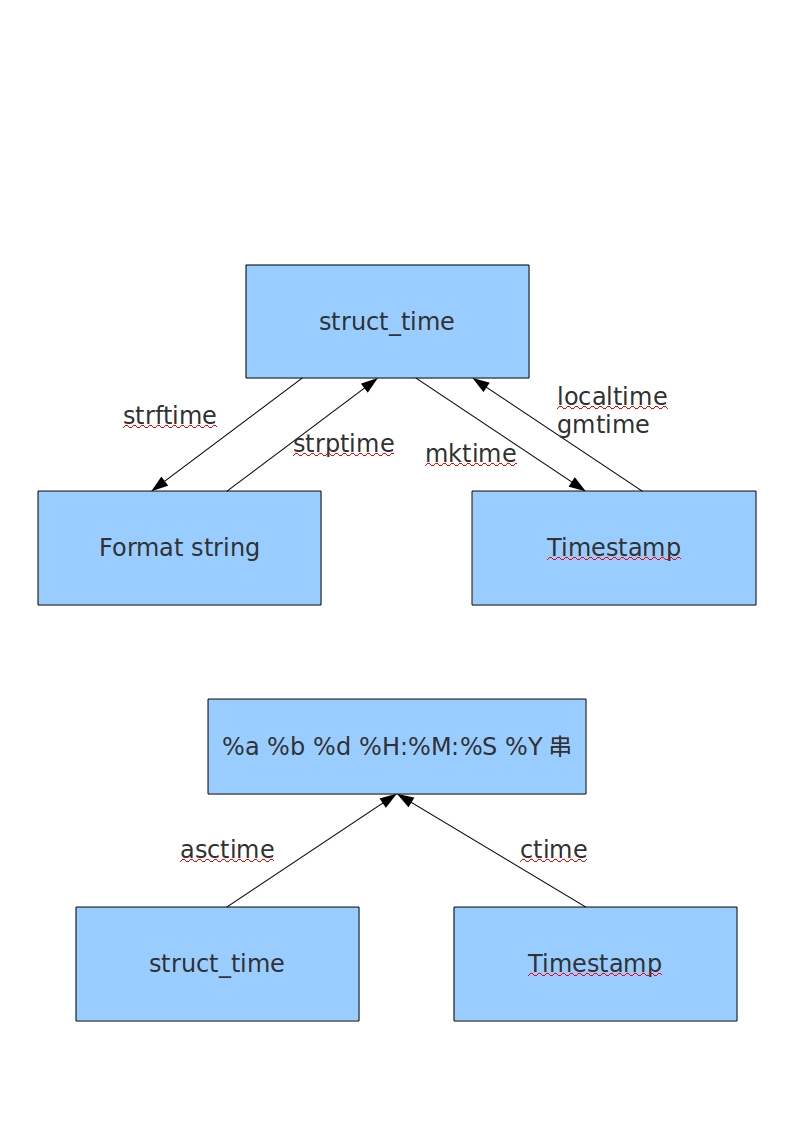
格式化当前时间
print time.strftime('%Y-%m-%d %H:%M:%S',time.localtime())
38. getpass模块
输入密码时不会明文显示密码
getuser()取自于系统环境变量LOGNAME, USER, LNAME and USERNAME,优先级从左到右。
#!/usr/bin/python

import getpass

password=getpass.getpass()

print(password)

print getpass.getuser()
39. 安装MySQL-python时报错
# pip install MySQL-python
_mysql.c::: error: Python.h: No such file or directory
解决方法:# yum install python-devel
40. 执行python脚本时,报“libmysqlclient.so.18: cannot open shared object file: No such file or directory”错误。
解决方法:# ln -s /usr/local/mysql/lib/libmysqlclient.so.18 /usr/lib64/libmysqlclient.so.18
或
# ln -s /usr/local/mysql/lib/libmysqlclient.so.18 /usr/lib/libmysqlclient.so.18
41. 如何检测文件的字符集
pip install chardet
print chardet.detect(each_excel)
42. 安装MySQL-python时报“EnvironmentError: mysql_config not found”
设置环境变量,export PATH=$PATH:/usr/local/mysql/bin
43. No module named 'fcntl'
在windows版本的Python中没有这个模块
44. 脚本手动调用没有问题,但通过crontab调用却报 'ascii' codec can't encode characters in position 0-5: ordinal not in range(128)
解决方法:
reload(sys)
sys.setdefaultencoding('utf-8')
45. UnicodeEncodeError: 'ascii' codec can't encode character u'\xa0' in position 20: ordinal not in range(128)
解决方法:
p.agent_info = u' '.join((agent_contact, agent_telno)).encode('utf-8').strip()
46. python安装完毕后,提示找不到ssl模块的解决步骤
http://www.cnblogs.com/yuechaotian/archive/2013/06/03/3115472.html
47. python 2.7源码安装
yum install -y gcc zlib zlib-devel openssl openssl-devel readline-devel sqlite-devel bzip2-devel gdbm-devel libdbi-devel ncurses-libs libffi-devel

wget https://www.python.org/ftp/python/2.7.17/Python-2.7.17.tgz

tar xf Python-2.7.17.tgz

cd Python-2.7.17

./configure --prefix=/usr/local

vim Modules/Setup

去掉注释

_ssl _ssl.c \

    -DUSE_SSL -I$(SSL)/include -I$(SSL)/include/openssl \

    -L$(SSL)/lib -lssl -lcrypto

make && make install

wget https://files.pythonhosted.org/packages/c2/f7/c7b501b783e5a74cf1768bc174ee4fb0a8a6ee5af6afa92274ff964703e0/setuptools-40.8.0.zip

unzip setuptools-40.8..zip
cd setuptools-40.8.0
python2. setup.py install
wget https://files.pythonhosted.org/packages/4c/4d/88bc9413da11702cbbace3ccc51350ae099bb351febae8acc85fec34f9af/pip-19.0.2.tar.gz

tar xvf pip-19.0..tar.gz

cd pip-19.0.

python2. setup.py install
48. timestamp to datetime
datetime.datetime.fromtimestamp(ts).strftime('%Y-%m-%d %H:%M:%S'))
49. 多个or语句合并
'Tom' in s or 'Bob' in s

any(name in s for name in ('Bob', 'Ed'))
50. 字典排序,基于value值,但value是个列表
sorted(myDict.items(), key=lambda i: i[][], reverse=True)
51. pip安装指定版本的包
pip install robotframework==2.8.
52. 多线程模拟MySQL并发操作
#!/usr/bin/python

import threading,pymysql

import time

def thread_print(i):

    conn = pymysql.connect("192.168.244.10","pt_user","pt_pass")

    cursor = conn.cursor()

    sql="select sleep(100)"

    cursor.execute(sql)

    cursor.close()

    conn.close()

threads = []

for i in range(30):

    threads.append(threading.Thread(target=thread_print,args=(i,)))

for th in threads:

    th.start()

for th in threads:

    th.join()
53. 对IP进行排序
def split_ip(ip):

    """Split a IP address given as string into a 4-tuple of integers."""

    return tuple(int(part) for part in ip.split('.'))

ips=["192.168.244.10","192.168.12.234","10.10.12.2"]

ips=sorted(ips,key=split_ip)
54. 使用豆瓣源安装python包
pip3. install Django==3.0. -i http://pypi.douban.com/simple/ --trusted-host pypi.douban.com
55. ImportError: No module named main
Traceback (most recent call last):

  File "/usr/bin/pip", line , in <module>

    from pip._internal.cli.main import main

ImportError: No module named main
解决方法:python -m pip install -U pip==8.0.1
56.
Python碎碎念的更多相关文章
- Linux碎碎念
在学习Linux过程中,有许多有用的小技巧.如果放在纸质的笔记本上,平时查阅会相当不方便.现在以一种“碎碎念”的方式,汇集整理在此,目前还不是很多,但随着学习.工作的深入,后续会陆陆续续添加更多的小技 ...
- 一些关于Linux入侵应急响应的碎碎念
近半年做了很多应急响应项目,针对黑客入侵.但疲于没有时间来总结一些常用的东西,寄希望用这篇博文分享一些安全工程师在处理应急响应时常见的套路,因为方面众多可能有些杂碎. 个人认为入侵响应的核心无外乎四个 ...
- 一个谷粉和3年的Google Reader重度使用者的碎碎念
2013-03-14 上午看到Andy Rubin辞去Android业务主管职务.由Chrome及应用高级副总裁继任的新闻,还在想这会给Android带来什么,中午刷微博的时候就挨了当头一棒:Goog ...
- Jerry的碎碎念:SAPUI5, Angular, React和Vue
去年我去一个国内客户现场时,曾经和他们IT部门的一位架构师聊到关于在SAP平台上进行UI应用的二次开发时,UI框架是选用UI5还是Vue这个话题. 我们代表SAP, 向客户推荐使用UI5是基于以下六点 ...
- 结对编程ending-我和洧洧的碎碎念
应该是第一次和队友分工合作去完成一个项目,其中也经历了跳进不少坑又被拉回来的过程,总体来说这对于我俩也的确是值得纪念的一次经历. 我的碎碎念时间…… 对比个人项目和结对编程项目二者需求,前者重在面对不 ...
- C语言 · 分分钟的碎碎念
算法提高 分分钟的碎碎念 时间限制:1.0s 内存限制:256.0MB 问题描述 以前有个孩子,他分分钟都在碎碎念.不过,他的念头之间是有因果关系的.他会在本子里记录每一个念头,并用 ...
- 最近关于Qt学习的一点碎碎念
最近关于Qt学习的一点碎碎念 一直在使用Qt,但是最近对Qt的认识更加多了一些.所以想把自己的一些想法记录下来. Qt最好的学习资料应该是官方的参考文档了.对Qt的每一个类都有非常详细的介绍.我做了一 ...
- Java实现 蓝桥杯VIP 算法提高 分分钟的碎碎念
算法提高 分分钟的碎碎念 时间限制:1.0s 内存限制:256.0MB 问题描述 以前有个孩子,他分分钟都在碎碎念.不过,他的念头之间是有因果关系的.他会在本子里记录每一个念头,并用箭头画出这个念头的 ...
- python日常碎碎念
关于取命令行中参数的方法 1,sys.argv 这个方法自动获取参数,并split.一般情况下第一个元素是程序的名字.即 python script.py arg1 arg2 然后sys.argv返回 ...
随机推荐
- 08.LoT.UI 前后台通用框架分解系列之——多样的Tag选择器
LOT.UI分解系列汇总:http://www.cnblogs.com/dunitian/p/4822808.html#lotui LoT.UI开源地址如下:https://github.com/du ...
- Canvas绘图之平移translate、旋转rotate、缩放scale
画布操作介绍 画布绘图的环境通过translate(),scale(),rotate(), setTransform()和transform()来改变,它们会对画布的变换矩阵产生影响. 函数 方法 描 ...
- ASP.NET Core应用针对静态文件请求的处理[3]: StaticFileMiddleware中间件如何处理针对文件请求
我们通过<以Web的形式发布静态文件>和<条件请求与区间请求>中的实例演示,以及上面针对条件请求和区间请求的介绍,从提供的功能和特性的角度对这个名为StaticFileMidd ...
- python开发环境搭建
虽然网上有很多python开发环境搭建的文章,不过重复造轮子还是要的,记录一下过程,方便自己以后配置,也方便正在学习中的同事配置他们的环境. 1.准备好安装包 1)上python官网下载python运 ...
- 谈谈一些有趣的CSS题目(八)-- 纯CSS的导航栏Tab切换方案
开本系列,谈谈一些有趣的 CSS 题目,题目类型天马行空,想到什么说什么,不仅为了拓宽一下解决问题的思路,更涉及一些容易忽视的 CSS 细节. 解题不考虑兼容性,题目天马行空,想到什么说什么,如果解题 ...
- 【夯实PHP基础】PHP数组,字符串,对象等基础面面观
本文地址 分享提纲 1.数组篇 2.字符创篇 3.函数篇 4.面向对象篇 5.其他篇 /*************************** 一.数组篇 Begin***************** ...
- TYPESDK手游聚合SDK服务端设计思路与架构之一:应用场景分析
TYPESDK 服务端设计思路与架构之一:应用场景分析 作为一个渠道SDK统一接入框架,TYPESDK从一开始,所面对的需求场景就是多款游戏,通过一个统一的SDK服务端,能够同时接入几十个甚至几百个各 ...
- centos安装nodejs
1.下载安装nodejs wget http://nodejs.org/dist/v0.10.25/node-v0.10.25.tar.gz compat--c++ tar -xf node-v0.1 ...
- Tomcat之APR错误
在发布Apache Tomcat的时候,突然出现如下错误: An incompatible version 1.1.31 of the APR based Apache Tomcat Native l ...
- springMVC初始化绑定器
单日期 在处理器类中配置绑定方法 使用@InitBinder注解 在这里首先注册一个用户编辑器 参数一为目标类型 propertyEditor为属性编辑器,此处我们选用 CustomDateEd ...