
Azure China (8) 使用Azure PowerShell创建虚拟机,并设置固定Virtual IP Address和Private IP
《Windows Azure Platform 系列文章目录》
update 2017-12-21
我把Azure PowerShell升级到5.0.0版本,发现语句有些细微区别:
#这里Linux用户名和密码

$adminName = "用户名"

$adminPassword = "密码"

#设置DNS Name和机器名

$serviceName = "DNSName"

$vmName ="VMName"

#VM所在的数据中心

$location = "China East"

#VM大小

$vmSize ="A7"

#VNet,子网,和内网IP

$vNetName = 'My-VNet'

$subnetName='Subnet-1'

$privateIP='10.0.0.1'

#外挂Disk大小

$disksize=500

$disklabel= $vmName + "DataDisk"

$lun=0

$hcaching="None"

$imageList = Get-AzureVMImage ` | where {$_.ImageName -like "*CentOS-65*"}

$image=$imageList[0]

#创建VM

$vm1 = New-AzureVMConfig -Name $vmName -InstanceSize $vmSize -ImageName $image.ImageName

#这里不能指定TimeZone

$vm1 | Add-AzureProvisioningConfig  -Linux -LinuxUser $adminName -Password $adminPassword

$vm1 | Set-AzureSubnet -SubnetNames $subnetName

$vm1 | Set-AzureStaticVNetIP -IPAddress $privateIP

$vm1 | Add-AzureDataDisk -CreateNew -DiskSizeInGB $disksize -DiskLabel $disklabel -LUN $lun -HostCaching $hcaching

New-AzureVM -ServiceName $serviceName -VM $vm1 -VNetName $vNetName -Location 'China East'
本文介绍的是由世纪互联运维的Windows Azure China。
相比于Global Azure (http://www.windowsazure.com),国内由世纪互联运维的Windows Azure在PowerShell仅有细微的差别。
Azure Global的IP Rang信息,可以参考:http://www.microsoft.com/en-us/download/details.aspx?id=41653
国内由世纪互联运维的Azure China的IP Rang信息,可以参考:http://www.microsoft.com/en-us/download/details.aspx?id=42064
如果读者用的是百度查询IP地址,经常会发现Azure上海的IP地址经常会显示来自北京,这是由于百度的IP库比较老,请读者注意
在介绍本文之前,建议读者熟悉Azure PowerShell的基本命令,请参考笔者之前的文章:
Windows Azure Virtual Network (5) 设置Azure Virtual Machine固定Private IP
Windows Azure Virtual Network (6) 设置Azure Virtual Machine固定公网IP (Virtual IP Address, VIP) (1)
Windows Azure Virtual Network (7) 设置Azure Virtual Machine固定公网IP (Virtual IP Address, VIP) (2)
接下来,笔者会比较快速的介绍相关PowerShell命令:
如果你是第一次运行Azure PowerShell。我们要在本地创建证书文件。以便本地计算机和Azure建立可靠的安全连接。
1.以管理员身份,运行Azure PowerShell,下载publishsettings文件
Get-AzurePublishSettingsFile -Environment AzureChinaCloud
如果不想运行Azure PoweShell的话,
国外的Azure Global,请在浏览器中输入地址:http://go.microsoft.com/fwlink/?LinkID=301775
在登陆框中,输入你的用户名和密码
国内世纪互联运维的Azure China,请在浏览器中输入地址:http://go.microsoft.com/fwlink/?LinkID=301776
在登陆框中,输入你的OrgID和密码
2.将publishsettings下载到本地磁盘,然后执行上传publishsettings命令
Import-AzurePublishSettingsFile <PathToFile>
上面步骤1、2执行成功后,下次运行Azure PowerShell将不必再次运行上面的运行。接下来可以运行我们的命令了。
3.创建新的存储账号(步骤略),选择当前的订阅,并设置存储账号
Set-AzureSubscription -SubscriptionName '[SubscriptionName]' -CurrentStorageAccount '[StorageName]'
4.在上海数据中心(China East),获得固定的Public IPV4地址
$NginxReservedIP = New-AzureReservedIP -ReservedIPName 'NginxPublicIP' -Label 'NginxPublicIP' -Location 'China East'
查看这个IP地址
Get-AzureReservedIP -ReservedIPName 'NginxPublicIP'
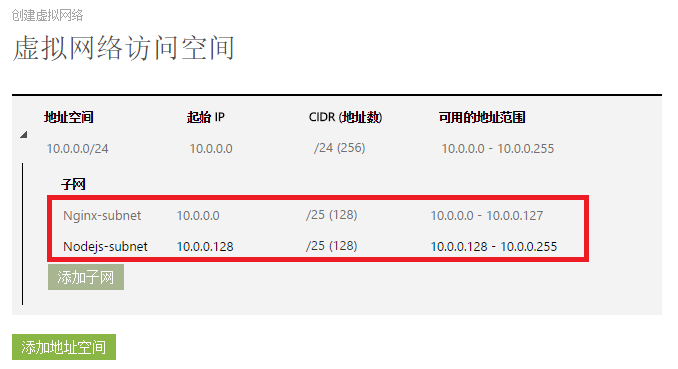
5.创建虚拟网络Virtual Network,命名为MyVNet (位置选择China East)。注意Virtual Network不能属于地缘组里。
- MyVNet IP Rang为10.0.0.0-10.0.0.255,
- 同时创建2个Subnet:Nginx-subnet和Nodejs-subnet
6.通过模糊查询,查询到CentOS 7.0镜像
$imageList = Get-AzureVMImage `

| where {$_.ImageName -like "*CentOS-70*"}

$image=$imageList[]
7.创建3台虚拟机:
- DNS为MyNginx,并且绑定Public IP (NginxPublicIP)
- 机器名分别为Nginx01,Nginx02和Nginx03
- 三台机器加入虚拟机网络MyVNet。子网为Nginx-subnet (10.0.0.0-10.0.0.127),
设置内网IP分别为10.0.0.4,10.0.0.5和10.0.0.6
- 虚拟机大小为Large
- 管理员用户名为:adminuser。 密码为:MyVM@6789
- 高可用性集名称为:NginxAvbSet
- 并设置该虚拟机的时区为UTC+8时区(北京时间)
创建第1台虚拟机(Nginx01,内网IP是10.0.0.4)的命令如下:
New-AzureVMConfig -Name 'Nginx01' -InstanceSize 'Large' -ImageName $image.ImageName -AvailabilitySetName 'NginxAvbSet' ` | Add-AzureProvisioningConfig -Linux -LinuxUser 'adminuser' -Password 'MyVM@6789' -TimeZone 'China Standard Time' | Set-AzureSubnet -SubnetNames 'Nginx-subnet' | Set-AzureStaticVNetIP -IPAddress '10.0.0.4' | New-AzureVM -ServiceName 'MyNginx' -VNetName 'MyVNet' –ReservedIPName 'NginxPublicIP' -Location 'China East'
创建第2台虚拟机(Nginx02,内网IP是10.0.0.5)的命令如下:
New-AzureVMConfig -Name 'Nginx02' -InstanceSize 'Large' -ImageName $image.ImageName -AvailabilitySetName 'NginxAvbSet' ` | Add-AzureProvisioningConfig -Linux -LinuxUser 'adminuser' -Password 'MyVM@6789' -TimeZone 'China Standard Time' | Set-AzureSubnet -SubnetNames 'Nginx-subnet' | Set-AzureStaticVNetIP -IPAddress '10.0.0.5' | New-AzureVM -ServiceName 'MyNginx' -VNetName 'MyVNet'
创建第3台虚拟机(Nginx03,内网IP是10.0.0.6)的命令如下:
New-AzureVMConfig -Name 'Nginx03' -InstanceSize 'Large' -ImageName $image.ImageName -AvailabilitySetName 'NginxAvbSet' ` | Add-AzureProvisioningConfig -Linux -LinuxUser 'adminuser' -Password 'MyVM@6789' -TimeZone 'China Standard Time' | Set-AzureSubnet -SubnetNames 'Nginx-subnet' | Set-AzureStaticVNetIP -IPAddress '10.0.0.6' | New-AzureVM -ServiceName 'MyNginx' -VNetName 'MyVNet'
==========================================分隔符=============================================
上面的内容,我们介绍的是创建Linux虚拟机,接下来笔者介绍一下如何使用PowerShell,创建Windows虚拟机。
我们直接从上面的步骤6开始,通过模糊查询,查询到Windows Server 2012虚拟机
$imageList = Get-AzureVMImage `

| where {$_.ImageName -like "*Windows-Server-2012-Datacenter*"}

$image=$imageList[]
或者通过精确查询,查询到Windows Server 2008 R2 SP中文版OS
$imageList = Get-AzureVMImage `

| where {$_.ImageName -eq "55bc2b193643443bb879a78bda516fc8__Win2K8R2SP1-Datacenter-201503.01-zh.cn-127GB.vhd"}

$image=$imageList[]
55bc2b193643443bb879a78bda516fc8__Windows-Server-2012-R2-201504.01-zh.cn-127GB.vhd
7.创建2台虚拟机。
- DNS为LeiVM,并且绑定Public IP (NginxPublicIP)
- 机器名分别为LeiVM01,LeiVM02
- 三台机器加入虚拟机网络MyVNet。子网为subnet-1 (10.0.0.0-10.0.0.127),
设置内网IP分别为10.0.0.4,10.0.0.5
- 虚拟机大小为Large
- 管理员用户名为:adminuser。 密码为:MyVM@6789
- 高可用性集名称为:LeiAvbSet
创建LeiVM01的PowerShell如下:
New-AzureVMConfig -Name 'LeiVM' -InstanceSize Large -ImageName $image.ImageName -AvailabilitySetName 'LeiAvbSet' ` | Add-AzureProvisioningConfig -Windows -AdminUsername 'adminuser' -Password 'MyVM@6789' | Set-AzureSubnet -SubnetNames 'Subnet-1' | Set-AzureStaticVNetIP -IPAddress '10.0.0.4' | New-AzureVM -ServiceName 'LeiVM' -VNetName 'MyVNet' –ReservedIPName 'NginxPublicIP' -Location 'China East'
创建LeiVM02的PowerShell如下:
New-AzureVMConfig -Name 'LeiVM02' -InstanceSize Large -ImageName $image.ImageName -AvailabilitySetName 'LeiAvbSet' ` | Add-AzureProvisioningConfig -Windows -AdminUsername 'adminuser' -Password 'MyVM@6789' | Set-AzureSubnet -SubnetNames 'Subnet-1' | Set-AzureStaticVNetIP -IPAddress '10.0.0.4' | New-AzureVM -ServiceName 'LeiVM' -VNetName 'MyVNet'
==========================================分隔符=============================================
创建一台SQL Server 2012 SP1的 Azure Virtual Machine
并设置该虚拟机的时区为UTC+8时区(北京时间)
同时关闭该虚拟机的自动更新功能
$imageList = Get-AzureVMImage | where {$_.ImageName -eq "74bb2f0b8dcc47fbb2914b60ed940c35__SQL-Server-2012SP1-Enterprise-SQL11-SP1-CU3-11.0.3350.0-Win2012-ENU"}

$image=$imageList[]

New-AzureVMConfig -Name 'LeiSQLVM01' -InstanceSize 'Medium' -ImageName $image.ImageName  -AvailabilitySetName 'LeiSQLAvbSet' ` | Add-AzureProvisioningConfig -Windows -AdminUsername 'azureadmin' -Password 'MyVM@6789' -TimeZone 'China Standard Time' -DisableAutomaticUpdates | Set-AzureSubnet -SubnetNames 'SQL-Subnet' | Set-AzureStaticVNetIP -IPAddress '10.0.0.132' | New-AzureVM -ServiceName 'LeiSQLCS' -VNetName 'LeiSQLAlwaysOnVNet' -Location 'China East'
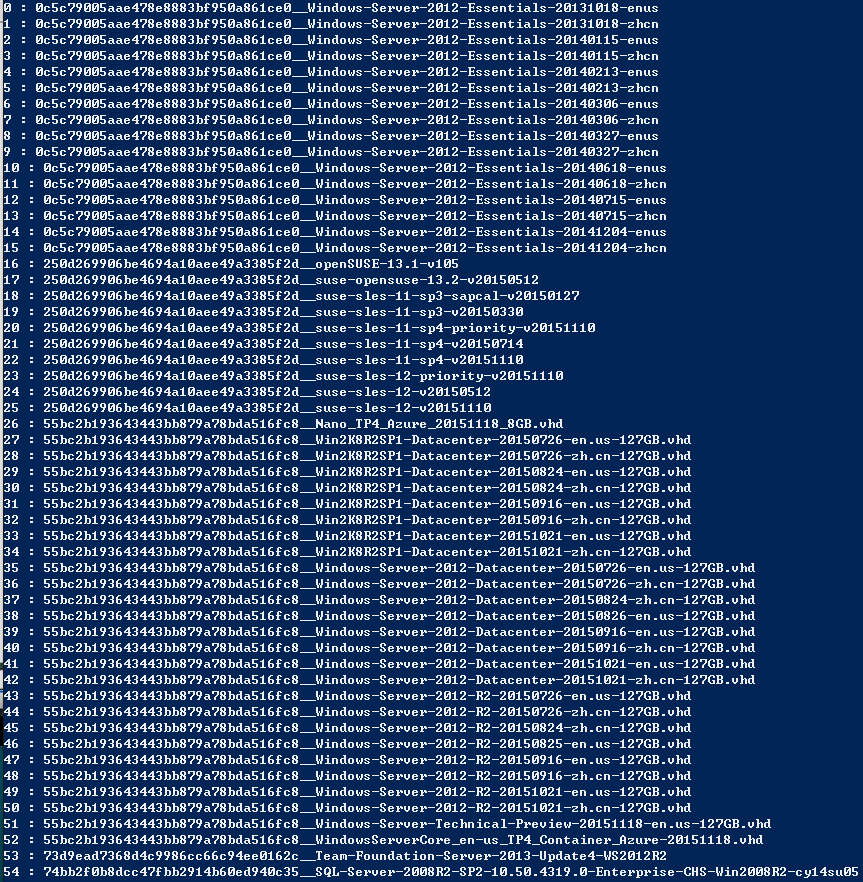
Update 2015-12-9,今天发现一个Azure PowerShell,可以导出所有的Azure VM Template Name,方便以后使用:
$images = Get-AzureVMImage

$count = $images.Count

for($i=0;$i -lt $count;$i++){ $i.ToString() + " : " + $images[$i].ImageName; }
部分截图信息如下:
Azure China (8) 使用Azure PowerShell创建虚拟机,并设置固定Virtual IP Address和Private IP的更多相关文章
- Azure China (5) 管理Azure China Powershell
<Windows Azure Platform 系列文章目录> 本文介绍的是国内由世纪互联运维的Azure China Cloud Update 2015-09-01 发现一个新的命令,在 ...
- azure 1元试用,如何创建虚拟机等
付了1元后,直接进 https://manage.windowsazure.cn 创建虚拟机即可.
- Azure China (4) 管理Azure China Storage Account
<Windows Azure Platform 系列文章目录> Update 2015-05-10 强烈建议使用AzCopy工具,AzCopy命令行工具,是经过优化的.高性能Azure S ...
- Azure China (10) 使用Azure China SAS Token
<Windows Azure Platform 系列文章目录> 本文介绍的是国内由世纪互联运维的Azure China 注意:本文介绍的是Azure China Storage Priva ...
- Azure China (9) 在Azure China配置CDN服务
<Windows Azure Platform 系列文章目录> 本文介绍的是国内由世纪互联运维的Azure China Update 2015-11-20:Azure China CDN服 ...
- Azure China (11) 使用Azure China Storage Public Blob
<Windows Azure Platform 系列文章目录> 本文介绍的是国内由世纪互联运维的Azure China 注意:本文介绍的是Azure China Storage Publi ...
- Linux虚拟机Centos 设置固定的静态IP
经过两天的研究(研究到深夜1点),百度了很多文章与加了几个linux的群,终于得到一种方式是可以正常设置静态IP且正常的ssh连接的方式. 第一种方式:NAT模式 参考文章 -- 虚拟机中的CentO ...
- [转载]CentOS 7虚拟机下设置固定IP详解
在 复制 他人作品之前,是因为我再此“跌倒”过一次,虽然原主说是永久地址,但是地址失效 不可避免.所以就原封不动的copy了过来,我自己也是按照他的一步一步配置的,我成功了,相信你们也会成功. 如果不 ...
- CentOS 7虚拟机下设置固定IP详解
说明 1.笔记本主机IP为设置自动获取,不管什么情况下,不受虚拟机影响,只要连接外网就可以正常上网: 2.只要笔记本主机可以正常访问外网,启动虚拟机中的CentOS 7系统就可以正常访问外网,无需再进 ...
随机推荐
- JAVA中protected的作用
JAVA中protected的作用 1.public:public表明该数据成员.成员函数是对所有用户开放的,所有用户都可以直接进行调用 2.private:private表示私有,私有的意思就是 ...
- shell学习--grep1
一. grep的来源 通过ex编辑器来查找某个字串: :/pattern/p 其中p是打印,包含字符串pattern的第一行将被打印:如果需要打印包含pattern的所有行,可以这样: :/g/pat ...
- Log
Public Shared Sub WriteLog(ByVal FormID As String, ByVal ex1 As Exception) 'log信息 Dim loginfo As Str ...
- 将ubuntu的id_rsa秘钥转为putty的ppk格式
1.使用putty的puttygen.exe: 2.导入需要转换的秘钥 3.保存私钥
- C#中语音合成简单使用
我使用的是vs2013 1.在项目中添加引用,项目->添加引用->COM选择Microsoft Speech Object Library 2.在需要使用语音合成的地方调用代码: SpVo ...
- 移动端H5页面的最佳终端适配之Flexible
lib-flexible是什么? lib-flexible是一个制作H5适配的开源库,可以点击这里下载相关文件,获取需要的JavaScript和CSS文件. 当然你可以直接使用阿里CDN: <s ...
- Java学习笔记 02 String类、StringBuilder类、字符串格式化和正则表达式
一.String类一般字符串 声明字符串 >>String str 创建字符串 >>String(char a[])方法用于将一个字符数组创建为String对象 >> ...
- wap,h5页面
网址: 1:天猫(http://m.tmall.com) 2:淘宝(http://m.taobao.com) 3:京东(http://m.jd.com) 4:网易(http://3g.163.com) ...
- 获取基于Internet Explorer_Server的聊天窗口内容
假设在得到窗体中控件的句柄(通过SPY++)的前提下,如果是像文本框这种控件,只要用SendMessage就可得到文本了,但是对于聊天记录窗口却行不通(返回空值),因为那其实是一个内置浏览器Inter ...
- appframework build目录各文件之包含内容
{ "build/css/af.ui.css": [ "css/main.css", "css/appframework.css", &qu ...