
[AngularJS] AngularJS系列(4) 中级篇之指令
目录
- API概览
- 使用Angular.UI.Bootstrap
- 自定义指令
- scope
- link
- 我的指令
angular中的指令可谓是最复杂的一块
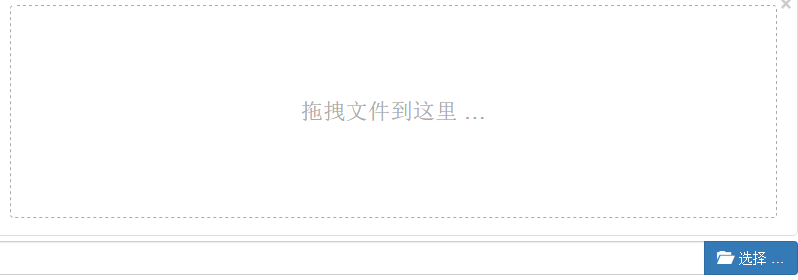
但是我们的上传组件就能这么写

效果图:
API概览
先上一段伪代码:
angular.module('moduleName', []).directive(

        'namespaceDirectiveName',

        [ function() {

            return {

                restrict : '',// 描述指令在模版中的使用方式,包括元素E,属性A,CSS样式类,注释或者以上方式的任意主和

                priority : 0,// 设置指令在模版中的执行顺序,顺序是相对于其他指令而言

                template : '',// 以字符串的形式编写一个内联模版,如果以url的形式提供模版,此属性会被忽略

                templateUrl : '',// 描述加载模版所需要的url。如果使用temlate形式提供模版,此属性会被忽略

                replace : true,// 如果设置为true则替换指令所在的元素,否则就追加到元素内部

                transclude : true,// 把指令元素原来的子节点移动到一个新模版内部

                scope : 'bool or object',// 为当前指令创建一个新的作用域,而不是使之继承父作用域

                constroller : function($scope, $element, $attrs, $transclude) {

                    // 创建一个控制器,它会暴露一个API,利用这个API可以在多个指令之间进行通信

                },

                require : '',// 要求必须存在另个一指令,当前指令才能执行

                link : function(scope, iElement, iAttrs) {

                    // 使用编程的方式修改最终生成的dom元素的实例,添加事件监听器,并设置数据绑定

                },

                compile : function(tElement, tAttrs, transclude) {

                    //在使用ng-repeat用编程的方式修改dom模版,从而实现一个指令跨越多个指令的特性。

                    //也可以返回一个link函数,可以用它来修改产生元素的示例

                    return {

                        pre : function preLink(scope, iElement, iAttrs,

                                controller) {

                        },

                        post : function postLink(scope, iElement, iAttrs,

                                controller) {

                        }

                    }

                }

            };

        } ]);
这里重点介绍几个定义
restrict: 描述指令在模版中的使用方式,包括:元素、样式类、属性、注释,或者以上几种方式的任意组合。(默认为AE)

使用AngularUI.Bootstrap
GitHub:https://angular-ui.github.io/bootstrap/
Nuget:
Install-Package Angular.UI.Bootstrap(该库在Bootstrap3.3.7下测试通过,这里顺便说包中的带tpls.js实际就是自带了模板的js)
这里演示一个最常用到的Pager

    <link href="Content/bootstrap.min.css" rel="stylesheet" />

</head>

<body ng-app="ui.bootstrap.demo">

    <div ng-controller="PaginationDemoCtrl">

        <ul uib-pagination total-items="totalItems" previous-text="上页" next-text="下页" first-text="首页" last-text="末页" items-per-page="itemsPerPage" ng-model="currentPage" max-size="maxSize" class="pagination-sm" boundary-links="true" force-ellipses="true" ng-change="pageChanged()"></ul>

    </div>

    <script src="Scripts/angular.min.js"></script>

    <script src="Scripts/angular-ui/ui-bootstrap-tpls.min.js"></script>

    <script>

        angular.module('ui.bootstrap.demo', ['ui.bootstrap']).controller('PaginationDemoCtrl', function ($scope, $log) {

            $scope.totalItems = 1000;

            $scope.currentPage = 4;

            $scope.maxSize = 5;//显示分页码个数

            $scope.itemsPerPage = 20;//每页大小

            $scope.pageChanged = function () {

                $log.log('Page changed to: ' + $scope.currentPage);

            };

        });

    </script>

</body>
更多需要ui-bootstrap的其他插件 访问对应的GitHub Pages
自定义指令
对于restrict,template,replace,transclude并不复杂,本节不做过多赘述.
scope
scope默认false: 表示使用现有的scope
设置为true : 表示新的scope(会继承父scope的属性)
设置为{} : 表示独立的scope(默认访问不到父scope的属性)
在设置为对象{}的时候,可以通过绑定策略传递父scope的属性

scope为true和默认false时,观察h2内容即可看到效果
<body ng-app="myApp" ng-init="user='aaa'">

    <h2>{{user}}</h2>

    <span hello></span>

    <script>

        angular.module('myApp', [])

            .directive('hello', [function () {

                return {

                    scope: true,

                    template: '<span>Hello-{{user}}</span>',

                    link: function ($scope) {

                        $scope.user = 'ccc';

                    }

                }

            }]);

    </script>

</body>
我们再探索下为scope为对象的时候,在上面的例子中做下调整,使用绑定策略@
    <span hello="{{user}}"></span>

    <script>

        angular.module('myApp', [])

            .directive('hello', [function () {

                return {

                    scope: {

                        user: '@hello'

                    },

                    template: '<span>Hello-{{user}}</span>',

                    link: function ($scope) {

                        $scope.user = 'ccc';

                    }

                }

            }]);

    </script>
发现和scope为false的时候效果一样,其实这已经为完全独立的scope了
我们再调整下绑定策略为=
<span hello="user"></span>
    return {

                    scope: {

                        user: '=hello'

                    },

                    template: '<span>Hello-{{user}}</span>',

                    link: function ($scope) {

                        $scope.user = 'ccc';

                    }

                }
最后我们看下&
<body ng-app="myApp" ng-controller="helloCtrl">

    <span func="log(aa,bb)"></span>

    <script>

        angular.module('myApp', []).controller('helloCtrl', function ($scope) {

            $scope.log = function (name, age) {

                console.log('hello:' + name + ':' + age);

            }

        }).directive('hello', [function () {

            return {

                scope: {

                    func: '&'

                },

                template: '<span ng-click="func({aa:\'小2\',bb:\'19岁\'})">Click Me</span>',

                link: function ($scope) {

                    $scope.user = 'ccc';

                    $scope.func({ aa: '小M', bb: '18岁' });

                }

            }

        }]);

    </script>

</body>
我想到此,scope已经ok.
link
谈到link一般都会说说compile,但我这里会重点介绍controller,require
link函数 会在指令的每个实例上触发一次.
controller函数 一般用来在指令间传递数据
require函数 依赖其他的指令
我们来自定义一个'经典的'according
<body ng-app="myApp" ng-init="items=[{title:'t1',text:'x1'},{title:'t2',text:'x2'},{title:'t3',text:'x3'}]">

    <div hello>

        <div word title="item.title" ng-repeat="item in items">{{item.text}}</div>

    </div>

</body>
先定义hello 指令
        angular.module('myApp', [])

            .directive('hello', [

                function () {

                    return {

                        scope: {

                            title: '='

                        },

                        transclude: true,

                        replace: true,

                        controller: function () {

                            var words = [];

                            this.add = function (word) {

                                words.push(word);

                            }

                            this.openOne = function (word) {

                                for (var i = 0; i < words.length; i++) {

                                    if (words[i] !== word)

                                        words[i].show = false;

                                }

                            }

                        },

                        template: '<div ng-transclude></div>'

                    }

                }

            ])
word指令
    .directive('word', [

                function () {

                    return {

                        require: '?^hello',

                        scope: {

                            title: '='

                        },

                        transclude: true,

                        replace: true,

                        template: '<div><div ng-click="toggle()">{{title}}</div><div ng-show="show" ng-transclude></div></div>',

                        link: function (scope, ele, attr, ctrl) {

                            if (!ctrl) {

                                console.warn('无hello指令');

                                return;

                            }

                            scope.show = false;

                            ctrl.add(scope);

                            scope.toggle = function () {

                                scope.show = !scope.show;

                                ctrl.openOne(scope);

                            }

                        }

                    }

                }

            ]);
效果图(这个according是不是太low了):

require
require接受字符串或字符串数组.会将对应的控制器注入到link函数的第4个参数上.
默认会在自身找的元素找指令
加^表示会从父级找指令
加?表示如果没找到,传递null给link
通常为了防止报错,会传'?^'组合(不分先后)
这里再补充下ngModel的情况.因为常常要和模型做交互
也就是require:'?ngModel'这种情况.
再补充下ngModelCtrl常用的属性或方法:
$setViewValue(): 设置ngModel值
$formatters: 格式化模型显示值
$render: 定义模型如何渲染展示方法
我的指令
虽然angular已经有很多指令插件,但我还是忍不住写了一些指令.
如分页,文件上传,富文本等。
分享1个今天写的fileinput 热乎着呢。
Nuget:Install-Package angularjs.fileinput
GitHub: https://github.com/NeverCL/Angular.FileInput
同时推荐一篇很详细的博客:http://www.cnblogs.com/rohelm/p/4051437.html
本文地址:http://www.cnblogs.com/neverc/p/5916247.html
[AngularJS] AngularJS系列(4) 中级篇之指令的更多相关文章
- Kotlin——从无到有系列之中级篇(四):面向对象的特征与类(class)继承详解
如果您对Kotlin很有兴趣,或者很想学好这门语言,可以关注我的掘金,或者进入我的QQ群大家一起学习.进步. 欢迎各位大佬进群共同研究.探索 QQ群号:497071402 进入正题 在前面的章节中,详 ...
- [AngularJS] AngularJS系列(3) 中级篇之表单验证
目录 基本验证 验证插件messages 自定义验证 基本验证 <form name="form" novalidate ng-app> <span>{{f ...
- [AngularJS] AngularJS系列(6) 中级篇之ngResource
目录 $http ngResource $http几乎是所有ng开发中,都会用到的服务.本节将重点说下$http 与 ngResource $http 使用:$http(config); 参数: me ...
- [AngularJS] AngularJS系列(2) 中级篇之路由
目录 原理 angular-route ui-router 事件 深度路由 原理 ng的route本质是监听hashchange事件. 在angular-route中 $rootScope.$on(' ...
- [AngularJS] AngularJS系列(5) 中级篇之动画
目录 CSS定义 JS定义 ng动画实际帮我们在状态切换的时候 添加特定的样式 从而实现动画效果. 一般我们会通过C3来实现具体的动画. CSS定义 ng-if 图(实际上,图并不能展现出什么): H ...
- 阿里巴巴笔试整理系列 Session2 中级篇
1知识点储备-----2笔试题总结-----3面试经验总结 知识点储备 2014年8月29日在线笔试题:20单选(40分钟内完成)+附加题(2道编程+1道问答) 1. 通过算法生成的随机数是“伪随机” ...
- AngularJS入门心得3——HTML的左右手指令
在<AngularJS入门心得1——directive和controller如何通信>我们提到“AngularJS是为了克服HTML在构建应用上的不足而设计的.HTML是一门很好的为静态文 ...
- Angularjs进阶笔记(2)-自定义指令中的数据绑定
有关自定义指令的scope参数,网上很多文章都在讲这3种绑定方式实现的效果是什么,但几乎没有人讲到底怎么使用,本篇希望聊聊到底怎么用这个话题. 一. 自定义指令 自定义指令,是Angularjs用来实 ...
- AngularJS路由系列(6)-- UI-Router的嵌套State
本系列探寻AngularJS的路由机制,在WebStorm下开发.本篇主要涉及UI-Route的嵌套State. 假设一个主视图上有两个部分视图,部分视图1和部分视图2,主视图对应着一个state,两 ...
随机推荐
- 【转】yahoo前端优化军规
雅虎给出了前端优化的34条法则(包括Yslow规则22条) 详细说明,下载转发 ponytail 的译文(来自帕兰映像). Minimize HTTP Requests 减少http请求 图片.css ...
- 设计模式之美:Strategy(策略)
索引 意图 结构 参与者 适用性 效果 相关模式 实现 实现方式(一):使用不同的 Strategy 处理内部状态. 别名 Policy 意图 定义一系列的算法,把它们一个个封装起来,并且使它们可以相 ...
- 千万用户级别应用系统背后的SOA组件化容器
背景 在<我们的应用系统是如何支撑千万级别用户的>随笔中已经从“宏观”角度去介绍了整个应用系统的布局.组件化是整个系统由头到尾都始终坚持的一个设计原则,其中“SOA组件化容器”也是我们应用 ...
- 四则运算的实现(C++)重做
#include <iostream> using namespace std; void main() { int a0[1000],b0[1000],c0[1000],a1[1000] ...
- Facebook 发布「流程」
时不时就会在面试过程中碰到有候选人问 Facebook 是否采用 Scrum 之类的敏捷方法,偶尔也会有中国的朋友问及 Facebook 上线流程.我通常会简单说几句,然后说「如果你真感兴趣的话,去搜 ...
- c#生成MD5字符串
public static string EncryptWithMD5(string source) { byte[] sor = Encoding.UTF8.GetBytes(source); MD ...
- Java框架搭建-Maven、Mybatis、Spring MVC整合搭建
1. 下载eclipse 到网站下载 http://www.eclipse.org/downloads/packages/eclipse-ide-java-ee-developers/marsr 选择 ...
- vi 卡住怎么办
http://zhidao.baidu.com/question/93283359.html ---------- 我貌似好像按了ctrl+s... 用惯了windows人,会习惯性地按Ctrl+S来 ...
- Nodejs·进程
之前对这部分的内容很感兴趣,没想到读起来有点晦涩,还是因为对服务器的知识不是很了解. 说道服务器一般人都会想到tomcat或者Jboss或者weblogic,现在流行起来的Node总让人不太放心,JS ...
- 在Ubuntu搭建.NET Core环境
Ubuntu16.04配置.net core环境 Ubuntu 16.04 desktop下载地址:http://www.ubuntu.com/desktop 本次是用vmware安装该系统. ...