
AngularJS路由系列(6)-- UI-Router的嵌套State
本系列探寻AngularJS的路由机制,在WebStorm下开发。本篇主要涉及UI-Route的嵌套State。
假设一个主视图上有两个部分视图,部分视图1和部分视图2,主视图对应着一个state,两个部分视图分别对应state1和state2,那state与state1和state2形成了嵌套关系。
AngularJS路由系列包括:
1、AngularJS路由系列(1)--基本路由配置
2、AngularJS路由系列(2)--刷新、查看路由,路由事件和URL格式,获取路由参数,路由的Resolve
3、AngularJS路由系列(3)-- UI-Router初体验
4、AngularJS路由系列(4)-- UI-Router的$state服务、路由事件、获取路由参数
5、AngularJS路由系列(5)-- UI-Router的路由约束、Resolve属性、路由附加数据、路由进入退出事件
6、AngularJS路由系列(6)-- UI-Router的嵌套State
文件结构
- index.html
- app.js
- partial-about.html
- partial-home.html
- partial-home-list.html
- table-data.html // 可复用的表格
● index.html
angular.js

angular-ui-router.min.js

app.js

<body ng-app="routerApp">

    <a ui-sref="#">AngularUI Router</a>

    <a ui-sref="home">Home</a>

    <a ui-sref="about">About</a>

    <!--第一级路由-->

    <div ui-view></div>

</body>
● app.js
var routerApp = angular.module('routerApp',['ui.router']);

routerApp.config(function($stateProvider, $uilRouterProvider){

   $urlRouterProvider.otherwise('/home') ;

   $stateProvider

        .state('home',{

            url: '/home',

            templateUrl:'partial-home.html'

        })

        .state('about',{

        })

});
● partial-home.html
The Homey Page
This page demonstrates nested vies.

● partial-home.html,添加2个按钮
The Homey Page

This page demonstrates nested vies.

<a ui-sref=".list">List</a>

<a ui-sref=".paragraph">Paragraph</a>

<!--第二级路由,嵌套在第一级路由中-->

<div ui-view></div>
● app.js,添加嵌套State
$urlRouterProvider.otherwise('/home') ;

$stateProvider

    .state('home', {

        url: '/home',

        templateUrl: 'partial-home.html'

    })

    // home.list符合惯例

    .state('home.list', {

        url: '/list',

        templateUrl: 'partial-home-list.html',

        controller: function($scope) {

            $scope.dogs = ['Bernese', 'Husky', 'Goldendoodle'];

        }

    })

    // home.paragraph符合惯例

    .state('home.paragraph', {

        url: '/paragraph',

        template: 'I could sure use a drink right now.'

    })
● partial-home-list.html
<ul>

    <li ng-repeat="dog in dogs">{{ dog }}</li>

</ul>

● partial-about.html
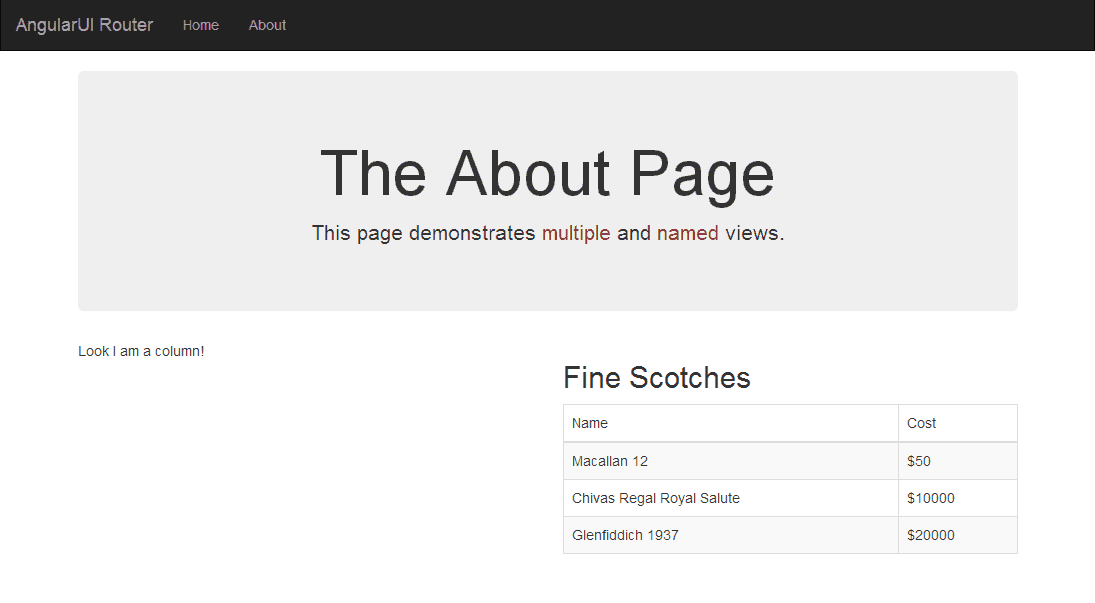
The About Page

his page demonstrates multiple and named views

<!--第二级路由,嵌套在第一级路由中,但有各自的名称-->

<div ui-view="columnOne"></div>

<div ui-view="columnTwo"></div>
● app.js,添加嵌套state,一个state有多个ng-view
$urlRouterProvider.otherwise('/home') ;

$stateProvider

    .state('home', {

        url: '/home',

        templateUrl: 'partial-home.html'

    })

    // home.list符合惯例

    .state('home.list', {

        url: '/list',

        templateUrl: 'partial-home-list.html',

        controller: function($scope) {

            $scope.dogs = ['Bernese', 'Husky', 'Goldendoodle'];

        }

    })

    // home.paragraph符合惯例

    .state('home.paragraph', {

        url: '/paragraph',

        template: 'I could sure use a drink right now.'

    })

    .state('about', {

            url: '/about',

            views: { //是指ng-view

                // 模板

                '': { templateUrl: 'partial-about.html' },

                // 名称为columnOne的ng-view,viewName@stateName

                'columnOne@about': { template: 'Look I am a column!' },

                // 名称为columnTow的ng-view,viewName@stateName

                'columnTwo@about': {

                    templateUrl: 'table-data.html',

                    controller: 'SecondController'

                }

            }

        });

    routerApp.controller('SecondController', function($scope) {

        $scope.message = 'test';

        $scope.products = [

            {

                name: 'Macallan 12',

                price: 50

            },

            {

                name: 'Chivas Regal Royal Salute',

                price: 10000

            },

            {

                name: 'Glenfiddich 1937',

                price: 20000

            }

        ];

    });
● table-data.html
<h2>Fine Scotches</h2>

<table class="table table-hover table-striped table-bordered">

    <thead>

        <tr>

            <td>Name</td>

            <td>Cost</td>

        </tr>

    </thead>

    <tbody>

        <tr ng-repeat="product in products">

            <td>{{ product.name }}</td>

            <td>${{ product.price }}</td>

        </tr>

    </tbody>

</table>
AngularJS路由系列,结束☺
AngularJS路由系列(6)-- UI-Router的嵌套State的更多相关文章
- AngularJS路由系列(5)-- UI-Router的路由约束、Resolve属性、路由附加数据、路由进入退出事件
本系列探寻AngularJS的路由机制,在WebStorm下开发.主要包括: ● UI-Router约束路由参数● UI-Router的Resolve属性● UI-Router给路由附加数据● UI- ...
- AngularJS路由系列(4)-- UI-Router的$state服务、路由事件、获取路由参数
本系列探寻AngularJS的路由机制,在WebStorm下开发.主要包括: ● UI-Router的$state服务● UI-Router的路由事件● UI-Router获取路由参数 Angular ...
- AngularJS路由系列(3)-- UI-Router初体验
本系列探寻AngularJS的路由机制,在WebStorm下开发. AngularJS路由系列包括: 1.AngularJS路由系列(1)--基本路由配置2.AngularJS路由系列(2)--刷新. ...
- AngularJS路由系列(2)--刷新、查看路由,路由事件和URL格式,获取路由参数,路由的Resolve
本系列探寻AngularJS的路由机制,在WebStorm下开发.主要包括: ● 刷新路由● 查看当前路由以及所有路由● 路由触发事件● 获取路由参数 ● 路由的resolve属性● 路由URL格式 ...
- AngularJS路由系列(1)--基本路由配置
本系列探寻AngularJS的路由机制,在WebStorm下开发.主要包括: ● 路由的Big Picture ● $routeProvider配置路由 ● 使用template属性 ● 使用temp ...
- AngularJS 使用 UI Router 实现表单向导
Today we will be using AngularJS and the great UI Router and the Angular ngAnimate module to create ...
- [转]AngularJS 使用 UI Router 实现表单向导
本文转自:http://www.oschina.net/translate/angularjs-multi-step-form-using-ui-router 今天我们将使用AngularJs和伟大的 ...
- ngRoute 和 ui.router 的使用方法和区别
在单页面应用中要把各个分散的视图给组织起来是通过路由机制来实现的.本文主要对 AngularJS 原生的 ngRoute 路由模块和第三方路由模块 ui.router 的用法进行简单介绍,并做一个对比 ...
- 【原创】ui.router源码解析
Angular系列文章之angular路由 路由(route),几乎所有的MVC(VM)框架都应该具有的特性,因为它是前端构建单页面应用(SPA)必不可少的组成部分. 那么,对于angular而言,它 ...
随机推荐
- 【Python】CVE-2017-10271批量自查POC(Weblogic RCE)
1.说明 看到大家对weblogic漏洞这么热衷,于是也看看这个漏洞的测试方式. 找了几个安全研究员的博客分析,经过几天的摸索大体清楚漏洞由XMLDecoder的反序列化产生. 漏洞最早4月份被发现, ...
- Heapify
Given an integer array, heapify it into a min-heap array. For a heap array A, A[0] is the root of he ...
- 标准linu休眠和唤醒机制分析(四)【转】
转自:http://blog.csdn.net/lizhiguo0532/article/details/6453552 suspend第三.四.五阶段:platform.processor.core ...
- RESET MASTER和RESET SLAVE使用场景和说明【转】
[前言]在配置主从的时候经常会用到这两个语句,刚开始的时候还不清楚这两个语句的使用特性和使用场景. 经过测试整理了以下文档,希望能对大家有所帮助: [一]RESET MASTER参数 功能说明:删除所 ...
- 【mac】7z 终端命令行
链接:http://www.2cto.com/os/201410/341079.html 7z指令 7z是7zip压缩工具的常用压缩文件格式.7zip是一个开源的压缩工具,软件本身十分小巧,功能强大, ...
- 001_chrome工具详解
一.chrome https://segmentfault.com/a/1190000000683599
- python中使用pillow绘制汉字
# pip install -i https://pypi.tuna.tsinghua.edu.cn/simple pillow from PIL import Image, ImageFont, I ...
- VirtualBox 安装 Gentoo 小记
因为需求,尝试了一下在 VirtualBox 安装 Gentoo.虽然多年前就折腾过多次 LFS,但 Gentoo 并没有太多尝试.这次确实也经历了种种波折,到最后总算成功了,大致跨度为3天.本来手上 ...
- centos7配置svn钩子hooks脚本自动同步代码到项目目录
由于项目需要,svn提交后的代码希望再测试服务器上测试,每次提交后还要手动去svn update一次 十分麻烦,配置好svn钩子以后就省去了这些麻烦. 进入svn版本库目录找到hooks目录找到文件p ...
- UVa140 Bandwidth 小剪枝+双射小技巧+枚举全排列+字符串的小处理
给出一个图,找出其中的最小带宽的排列.具体要求见传送门:UVa140 这题有些小技巧可以简化代码的编写. 本题的实现参考了刘汝佳老师的源码,的确给了我许多启发,感谢刘老师. 思路: 建立双射关系:从字 ...