
EasyUI DataGrid 分页实现示例
使用easyui可以很方便的开发web程序,这儿仅展示一个后台使用mvc来实现分页的示例,截图如下
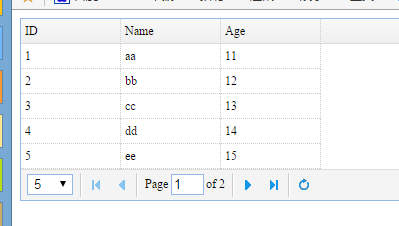
示例代码如下
1. 创建模型类,代码如下
using System;

using System.Collections.Generic;

using System.Linq;

using System.Web;

namespace EasyuiDemo.Models

{

    public class Student

    {

        public int ID { get; set; }

        public string Name { get; set; }

        public int Age { get; set; }

    }

}
2. 因为easyui加载数据的格式有要求,所以创建一个模型包装类以方便序列化为json,代码如下
using System;

using System.Collections.Generic;

using System.Linq;

using System.Web;

namespace EasyuiDemo.Models

{

    public class PageModel<T>

    {

        public int total { get; set; }

        public List<T> rows { get; set; }

    }

}
3. 在控制器中创建一个静态的模型集合以作为数据源,并提供对应的处理分页的动作,代码如下
using System;

using System.Collections.Generic;

using System.Linq;

using System.Web;

using System.Web.Mvc;

using EasyuiDemo.Models;

using Newtonsoft.Json;

namespace EasyuiDemo.Controllers

{

    public class HomeController : Controller

    {

        private static List<Student> list;

        static HomeController()

        {

            list = new List<Student>();

            list.Add(new Student() { ID = , Name = "aa", Age =  });

            list.Add(new Student() { ID = , Name = "bb", Age =  });

            list.Add(new Student() { ID = , Name = "cc", Age =  });

            list.Add(new Student() { ID = , Name = "dd", Age =  });

            list.Add(new Student() { ID = , Name = "ee", Age =  });

            list.Add(new Student() { ID = , Name = "ff", Age =  });

            list.Add(new Student() { ID = , Name = "gg", Age =  });

            list.Add(new Student() { ID = , Name = "hh", Age =  });

            list.Add(new Student() { ID = , Name = "ii", Age =  });

            list.Add(new Student() { ID = , Name = "jj", Age =  });

        }

        // GET: Home

        public ActionResult Index()

        {

            return View();

        }

        public string Page()

        {

            int page = ;

            int rows = ;

            if(Request.Params["page"] != null)

            {

                page = Convert.ToInt32(Request.Params["page"]);

            }

            if (Request.Params["rows"] != null)

            {

                rows = Convert.ToInt32(Request.Params["rows"]);

            }

            PageModel<Student> pdata = new PageModel<Student>();

            pdata.total = list.Count;

            pdata.rows = list.GetRange(rows * (page - ), rows);

            return JsonConvert.SerializeObject(pdata);

        }

    }

}
4. 视图页面代码如下
@{

    Layout = null;

}

<!DOCTYPE html>

<html>

<head>

    <meta name="viewport" content="width=device-width" />

    <title>Index</title>

    <link rel="stylesheet" href="~/Content/themes/default/easyui.css"/>

    <script src="~/scripts/jquery-1.11.3.js"></script>

    <script src="~/scripts/jquery.easyui-1.4.5.js"></script>

    <script>

        $(function () {

            $("#dg").datagrid({

                url: "/home/page",

                columns: [[

                    { field: 'ID', title: 'ID', width: 100 },

                    { field: 'Name', title: 'Name', width: 100 },

                    { field: 'Age', title: 'Age', width: 100 }

                ]],

                pageSize: 5,

                pageList: [5, 10],

                pagination: true

            })

        })

    </script>

</head>

<body>

    <div id="dg">

    </div>

</body>

</html>
datagrid设定pageSize时必须设定pageList,且pageSize的值要在pageList中,否则就是用默认的10.
如上就完成了datagrid的分页是用。
EasyUI DataGrid 分页实现示例的更多相关文章
- EasyUI DataGrid分页数据绑定
记录东西感觉很痛苦,总结东西很痛苦,麻烦,不过为了下次的方便和知识的牢固以后要坚持总结. EasyUI DataGrid分页数据绑定 在解决方案中新建两个文件FormMain.aspx(html也可以 ...
- EasyUI datagrid 分页Json字符串格式
//EasyUI datagrid 分页Json字符串格式 //{"total":xx,"rows":[{...},{...}]} total:总数 rows: ...
- asp.net mvc easyui datagrid分页
提到 asp.net mvc 中的分页,很多是在用aspnetpager,和easyui datagrid结合的分页却不多,本文介绍的是利用easyui 中默认的分页控件,实现asp.net mvc分 ...
- easyUI datagrid 分页参数page和rows
Struts2获取easyUI datagrid 分页参数page和rows 用pageHelper分页时,只要是能够获取前台传来的两个参数page和rows基本就完成了很大一部分. 获取方法:定义两 ...
- EasyUI Datagrid 分页显示(客户端)
转自:https://blog.csdn.net/metal1/article/details/17536185 EasyUI Datagrid 分页显示(客户端) By ZYZ 在使用JQuery ...
- 构建ASP.NET MVC4+EF5+EasyUI+Unity2.x注入的后台管理系统(8)-MVC与EasyUI DataGrid 分页
系列目录 前言 为了符合后面更新后的重构系统,文章于2016-11-1日重写 EasyUI Datagrid在加载的时候会提交一些分页的信息到后台,我们需要根据这些信息来进行数据分页再次返回到前台 实 ...
- easyui datagrid 分页略解
easyui datagrid 本身自带了分页功能. 但是这个需要你自己控制. 在后台可以得到两个datagrid的参数,rows 和page.其中rows是每页要显示的个数,page是第几页.单纯的 ...
- jquery easyui datagrid 分页详解
由于项目原因,用了jquery easyui 感觉界面不错,皮肤样式少点,可是官网最近打不开了,资料比较少,给的demo没有想要的效果,今天在用datagrid 做分页显示的时候,折腾了半天,网上的资 ...
- easyui datagrid分页
datagrid分页设置 pagination="true" 貌似是不行的! 只是显示分页工具栏 没有达到分页效果 前端 $(function (){ var p = $('#d ...
随机推荐
- 【Cocos2d-x 3.x】 调度器Scheduler类源码分析
非个人的全部理解,部分摘自cocos官网教程,感谢cocos官网. 在<CCScheduler.h>头文件中,定义了关于调度器的五个类:Timer,TimerTargetSelector, ...
- kernel/vsprintf.c
/* * linux/kernel/vsprintf.c * * Copyright (C) 1991, 1992 Linus Torvalds */ /* vsprintf.c -- Lars ...
- Android Sqlite数据库加密
Android使用的是开源的SQLite数据库,数据库本身没有加密,加密思路通常有两个: 1. 对几个关键的字段使用加密算法,再存入数据库 2. 对整个数据库进行加密 SQLite数据库加密工具: 收 ...
- 单例模式读取properties配置文件中的信息
public class ConfigManager { private static ConfigManager config = null; //创建Properties文件 读取配 ...
- Python使用re模块正则式的预编译及pickle方案
项目上线要求当中有言论和昵称的过滤需求, 客户端使用的是python脚本, python脚本中直接利用re模块来进行正则匹配, 一开始的做法是开启游戏后, 每帧编译2条正则式, 无奈运营需求里面100 ...
- 将应用部署到Tomcat根目录的方法 去掉url里的项目名
在"conf/Catalina/localhost"目录下增加新的文件"ROOT.xml"(注意大小写哦),文件内容如下: <?xml version=& ...
- Arcgis 图层编辑器“粘贴”功能菜单灰色不能使用的问题与解决办法
本人由win7系统更换为win10系统,平常使用的arcgis10.2升级使用10.3版本,相应的VS2012也升级使用2013版本,但是在安装了之后发现"Editor"编辑工具中 ...
- CentOS 6、7下pptp vpn一键安装脚本
之前有折腾过<CentOS 6.7下IPSEC/L2TP VPN一键安装脚本>,不稳定.不支持IOS,因此换成pptp,并已经添加到<lnmp一键安装包>.这个脚本可以单独使用 ...
- QGC 支付宝无法异步通知及异步通知常见问题注意事项
支付宝异步通知参数(notify_url)路径常见问题注意事项: 1.不能是内网或者局域网地址,必须是外网可以访问的.否则无法调用!! 2.地址不能有session拦截,支付宝主动发送,所有sessi ...
- [2015.07.27]万峰图片批量处理专家 v8.6
万峰图片批量处理专家,界面简洁易用,功能强大实用.支持多种处理任务同时按顺序执行,真正的批量图片,批量效果处理.支持图片批量自定义的放大缩小,旋转或者翻转,支持图片格式批量转换.支持图片批量文字水印, ...