
Django之 url组件
本节内容
- 路由系统
- models模型
- admin
- views视图
- template模板
路由系统
我们已知,用户从浏览器发出的请求会首先打到django url的路由分发系统这里,然后再到views视图--》models模型--》template模板--》用户浏览器。
换言之,urls.py 文件主载着你整个网站的所有页面&接口的url分配。
正式开讲django的路由语法前,先要知道路由分为以下两种:
静态路由:已经明确定义好的一条路由,比如下例,用户只能在浏览器上输入/articles/2003/ 才能匹配到这条路由,输入任何其它的都匹配不上本条。
|
1
2
3
|
urlpatterns = [ path('articles/2003/', views.special_case_2003),] |
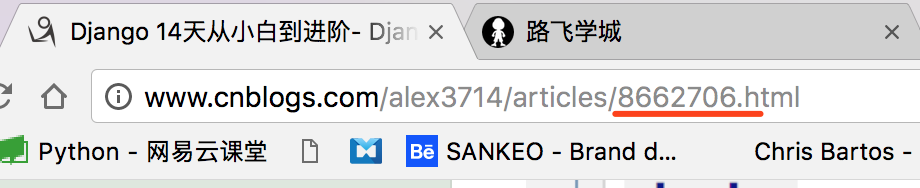
动态路由:定义的只是路由规则,比如只能输入数字、或特定排列、长度的字符等,你不知道用户会具体输入什么,只要符合你的规则即可。比如通过博客园每发篇文章,就会为这篇文章产生一个新的url,这个url肯定不可能是后台程序员手动给你填加的,那他得累死。肯定是他写好规则,比如8662706就代表这个文章编号,这个编号可能是数据库中此文章的id, 这个不管,程序员在定义路由时,只需规定,后面用户输入的url必须是数字就行。
Django urls.py 配置
Django 的路由本质上是通过正则表达式来对用户请求的url进行匹配
|
1
2
3
4
5
6
7
8
9
10
|
from django.urls import re_pathfrom app01 import viewsurlpatterns = [ re_path(r'articles/2003/$', views.special_case_2003), # 静态路由 re_path(r'^articles/(?P<year>[0-9]{4})/$', views.year_archive), # 动态路由 re_path(r'^articles/(?P<year>[0-9]{4})/(?P<month>[0-9]{2})/$', views.month_archive), # 动态路由 re_path(r'^articles/(?P<year>[0-9]{4})/(?P<month>[0-9]{2})/(?P<slug>[\w-]+)/$', views.article_detail), # 动态路由] |
以上路由对应views.py视图方法
|
1
2
3
4
5
6
7
8
9
10
11
12
13
14
15
|
def special_case_2003(request): return HttpResponse("dddd")def year_archive(request,year): return HttpResponse("year_archive" + str(year))def month_archive(request,year,month): return HttpResponse("month_archive %s-%s" %(year,month))def article_detail(request,year,month,slug): return HttpResponse("article_detail %s-%s %s" %(year,month,slug)) |
虽然实现了路由匹配,但url中的代码看着很笨拙+丑陋,不过在黑暗的django 1.0时代,大家只能这么玩。不过解放之神django2.0来啦,带来了路由匹配新玩法。
|
1
2
3
4
5
6
7
8
9
10
|
from django.urls import pathfrom . import viewsurlpatterns = [ path('articles/2003/', views.special_case_2003), path('articles/<int:year>/', views.year_archive), path('articles/<int:year>/<int:month>/', views.month_archive), path('articles/<int:year>/<int:month>/<slug:slug>/', views.article_detail),] |
先说,实现的功能跟之前用re写的路由一样,但是直观来看,是不是干净了很多?
下面解释语法,我太懒,直接把官网解释copy来啦,
Notes:
- To capture a value from the URL, use angle brackets.
- Captured values can optionally include a converter type. For example, use
<int:name>to capture an integer parameter. If a converter isn’t included, any string, excluding a/character, is matched. - There’s no need to add a leading slash, because every URL has that. For example, it’s
articles, not/articles.
Example requests:
- A request to
/articles/2005/03/would match the third entry in the list. Django would call the functionviews.month_archive(request, year=2005, month=3). /articles/2003/would match the first pattern in the list, not the second one, because the patterns are tested in order, and the first one is the first test to pass. Feel free to exploit the ordering to insert special cases like this. Here, Django would call the functionviews.special_case_2003(request)/articles/2003would not match any of these patterns, because each pattern requires that the URL end with a slash./articles/2003/03/building-a-django-site/would match the final pattern. Django would call the functionviews.article_detail(request, year=2003, month=3, slug="building-a-django-site").
Path converters
The following path converters are available by default:
str- Matches any non-empty string, excluding the path separator,'/'. This is the default if a converter isn’t included in the expression.int- Matches zero or any positive integer. Returns an int.slug- Matches any slug string consisting of ASCII letters or numbers, plus the hyphen and underscore characters. For example,building-your-1st-django-site.uuid- Matches a formatted UUID. To prevent multiple URLs from mapping to the same page, dashes must be included and letters must be lowercase. For example,075194d3-6885-417e-a8a8-6c931e272f00. Returns aUUIDinstance.path- Matches any non-empty string, including the path separator,'/'. This allows you to match against a complete URL path rather than just a segment of a URL path as withstr.
上面这些默认自带的converter已经可以满足你大部分的url匹配需求,但有特殊情况不能满足时,你还可以自定义converter哈。
自定义Path Converter
A converter is a class that includes the following:
- A
regexclass attribute, as a string. - A
to_python(self, value)method, which handles converting the matched string into the type that should be passed to the view function. It should raiseValueErrorif it can’t convert the given value. - A
to_url(self, value)method, which handles converting the Python type into a string to be used in the URL.
For example:
|
1
2
3
4
5
6
7
8
|
class FourDigitYearConverter: regex = '[0-9]{4}' def to_python(self, value): return int(value) def to_url(self, value): return '%04d' % value |
通过上面的regex参数来看, 其实django 2.0 这个path converter本质上也只是通过对正则表达式进行了封装,使其调用更简单而已。
Register custom converter classes in your URLconf using register_converter():
|
1
2
3
4
5
6
7
8
9
10
11
|
from django.urls import register_converter, pathfrom . import converters, viewsregister_converter(converters.FourDigitYearConverter, 'yyyy')urlpatterns = [ path('articles/2003/', views.special_case_2003), path('articles/<yyyy:year>/', views.year_archive), ...] |
include 子url
当有多个app时,每个app可以有自己的urls.py, 只需在顶级urls.py中include一下就可以
|
1
2
3
4
5
6
7
8
|
from django.urls import include, pathurlpatterns = [ # ... snip ... path('community/', include('aggregator.urls')), path('contact/', include('contact.urls')), # ... snip ...] |
django 在匹配url时,只要遇到include()语法, 就会把url分成2部分,比如上面代码里的url, 只要匹配上community/,就会把整条url丢给include('aggregator.urls')子urls.py。 子urls.py负责匹配后面的部分。
减少重复的url
如果url 中出向很多重复的部分,可以按下面的方法聚合

from django.urls import include, path

from apps.main import views as main_views

from credit import views as credit_views

extra_patterns = [

    path('reports/', credit_views.report),

    path('reports/<int:id>/', credit_views.report),

    path('charge/', credit_views.charge),

]

urlpatterns = [

    path('', main_views.homepage),

    path('help/', include('apps.help.urls')),

    path('credit/', include(extra_patterns)),

]
in this example, the /credit/reports/ URL will be handled by the credit_views.report() Django view.
传递额外参数给views
URLconfs have a hook that lets you pass extra arguments to your view functions, as a Python dictionary.
The path() function can take an optional third argument which should be a dictionary of extra keyword arguments to pass to the view function.
For example:
|
1
2
3
4
5
6
|
from django.urls import pathfrom . import viewsurlpatterns = [ path('blog/<int:year>/', views.year_archive, {'foo': 'bar'}),] |
In this example, for a request to /blog/2005/, Django will call views.year_archive(request, year=2005, foo='bar').
*注:这个功能很少用,知道就行了。
到此,我们就掌握了django url系统的大部分用法,是不是很简单?
now , it's time to move forward。
Django之 url组件的更多相关文章
- Django之Form组件
Django之Form组件 本节内容 基本使用 form中字段和插件 自定义验证规则 动态加载数据到form中 1. 基本使用 django中的Form组件有以下几个功能: 生成HTML标签 验证用户 ...
- 第十一篇:web之Django之Form组件
Django之Form组件 Django之Form组件 本节内容 基本使用 form中字段和插件 自定义验证规则 动态加载数据到form中 1. 基本使用 django中的Form组件有以下几个功 ...
- Django----列表分页(使用Django的分页组件)
目的:是为了实现列表分页 1.定制URL http://127.0.0.1:8000/blog/get_article?page=3之前定制URL是在url后增加了/id,这次使用参数的方式 def ...
- Django之Form组件(一)
Django之Form组件(一) Django的Form主要具有一下几大功能: 生成HTML标签 验证用户数据(显示错误信息) HTML Form提交保留上次提交数据 初始化页面显示内容 基本操作:字 ...
- python框架之Django(10)-Form组件
介绍 我们之前在HTML页面中利用form表单向后端提交数据时,都会写一些获取用户输入的标签并且用form标签把它们包起来.与此同时我们在好多场景下都需要对用户的输入做校验,比如校验用户是否输入,输入 ...
- 〖Python〗-- Django的Form组件
[Django的Form组件] Django的Form主要具有一下几大功能: 生成HTML标签 验证用户数据(显示错误信息) HTML Form提交保留上次提交数据 初始化页面显示内容 Form类的使 ...
- web之Django之Form组件
Django之Form组件 本节内容 基本使用 form中字段和插件 自定义验证规则 动态加载数据到form中 1. 基本使用 django中的Form组件有以下几个功能: 生成HTML标签 验证用户 ...
- Django 之 ModelForm 组件
Django的model form组件 扩展:Django 之Form组件 首先我们要知道 Model 和 Form 分别时干什么的 Model 生成表数据 Form 对表单.字段进行校验 Dja ...
- Ajax的原理及Django上传组件
title: Ajax的原理及Django上传组件 tags: Django --- Ajax的原理及Django上传组件 Ajax的原理 ajax 是异步JavaScript和xml ajax就是向 ...
随机推荐
- [转] 浅谈C++中的那些内存泄露
点击阅读原文 尽管学过C语言.可是C++里面的一些基础还是不太懂,还须要再掌握. 对于内存泄露,我的个人理解就是程序在执行过程中,自己开辟了空间,用完这块空间后却没有释放. 今晚上我就犯了这种低级错误 ...
- GoldenDict和AutoHotKey的安装和使用
GoldenDict 下载地址:http://sourceforge.net/projects/goldendict/files/early%20access%20builds/ 官网提供的版本很老, ...
- PuTTY通过SSH连接上Ubuntu20.04
在PuTTY中连接到Ubuntu20.04大致需要几个步骤(不一定对应文本中的序号):1) 安装opensh-server (Ubuntu安装好之后 ,一般openssh-client自动已经安装好) ...
- RocksDB事务的隔离性分析【原创】
Rocksdb事务隔离性指的是多线程并发事务使用时候,事务与事务之间的隔离性,通过加锁机制来实现,本文重点剖析Read Commited隔离级别下,Rocksdb的加锁机制. Rocksdb事务相关类 ...
- SSL/TSL 原理( 握手原理和传输原理)
本文参考<计算机网络 自顶向下方法> 目录 背景 通信的4要素 SSL/TLS in Detail 通讯保证 The Handshake Protocol 1. Initial Clien ...
- redis高级命令3哨兵模式
redis的哨兵模式 现在我们在从服务器1.222上让该从服务器作为哨兵 首先将redis安装包文件下的sentinel.conf文件复制到/usr/local/redis/etc目录下 然后修改se ...
- 阿里巴巴开源canal 工具数据同步异常CanalParseException:parse row data failed,column size is not match for table......
一.异常现象截图 二.解决方式: 1.背景 早期的canal版本(<=1.0.24),在处理表结构的DDL变更时采用了一种简单的策略,在内存里维护了一个当前数据库内表结构的镜像(通过desc ...
- python高级-闭包-装饰器
闭包内容: 匿名函数:能够完成简单的功能,传递这个函数的引用,只有功能 普通函数:能够完成复杂的功能,传递这个函数的引用,只有功能 闭包:能够完成较为复杂的功能,传递这个闭包中的函数以及数据,因此传递 ...
- 入门大数据---SparkSQL外部数据源
一.简介 1.1 多数据源支持 Spark 支持以下六个核心数据源,同时 Spark 社区还提供了多达上百种数据源的读取方式,能够满足绝大部分使用场景. CSV JSON Parquet ORC JD ...
- Python进阶之浅谈内置方法
目录 有序or无序和可变or不可变 数字类型内置方法 整形 浮点型 字符串类型内置方法 有序or无序和可变or不可变 有序:有索引 无序:无索引 可变:变量值变,id不变 不可变:变量值变,id也变 ...