
CentOS 7关闭firewalld启用iptables 开放端口
在CentOS7中,有很多CentOS 6中的常用服务发生了变化。
其中iptables是其中比较大的一个。防火墙iptables被firewalld取代。
本文将介绍,如果采用systemctl关闭firewalld,开启iptables。
1.关闭firewalld
[root@hwcentos70-01 system]# systemctl stop firewalld

[root@hwcentos70-01 system]# systemctl disable firewalld

[root@hwcentos70-01 system]# systemctl status firewalld

firewalld.service - firewalld - dynamic firewall daemon

Loaded: loaded (/usr/lib/systemd/system/firewalld.service; disabled)

Active: inactive (dead)

Feb 26 13:48:00 hwcentos70-01 systemd[1]: Stopped firewalld - dynamic firewall daemon.

Feb 26 13:48:14 hwcentos70-01 systemd[1]: Starting firewalld - dynamic firewall daemon...

Feb 26 13:48:15 hwcentos70-01 systemd[1]: Started firewalld - dynamic firewall daemon.

Feb 26 13:49:23 hwcentos70-01 systemd[1]: Started firewalld - dynamic firewall daemon.

Feb 26 13:53:18 hwcentos70-01 systemd[1]: Stopping firewalld - dynamic firewall daemon...

Feb 26 13:53:18 hwcentos70-01 systemd[1]: Stopped firewalld - dynamic firewall daemon.
2.开启iptables
首先安装iptables:
[root@hwcentos70-01 system]#yum install -y iptables-services

[root@hwcentos70-01 system]# systemctl enable iptables

ln -s '/usr/lib/systemd/system/iptables.service' '/etc/systemd/system/basic.target.wants/iptables.service'

[root@hwcentos70-01 system]# systemctl start iptables

[root@hwcentos70-01 system]# systemctl status iptables

iptables.service - IPv4 firewall with iptables

Loaded: loaded (/usr/lib/systemd/system/iptables.service; enabled)

Active: active (exited) since Fri 2016-02-26 13:54:45 UTC; 6s ago

Process: 55539 ExecStart=/usr/libexec/iptables/iptables.init start (code=exited, status=0/SUCCESS)

Main PID: 55539 (code=exited, status=0/SUCCESS)

Feb 26 13:54:45 hwcentos70-01 iptables.init[55539]: iptables: Applying firewall rules: [ OK ]

Feb 26 13:54:45 hwcentos70-01 systemd[1]: Started IPv4 firewall with iptables.
此时iptables的命令都可以使用了:
[root@hwcentos70-01 system]# iptables -L

Chain INPUT (policy ACCEPT)

target prot opt source destination

Chain FORWARD (policy ACCEPT)

target prot opt source destination

Chain OUTPUT (policy ACCEPT)

target prot opt source destination

[root@hwcentos70-01 system]# service iptables save

iptables: Saving firewall rules to /etc/sysconfig/iptables:[ OK ]
3.开放5000端口
输入“vi /etc/sysconfig/iptables”,打开iptables的配置文件,输入之前按一下"i",然后添加一行"-A INPUT -m state --state NEW -m tcp -p tcp --dport 5000 -j ACCEPT",添加以后按一下ESC,输入":x",回车,就保存退出了
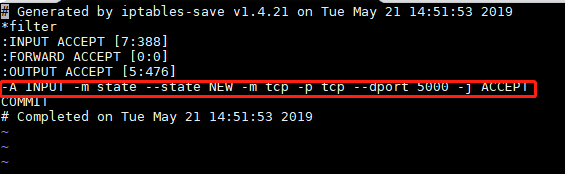
重启iptables,输入"service iptables restart",重启成功以后,,输入"service iptables status",回车,就会显示正在生效的规则
启动监听5000的应用程序
4.测试
cmd(命令提示符)窗口,使用telnet命令进行测试,命令"telnet+空格+服务器IP+空格+5000",可以连接就会直接跳转到一个空白的窗口,连不上就会卡住一段时间,然后提示错误

查看网页

CentOS 7关闭firewalld启用iptables 开放端口的更多相关文章
- CentOS 7关闭firewalld启用iptables
在CentOS7中,有很多CentOS 6中的常用服务发生了变化. 其中iptables是其中比较大的一个.防火墙iptables被firewalld取代. 本文将介绍,如果采用systemctl关闭 ...
- centos 7 关闭firewalld开启iptables
1: 关闭系统高级防火墙firewalld systemctl stop firewalld.service #停止firewall systemctl disable firewalld.servi ...
- [转载]CENTOS 6.0 iptables 开放端口80 3306 22端口
原文地址:6.0 iptables 开放端口80 3306 22端口">CENTOS 6.0 iptables 开放端口80 3306 22端口作者:云淡风轻 #/sbin/iptab ...
- 玩转Linux之- CentOS 7.0,启用iptables防火墙
原文 玩转Linux之- CentOS 7.0,启用iptables防火墙 CentOS 7.0默认使用的是firewall作为防火墙,这里改为iptables防火墙. 1.关闭firewall:sy ...
- Centos7防火墙关闭和启用iptables操作
https://yq.aliyun.com/ziliao/33590前序 还是docker惹得最近做的系统都是上的centos7的系统带来的一系列的新环境的适应 补记下:在使用oracle vmbox ...
- Centos7 防火墙关闭和启用iptables防火墙
操作系统环境:CentOS Linux release 7.0.1406(Core) 64位CentOS 7.0默认使用的是firewall作为防火墙,这里改为iptables防火墙步骤. 1.关闭f ...
- linux命令启动关闭firewalld防火墙,添加端口
firewalld管理防火墙常用命令 1.查看防火墙的状态 [root@localhost HMK]# firewall-cmd --state 查看防火墙的运行状态 not running [r ...
- Linux 防火墙iptables开放端口
Iptabels是与Linux内核集成的包过滤防火墙系统,几乎所有的linux发行版本都会包含Iptables的功能.如果 Linux 系统连接到因特网或 LAN.服务器或连接 LAN 和因特网的代理 ...
- CentOS 8 关闭 Firewalld 及 SELinux
检查 SELinux 是否开启 执行 sestatus 指令可以检视目前 SELinux 的状态, 其中一项是是否有开启, 执行以下指令: # sestatus | grep status 如果看到 ...
随机推荐
- Dire Wolf——HDU5115
Dire wolves, also known as Dark wolves, are extraordinarily large and powerful wolves. Many, if not ...
- Codeforces Round #687 (Div. 2, based on Technocup 2021 Elimination Round 2) A. Prison Break
题意:有一张\(n\)x\(m\)的图,图中每个点都关押着罪犯,在坐标\((r,c)\)处有一个出口,每名罪犯每秒可以可以像上下最有移动一个单位或者不动,问所有罪犯能够逃离监狱的最少时间. 题解:直接 ...
- Codeforces Round #669 (Div. 2) B. Big Vova (枚举)
题意:有一个长度为\(n\)的序列,你需要对其重新排序,构造一个新数组\(c\),\(c_{i}=gcd(a_{1},...,a{i})\)并且使得\(c\)的字典序最小. 题解:直接跑\(n\)次, ...
- P类问题,NP,NPC,HPHard,coNP,NPI问题 的简单认识
参考<算法设计技巧与分析>--沙特 问题可以分为判定类问题和最优化问题,判定类问题可以转化为最优化问题,所以下面讨论的是判定类的问题. P类问题是可以在多项式时间 采用确定性算法给出解 ...
- sizeof和strlen在string类中的使用
字符串的sizeof和strlen 考虑下面的问题: char a[] = "abcdef"; char b[20] = "abcdef"; string s ...
- ZOJ 3494 BCD Code(AC自动机 + 数位DP)题解
题意:每位十进制数都能转化为4位二进制数,比如9是1001,127是 000100100111,现在问你,在L到R(R <= $10^{200}$)范围内,有多少数字的二进制表达式不包含模式串. ...
- Redis-第八章节-应用场景
目录 概述 详解 1.概述 Redis支持五种数据类型:String(字符串).Hash(哈希).List(列表).Set(集合).Zset(有序集合). 2.详解 1.String(字符串) 定义: ...
- Linux 驱动框架---linux 设备
Linux 设备 Linux驱动中的三大主要基础成员主要是设备,总线和驱动.今天先来从设备开始分析先把设备相关的数据结构放到这里方便后面看到来查,其中有些进行了简单的注释. struct device ...
- USB2.0协议学习笔记---USB工作过程(类的方法)
前面学习了那么多的概念,这里需要记住一点分层概念即设备 ---> 配置 ---> 接口 ---> 端点,这种分层的概念结构 . 也可以理解为端点构成接口,接口组成配置,配置组成设备. ...
- 如何在手机上实现 H5 页面全屏显示
如何在手机上实现 H5 页面全屏显示 fullscreen 隐藏头部地址栏 隐藏底部导航栏 refs xgqfrms 2012-2020 www.cnblogs.com 发布文章使用:只允许注册用户才 ...