
Pyqt5——表格中隐藏的控件(Model/View/Delegate)
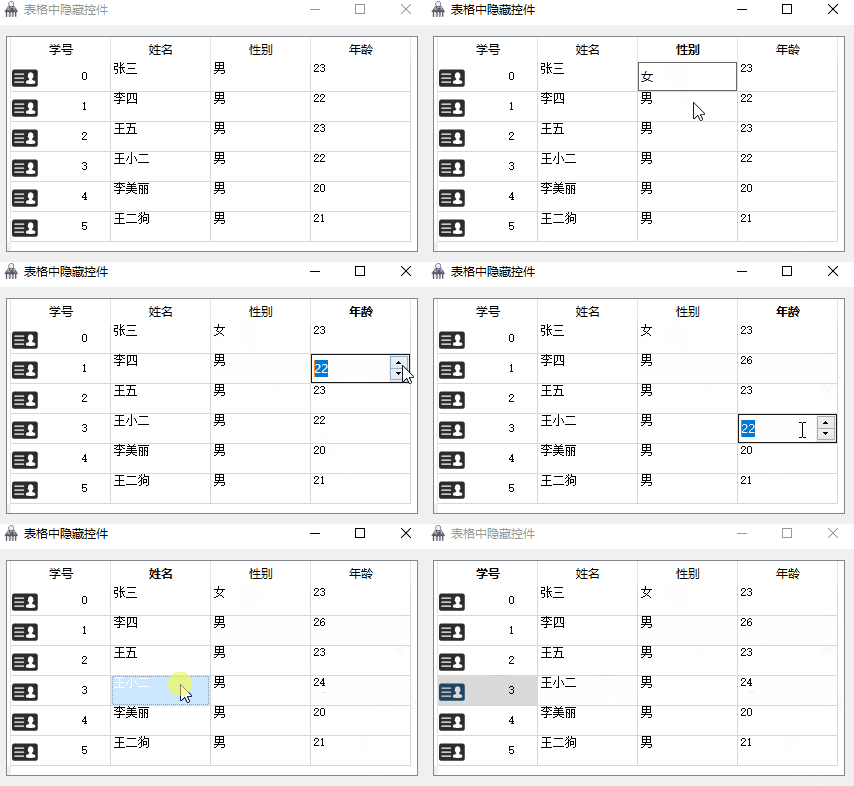
需求:在TableView表格中点击单元格可以实现编辑功能。性别由LineEdite控件编辑,年龄由spinBox控件编辑。
实现:(1)使用Qt的model-view模式生成表格视图。
(2)重写QAbstractItemDelegate类和类中的paint、createEditor、setEditorData、setModelData函数。
(3)重写QAbstractTableModel类。
功能展示:
主要代码:
(1)Model部分。此部分完成数据推送和数据编辑功能。
class MyTableModel(QAbstractTableModel):

    """Model"""

    def __init__(self):

        super(MyTableModel, self).__init__()

        self._data = []

        self._background_color = []

        self._headers = ['学号', '姓名', '性别', '年龄']

        self._generate_data()

    def _generate_data(self):

        """填充表格数据"""

        name_list = ['张三', '李四', '王五', '王小二', '李美丽', '王二狗']

        for id_num, name in enumerate(name_list):

            self._data.append([str(id_num), name, '男', str(random.randint(20, 25))])

            # :默认单元格颜色为白色

            self._background_color.append([QColor(255, 255, 255) for i in range(4)])

    def rowCount(self, parent=QModelIndex()):

        """返回行数量。"""

        return len(self._data)

    def columnCount(self, parent=QModelIndex()):

        """返回列数量。"""

        return len(self._headers)

    def headerData(self, section, orientation, role):

        """设置表格头"""

        if role == Qt.DisplayRole and orientation == Qt.Horizontal:

            return self._headers[section]

    def data(self, index, role):

        """显示表格中的数据。"""

        if not index.isValid() or not 0 <= index.row() < self.rowCount():

            return QVariant()

        row = index.row()

        col = index.column()

        if role == Qt.DisplayRole:

            return self._data[row][col]

        elif role == Qt.BackgroundColorRole:

            return self._background_color[row][col]

        elif role == Qt.TextAlignmentRole:

            return Qt.AlignCenter

        return QVariant()

    def setData(self, index, value, role):

        """编辑单元格中的数据"""

        if not index.isValid() or not 0 <= index.row() < self.rowCount():

            return QVariant()

        if role == Qt.EditRole:

            if index.column() == 2:

                self._data[index.row()][index.column()] = value

                self.layoutChanged.emit()       # 更新数据后要通知表格刷新数据

                return True

            elif index.column() == 3:

                self._data[index.row()][index.column()] = str(value)

                self.layoutChanged.emit()

                return True

            else:

                return False

    def flags(self, index):

        """设置单元格的属性。"""

        if index.column() == 0 or index.column() == 1:

            # :我们设置第0、1列不可编辑,其他列可以编辑。

            return super().flags(index)

        return Qt.ItemIsEditable | super().flags(index)
(2)Delegate部分。此部分完成View中数据的展示,以及单元格中编辑器的生成、编辑器内容的推送和编辑器内容更新到Model。
class MyDelegate(QAbstractItemDelegate):

    """Delegate"""

    def __init__(self):

        super(MyDelegate, self).__init__()

    def paint(self, painter, option, index):

        """绘制单元格。"""

        if index.column() == 0:

            # :表格第一列是ID,单元格中绘制一个图片和ID。

            p = QStyleOptionViewItem()

            p.index = index

            p.rect = option.rect

            p.features = QStyleOptionViewItem.HasDecoration | QStyleOptionViewItem.HasDisplay

            p.text = str(index.data())

            p.decorationSize = QSize(44, 44)      # 设置装饰图标的大小。

            p.icon = QIcon('../image/id.png')     # 设置装饰图标路径名

            p.state = option.state

            p.showDecorationSelected = True     # 开启选中时,单元格高亮显示

            # :若项目被选择,则高亮绘制其矩形

            p.decorationPosition = QStyleOptionViewItem.Left        # 图片在文字的左边

            p.displayAlignment = Qt.AlignLeft | Qt.AlignCenter      # 设置文字的位置

            QApplication.style().drawControl(QStyle.CE_ItemViewItem, p, painter)

        else:

            # :向表格中渲染数据,如果缺少下面代码,表格中数据不能正常显示。

            # :这里应该在model的data函数之后调用,此时通过index可以获取要显示。

            # :的数据。

            p = QStyleOptionViewItem()

            p.features = QStyleOptionViewItem.HasDisplay

            p.index = index                     # 表格QModelIndex索引

            p.rect = option.rect

            p.state = option.state

            p.showDecorationSelected = True     # 开启选中时,单元格高亮显示

            p.text = str(index.data())          # 表格中的数据

            QApplication.style().drawControl(QStyle.CE_ItemViewItem, p, painter)

    def createEditor(self, parent, option, index):

        """给单元格创建编辑器(点击单元格的时候调用)"""

        if index.column() == 2:

            # :第2列性别设置为lineEdite编辑器。

            # :注意,在创建编辑控件的时候传入parent防止在编辑时新弹出窗口来进行编辑。

            p = QLineEdit(parent)

            p.setFocusPolicy(Qt.TabFocus)

            # :设置控件的位置,如果忽略此句,控件会出现在窗体的左上角。

            p.setGeometry(option.rect)

            return p

        elif index.column() == 3:

            # :第3列年龄设置为spinBox编辑器。

            p = QSpinBox(parent)

            p.setMaximum(150)       # 年龄最大值为150

            p.setGeometry(option.rect)

            return p

        else:

            return super().createEditor(parent, option, index)

    def setEditorData(self, editor, index):

        """把model中的数据填充到编辑器当中(点击单元格的时候调用但晚于createEditor)"""

        if index.column() == 2:

            # :lineEdit编辑器。

            editor.setText(index.data())

        elif index.column() == 3:

            editor.setValue(int(index.data()))

        else:

            super().setEditorData(editor, index)

    def setModelData(self, editor, model, index):

        """把编辑器中的数据更新到model当中(编辑完成时调用)"""

        if index.column() == 2:

            model.setData(index, editor.text(), role=Qt.EditRole)

        elif index.column() == 3:

            model.setData(index, editor.value(), role=Qt.EditRole)

        else:

            super().setModelData(editor, model, index)
Demo源码:
Demo源码参考网址(码云):https://gitee.com/cui_zhen/pyqt5-example
Pyqt5——表格中隐藏的控件(Model/View/Delegate)的更多相关文章
- 在VisualStudio 工具箱中隐藏用户控件
当我们创建一个用户控件后,VisualStudio会自动将其添加到工具箱中,本来这是一个比较贴心的设计.但是,有的时候,我们并不想将用户控件放到工具箱中. 例如:在WPF中,为了避免一个页面的控件过多 ...
- 重写UITableViewCell子类中属性的setter方法来实现隐藏或显示该cell中的某些控件
重写UITableViewCell子类中属性的setter方法来实现隐藏或显示该cell中的某些控件 为什么会需要这样子的一种方法来实现隐藏或者显示一个cell中的某些控件呢? 其实,隐藏cell中某 ...
- (转)客户端触发Asp.net中服务端控件事件
第一章. Asp.net中服务端控件事件是如何触发的 Asp.net 中在客户端触发服务端事件分为两种情况: 一. WebControls中的Button 和HtmlControls中的Type为su ...
- 转:ExpressBars中的停靠控件使用
http://www.cnblogs.com/jxsoft/archive/2011/08/25/2152872.html 1 新手上路 1.1 控件简介 Dock pan ...
- ASP.NET中 WebForm 窗体控件使用及总结【转】
原文链接:http://www.cnblogs.com/ylbtech/archive/2013/03/06/2944675.html ASP.NET中 WebForm 窗体控件使用及总结. 1.A, ...
- HTML5 Web app开发工具Kendo UI Web中Grid网格控件的使用
Kendo UI Web中的Grid控件不仅可以显示数据,并对数据提供了丰富的支持,包括分页.排序.分组.选择等,同时还有着大量的配置选项.使用Kendo DataSource组件,可以绑定到本地的J ...
- android中的EditView控件
android中的EditView控件 EditText继承关系:View-->TextView-->EditText ,EditText是可编辑文本框 1.EditText默认情况下,光 ...
- android中的TextView控件
我以前是搞ssh开发的,现在在搞android开发,所以简单学习了一下,对于自己所了解的做一个记录,也算是一个笔记吧,如果有什么不对的,希望大家给予一定的指导. 一.TextView的基本使用 Te ...
- TWaver初学实战——如何在TWaver属性表中添加日历控件?
在日期输入框中添加日历控件,是一种非常流行和实用的做法.临渊羡鱼不如退而写代码,今天就看看在TWaver中是如何实现的. 资源准备 TWaver的在线使用文档中,就有TWaver Proper ...
随机推荐
- Ancient Printer HDU - 3460 贪心+字典树
The contest is beginning! While preparing the contest, iSea wanted to print the teams' names separat ...
- SpringBoot整合shiro-MD5盐值加密
为什么要进行密码加密? 在我们的日常生活中,许多人有着在不同网站上使用相同密码的坏习惯(包括我也是qaq),假如应用程序或服务器出现漏洞,数据被窃取,用户的明文密码直接被暴露给黑客.显然后果将不堪设想 ...
- [视频] FFMpeg 基本组成和入门示例
目录 FFmpeg基本组成 编解码工具 ffmpeg.exe ffmpeg.exe的工作流程 播放器 ffplay.exe 多媒体分析器 ffprobe FFmpeg基本组成 AVFormat 封装了 ...
- VS2010的单元测试(一)
在VS2010中,单元测试的功能很强大,使得建立单元测试和编写单元测试代码,以及管理和运行单元测试都变得简单起来,通过私有访问器可以对私有方法也能进行单元测试,并且支持数据驱动的单元测试. 一.创建单 ...
- 基于Vue的单页面应用的Markdown渲染
之前渲染 Markdown 的时候, 笔者使用的是 mavonEditor 的预览模式, 使用起来比较爽, 只需要引入组件即可, 但是在最近的开发中, 遇到了困难. 主要问题在于作为单页面应用, 站内 ...
- 北京网络赛G BOXES 大模拟+BFS
题目描述 Description There is a strange storehouse in PKU. In this storehouse there are n slots for boxe ...
- docker-compose -----单机多容器管理
Compose是用于定义和运行多容器Docker应用程序的工具.通过Compose,您可以使用YAML文件来配置应用程序的服务.然后,使用一个命令,就可以从配置中创建并启动所有服务. Docker-C ...
- Linux 驱动框架---模块参数
Linux 模块的参数 通过在内核模块中定义模块参数从而可以在安装模块时通过insmod module_name paramname=param形式给模块传递参数.如果安装模块是传参数则将使用模块内定 ...
- github gist 无法访问
转自这里 以管理员身份在hosts文件: Windows: C:\Windows\System32\drivers\etc Ubuntu: /etc/hosts 添加: 192.30.253.118 ...
- Node.js 返回 JSON 数据
Node.js 返回 JSON 数据 request.end([data[, encoding]][, callback]) var http = require('http'); const log ...