
DevExtreme 搭建Node.js开发环境
简介
DevExtreme is a component suite for creating highly responsive web applications for touch devices and traditional desktops.
创建Angular应用
$ ng new DevExtremeDemo --skip-install --skip-git
$ cnpm install

安装DevExtreme
$ cnpm install --save devextreme devextreme-angular

设置angular-cli.json 文件
"styles": [
"styles.scss",
"../node_modules/devextreme/dist/css/dx.common.css",
"../node_modules/devextreme/dist/css/dx.spa.css",
"../node_modules/devextreme/dist/css/dx.carmine.css"
],
参考源码
index.html
<!doctype html>
<html
lang="en">
<head>
<meta
charset="utf-8">
<title>DevExtremeDemo</title>
<base
href="/">
<meta
name="viewport"
content="width=device-width, initial-scale=1">
<link
rel="icon"
type="image/x-icon"
href="favicon.ico">
<link
rel="stylesheet"
type="text/css"
href="assets/css/dx.common.css" />
<link
rel="stylesheet"
type="text/css"
href="assets/css/dx.spa.css" />
<link
rel="stylesheet"
type="text/css"
href="assets/css/dx.carmine.css" />
</head>
<body
class="dx-viewport">
<app-root></app-root>
</body>
</html>
app.module.ts
import { BrowserModule } from
'@angular/platform-browser';
import { NgModule } from
'@angular/core';
import { DxButtonModule } from
'devextreme-angular';
import { AppComponent } from
'./app.component';
@NgModule({
declarations: [
AppComponent
],
imports: [
DxButtonModule,
BrowserModule
],
providers: [],
bootstrap: [AppComponent]
})
export
class AppModule { }
app.component.html
<!--The content below is only a placeholder and can be replaced.-->
<div
style="text-align:center">
<h1>
Welcome to DevExtreme!
</h1>
</div>
<dx-button
text="Press me" (onClick)="hello()"></dx-button>
<div
class="dx-fieldset">
<div
class="dx-field">
<div
class="dx-field-label">Normal</div>
<div
class="dx-field-value">
<dx-button [text]="okButtonOptions.text" [type]="okButtonOptions.type" (onClick)="okButtonOptions.onClick()"></dx-button>
</div>
</div>
<div
class="dx-field">
<div
class="dx-field-label">Success</div>
<div
class="dx-field-value">
<dx-button [text]="applyButtonOptions.text" [type]="applyButtonOptions.type" (onClick)="applyButtonOptions.onClick()"></dx-button>
</div>
</div>
<div
class="dx-field">
<div
class="dx-field-label">Default</div>
<div
class="dx-field-value">
<dx-button [text]="doneButtonOptions.text" [type]="doneButtonOptions.type" (onClick)="doneButtonOptions.onClick()"></dx-button>
</div>
</div>
<div
class="dx-field">
<div
class="dx-field-label">Danger</div>
<div
class="dx-field-value">
<dx-button [text]="deleteButtonOptions.text" [type]="deleteButtonOptions.type" (onClick)="deleteButtonOptions.onClick()"></dx-button>
</div>
</div>
<div
class="dx-field">
<div
class="dx-field-label">Back</div>
<div
class="dx-field-value">
<dx-button [type]="backButtonOptions.type" (onClick)="backButtonOptions.onClick()"></dx-button>
</div>
</div>
</div>
app.component.html
<!--The content below is only a placeholder and can be replaced.-->
<div
style="text-align:center">
<h1>
Welcome to DevExtreme!
</h1>
</div>
<dx-button
text="Press me" (onClick)="hello()"></dx-button>
<div
class="dx-fieldset">
<div
class="dx-field">
<div
class="dx-field-label">Normal</div>
<div
class="dx-field-value">
<dx-button [text]="okButtonOptions.text" [type]="okButtonOptions.type" (onClick)="okButtonOptions.onClick()"></dx-button>
</div>
</div>
<div
class="dx-field">
<div
class="dx-field-label">Success</div>
<div
class="dx-field-value">
<dx-button [text]="applyButtonOptions.text" [type]="applyButtonOptions.type" (onClick)="applyButtonOptions.onClick()"></dx-button>
</div>
</div>
<div
class="dx-field">
<div
class="dx-field-label">Default</div>
<div
class="dx-field-value">
<dx-button [text]="doneButtonOptions.text" [type]="doneButtonOptions.type" (onClick)="doneButtonOptions.onClick()"></dx-button>
</div>
</div>
<div
class="dx-field">
<div
class="dx-field-label">Danger</div>
<div
class="dx-field-value">
<dx-button [text]="deleteButtonOptions.text" [type]="deleteButtonOptions.type" (onClick)="deleteButtonOptions.onClick()"></dx-button>
</div>
</div>
<div
class="dx-field">
<div
class="dx-field-label">Back</div>
<div
class="dx-field-value">
<dx-button [type]="backButtonOptions.type" (onClick)="backButtonOptions.onClick()"></dx-button>
</div>
</div>
</div>
app.component.ts
import { Component } from
'@angular/core';
import notify from
'devextreme/ui/notify';
@Component({
selector: 'app-root',
templateUrl: './app.component.html',
styleUrls: ['./app.component.css']
})
export
class AppComponent {
title = 'app';
okButtonOptions: any;
applyButtonOptions: any;
doneButtonOptions: any;
deleteButtonOptions: any;
backButtonOptions: any;
constructor(){
this.okButtonOptions = {
text: 'OK',
type: 'normal',
onClick: function (e) {
notify("The OK button was clicked");
}
};
this.applyButtonOptions = {
text: "Apply",
type: "success",
onClick: function (e) {
notify("The Apply button was clicked");
}
};
this.doneButtonOptions = {
text: "Done",
type: "default",
onClick: function (e) {
notify("The Done button was clicked");
}
};
this.deleteButtonOptions = {
text: "Delete",
type: "danger",
onClick: function (e) {
notify("The Delete button was clicked");
}
};
this.backButtonOptions = {
type: "back",
onClick: function (e) {
notify("The Back button was clicked");
}
};
}
hello() {
alert('Hello DevExtreme!');
}
}
运行
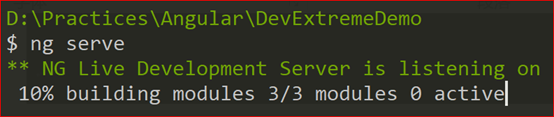
$ ng serve
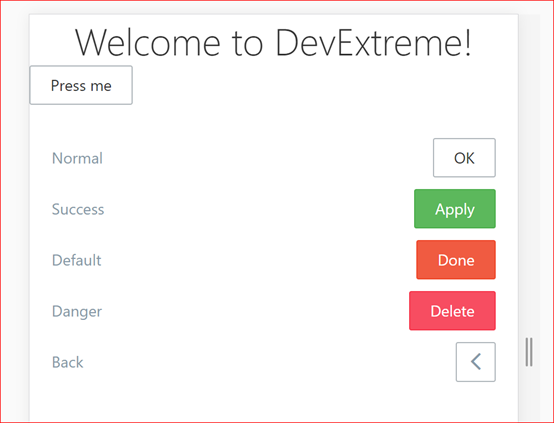
浏览器中打开网址 http://localhost:4200/
参考资源
https://github.com/devexpress/DevExtreme-angular
DevExtreme 搭建Node.js开发环境的更多相关文章
- 快速搭建 Node.js 开发环境以及加速 npm
如何快速搭建 node 开发环境 npm 超慢 github 无法打开的问题 于是我觉得应该写一篇文章解答所有这些起步问题,让新同学也能顺顺利利入门. 快速搭建 Node.js 开发环境 如果你想长期 ...
- 【转】使用nvm快速搭建 Node.js 开发环境
原文链接:http://www.cnblogs.com/shuoer/p/7802891.html 快速搭建 Node.js 开发环境 如果你想长期做 node 开发, 或者想快速更新 node 版本 ...
- ES6 学习笔记 (2)-- Liunx环境安装Node.js 与 搭建 Node.js 开发环境
笔记参考来源:廖雪峰老师的javascript全栈教程 一.安装Node.js 目前Node.js的最新版本是6.2.x.首先,从Node.js官网下载对应平台的安装程序. 1.下载 选择对应的Liu ...
- 手把手教你学node之搭建node.js开发环境
搭建node.js开发环境 本文只针对在Linux或者Mac下面.至于使用 Windows 并坚持玩新技术的同学,我坚信他们一定有着过人的.甚至是不可告人的兼容性 bug 处理能力,所以这部分同学麻烦 ...
- 1.0搭建 Node.js 开发环境
<搭建 Node.js 开发环境> 本课程假设大家都是在 Linux 或者 Mac 下面.至于使用 Windows 并坚持玩新技术的同学,我坚信他们一定有着过人的.甚至是不可告人的兼容性 ...
- MongoDB 搭建Node.js开发环境
理解Mongoose Elegant MongoDB object modeling for Node.js 安装Mongoose $ cnpm install --save mongoose ...
- Oracle 搭建Node.js开发环境
先决条件 安装oralce客户端驱动. 安装node.js. 创建项目 安装oracledb模块 $npm install oracledb 如果失败了,你可能要爬墙. 参考package ...
- Linux虚拟机中 Node.js 开发环境搭建
Node.js 开发环境搭建: 1.下载CentOS镜像文件和VMWare虚拟机程序; 2.安装VMWare——>添加虚拟机——>选择CentOS镜像文件即可默认安装带有桌面的Linux虚 ...
- [转载]Sublime Text 3 搭建 React.js 开发环境
[转载]Sublime Text 3 搭建 React.js 开发环境 Sublime有很强的自定义功能,插件库很庞大,针对新语言插件更新很快,配合使用可以快速搭建适配语言的开发环境. 1. babe ...
随机推荐
- Linux的防火墙iptables配置示例
注:内容来自网络 一.关闭防火墙 1.重启后永久性生效: 开启:chkconfig iptables on 关闭:chkconfig iptables off 2.即时生效,重启后失效: 开启:ser ...
- loj #2055. 「TJOI / HEOI2016」排序
#2055. 「TJOI / HEOI2016」排序 题目描述 在 2016 年,佳媛姐姐喜欢上了数字序列.因而他经常研究关于序列的一些奇奇怪怪的问题,现在他在研究一个难题,需要你来帮助他. 这个 ...
- FullCalendar插件的基本使用
我的另一博客地址:https://segmentfault.com/u/lyrfighting/articles 前段时间,一直在开发考勤系统,当时为满足设计的需求,选了好几个插件,最后决定采用Ful ...
- Unity---Directory目录的删除、存在、创建操作
使用Directory类要引入命名空间 using System.IO; Directory类下的三个静态方法. public static void CreateDirectory(string ...
- P4719 【模板】动态dp
\(\color{#0066ff}{ 题目描述 }\) 给定一棵\(n\)个点的树,点带点权. 有\(m\)次操作,每次操作给定\(x,y\),表示修改点xx的权值为\(y\). 你需要在每次操作之后 ...
- socket中close发生的事情,RST,pipe信号错误
1.server端close之后,client端write,导致server端发送RST(服务器关闭套接字):对方已经关闭或者异常终止,但是client端,不知道,这个成为半打开 当server端cl ...
- 4. mybatis 的排序
order by(排序) 的用法 根据哪一个列进行排序 配置文件 mapper.xml 如果是一个列的话就用${value} <select id="selectBlogOrder ...
- Django2.0以上版本的URL的正则匹配问题
正则表达式形式的URL匹配问题: 1.导入re_path from django.urls import path,re_path 2.进行正则匹配 re_path('detail-(\d+).htm ...
- ST表(查询区间最值问题)
ST表与线段树相比,这是静态的,无法改动,但是他的查询速度比线段树要快,这是牺牲空间换时间的算法. O(nlogn)预处理,O(1)查询.空间O(nlogn). ][]; ]; void rmq_in ...
- 毕业设计 python opencv实现车牌识别 矩形矫正
主要代码参考https://blog.csdn.net/wzh191920/article/details/79589506 GitHub:https://github.com/yinghualuow ...