
[转]Missing MSS Settings in Security Options of Group Policy (GPO)
I'm currently working on a new Windows Server 2012 and Windows 8 project. As part of that project is to implement new standarised security policies for both Windows Server 2012 and Windows 8, much like the Server 2008 and Windows 7 policies we use. These are based on the CIS Security Benchmarks from http://www.cisecurity.org/
While creating the group policy objects (GPOs) from these CIS benchmarks, I came across a problem which was a bunch of missing settings in my Group Policy Mangement console on Windows Server 2012. Specifically these settings were within:
Computer Configuration --> Windows Settings --> Security Settings --> Local Policies --> Security Options --> MSS:
These settings are items such as TcpMaxDataRetransmissions and EnableICMPRedirect which I need to set.
Then followed a number of wasted hours trying to figure out how to get these MSS settings to appear so I could configure my GPO as required to comply with the CIS Benchmarks.
After much time wasted (thanks Microsoft for removing these settings) I found the following is the best way to get the MSS settings to appear in the group policy management console editor.
1. Download the Microsoft Security Compliance Manager and install in a Windows Server 2008 R2 VM you can throw away.
http://technet.microsoft.com/en-gb/library/cc677002.aspx
I tried Windows Server 2012 and the installer kept crashing, well done again Microsoft!
The reason I used a throw away VM was because it installs SQL and a bunch of stuff I don't want.
We are after a specific MSI that once SCM installed we can get - thats all!
2. After SCM is installed copy the following MSI to your management station with GPMC where you are editing your GPOs.
C:\Program Files (x86)\Microsoft Security Compliance Manager\LGPO\LocalGPO.msi
3. Install the LocalGPO.msi on your to your management station with GPMC where you are editing your GPOs.
4. Run the LocalGPO command prompt as an administrator (search the 2012 start menu tiles - type "local")
5. Using LocalGPO, configure Security Configuration Editor (SCE) to display MSS settings.
C:\Program Files (x86)\LocalGPO>cscript LocalGPO.wsf /ConfigSCE
Microsoft (R) Windows Script Host Version 5.8
Copyright (C) Microsoft Corporation. All rights reserved.
Modifying the Security Configuration Editor to the include MSS settings...
Updating the registry
89 subkeys found.
Subkeys deleted successfull
Subkeys added successfully
Registering SceCli.dll to complete SCE modification
The Security Configuration Editor is updated.
Security Configuration Editor has been modified successfully!
The Security Configuration Editor is updated.#vmadmin
6. And there you have it! The MSS settings are back without having to install SQL and SCM on your domain controller or anything else.
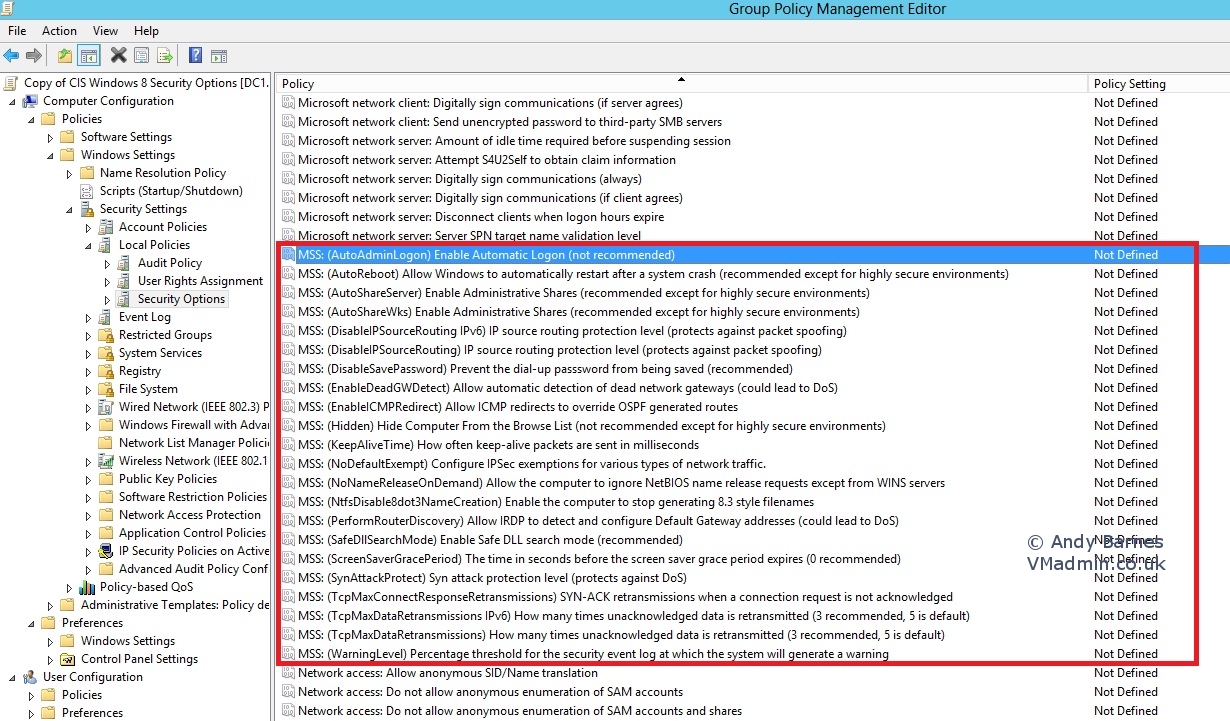
Note: Keep the LocalGPO.msi handy so you can install it on any server and edit the MSS settings with GPMC.
You can also now delete the VM you created to install SCM as we no longer need it.
Hope that saved you some time and you came across this article first. It took me a few wasted hours to figure it out and right the above procedure.
referer:https://www.vmadmin.co.uk/microsoft/43-winserver2008/348-server2012mssgposettings
[转]Missing MSS Settings in Security Options of Group Policy (GPO)的更多相关文章
- DFS security warning and use group policy to set up internet security zones
Opening a file from a DFS domain share shows a security warning while openning from the server share ...
- How to apply Local Group Policy settings silently using the ImportRegPol.exe and Apply_LGPO_Delta.exe utilities.
参考:http://supportishere.com/how-to-apply-local-group-policy-settings-silently-using-the-importregpol ...
- mac远程桌面连接windows 8.1 update,提示: 远程桌面连接无法验证您希望连接的计算机的身份
在网上找到解决方案: SolutionEnable RDP security layer in Group Policy on the machine: Verify that the firewal ...
- How to detect, enable and disable SMBv1, SMBv2, and SMBv3 in Windows and Windows Server
转自:https://support.microsoft.com/en-us/help/2696547/detect-enable-disable-smbv1-smbv2-smbv3-in-windo ...
- Group Policy Object Editor
Group Policy Object Editor The Group Policy Object Editor is a tool that hosts MMC extension snap- ...
- Configure Security Settings for Remote Desktop(RDP) Services Connections
catalogue . Configure Server Authentication and Encryption Levels . Configure Network Level Authenti ...
- Android Studio :enable vt-x in your bios security,已经打开还是报错的解决方法
quote: For Windows 10: First of all, install the intelhaxm-android.exe located in the folder SDK\ext ...
- Cisco IOS Security command Guide
copy system:running-config nvram:startup-config : to save your configuration changes to the startup ...
- What is XMLHTTP? How to use security zones in Internet Explorer
Types of Security Zones Internet Zone This zone contains Web sites that are not on your computer or ...
随机推荐
- 【P3957】跳房子(单调队列+DP+二分)
终于把这个题缸出来了,话说这题也不是想的那么难... 因为最小的最大,所以二分,因为由前面推出后面,所以DP,因为输入单调,朴素DP会T,所以单调队列.要注意的是,这个题数据很大,要开LL,然后DP数 ...
- 操作文件和目录【TLCL】
cp – Copy files and directories mv – Move/rename files and directories mkdir – Create directories rm ...
- JAVA题库01
说出一些常用的类,包,接口,请各举5个 常用的类:BufferedReader BufferedWriter FileReader FileWirter String Integer java ...
- 【整理】C#文件操作大全(SamWang)
[整理]C#文件操作大全(SamWang) 文件与文件夹操作主要用到以下几个类: 1.File类: 提供用于创建.复制.删除.移动和打开文件的静态方法,并协助创建 FileStream 对象. msd ...
- Eclipse安装SVN客户端
在Eclipse中安装SVN客户端有个好处,不用兼容其它操作系统都能保持一致的操作.比如再Linux下SVN客户端软件体验相对较差,但是基于命令行的操作却在Linux下无所不能. 一.通过在线安装 地 ...
- SQL 存在一个表而不在另一个表中的数据
原文链接:http://blog.csdn.net/windren06/article/details/8188136 (转)A.B两表,找出ID字段中,存在A表,但是不存在B表的数据.A表总共13w ...
- C语言基础三
C--数组 一维数组的定义和引用 定义:类型说明符 数组名[常量表达式] int a[ 10 ];他表示定义了一个整形数组,数组名为a,有10个元素. 注意:C语言不允许对数组的大小做动态定义. 一维 ...
- php程序员应该掌握的技能包
作为一名web开发者来说,不论是php还是java web,就我目前掌握的知识来说,个人认为应该掌握以下几个方面的内容 1 基础的编程语言,这个好像是废话 2 软件设计的思想,如面向对象.mvc.各种 ...
- Java使用指南(1)—— Java下载和安装
Java下载 1.在Oracle的官网中找到相应的
- UVALive 3971 Assemble(二分+贪心)
本题思路不难,但是要快速准确的AC有点儿考验代码功力. 看了大白书上的标程,大有所获. 用map和vector的结合给输入分组,这个数据结构的使用非常精美,恰到好处. #include<iost ...