
How to apply Local Group Policy settings silently using the ImportRegPol.exe and Apply_LGPO_Delta.exe utilities.
In many Organizations, the AD support team is separated from the team in charge of Imaging. The AD team naturally is protective with their setup and fight any GPO setting that would result in more responsibility to their staff. So that leaves us in some occasions having to turn to Local Group Policy to apply the settings we want. I’ve recently come across some great tools provided by Microsoft (very quietly) for Government usage. These tools allow you to basically back up your LGPO settings to a txt file and apply them on demand with a script silently.
MS link: http://blogs.technet.com/cfs-file.ashx/__key/communityserver-components-postattachments/00-03-05-16-48/LGPO_2D00_Utilities.zip
BackUp link: https://panaconsulting.egnyte.com/h-s/20120118/077e07ba18c74413
How to use:
- Apply desired settings on a Windows 7 test machine, using the gpedit.msc MMC snap-in.
- Run the “ImportRegPol.exe” with the /parseonly and /log to pull settings and save to a specified LOG file.
User settings and machine settings need to be captured separately: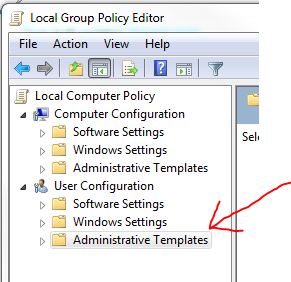
Capture User Example
ImportRegPol.exe /u C:\Windows\System32\GroupPolicy\User\registry.pol /parseonly /log <PathToSettingsFile>.log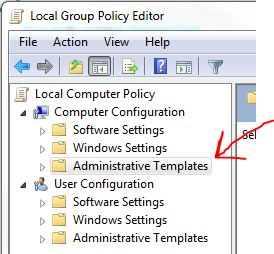
Capture Machine Settings Example:
ImportRegPol.exe /m C:\Windows\System32\GroupPolicy\Machine\registry.pol /parseonly /log <PathToSettingsFile>.log - Use the Apply_LGPO_Delta.exe utility to apply the settings silently. On restart the settings will take effect.
Apply_LGPO_Delta.exe <PathToSettingsFile>.log /log <PathToLogFile>.log - This can easily be added to an SCCM or MDT Task Sequence and tied to logic to ensure the correct settings get pushed to the appropriate target systems/users.
Command Line help for LGPO Tools:
Apply_LGPO_Delta.exe inputfile0 [inputfile1 ...] [/log LogFile] [/error ErrorLogFile] [/boot]
inputfileN One or more input files specifying the changes to make. Input files must be security template files, or registry-based policy files using a custom file format described below. Apply_LGPO_Delta automatically determines whether a file is a custom policy file or a security template. Security templates can be created using the “Security Templates” MMC snap-in.
/log LogFile Writes detailed results to a log file. If this option is not specified, output is not logged nor displayed.
/error ErrorLogFile Writes error information to a log file. If this option is not specified, error information is displayed in a message box dialog.
/boot Reboots the computer when done.
ImportRegPol.exe –m|-u path\registry.pol [/parseOnly] [/log LogFile] [/error ErrorLogFile] [/boot]
-m path\registry.pol [for Computer configuration] or
-u path\registry.pol [for User configuration]
Path\registry.pol specifies the absolute or relative path to the input registry policy file (which does not need to be named “registry.pol”).
/parseOnly Reads and validates the input file but does not make changes to local group policy. In conjunction with the /log option, can be used to convert a registry policy file to an input file for Apply_LGPO_Delta.
/log LogFile Writes detailed results to a log file. If this option is not specified, output is not logged nor displayed. The logged results for the registry policy settings can be used as input for Apply_LGPO_Delta.
/error ErrorLogFile Writes error information to a log file. If this option is not specified, error information is displayed in a message box dialog.
/boot Reboots the computer when done.
How to apply Local Group Policy settings silently using the ImportRegPol.exe and Apply_LGPO_Delta.exe utilities.的更多相关文章
- 10 Common Problems Causing Group Policy To Not Apply
10 Common Problems Causing Group Policy To Not Apply Group Policy is a solid tool and is very stable ...
- [转]Missing MSS Settings in Security Options of Group Policy (GPO)
I'm currently working on a new Windows Server 2012 and Windows 8 project. As part of that project is ...
- Managing Group Policy with PowerShell
Overview In this article, I’ll talk about your options when it comes to managing Group Policy using ...
- How to Add Trust Sites into IE before IE10 through Group Policy
Due to IE10 published, I'll conclude the methods that how to add trust sites in to IE of the version ...
- Create a Group Policy Central Store
一.How to create a Group Policy Central Store You have downloaded or created your own Group Policy Ad ...
- Setting IE11 with Group Policy Preferences
一.Setting Home Page with Group Policy Preferences 1.Open the Group Policy Management Console and cre ...
- DFS security warning and use group policy to set up internet security zones
Opening a file from a DFS domain share shows a security warning while openning from the server share ...
- RDP setting group policy
RDP setting group policy 1.Login to domain controller and go to Group Policy Management tool2.Click ...
- Three Steps to Migrate Group Policy Between Active Directory Domains or Forests Using PowerShell
Three Steps Ahead Have you ever wished that you had three legs? Imagine how much faster you could ru ...
随机推荐
- html css 注释
html <!-- 注释内容 --> css注释/* 注释内容*/
- ASP.NET访问网络映射盘&实现文件上传读取功能
最近在改Web的时候,遇到一个问题,要跨机器访问共享文件夹,以实现文件正常上传下载功能. 要实现该功能,可以采用HTTP的方式,也可以使用网络映射磁盘的方式,今天主要给大家分享一下使用网络映射磁盘的方 ...
- 学习python之练习(三)
python排序算法 1.冒泡排序: import math def BubbleSort(list): lengthOfList = len(list) for i in range(0,lengt ...
- LeetCode OJ--Swap Nodes in Pairs
https://oj.leetcode.com/problems/swap-nodes-in-pairs/ 链表的处理 /** * Definition for singly-linked list. ...
- 利用Apache Ant编译Hadoop2.6.0-eclipse-plugin
环境要求:系统不重要,重要的是要有Ant环境,这里不做赘述,自行百度配置去. 1)在github上下载Hadoop-eclipse-plugin-master的zip包,下载地址. 2)在Hadoop ...
- Redis在CentOS6.4中的安装
首先,介绍一下Redis数据库.Redis是一种面向“键/值”对数据类型的内存数据库,可以满足我们对海量数据的读写需求. 1)redis的键只能是字符串: 2)redis的值支持多种数据类型: a:字 ...
- jsp_属性范围_session
session属性设置后,不管是客户端跳转还是服务器端跳转,只要属性设置了就可以取得. 下面写个小例子来验证一下: (1)session_demo.jsp <%@ page contentTyp ...
- Hibernate映射问题之OneToOne【自己整理】
首先贴上一个MkYong的例子 stock.java package com.mkyong.stock; import javax.persistence.CascadeType; import ja ...
- bzoj 1977
题意:求严格的次小生成树.点n<=100000,m<=300000 思路:很容易想到先做一边最小生成树,然后枚举每条非树边(u, v, w),然后其实就是把u,v路径上小于w的最大边替换成 ...
- 《Linux内核设计与实现》读书笔记(十八)- 内核调试
内核调试的难点在于它不能像用户态程序调试那样打断点,随时暂停查看各个变量的状态. 也不能像用户态程序那样崩溃后迅速的重启,恢复初始状态. 用户态程序和内核交互,用户态程序的各种状态,错误等可以由内核来 ...