
微信小程序之 ShoppingCart(购物车)
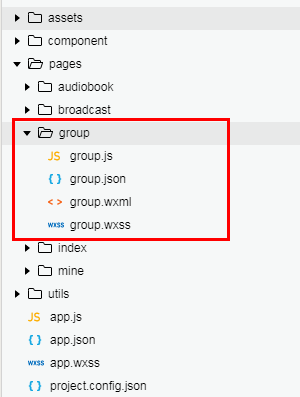
1.项目目录
2.逻辑层
group.js
// pages/group/group.js

Page({

  /**

   * 页面的初始数据

   */

  data: {

    goodslist: [

      {

        id: "001",

        imgUrl: "http://img5.imgtn.bdimg.com/it/u=2906541843,1492984080&fm=23&gp=0.jpg",

        name: "女装T恤中长款大码摆裙春夏新款",

        price: "65.00"

      },

      {

        id: "002",

        imgUrl: "http://img4.imgtn.bdimg.com/it/u=1004404590,1607956492&fm=23&gp=0.jpg",

        name: "火亮春秋季 男青年修身款圆领男士T恤",

        price: "68.00"

      },

      {

        id: "003",

        imgUrl: "http://img1.imgtn.bdimg.com/it/u=2305064940,3470659889&fm=23&gp=0.jpg",

        name: "新款立体挂脖t恤女短袖大码宽松条纹V领上衣显瘦休闲春夏",

        price: "86.00"

      },

      {

        id: "004",

        imgUrl: "http://img4.imgtn.bdimg.com/it/u=3986819380,1610061022&fm=23&gp=0.jpg",

        name: "男运动上衣春季上新品 上衣流行装青年",

        price: "119.00"

      },

      {

        id: "005",

        imgUrl: "http://img1.imgtn.bdimg.com/it/u=3583238552,3525141111&fm=23&gp=0.jpg",

        name: "时尚字母三角露胸t恤女装亮丝大码宽松不规则春夏潮",

        price: "69.00"

      },

      {

        id: "006",

        imgUrl: "http://img2.imgtn.bdimg.com/it/u=1167272381,3361826143&fm=23&gp=0.jpg",

        name: "新款立体挂脖t恤短袖大码宽松条纹V领上衣显瘦休闲春夏",

        price: "86.00"

      },

      {

        id: "007",

        imgUrl: "http://img0.imgtn.bdimg.com/it/u=789486313,2033571593&fm=23&gp=0.jpg",

        name: "时尚字母三角露胸t恤女装亮丝大码宽松不规则春夏潮",

        price: "119.00"

      },

      {

        id: "008",

        imgUrl: "http://img2.imgtn.bdimg.com/it/u=3314044863,3966877419&fm=23&gp=0.jpg",

        name: "男运动上衣春季上新品 上衣流行装青年",

        price: "69.00"

      },

    ]

  },

  /**

   * 生命周期函数--监听页面加载

   */

  onLoad: function (options) {

  },

  // 加入购物车

  addcart: function (e) {

    this.setData({

      toastHidden: false

    });

    // 遍历列表 与 购物车列表

    for (var i in this.data.goodslist) {

      // 列表中某一项item的id == 点击事件传递过来的id。则是被点击的项

      if (this.data.goodslist[i].id == e.target.id) {

        // 给goodsList数组的当前项添加count元素,值为1,用于记录添加到购物车的数量

        this.data.goodslist[i].count = 1;

        // 获取购物车的缓存数组(没有数据,则赋予一个空数组)

        var arr = wx.getStorageSync('cart') || [];

        // 如果购物车有数据

        if (arr.length > 0) {

          // 遍历购物车数组

          for (var j in arr) {

            // 判断购物车内的item的id,和事件传递过来的id,是否相等

            if (arr[j].id == e.target.id) {

              // 相等的话,给count+1(即再次添加入购物车,数量+1)

              arr[j].count = arr[j].count + 1;

              // 最后,把购物车数据,存放入缓存(此处不用再给购物车数组push元素进去,因为这个是购物车有的,直接更新当前数组即可)

              try {

                wx.setStorageSync('cart', arr)

              } catch (e) {

                console.log(e)

              }

              // 返回(在if内使用return,跳出循环节约运算,节约性能)

              return;

            }

          }

          // 遍历完购物车后,没有对应的item项,把goodslist的当前项放入购物车数组

          arr.push(this.data.goodslist[i]);

        }

        // 购物车没有数据,把item项push放入当前数据(第一次存放时)

        else {

          arr.push(this.data.goodslist[i]);

        }

        // 最后,把购物车数据,存放入缓存

        try {

          wx.setStorageSync('cart', arr)

          // 返回(在if内使用return,跳出循环节约运算,节约性能)

          return;

        } catch (e) {

          console.log(e)

        }

      }

    }

  }

})
3.页面布局
group.wxml
<!--pages/group/group.wxml-->

<!--主盒子-->

<view class="container">

  <!--head-->

  <view class="tit">

    <view class="title_val">商品列表</view>

    <view class="more">更多</view>

  </view>

  <!--list-->

  <view class="goodslist">

    <!--item-->

    <block wx:for="{{goodslist}}" wx:key="id">

      <view class="goods">

        <!--左侧图片盒子-->

        <view>

          <image src="{{item.imgUrl}}" class="good-img" />

        </view>

        <!--右侧说明部分-->

        <view class="good-cont">

          <!--上--文字说明-->

          <view class="goods-navigator">

            <text class="good-name">{{item.name}}</text>

          </view>

          <!--下--价格部分-->

          <view class="good-price">

            <text>¥{{item.price}}</text>

            <image id="{{item.id}}" class="cart" src="../../assets/images/shopping_cart.png" bindtap="addcart" />

          </view>

        </view>

      </view>

    </block>

  </view>

</view>
4.样式
group.wxss
/* pages/group/group.wxss */

page{

  height: 100%;

}

.container{

  background: #f5f5f5;

}

.tit{

  display: flex;

  flex-direction: row;

  justify-content: space-between;

  height: 30px;

  position: relative;

}

.tit::before{

  content:'';

  background: #ffcc00;

  width:5px;

  height: 100%;

  position: absolute;

  left: 0;

  top: 0;

}

.title_val{

  padding: 0 15px;

  font-size: 14px;

  color: #555;

  line-height: 30px;

}

.more{

  font-size: 12px;

  line-height: 30px;

  color: #999;

  padding: 0 5px 0 0 ;

}

.goodslist{

  background: #fff;

  display: flex;

  flex-direction: column;

}

.goods{

  display: flex;

  flex-direction: row;

  border-bottom: 1px solid #ddd;

}

.good-img{

  padding: 5px;

  width: 80px;

  height: 80px;

}

.good-cont{

  display: flex;

  flex: 1;

  flex-direction: column;

  font-size: 14px;

}

.goods-navigator{

  display: flex;

  flex: 1;

  flex-direction: column;

  justify-content: center;

}

.good-name{

  display: flex;

  flex: 1;

  flex-direction: column;

  color: #555;

  justify-content: center;

}

.good-price{

  display: flex;

  flex: 1;

  flex-direction: row;

  justify-content: space-between;

  color:#e4393c;

  font-weight: 600;

}

.cart{

  width: 40px;

  height: 40px;

  padding-right: 10px;

}

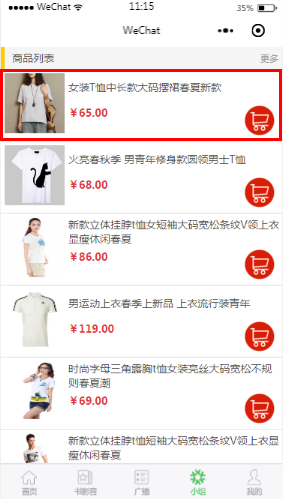
5.效果图
微信小程序之 ShoppingCart(购物车)的更多相关文章
- 微信 小程序组件 加入购物车全套 one wxml
<!--pages/shop/shop.wxml--> <view wx:if="{{hasList}}"> <view class="co ...
- 微信 小程序组件 加入购物车全套 one js
// pages/shop/shop.js Page({ /** * 页面的初始数据 */ data: { carts: [ { teaname: '冠军乌龙茶-150g', image: '../. ...
- 微信小程序 功能函数 购物车商品删除
// 购物车删除 deleteList(e) { const index = e.currentTarget.dataset.index; let carts = this.data.carts; c ...
- 微信 小程序组件 加入购物车全套 one wxss
//1,wxss /*外部容器*/ .container { display: flex; flex-direction: column; align-items: center; justify-c ...
- 微信小程序 - 贝塞尔曲线(购物车效果)
转载来源于:https://segmentfault.com/a/1190000011710786 简化了一下,发出来吧 示例源码:点击下载
- 微信小程序全选,微信小程序checkbox,微信小程序购物车
微信小程序,这里实现微信小程序checkbox,有需要此功能的朋友可以参考下. 摘要: 加减商品数量,汇总价格,全选与全不选 设计思路: 一.从网络上传入以下Json数据格式的数组 1.标题titl ...
- 微信小程序之购物车功能
前言 以往的购物车,基本都是通过大量的 DOM 操作来实现.微信小程序其实跟 vue.js 的用法非常像,接下来就看看小程序可以怎样实现购物车功能. 需求 先来弄清楚购物车的需求. 单选.全选和取消, ...
- 微信小程序购物车产品计价
微信小程序购物车产品计价: 问题:当选中商品,价格累加时会出现无限循环小数 解答:在计算前先parseFloat(变量),再计算的最后使用(变量).toFixed(2)保留两位小数 例如: jiaCa ...
- 微信小程序——加入购物车弹层
对于网上商城,加入购物车是一个必备功能了.俺今天就来说下在微信小程序里如何造一个购物车弹层. 先上图: 主要用到的微信API:wx.createAnimation(OBJECT) 说下思路: 1.wx ...
随机推荐
- Open Cascade:使用鼠标画线
Open Cascade:使用鼠标画线 在View类文件中创建以下代码: 1.创建鼠标消息: afx_msg void OnLButtonDown(UINT nFlags, CPoint point) ...
- Spring JDBC 例子
http://www.yiibai.com/spring/spring_jdbc_example.html 要了解有关Spring JDBC框架与JdbcTemplate类的概念,让我们写这将实现所有 ...
- 第1节 flume:6、flume的入门测试案例
案例:使用网络telent命令向一台机器发送一些网络数据,然后通过flume采集网络端口数据. 1.2.1 Flume的安装部署 第一步:下载解压修改配置文件 Flume的安装非常简单,只需要解压即可 ...
- scrapy example
scrapy example scrapy with pycharm import win32api 出现ImportError: DLL load failed 错误的解决方法 pip instal ...
- Echarts 异步数据加载遇到的问题
看了Echarts官网异步加载数据的Demo var myChart = echarts.init(document.getElementById('main')); // 显示标题,图例和空的坐标轴 ...
- 牛客网练习赛25 C 再编号
链接:https://www.nowcoder.com/acm/contest/158/C来源:牛客网 定义对 a 的再编号为 a' ,满足 . 现在有 m 次询问,每次给定 x,t ,表示询问经过 ...
- sin_addr.s_addr和sin_addr.S_un.S_addr
sin_addr.s_addr和sin_addr.S_un.S_addr 先mark一下,等下写
- win7下qt error: undefined reference to `_imp__getnameinfo@28'解决
_imp__getnameinfo@28对应着winsock2.h的getnameinfo函数 首先需要导入对应的头文件 #ifndef WIN32 #include <sys/socket.h ...
- python抓取知识星球精选帖,制作为pdf文件
版权声明:本文为xing_star原创文章,转载请注明出处! 本文同步自http://javaexception.com/archives/90 背景: 这两年知识付费越来越热,我也加入了不少知识星球 ...
- 【HDU 6000】Wash(贪心)
Problem Description Mr.Panda is about to engage in his favourite activity doing laundry! He's brough ...