
create-react-app 引入 antd 及 解决 antd 样式无法显示的bug
方案一: npm run eject 暴露所有内建的配置
安装组件库
yarn add antd babel-plugin-import
根目录下新建.roadhogrc文件(别忘了前面的点,这是roadhog工具的配置文件,下面的代码用于加载上一个命令安装的import插件),写入:
{

  "extraBabelPlugins": [

    ["import", {

      "libraryName": "antd",

      "libraryDirectory": "lib",

      "style": "css"

    }]

  ]

}
antd配置
修改 webpack.config.dev.js 和 webpack.config.prod.js文件,这里以webpack.config.dev.js举例,
webpack.config.prod.js一样配置即可:
// Process JS with Babel.

{

  test: /\.(js|jsx|mjs)$/,

  include: paths.appSrc,

  loader: require.resolve('babel-loader'),

  options: {

    // 改动: 添加 antd 按需加载文件处理插件

    plugins: [

      ['react-html-attrs'],//添加babel-plugin-react-html-attrs组件的插件配置

      // 引入样式为 css

      ['import', { libraryName: 'antd', style: 'css' }],

      // 改动: 引入样式为 less

      //  ['import', { libraryName: 'antd', style: true }],

    ],

    // This is a feature of `babel-loader` for webpack (not Babel itself).

    // It enables caching results in ./node_modules/.cache/babel-loader/

    // directory for faster rebuilds.

    cacheDirectory: true,

  },

},
引入模块如下:
  // scr/App.js

  import React, { Component } from 'react';

- import Button from 'antd/lib/button';

+ import { Button } from 'antd';

  import './App.css';
方案二:React-app-rewired(一个对 create-react-app 进行自定义配置的社区解决方案)
1. 安装react-app-rewired
npm install –save-dev react-app-rewired
2.修改package.json启动项
/* package.json */

"scripts": {

   "start": "react-app-rewired start",

   "build": "react-app-rewired build",

   "test": "react-app-rewired test --env=jsdom",

}
3.在项目根目录创建一个 config-overrides.js 用于修改默认配置。
module.exports = function override(config, env) {

  // do stuff with the webpack config...

  return config;

};
4.使用babel-plugin-import实现Antd按需加载,修改config-overrides.js
npm install –save-dev babel-plugin-import
config-overrides.js
/* config-overrides.js */

const { injectBabelPlugin } = require('react-app-rewired');

module.exports = function override(config, env) {

    config = injectBabelPlugin(['import', { libraryName: 'antd', style: 'css'}], config);

    return config;

};
5.使用react-app-rewire-less配置Less
npm install –save-dev react-app-rewire-less
config-overrides.js
/* config-overrides.js */

const { injectBabelPlugin } = require('react-app-rewired');

const rewireLess = require('react-app-rewire-less');

module.exports = function override(config, env) {

   config = injectBabelPlugin(['import', { libraryName: 'antd', style: true }], config);

   config = rewireLess.withLoaderOptions({

     modifyVars: { "@primary-color": "#1DA57A" },

   })(config, env);

    return config;

};
我遇到的问题: 1. \__DEV__ is not defined.
npm install –save-dev react-app-rewire-defind-plugin
config-overrides.js
/* config-overrides.js */

const { injectBabelPlugin } = require('react-app-rewired');

const rewireLess = require('react-app-rewire-less');

const rewireDefinePlugin = require('react-app-rewire-define-plugin');

module.exports = function override(config, env) {

    config = injectBabelPlugin(['import', { libraryName: 'antd', style: true }], config);

    config = rewireLess.withLoaderOptions({

        modifyVars: { "@primary-color": "#1DA57A" },

    })(config, env);

    config = rewireDefinePlugin(config, env, {

        __DEV__: false

    });

    return config;

};
注:在执行 yarn build 进行打包部署后,antd样式没有加载进去
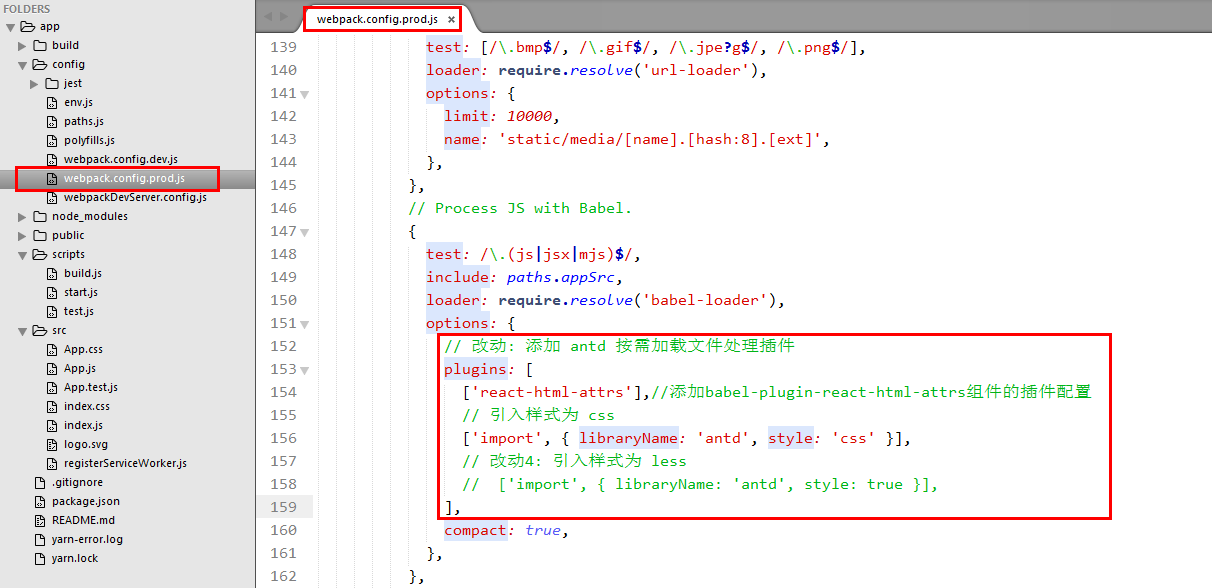
解决方案:生产部署增加对antd的支持
// Process JS with Babel.

{

  test: /\.(js|jsx|mjs)$/,

  include: paths.appSrc,

  loader: require.resolve('babel-loader'),

  options: {

    // 改动: 添加 antd 按需加载文件处理插件

    plugins: [

      ['react-html-attrs'],//添加babel-plugin-react-html-attrs组件的插件配置

      // 引入样式为 css

      ['import', { libraryName: 'antd', style: 'css' }],

      // 改动4: 引入样式为 less

      //  ['import', { libraryName: 'antd', style: true }],

    ],

    compact: true,

  },

},
create-react-app 引入 antd 及 解决 antd 样式无法显示的bug的更多相关文章
- 深入 Create React App 核心概念
本文差点难产而死.因为总结的过程中,多次怀疑本文是对官方文档的直接翻译和简单诺列:同时官方文档很全面,全范围的介绍无疑加深了写作的心智负担.但在最终的梳理中,发现走出了一条与众不同的路,于是坚持分享出 ...
- 在 .NET Core 5 中集成 Create React app
翻译自 Camilo Reyes 2021年2月22日的文章 <Integrate Create React app with .NET Core 5> [1] Camilo Reyes ...
- tap news:week5 0.0 create react app
参考https://blog.csdn.net/qtfying/article/details/78665664 先创建文件夹 安装create react app 这个脚手架(facebook官方提 ...
- 使用create react app教程
This project was bootstrapped with Create React App. Below you will find some information on how to ...
- 如何扩展 Create React App 的 Webpack 配置
如何扩展 Create React App 的 Webpack 配置 原文地址https://zhaozhiming.github.io/blog/2018/01/08/create-react-a ...
- Create React App
Facebook开源了React前端框架(MIT Licence),也同时提供了React脚手架 - create-react-app. create-react-app遵循约定优于配置(Coc)的原 ...
- Create React App 安装less 报错
执行npm run eject 暴露模块 安装 npm i less less-loader -D 1.打开 react app 的 webpack.config.js const sassRege ...
- [React] Use the Fragment Short Syntax in Create React App 2.0
create-react-app version 2.0 added a lot of new features. One of the new features is upgrading to Ba ...
- [React] {svg, css module, sass} support in Create React App 2.0
create-react-app version 2.0 added a lot of new features. One of the new features is added the svgr ...
随机推荐
- css3 平行四边形 、大括弧
<!DOCTYPE html> <html lang="en"> <head> <meta charset="UTF-8&quo ...
- 前端入门22-讲讲模块化 包括webstrom建立简单ES6
https://www.cnblogs.com/dasusu/p/10105433.html
- 打印出A到Z的所有字符,使用char和int转换
public class Demo14{ //A到Z的所有字符,使用char和int转换 public static void main(String[] args) { for(int i = 65 ...
- Hibernate-02
一.hibernate实体创建规则 1.hibernate---->持久层ORM 映射框架,专注于数据的持久化工作. 2.持久化类创建规则 --->1.提供无参数的构造方法 2.私有化.对 ...
- Layui表格之动态添加数据(表格多选解决方案)
前言: Layui已经给出了多选记录的解决方案,是在每条数据的前面加上CheckBox,每次选择都有监听.效果是这样: 实现监听的代码如下,这是一种解决选择多条数据的方案: table.on('edi ...
- [Python3网络爬虫开发实战] 6.3-Ajax结果提取
这里仍然以微博为例,接下来用Python来模拟这些Ajax请求,把我发过的微博爬取下来. 1. 分析请求 打开Ajax的XHR过滤器,然后一直滑动页面以加载新的微博内容.可以看到,会不断有Ajax请求 ...
- PHP典型功能与Laravel5框架开发学习笔记
步骤一:PHP的Redis应用及HTTP协议 一.Redis初识 1.Linux下安装redis:具体看官网:https://redis.io/download:以下为以个人习惯的安装目录进行的red ...
- [Android] java代码无错误,但跳转失败
今天在调代码的时候,出现了这样的问题,我晕了半天,才找到解决办法. 查看日志发现:Initialize Binary Program Cache: Load Failed 从来没见过这种问题,Java ...
- 【03】Html书写规范
[03] Html书写规范 1.推荐使用html5的文档声明 <!DOCTYPE HTML> 2.必须申明文档的编码charset,且与文件本身编码保持一致,推荐使用UTF-8编码 ...
- HDU 2897 经典巴什博弈
从n个石子中每次取p~q个,求先手能否获胜 可以先列举一部分数据,然后观察可得总是在p+q中循环,所以只要用n对p+q取模就好了 #include <cstdio> #include &l ...