
获取指定订阅下所有Azure ARM虚拟机配置(CPU核数,内存大小,磁盘信息)的使用情况
脚本内容:
<#

.SYNOPSIS

    This script grab all ARM VM VHD file in the subscription and caculate VHD size.

.DESCRIPTION

    This script grab all ARM VM VHD file in the subscription and caculate VHD size.

.Example

    .\Get-ArmVMDiskSize.ps1 -subscriptionid xxxxxxx-xxxx-xxxx-xxxxxxx

    Then input the username and password of Azure China.

.Disclaimer

    This sample code is provided for the purpose of illustration only and is not intended to be used in a production environment.

    THIS SAMPLE CODE AND ANY RELATED INFORMATION ARE PROVIDED "AS IS" WITHOUT WARRANTY OF ANY KIND, EITHER EXPRESSED OR IMPLIED, INCLUDING BUT NOT LIMITED TO THE IMPLIED WARRANTIES OF MERCHANTABILITY AND/OR FITNESS FOR A PARTICULAR PURPOSE.

    We grant You a nonexclusive, royalty-free right to use and modify the Sample Code and to reproduce and distribute the object code form of the Sample Code, provided that You agree:

    (i)     to not use Our name, logo, or trademarks to market Your software product in which the Sample Code is embedded;

    (ii)    to include a valid copyright notice on Your software product in which the Sample Code is embedded;

    (iii)    to indemnify, hold harmless, and defend Us and Our suppliers from and against any claims or lawsuits, including attorneys’ fees, that arise or result from the use or distribution of the Sample Code.

#>

param(

    [Parameter(Mandatory = $true)]

    [String]$SubscriptionID

)

function Get-BlobBytes

{

    param (

        [Parameter(Mandatory=$true)]

        [Microsoft.WindowsAzure.Commands.Common.Storage.ResourceModel.AzureStorageBlob]$Blob)

    # Base + blob name

    $blobSizeInBytes = 124 + $Blob.Name.Length * 2

    # Get size of metadata

    $metadataEnumerator = $Blob.ICloudBlob.Metadata.GetEnumerator()

    while ($metadataEnumerator.MoveNext())

    {

        $blobSizeInBytes += 3 + $metadataEnumerator.Current.Key.Length + $metadataEnumerator.Current.Value.Length

    }

    if ($Blob.BlobType -eq [Microsoft.WindowsAzure.Storage.Blob.BlobType]::BlockBlob)

    {

        $blobSizeInBytes += 8

        $Blob.ICloudBlob.DownloadBlockList() |

            ForEach-Object { $blobSizeInBytes += $_.Length + $_.Name.Length }

    }

    else

    {

        [int64]$rangeSize = 1GB

        [int64]$start = 0; $pages = "Start";

        While ($pages)

        {

            try

            {

                $pages = $Blob.ICloudBlob.GetPageRanges($start, $rangeSize)

            }

            catch

            {

                if ($_ -like "*the range specified is invalid*")

                {

                    $pages = $null

                    break

                }

                else

                {

                    write-error $_

                }

            }

            $pages | ForEach-Object { $blobSizeInBytes += 12 + $_.EndOffset - $_.StartOffset }

            $start += $rangeSize

        }

    }

    return @{"vhdlength" = "{0:F2}" -f ($blob.Length / 1GB) -replace ","; "usedsize" = "{0:F2}" -f ($blobSizeInBytes / 1GB) -replace ","}

}

function Get-VMCoresandMemory

{

    param (

        [Parameter(Mandatory=$true)]

        [String]$VMSize)

    $csvfile = $env:USERPROFILE+"\Downloads\VMsizes.csv"

    $VMSizeList = Import-Csv $csvfile

    $VMcoresmem = $VMSizeList | where {$_.Size -eq $VMSize}

    return @{"Cores" = $VMcoresmem.Cores; "Memory" = $vmcoresmem.Memory}

}

<#

Import-Module AzureRM.Compute

$PSversion = (Get-Module -Name AzureRM.Compute).Version

If($PSversion -lt [System.Version]"2.6.0")

{

    Write-Host "PowerShell Version too low. Visit https://docs.microsoft.com/en-us/powershell/azure/overview to install the newest AzureRM module.";

    Exit

}

#>

Login-AzureRmAccount -EnvironmentName AzureChinaCloud  | Out-Null

Get-AzureRmSubscription -SubscriptionId $SubscriptionID  | Out-Null

Select-AzureRmSubscription -SubscriptionId $SubscriptionID  | Out-Null

$armfile = $env:USERPROFILE+"\Downloads\armvms-"+$subscriptionID+".csv"

Set-Content $armfile -Value "ResourceGroup,VMName,VMSize,Cores,Memory(GB),DiskName,OSorData,VHDUri,StorageAccount,VHDLength,VHDUsedSize"

Write-Verbose "ARM part starts!"

$armvms = Get-AzureRmVM

foreach($armvm in $armvms)

{

    $vmresourcegroup = $armvm.ResourceGroupName

    $vmname = $armvm.Name

    $vmsize = $armvm.HardwareProfile.VmSize

    $vmcores = (Get-VMCoresandMemory -VMSize $vmsize).Cores

    $vmmemory = (Get-VMCoresandMemory -VMSize $vmsize).Memory

    $vmosdiskname = $armvm.StorageProfile.OsDisk.Name

    If ($armvm.StorageProfile.OsDisk.vhd -eq $null)

    {

        Write-Host ("The VM "+$vmname+" is using Managed Disks.")

        $vmosdisksize = (Get-AzureRmDisk -ResourceGroupName $vmresourcegroup -DiskName $vmosdiskname).DiskSizeGB

        Add-Content $armfile -Value ($vmresourcegroup+","+$vmname+","+$vmsize+“,”+$vmcores+","+$vmmemory+","+$vmosdiskname+",OSDisk,No visible VHD files for Managed Disk VM,No visible storage account for Managed Disk VM,"+$vmosdisksize+",Managed Disks don't support GetBlobSize method")

        $datadisks = $armvm.StorageProfile.DataDisks

        If ($datadisks.Count -eq 0)

        {

            Write-Host ("The VM "+$vmname+" contains no data disk.")

        }

        else

        {

            Write-Host ("The VM "+$vmname+" contains "+$datadisks.Count+" data disk(s).")

            foreach ($datadisk in $datadisks)

            {

                $vmdatadiskname = $datadisk.Name

                $vmdatadisksize = (Get-AzureRmDisk -ResourceGroupName $vmresourcegroup -DiskName $vmdatadiskname).DiskSizeGB

                Add-Content $armfile -Value (",,,,,"+$vmdatadiskname+",DataDisk,No visible VHD files for Managed Disk VM,No visible storage account for Managed Disk VM,"+$vmdatadisksize+",Managed Disks don't support GetBlobSize method")

            }

        }

    }

    else

    {

        $vmosdiskuri = $armvm.StorageProfile.OsDisk.Vhd.Uri

        $vmosdiskstorageaccountname = ($armvm.StorageProfile.OsDisk.Vhd.Uri.Split("{/,.}"))[2]

        $vmosdiskstorageaccountkey = (Get-AzureRmStorageAccount | ? {$_.StorageAccountName -eq $vmosdiskstorageaccountname} | Get-AzureRmStorageAccountKey)[0].Value

        $vmosdiskstorageaccountcontext = New-AzureStorageContext -StorageAccountName $vmosdiskstorageaccountname -StorageAccountKey $vmosdiskstorageaccountkey

        $vmosdiskcontainername = ($armvm.StorageProfile.OsDisk.Vhd.Uri.Split("/")[3])

        $vmosdiskblobname = ($armvm.StorageProfile.OsDisk.Vhd.Uri.Split("/")[(($armvm.StorageProfile.OsDisk.Vhd.Uri.Split("/")).count) - 1])

        $vmosdiskblob = Get-AzureStorageBlob -Context $vmosdiskstorageaccountcontext -blob $vmosdiskblobname -Container $vmosdiskcontainername

        $osvhdsize = Get-BlobBytes $vmosdiskblob

        If ($vmsize -like "*DS*")

        {

            Add-Content $armfile -Value ($vmresourcegroup+","+$vmname+","+$vmsize+","+$vmcores+","+$vmmemory+","+$vmosdiskname+",OSDisk,"+$vmosdiskuri+","+$vmosdiskstorageaccountname+","+$osvhdsize+",Premium Disks don't support GetBlobSize method")

        }

        else

        {

            Add-Content $armfile -Value ($vmresourcegroup+","+$vmname+","+$vmsize+","+$vmcores+","+$vmmemory+","+$vmosdiskname+",OSDisk,"+$vmosdiskuri+","+$vmosdiskstorageaccountname+","+$osvhdsize.vhdlength+","+$osvhdsize.usedsize)

        }

        $datadisks = $armvm.StorageProfile.DataDisks

        If ($datadisks.count -eq 0)

        {

            Write-Host ("The VM "+$vmname+" contains no data disk.")

        }

        else

        {

            Write-Host ("The VM "+$vmname+" contains "+$datadisks.Count+" data disk(s).")

            foreach ($datadisk in $datadisks)

            {

                $vmdatadiskname = $datadisk.Name

                $vmdatadiskuri = $datadisk.Vhd.Uri

                $vmdatadiskstorageaccountname = ($vmdatadiskuri.Split("{/,.}"))[2]

                $vmdatadiskstorageaccountkey = (Get-AzureRmStorageAccount | ? {$_.StorageAccountName -eq $vmdatadiskstorageaccountname} | Get-AzureRmStorageAccountKey)[0].Value

                $vmdatadiskstorageaccountcontext = New-AzureStorageContext -StorageAccountName $vmdatadiskstorageaccountname -StorageAccountKey $vmdatadiskstorageaccountkey

                $vmdatadiskcontainername = ($datadisk.Vhd.Uri.Split("/")[3])

                $vmdatadiskblobname = ($datadisk.Vhd.Uri.Split("/")[(($datadisk.Vhd.Uri.Split("/")).count) - 1])

                $vmdatadiskblob = Get-AzureStorageBlob -Context $vmdatadiskstorageaccountcontext -blob $vmdatadiskblobname -Container $vmdatadiskcontainername

                $datavhdsize = Get-BlobBytes $vmdatadiskblob

                If ($vmsize -like "*DS*")

                {

                    Add-Content $armfile -Value (",,,,,"+$vmdatadiskname+",DataDisk,"+$vmdatadiskuri+","+$vmdatadiskstorageaccountname+","+$datavhdsize.vhdlength+",Premium Disks don't support GetBlobSize method")

                }

                else

                {

                    Add-Content $armfile -Value (",,,,,"+$vmdatadiskname+",DataDisk,"+$vmdatadiskuri+","+$vmdatadiskstorageaccountname+","+$datavhdsize.vhdlength+","+$datavhdsize.usedsize)

                }

            }

        }

    }

}

Write-Verbose "ARM part finished!"
脚本运行步骤:
1.安装较新的Azure Powershell模块,https://docs.azure.cn/zh-cn/powershell-install-configure
2.将附件压缩包下的.csv文件拷贝至机器%UserProfile%\Downloads 文件夹下
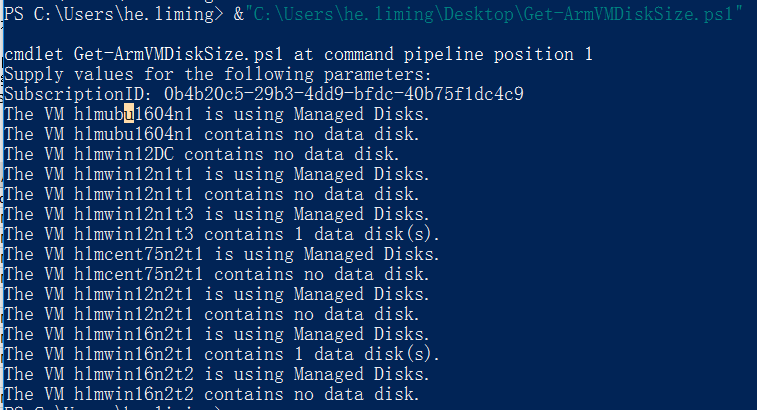
3.在PowerShell中运行脚本,提供订阅号并登陆账号,即可成功抓取虚拟机的CPU核数、内存大小及磁盘信息
执行脚本及输出示例:

获取指定订阅下所有Azure ARM虚拟机配置(CPU核数,内存大小,磁盘信息)的使用情况的更多相关文章
- Java获取Linux和Window系统CPU、内存和磁盘总使用率的情况
这是一个工具类,获取的内容: CPU使用率:得到的是当前CPU的使用情况,这是算出的是两次500毫秒时间差的CPU使用率 内存使用率:[1 - 剩余的物理内存/(总的物理内存+虚拟内存) ] * 1 ...
- Azure Powershell获取指定订阅下的虚拟机信息(ARM)
为方便Azure用户导出已创建虚拟机的相关信息,特编写如下脚本: 详情脚本: # 登陆Azure Account Add-AzureRmAccount -EnvironmentName AzureCh ...
- Azure Powershell获取指定订阅下的虚拟机信息(ASM)
为方便Azure用户导出已创建虚拟机的相关信息,特编写如下脚本: 详情脚本: # 登陆Azure Account Add-AzureAccount -Environment AzureChinaClo ...
- linux下查看CPU、内存、磁盘信息
1.查看CPU信息# 总核数 = 物理CPU个数 X 每颗物理CPU的核数 # 总逻辑CPU数 = 物理CPU个数 X 每颗物理CPU的核数 X 超线程数 # 查看物理CPU个数cat /proc/c ...
- 【转】Linux下查看CPU、内存、磁盘信息
1.查看CPU信息# 总核数 = 物理CPU个数 X 每颗物理CPU的核数 # 总逻辑CPU数 = 物理CPU个数 X 每颗物理CPU的核数 X 超线程数 # 查看物理CPU个数cat /proc/c ...
- Azure ARM虚拟机部署反恶意软件-安全扩展
Azure虚拟机,默认情况下没有安装杀毒软件.如果您有此需求可以通过Azure 扩展进行安装,有关Azure反恶意软件的官方说明请参考:https://docs.azure.cn/zh-cn/secu ...
- 一个获取指定目录下一定格式的文件名称和文件修改时间并保存为文件的python脚本
摘自:http://blog.csdn.net/forandever/article/details/5711319 一个获取指定目录下一定格式的文件名称和文件修改时间并保存为文件的python脚本 ...
- PHP 获取指定目录下所有文件(包含子目录)
PHP 获取指定目录下所有文件(包含子目录) //glob — 寻找与模式匹配的文件路径 $filter_dir = array('CVS', 'templates_c', 'log', 'img', ...
- TDirectory.GetFileSystemEntries获取指定目录下的目录和文件
使用函数: System.IOUtils.TDirectory.GetFileSystemEntries 所有重载: class function GetFileSystemEntries(const ...
随机推荐
- 读写大“二进制”文件,不必申请很大内存(fopen,fread,fwrite,fclose)
<?php /** * 读写大二进制文件,不必申请很大内存 * 只有读取到内容才创建文件 * 保证目录可写 * * @param string $srcPath 源文件路径 * @param s ...
- Linux命令:cp (copy)复制文件或目录
复制文件,只有源文件较目的文件的修改时间新时,才复制文件 cp -u -v file1 file2 .将文件file1复制成文件file2 cp file1 file2 .采用交互方式 ...
- jquery判断页面元素是否存在的方法
- linux数据库备份
linux数据库备份 服务端启用二进制日志 如果日志没有启开,必须启用binlog,要重启mysql,首先,关闭mysql,打开/etc/my.cnf,加入以下几行: [mysqld] log-bin ...
- An Introduction to Text Mining using Twitter Streaming
Text mining is the application of natural language processing techniques and analytical methods to t ...
- [leetcode] 7. Binary Tree Level Order Traversal II
这次相对来讲复杂点,题目如下: Given a binary tree, return the bottom-up level order traversal of its nodes' values ...
- mybatis如何直接 执行传入的任意sql语句 并按照顺序取出查询的结果集
需求: 1.直接执行前端传来的任何sql语句,parameterType="String", 2.对于任何sql语句,其返回值类型无法用resultMap在xml文件里配置或者返回 ...
- 国际时区 TimeZone ID列表
public static void main(String[] args) { Calendar c = new GregorianCalendar(); c.setTime(new Date()) ...
- Git Note - Branch
1. add a new branch cd workspace git branch user1/newbranch1 git checkout user1/newbranch1 or git ch ...
- archlinux 64bit 开发android
arch 64位下直接运行android emulator会出现错误:“Failed to start emulator: Cannot run program "xxxx/sdk/tool ...