
mysql数据库----Pymysql
本节重点:
pymysql下载和使用
sql注入
增、删、改:conn.commit()
查:fetchone、fetchmany、fetchall
一、pymysql的下载和使用
之前我们都是通过MySQL自带的命令行客户端工具mysql来操作数据库,那如何在python程序中操作数据库呢?这就用到了pymysql模块,该模块本质就是一个套接字客户端软件,使用前需要事先安装。
(1)pymysql模块的下载
pip3 install pymysql
下载好后在pycharm内设置setting  加入环境
(2)pymysql的使用
数据库和数据都已存在
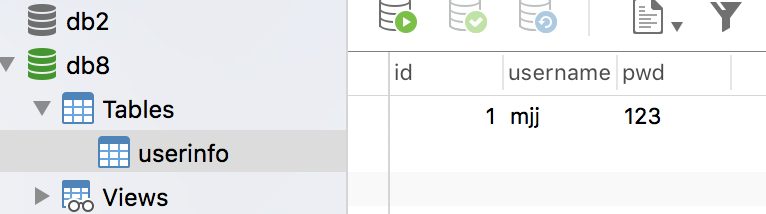
# 实现:使用Python实现用户登录,如果用户存在则登录成功(假设该用户已在数据库中)

import pymysql

user = input('请输入用户名:')

pwd = input('请输入密码:')

# .连接

conn = pymysql.connect(host='127.0.0.1',
   port=,
   user='root',
   password='',
   db='db8',
     charset='utf8'

)

# .创建游标

cursor = conn.cursor()

#注意%s需要加引号

sql = "select * from userinfo where username='%s' and pwd='%s'" %(user, pwd)

print(sql)

# .执行sql语句

cursor.execute(sql)

result=cursor.execute(sql) #执行sql语句,返回sql查询成功的记录数目

print(result)

# 关闭连接,游标和连接都要关闭

cursor.close()

conn.close()

if result:

    print('登陆成功')

else:

    print('登录失败')
二、execute()之sql注入
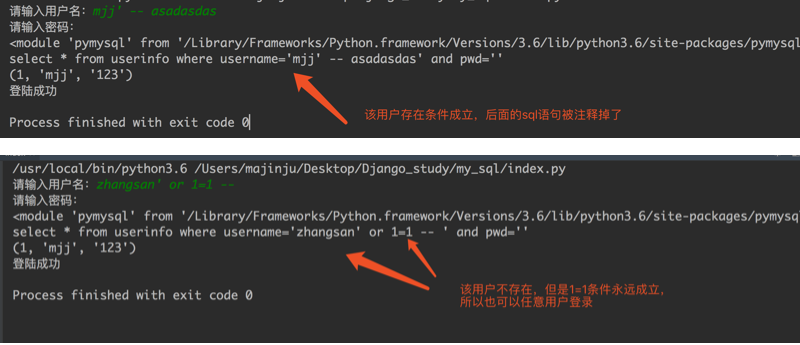
最后那一个空格,在一条sql语句中如果遇到select * from userinfo where username='mjj' -- asadasdas' and pwd='' 则--之后的条件被注释掉了(注意--后面还有一个空格)

#、sql注入之:用户存在,绕过密码

mjj' -- 任意字符

#、sql注入之:用户不存在,绕过用户与密码

xxx' or 1=1 -- 任意字符
解决方法;;;
# 原来是我们对sql进行字符串拼接

# sql="select * from userinfo where name='%s' and password='%s'" %(username,pwd)

# print(sql)

# result=cursor.execute(sql)


解决:

#改写为(execute帮我们做字符串拼接,我们无需且一定不能再为%s加引号了)

sql="select * from userinfo where name=%s and password=%s" #!!!注意%s需要去掉引号,因为pymysql会自动为我们加上

result=cursor.execute(sql,[user,pwd]) #pymysql模块自动帮我们解决sql注入的问题,只要我们按照pymysql的规矩来。
三、增、删、改:conn.commit()
commit()方法:在数据库里增、删、改的时候,必须要进行提交,否则插入的数据不生效。
username = input('请输入用户名:')

pwd = input('请输入密码:')

# .连接

conn = pymysql.connect(host='localhost', port=, user='root', password='', db='db8', charset='utf8')

# .创建游标

cursor = conn.cursor()

# 操作

# 增

# sql = "insert into userinfo(username,pwd) values (%s,%s)"

# effect_row = cursor.execute(sql,(username,pwd))

#同时插入多条数据

#cursor.executemany(sql,[('李四',''),('王五','')])

# print(effect_row)#

# 改

# sql = "update userinfo set username = %s  where id = 2"

# effect_row = cursor.execute(sql,username)

# print(effect_row)

# 删

sql = "delete from userinfo  where id = 2"

effect_row = cursor.execute(sql)

print(effect_row)

#一定记得commit

conn.commit()

# .关闭游标

cursor.close()

# .关闭连接

conn.close()
四、查:fetchone、fetchmany、fetchall
fetchone():获取下一行数据,第一次为首行;

fetchall():获取所有行数据源

fetchmany():获取4行数据
查看一下表内容:

mysql> select * from userinfo;

+----+----------+-----+

| id | username | pwd |

+----+----------+-----+

|  1 | mjj      | 123 |

|  3 | 张三     | 110 |

|  4 | 李四     | 119 |

+----+----------+-----+

3 rows in set (0.00 sec)
使用fetchone():
import pymysql

# 1.连接

conn = pymysql.connect(host='localhost', port=3306, user='root', password='', db='db8', charset='utf8')

# 2.创建游标

cursor = conn.cursor()

sql = 'select * from userinfo'

cursor.execute(sql)

# 查询第一行的数据

row = cursor.fetchone()

print(row) # (1, 'mjj', '123')

# 查询第二行数据

row = cursor.fetchone()

print(row) # (3, '张三', '110')

# 4.关闭游标

cursor.close()

# 5.关闭连接

conn.close()
使用fetchall():
import pymysql

# 1.连接

conn = pymysql.connect(host='localhost', port=3306, user='root', password='', db='db8', charset='utf8')

# 2.创建游标

cursor = conn.cursor()

sql = 'select * from userinfo'

cursor.execute(sql)

# 获取所有的数据

rows = cursor.fetchall()

print(rows)

# 4.关闭游标

cursor.close()

# 5.关闭连接

conn.close()

#运行结果

((1, 'mjj', '123'), (3, '张三', '110'), (4, '李四', '119'))
默认情况下,我们获取到的返回值是元组,只能看到每行的数据,却不知道每一列代表的是什么,这个时候可以使用以下方式来返回字典,每一行的数据都会生成一个字典:
cursor = conn.cursor(cursor=pymysql.cursors.DictCursor) #在实例化的时候,将属性cursor设置为pymysql.cursors.DictCursor
在fetchone示例中,在获取行数据的时候,可以理解开始的时候,有一个行指针指着第一行的上方,获取一行,它就向下移动一行,所以当行指针到最后一行的时候,就不能再获取到行的内容,所以我们可以使用如下方法来移动行指针:
cursor.scroll(1,mode='relative')  # 相对当前位置移动

cursor.scroll(2,mode='absolute') # 相对绝对位置移动

第一个值为移动的行数,整数为向下移动,负数为向上移动,mode指定了是相对当前位置移动,还是相对于首行移动
# .Python实现用户登录

# .Mysql保存数据

import pymysql

# .连接

conn = pymysql.connect(host='localhost', port=, user='root', password='', db='db8', charset='utf8')

# .创建游标

cursor = conn.cursor(cursor=pymysql.cursors.DictCursor)

sql = 'select * from userinfo'

cursor.execute(sql)

# 查询第一行的数据

row = cursor.fetchone()

print(row) # (, 'mjj', '')

# 查询第二行数据

row = cursor.fetchone() # (, '张三', '')

print(row)

cursor.scroll(-,mode='relative') #设置之后,光标相对于当前位置往前移动了一行,所以打印的结果为第二行的数据

row = cursor.fetchone()

print(row)

cursor.scroll(,mode='absolute') #设置之后,光标相对于首行没有任何变化,所以打印的结果为第一行数据

row = cursor.fetchone()

print(row)

# .关闭游标

cursor.close()

# .关闭连接

conn.close()

#结果如下

{'id': , 'username': 'mjj', 'pwd': ''}

{'id': , 'username': '张三', 'pwd': ''}

{'id': , 'username': '张三', 'pwd': ''}

{'id': , 'username': 'mjj', 'pwd': ''}
fetchall()

import pymysql

# .连接

conn = pymysql.connect(host='localhost', port=, user='root', password='', db='db8', charset='utf8')

# .创建游标

cursor = conn.cursor(cursor=pymysql.cursors.DictCursor)

sql = 'select * from userinfo'

cursor.execute(sql)

# 获取2条数据

rows = cursor.fetchmany()

print(rows)

# .关闭游标

# rows = cursor.fetchall()

# print(rows)

cursor.close()

# .关闭连接

conn.close()

#结果如下:

[{'id': , 'username': 'mjj', 'pwd': ''}, {'id': , 'username': '张三', 'pwd': ''}]
mysql数据库----Pymysql的更多相关文章
- 第二百七十九节,MySQL数据库-pymysql模块操作数据库
MySQL数据库-pymysql模块操作数据库 pymysql模块是python操作数据库的一个模块 connect()创建数据库链接,参数是连接数据库需要的连接参数使用方式: 模块名称.connec ...
- Django2.2使用mysql数据库pymysql版本不匹配问题的解决过程与总结
前置条件 django版本:2.2.1 python版本:3.6.6 mysql版本:mysql-community8.0.15 问题 在搭建django项目,配置mysql数据库时遇到无法迁移数据库 ...
- MySQL数据库-pymysql模块操作数据库
pymysql模块是python操作数据库的一个模块 connect()创建数据库链接,参数是连接数据库需要的连接参数使用方式: 模块名称.connect() 参数: host=数据库ip port= ...
- Python连接MySQL数据库(pymysql的使用)
本文Python版本3.5.3,mysq版本5.7.23 基本使用 # 导入pymysql模块 import pymysql #连接数据库 conn = pymysql.connect( databa ...
- 使用python连接mysql数据库——pymysql模块的使用
安装pymysql pip install pymysql 使用pymysql 使用数据查询语句 查询一条数据fetchone() from pymysql import * conn = conne ...
- python3.4怎么连接mysql pymysql连接mysql数据库
本文介绍了python3 4连接mysql数据库的方法,在python3 4中使用原来python2 7的mysqldb已不能连接mysql数据库了,可以使用pymysql. 在python3.4 ...
- python专题-Mysql数据库(python3._+ PyMysql)
之前写过一篇 Python使用MySQL数据库的博客,主要使用的是Python2和MySQLdb驱动. python使用mysql数据库 Python2 ---> Python3 MySQLdb ...
- Python连接MySQL数据库之pymysql模块使用
安装PyMySQL pip install pymysql PyMySQL介绍 PyMySQL是在python3.x版本中用于连接MySQL服务器的一个库,2中则使用mysqldb. Django中也 ...
- pymysql 使用twisted异步插入数据库:基于crawlspider爬取内容保存到本地mysql数据库
本文的前提是实现了整站内容的抓取,然后把抓取的内容保存到数据库. 可以参考另一篇已经实现整站抓取的文章:Scrapy 使用CrawlSpider整站抓取文章内容实现 本文也是基于这篇文章代码基础上实现 ...
随机推荐
- 【洛谷P3807】(模板)卢卡斯定理
卢卡斯定理 把n写成p进制a[n]a[n-1][n-2]…a[0],把m写成p进制b[n]b[n-1][n-2]…b[0],则C(n,m)与C(a[n],b[n])*C(a[n-1],b[n-1])* ...
- 【题解】POJ1845 Sumdiv(乘法逆元+约数和)
POJ1845:http://poj.org/problem?id=1845 思路: AB可以表示成多个质数的幂相乘的形式:AB=(a1n1)*(a2n2)* ...*(amnm) 根据算数基本定理可 ...
- 让网页显示ajax的查询数据
今天下午做一个项目小练习.需要把查询日志的内容显示到网页上来.一开始陷入了一个误区. 一直以来我这个小项目需要访问ashx来生成html的代码.后台用的Razor模板引擎. 刚开始显示用户列表时.因为 ...
- U盘安装CentOS7.3教程
0.准备工作: 一台没系统的普通电脑u盘一个(大于1G,最小安装的话不超过1G,根据选择系统大小匹配U盘即可)CentOS7.3 iso文件一个UltraISO工具 1.制作U盘 ①使用UltraIS ...
- js数组去重(多种方法)
// js数组去重 Array.prototype.fun1 = function(){ var arr = this, result = [], i, len = arr.length; for(i ...
- Java并发编程:JMM和volatile关键字
转载请标明出处: http://blog.csdn.net/forezp/article/details/77580491 本文出自方志朋的博客 Java内存模型 随着计算机的CPU的飞速发展,CPU ...
- zepto 基础知识(5)
81.width width() 类型:number width(value) 类型:self width(function(index,oldWidth){....}) 类型:self 获取对象集合 ...
- [JSOI2008]最大数(线段树基础)
题目描述 现在请求你维护一个数列,要求提供以下两种操作: 1. 查询操作. 语法:Q L 功能:查询当前数列中末尾L个数中的最大的数,并输出这个数的值. 限制: L 不超过当前数列的长度.(L > ...
- 使用Python读取Dbf文件
DBF:一种特殊的文件格式!表示数据库文件,Foxbase,Dbase,Visual FoxPro等数据库处理系统所产生的数据库文件! DBF 数据库是常用的桌面型数据库,它曾经被各企业.事业单位广泛 ...
- JSP/Servlet开发——第五章 使用分层实现业务处理
1.JNDI(Java Naming and Directory Interface)Java命名和目录接口: ●JNDI:是一个有关应用序设计的 API 为开发人员提供了查找和访问各种命名和目录服务 ...