
HTML5 Canvas 绘制库存变化折线 增加超储告罄线
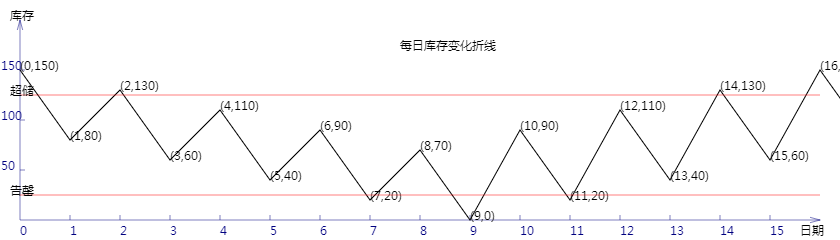
<!DOCTYPE html>
<html lang="utf-8">
<meta http-equiv="Content-Type" content="text/html; charset=utf-8"/>
<head>
     <title>库存曲线</title>
    </head>

     <body onload="draw()">
        <canvas id="myCanvus" width="840px" height="240px" style="border:1px dashed black;">
            出现文字表示你的浏览器不支持HTML5
        </canvas>
     </body>
</html>
<script type="text/javascript">
<!--
    function draw(){
        var canvas=document.getElementById("myCanvus");
        var canvasWidth=840;
        var canvasHeight=240;

        var context=canvas.getContext("2d");

        context.fillStyle = "white";
        context.fillRect(0, 0, canvasWidth, canvasHeight);

        context.strokeStyle = "black";
        context.fillStyle = "black";

        context.save();

        // 进行坐标变换:把原点放在左下角,东方为X轴正向,北方为Y轴正向
        var offset=20;// 偏移值,用来画坐标轴

        context.save();
        context.translate(0+offset,canvasHeight-offset);
        context.rotate(getRad(180));
        context.scale(-1,1);

        drawAxisX(context);
        drawAxisY(context);

        var actualStock=100;
        var inbounds=[50,0,50,0,50,0,50,0,50,0,90,0,90,0,90,0,90,0,];
        var outbounds=[0,70,0,70,0,70,0,70,0,70,0,70,0,70,0,70,0,70,];

        drawStockCurve(context,actualStock,inbounds,outbounds);
        drawBounds(context);

        context.restore();

        context.fillText("每日库存变化折线",400,50);

        context.fillText("库存",10,20);
        context.fillText("日期",800,235);
    }

    function drawBounds(ctx){
        ctx.save();

        ctx.lineWidth=0.5;
        ctx.strokeStyle='red';

        // 画underage
        ctx.beginPath();
        ctx.moveTo(0, 25);
        ctx.lineTo(800, 25);
        ctx.stroke();
        ctx.closePath();

        ctx.save();
        ctx.translate(-10,25);
        ctx.rotate(getRad(180));
        ctx.scale(-1,1);
        ctx.fillText("告罄",0,0);
        ctx.restore();

        ctx.restore();

        ctx.save();

        ctx.lineWidth=0.5;
        ctx.strokeStyle='red';

        // 画underage
        ctx.beginPath();
        ctx.moveTo(0, 125);
        ctx.lineTo(800, 125);
        ctx.stroke();
        ctx.closePath();

        ctx.save();
        ctx.translate(-10,125);
        ctx.rotate(getRad(180));
        ctx.scale(-1,1);
        ctx.fillText("超储",0,0);
        ctx.restore();

        ctx.restore();
    }

    function drawStockCurve(ctx,actualStock,inbounds,outbounds){
        ctx.save();

        ctx.lineWidth=1;
        ctx.strokeStyle='black';
        ctx.fillStyle='black';

        var y=actualStock;
        var x;

        ctx.beginPath();
        for(var i=0;i<inbounds.length;i++){
            y=y+inbounds[i]-outbounds[i];
            x=i*50;
            ctx.lineTo(x, y);

            ctx.save();
            // 因坐标变换会导致文字错位,故采用位移+旋转+缩放的方式恢复
            ctx.translate(x,y);
            ctx.rotate(getRad(180));
            ctx.scale(-1,1);
            ctx.fillText("("+i+","+y+")",0,0);
            ctx.restore();
        }
        ctx.stroke();
        ctx.closePath();

        ctx.restore();
    }

    function drawAxisX(ctx){
        ctx.save();

        ctx.lineWidth=0.5;
        ctx.strokeStyle='navy';
        ctx.fillStyle='navy';

        // 画轴
        ctx.beginPath();
        ctx.moveTo(0, 0);
        ctx.lineTo(800, 0);
        ctx.stroke();
        ctx.closePath();

        ctx.beginPath();
        ctx.moveTo(800-Math.cos(getRad(15))*10, Math.sin(getRad(15))*10);
        ctx.lineTo(800, 0);
        ctx.lineTo(800-Math.cos(getRad(15))*10, -Math.sin(getRad(15))*10);
        ctx.stroke();
        ctx.closePath();

        // 画刻度
        var x,y;
        y=5;
        for(x=50;x<800;x+=50){
            ctx.beginPath();
            ctx.moveTo(x, 0);
            ctx.lineTo(x, y);

            ctx.stroke();
            ctx.closePath();
        }

        // 写文字
        var i=0;
        for(x=0;x<800;x+=50){
            ctx.save();
            ctx.scale(1,-1);
            ctx.fillText(i,x,y+10);
            ctx.restore();

            i++;
        }

        ctx.restore();
    }

    function drawAxisY(ctx){
        ctx.save();

        ctx.lineWidth=0.5;
        ctx.strokeStyle='navy';
        ctx.fillStyle='navy';

        // 画轴
        ctx.beginPath();
        ctx.moveTo(0, 0);
        ctx.lineTo(0, 200);
        ctx.stroke();
        ctx.closePath();

        ctx.beginPath();
        ctx.moveTo(Math.sin(getRad(15))*10, 200-Math.cos(getRad(15))*10);
        ctx.lineTo(0, 200);
        ctx.lineTo(-Math.sin(getRad(15))*10, 200-Math.cos(getRad(15))*10);
        ctx.stroke();
        ctx.closePath();

        // 画刻度
        var x,y;
        x=5;
        for(y=50;y<200;y+=50){
            ctx.beginPath();
            ctx.moveTo(x, y);
            ctx.lineTo(0, y);

            ctx.stroke();
            ctx.closePath();
        }

        // 写文字
        x=-19;
        for(y=50;y<200;y+=50){
            ctx.save();

            ctx.scale(1,-1);
            ctx.translate(0,-200);

            ctx.fillText(200-y,x,y);
            ctx.restore();
        }

        ctx.restore();
    }

    function getRad(degree){
        return degree/180*Math.PI;
    }
//-->
</script>
HTML5 Canvas 绘制库存变化折线 增加超储告罄线的更多相关文章
- HTML5 Canvas 绘制库存变化折线 画入库出库柱状图
代码: <!DOCTYPE html> <html lang="utf-8"> <meta http-equiv="Content-Type ...
- HTML5 Canvas 绘制库存变化折线 计算出库存周转率
<!DOCTYPE html> <html lang="utf-8"> <meta http-equiv="Content-Type&quo ...
- HTML5 Canvas 绘制库存变化折线 计算出最高最低库存
<!DOCTYPE html> <html lang="utf-8"> <meta http-equiv="Content-Type&quo ...
- HTML5 Canvas 绘制库存变化折线
<!DOCTYPE html> <html lang="utf-8"> <meta http-equiv="Content-Type&quo ...
- 使用html5 Canvas绘制线条(直线、折线等)
使用html5 Canvas绘制直线所需的CanvasRenderingContext2D对象的主要属性和方法(有"()"者为方法)如下: 属性或方法 基本描述 strokeSty ...
- html5 Canvas绘制图形入门详解
html5,这个应该就不需要多作介绍了,只要是开发人员应该都不会陌生.html5是「新兴」的网页技术标准,目前,除IE8及其以下版本的IE浏览器之外,几乎所有主流浏览器(FireFox.Chrome. ...
- 怎样用JavaScript和HTML5 Canvas绘制图表
原文:https://code.tutsplus.com/zh-...原作:John Negoita翻译:Stypstive 在这篇教程中,我将展示用JavaScript和canvas作为手段,在饼状 ...
- 学习笔记:HTML5 Canvas绘制简单图形
HTML5 Canvas绘制简单图形 1.添加Canvas标签,添加id供js操作. <canvas id="mycanvas" height="700" ...
- 使用 HTML5 Canvas 绘制出惊艳的水滴效果
HTML5 在不久前正式成为推荐标准,标志着全新的 Web 时代已经来临.在众多 HTML5 特性中,Canvas 元素用于在网页上绘制图形,该元素标签强大之处在于可以直接在 HTML 上进行图形操作 ...
随机推荐
- [bzoj5017][Snoi2017]炸弹 tarjan缩点+线段树优化建图+拓扑
5017: [Snoi2017]炸弹 Time Limit: 30 Sec Memory Limit: 512 MBSubmit: 608 Solved: 190[Submit][Status][ ...
- Nodejs解决所有跨域请求
Nodejs解决所有跨域请求 app.use(function(req, res, next) { res.setHeader('Access-Control-Allow-Origin', '*'); ...
- 蓝牙遥控小车设计(四)——Android APP遥控
最近都没心情写博客,忙着答辩论文之类的,唉,主要是愁工作啊...... 先上车体全景图: APP截图: 上最终视频:
- Python与数据结构[4] -> 散列表[0] -> 散列表与散列函数的 Python 实现
散列表 / Hash Table 散列表与散列函数 散列表是一种将关键字映射到特定数组位置的一种数据结构,而将关键字映射到0至TableSize-1过程的函数,即为散列函数. Hash Table: ...
- (寒假GYM开黑)2018 German Collegiate Programming Contest (GCPC 18)
layout: post title: 2018 German Collegiate Programming Contest (GCPC 18) author: "luowentaoaa&q ...
- 1、Django实战第1天:建立项目mxonline
工具版本: python3.6.3 django1.9.8 安装工具 mkvirtualenv --python="C:\Python36\python.exe" mxonline ...
- HDOJ 5693 D Game
众所周知,度度熊喜欢的字符只有两个:B 和D. 今天,它发明了一个游戏:D游戏. 度度熊的英文并不是很高明,所以这里的D,没什么高深的含义,只是代指等差数列[(等差数列百科)](http://baik ...
- POJ 2226 Muddy Fields (二分图匹配)
[题目链接] http://poj.org/problem?id=2226 [题目大意] 给出一张图,上面有泥和草地,有泥的地方需要用1*k的木板覆盖, 有草地的地方不希望被覆盖,问在此条件下需要的最 ...
- [xsy2962]作业
题意:$f_0=1-\dfrac1e,f_n=1-nf_{n-1}$,求$f_n(n\leq10000)$,保留四位小数 这题代码只有⑨行但是题解很神... 因为递推式中有乘法,所以直接按题目来推肯定 ...
- 【二分法】【尺取法】bzoj2348 [Baltic 2011]Plagiarism
一开始以为死于精度……调了半天发现死于long long…… 一.二分法: #include<cstdio> #include<cstring> #include<alg ...