
iOS 物流信息时间轴
timelineLogistics 是模仿淘宝物流信息时间轴界面的自定义View
准备工作
引入Masonry,YYkit库
- 使用了MAsonry进行布局
- 使用了YYkit中的YYLable进行富文本电话号码点击拨打电话
文件目录
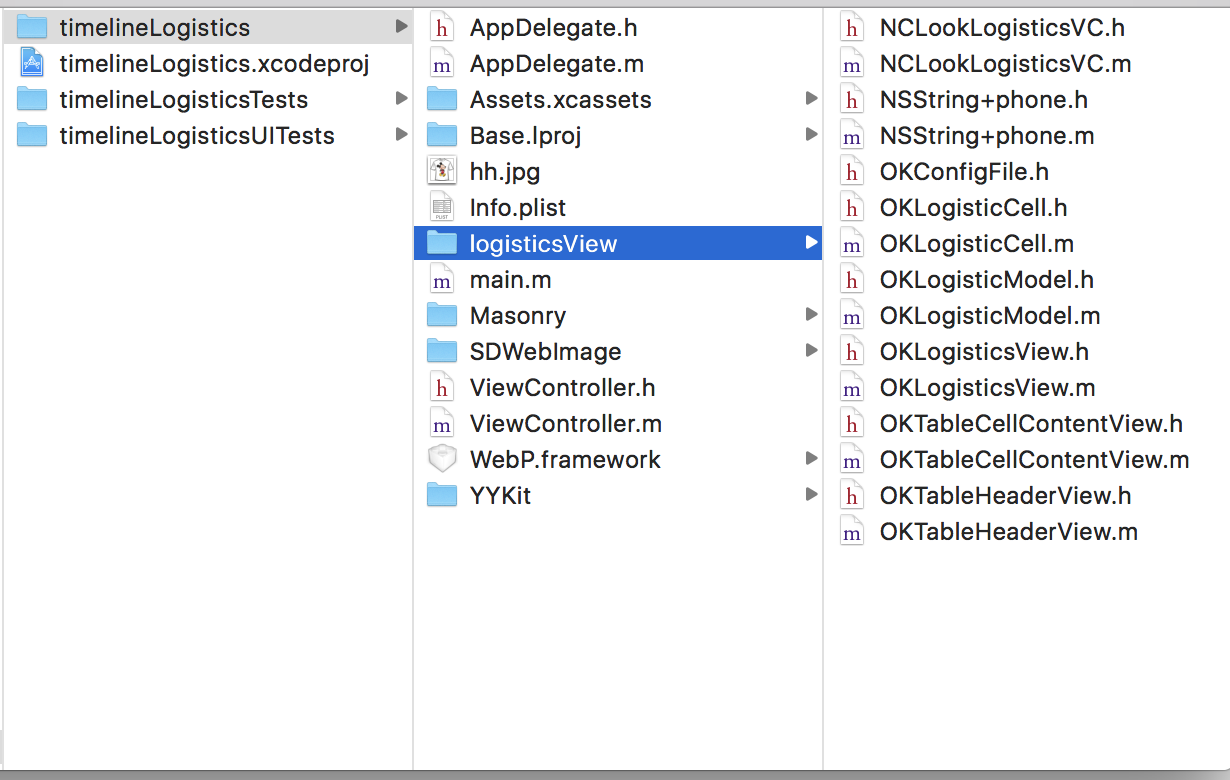
原理
1.自定义view
@interface OKLogisticsView : UIView

/**

 运单号码

 */

@property (copy, nonatomic)NSString *number;

/**

 承运公司

 */

@property (copy, nonatomic)NSString *company;

/**

 官方电话

 */

@property (copy, nonatomic)NSString *phone;

/**

 物流状态

 */

@property (nonatomic,copy) NSString * wltype;

/**

 图片url

 */

@property (nonatomic,copy) NSString * imageUrl;

@property (strong, nonatomic)NSArray *datas;

@property (nonatomic,strong) OKTableHeaderView *header ;

- (instancetype)initWithDatas:(NSArray*)array;

- (void)reloadDataWithDatas:(NSArray *)array;

@end
设置自定义view的tableView的headView为自定义headView。
在自定义view 的set方法中为headview的属性赋值
- (void)setWltype:(NSString *)wltype {

    _wltype = wltype;

    self.header.wltype = wltype;

}

-(void)setNumber:(NSString *)number {

    _number = number;

    self.header.number = number;

}

- (void)setCompany:(NSString *)company {

    _company = company;

    self.header.company = company;

}

- (void)setPhone:(NSString *)phone {

    _phone = phone;

    self.header.phone = phone;

}

- (void)setImageUrl:(NSString *)imageUrl {

    _imageUrl = imageUrl;

    self.header.imageUrl = imageUrl;

}
** 对外提供的刷新数据方法**
- (void)setDatas:(NSArray *)datas {

    if (_datas == datas) {

        _datas = datas;

    }

    [self.table reloadData];

}

- (void)reloadDataWithDatas:(NSArray *)array {

    [self.dataArray addObjectsFromArray:array];

    [self.table reloadData];

}
2.在headview的set方法中赋值
- (void)setNumber:(NSString *)number {

    _number = number;

    self.numLabel.text = [NSString stringWithFormat:@"运单编号:%@",number];

}

- (void)setCompany:(NSString *)company {

    _company = company;

    self.comLabel.text = [NSString stringWithFormat:@"承运公司:%@",company];

}

- (void)setWltype:(NSString *)wltype {

    _wltype = wltype;

    NSMutableAttributedString *wlStr = [[NSMutableAttributedString alloc]initWithString:[NSString stringWithFormat:@"物流状态:%@",wltype]];

    NSRange range = [[NSString stringWithFormat:@"物流状态:%@",wltype] rangeOfString: wltype];

    [wlStr addAttribute:NSForegroundColorAttributeName value:nckColor(0x07A628) range:range];

    self.type.attributedText = wlStr;

}
3.cell内部view为自定义view-OKTableCellContentView
在其内部实现正则匹配电话号码并进行拨打
- (void)reloadDataWithModel:(OKLogisticModel*)model {

    NSRange stringRange = NSMakeRange(0, model.dsc.length);

    //正则匹配

    NSError *error;

    NSRegularExpression *regexps = [NSRegularExpression regularExpressionWithPattern:PHONEREGULAR options:0 error:&error];

    // 转为富文本

    NSMutableAttributedString *dsc = [[NSMutableAttributedString alloc]initWithString:model.dsc];

    // NSFontAttributeName

    [dsc addAttribute:NSFontAttributeName value:[UIFont systemFontOfSize:12] range:NSMakeRange(0, model.dsc.length)];

    if (self.currented) {

        [dsc addAttribute:NSForegroundColorAttributeName value:OKRGBColor(7, 166, 40) range:NSMakeRange(0, model.dsc.length)];

    }else {

        [dsc addAttribute:NSForegroundColorAttributeName value:OKRGBColor(139, 139, 139) range:NSMakeRange(0, model.dsc.length)];

    }

    if (!error && regexps != nil) {

        [regexps enumerateMatchesInString:model.dsc options:0 range:stringRange usingBlock:^(NSTextCheckingResult * _Nullable result, NSMatchingFlags flags, BOOL * _Nonnull stop) {

            //可能为电话号码的字符串及其所在位置

            NSMutableAttributedString *actionString = [[NSMutableAttributedString alloc]initWithString:[NSString stringWithFormat:@"%@",[model.dsc substringWithRange:result.range]]];

            NSRange phoneRange = result.range;

            //这里需要判断是否是电话号码,并添加链接

            if ([NSString isMobilePhoneOrtelePhone:actionString.string]) {

                [dsc setTextHighlightRange:phoneRange

                                     color:nckColor(0x59A3E8)

                           backgroundColor:[UIColor whiteColor]

                                 tapAction:^(UIView * _Nonnull containerView, NSAttributedString * _Nonnull text, NSRange range, CGRect rect) {

                                     [self callPhoneThree:actionString.string];

                                 }];

            }

        }];

    }

    self.infoLabel.attributedText = dsc;

    self.dateLabel.text = model.date;

    [self setNeedsDisplay];

}
4.在OKTableCellContentView的drawrect方法中进行竖线绘制
- (void)drawRect:(CGRect)rect {

    // Drawing code

    CGFloat height = self.bounds.size.height;

    CGFloat cicleWith = self.currented?12:6;

    //    CGFloat shadowWith = cicleWith/3.0;

    if (self.hasUpLine) {

        UIBezierPath *topBezier = [UIBezierPath bezierPath];

        [topBezier moveToPoint:CGPointMake(ok_leftSpace/2.0, 0)];

        [topBezier addLineToPoint:CGPointMake(ok_leftSpace/2.0, height/2.0 - cicleWith/2.0 - cicleWith/6.0)];

        topBezier.lineWidth = 1.0;

        UIColor *stroke = OKRGBColor(185, 185, 185);

        [stroke set];

        [topBezier stroke];

    }

    if (self.currented) {

        UIBezierPath *cicle = [UIBezierPath bezierPathWithOvalInRect:CGRectMake(ok_leftSpace/2.0 - cicleWith/2.0, height/2.0 - cicleWith/2.0, cicleWith, cicleWith)];

        cicle.lineWidth = cicleWith/3.0;

        UIColor *cColor = OKRGBAColor(7, 166, 40, 1.0);

        [cColor set];

        [cicle fill];

        UIColor *shadowColor = OKRGBAColor(7, 166, 40, 0.5);

        [shadowColor set];

        [cicle stroke];

    } else {

        UIBezierPath *cicle = [UIBezierPath bezierPathWithOvalInRect:CGRectMake(ok_leftSpace/2.0-cicleWith/2.0, height/2.0 - cicleWith/2.0, cicleWith, cicleWith)];

        UIColor *cColor = OKRGBColor(185, 185, 185);

        [cColor set];

        [cicle fill];

        [cicle stroke];

    }

    if (self.hasDownLine) {

        UIBezierPath *downBezier = [UIBezierPath bezierPath];

        [downBezier moveToPoint:CGPointMake(ok_leftSpace/2.0, height/2.0 + cicleWith/2.0 + cicleWith/6.0)];

        [downBezier addLineToPoint:CGPointMake(ok_leftSpace/2.0, height)];

        downBezier.lineWidth = 1.0;

        UIColor *stroke = OKRGBColor(185, 185, 185);

        [stroke set];

        [downBezier stroke];

    }

}
使用
- 初始化数组
NSArray *titleArr = [NSArray arrayWithObjects:
@"[北京通州区杨庄公司锦园服务部]快件已被27号楼e站代签收",
@"[北京通州区杨庄公司]到达目的地网店,快件将很快进行派送" ,
@"[北京通州区杨庄公司]进行派件扫描;派送业务员:周志军;联系电话:13522464946",
@"[北京分拨中心]在分拨中心进行卸车扫描",
@"[浙江杭州分拨中心]在分拨中心进行称重扫描",
@"[浙江杭州下城区三里亭公司]进行揽件扫描",nil];
NSArray *timeArr = [NSArray arrayWithObjects:
@"2017-07-04 12:59:00",
@"2017-07-03 10:59:00",
@"2017-07-03 08:22:00",
@"2017-07-03 03:34:22",
@"2017-07-02 12:59:00",
@"2017-07-02 08:10:00",nil];
```
* 转为模型
``` objc
for (NSInteger i = titleArr.count-1;i>=0 ; i--)
{
OKLogisticModel * model = [[OKLogisticModel alloc]init];
model.dsc = [titleArr objectAtIndex:i];
model.date = [timeArr objectAtIndex:i];
[self.dataArry addObject:model];
}
```
* 初始化控制器
``` objc
OKLogisticsView * logis = [[OKLogisticsView alloc]initWithDatas:self.dataArry];
// 给headView赋值
logis.wltype=@"已签收";
logis.number = @"3908723967437";
logis.company = @"韵达快运";
logis.phone = @"400-821-6789";
logis.imageUrl = @"http://pic40.nipic.com/20140420/12064170_201114370112_2.jpg";
logis.frame = CGRectMake(0, 64, OKScreenWidth, OKScreenHeight-64);
[self.view addSubview:logis];
```
## 效果
iOS 物流信息时间轴
> 代码地址如下:<br>http://www.demodashi.com/demo/11958.html
> 注:本文著作权归作者,由demo大师代发,拒绝转载,转载需要作者授权iOS 物流信息时间轴的更多相关文章
- ios 物流时间轴,自动匹配电话号码,可点击拨打
http://www.code4app.com/thread-27587-1-1.html 资讯时间轴(折叠/展开) http://www.code4app.com/thread-32358-1-1. ...
- iOS最为简单时间轴(GZTimeLine)
概述 迄今为止最为简单的时间轴 :可以自定义(类似于美团的送餐信息) 详细 代码下载:http://www.demodashi.com/demo/10797.html 迄今为止 最为简单的时间轴 :可 ...
- iOS之TimeLine(时间轴)的实现
这是一个关于OC时间轴的简单实现,我认为重要的是思路. 感谢作者:Cyandev 的文章<iOS 实现时间线列表效果>给的思路.这里先附上Objective-C的代码实现,有时间再去试试S ...
- Android自定义指示器时间轴
指示器时间轴在外卖.购物类的APP里会经常用到,效果大概就像下面这样,看了网上很多文章,大都是自己绘制,太麻烦,其实通过ListView就可以实现. 在Activity关联的布局文件activit ...
- echart 时间轴、以及y轴值过大但是变化不大显示感觉不出变化的问题+弹出框拖动div事件
1.时间轴 echart 提供了一种图表,如果x轴是一个时间范围,并且是连续的,如果用传统的数据驱动会很慢,所以用时间轴的方式 function initCurve(_data){ var resul ...
- 海康、大华NVR网络硬盘录像机录像无插件全平台访问实现—录像回放时间轴功能实现方法
在之前的博文中我们有介绍方案*NVR硬件录像机web无插件播放方案(支持取特定时间段视频流)*:该片博文旨在介绍时间轴功能的实现和相关接口的调用: 时间轴样式展示: 问题分析 对于 时间轴的展示实现需 ...
- 08. Web大前端时代之:HTML5+CSS3入门系列 ~ QQ空间时间轴
Web大前端时代之:HTML5+CSS3入门系列:http://www.cnblogs.com/dunitian/p/5121725.html 大前端系列,主要就是使用CSS3.0来实现,注释我已经打 ...
- [原创]首次制作JQueryUI插件-Timeline时间轴
特点: 1. 支持多左右滚动,左右拖动. 2. 时间轴可上下两种显示方式. 3. 支持两种模式的平滑滚动/拖动. 4. 行压缩(后续版本此处可设置是否开启,上传的代码不带这个功能). 5. 支持hov ...
- SmohanTimeLine.js 酷炫的时间轴效果
展示地址 点此下载 原文出处 一.参数说明 item : '.item', //项目元素 top : 30, //与下一行的间距 pointWidth : 22, //时间点宽度 cornerWidt ...
随机推荐
- Hydra--密码破解的神器
原来不止burpsuit.sqlmap是神器,还有Hydra. 虽久闻大名,却未曾使用,今天偶然用到,发现支持的服务那真是多,ftp.ssh.smtp.imap.http...,而且支持ssl 可以想 ...
- spoj - Longest Common Substring(后缀自动机模板题)
Longest Common Substring 题意 求两个串的最长公共子串. 分析 第一个串建后缀自动机,第二个串在自动机上跑,对于自动机上的结点(状态)而言,它所代表的最大长度为根结点到当前结点 ...
- 洛谷——P1287 盒子与球
P1287 盒子与球 题目描述 现有r个互不相同的盒子和n个互不相同的球,要将这n个球放入r个盒子中,且不允许有空盒子.问有多少种方法? 例如:有2个不同的盒子(分别编为1号和2号)和3个不同的球(分 ...
- python3 Django框架报错(备忘录)
这篇博客主要总结的学习Django框架中,遇到的报错如何去解决问题: 1.decimal.InvalidOperation: decimal.InvalidOperation: [<class ...
- Linux虚拟机小问题解决方法系列
1)使用虚拟机的过程中,会碰到虚拟机占用的空间越来越大的情况,即使删除了虚拟机里的文件,磁盘空间还是似乎还是没有释放,使用“vmware-vdiskmanager”工具解决.解决方法在这里:参考.合并 ...
- Hadoop下大矩阵乘法Version2
1)使用本方法计算F*B,其中F是1000*1000的矩阵,B是1000*20000的矩阵,使用三个节点的集群,每个节点一个CPU核(集群装在虚拟机里,宿主机只有4个CPU核),每个节点配置一个map ...
- 关于scanf函数的返回值问题
如: scanf("%d%d",&a,&b); 1.如果a和b都被成功读入,则scanf的返回值为2 2.如果只有a被成功读入,那么返回值为1 3.如果a和b都未被 ...
- python爬虫爬取煎蛋网妹子图片
import urllib.request import os def url_open(url): req = urllib.request.Request(url) req.add_header( ...
- OC语言基础之NSString
1.字符串的创建 1: NSString *s1 = @"jack"; 2: 3: //NSString *s2 = [[NSString alloc] initWithStrin ...
- 求同余方程x^A=B(mod m)的解个数(原根与指标)
求方程:的解个数 分析:设,那么上述方程解的个数就与同余方程组:的解等价. 设同于方程的解分别是:,那么原方程的解的个数就是 所以现在的关键问题是求方程:的解个数. 这个方程我们需要分3类讨论: 第一 ...