
iOS 物流信息时间轴
timelineLogistics 是模仿淘宝物流信息时间轴界面的自定义View
准备工作
引入Masonry,YYkit库
- 使用了MAsonry进行布局
- 使用了YYkit中的YYLable进行富文本电话号码点击拨打电话
文件目录
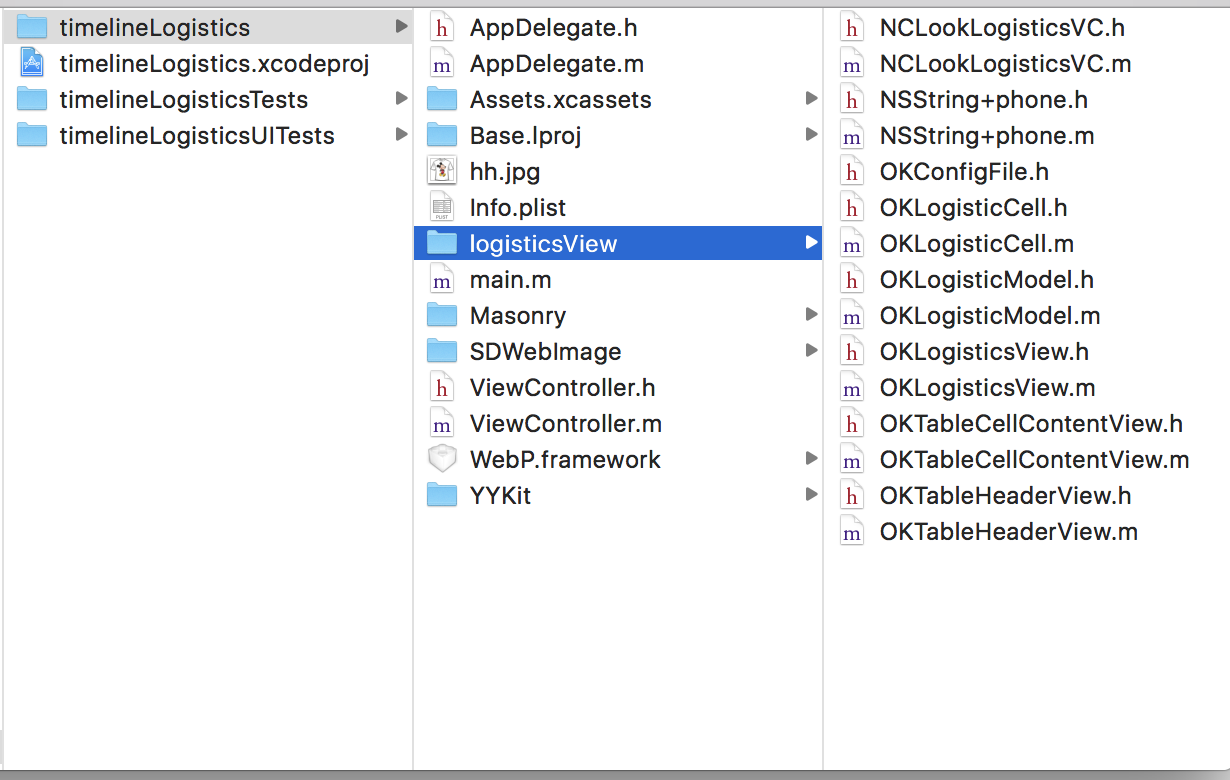
原理
1.自定义view
@interface OKLogisticsView : UIView

/**

 运单号码

 */

@property (copy, nonatomic)NSString *number;

/**

 承运公司

 */

@property (copy, nonatomic)NSString *company;

/**

 官方电话

 */

@property (copy, nonatomic)NSString *phone;

/**

 物流状态

 */

@property (nonatomic,copy) NSString * wltype;

/**

 图片url

 */

@property (nonatomic,copy) NSString * imageUrl;

@property (strong, nonatomic)NSArray *datas;

@property (nonatomic,strong) OKTableHeaderView *header ;

- (instancetype)initWithDatas:(NSArray*)array;

- (void)reloadDataWithDatas:(NSArray *)array;

@end
设置自定义view的tableView的headView为自定义headView。
在自定义view 的set方法中为headview的属性赋值
- (void)setWltype:(NSString *)wltype {

    _wltype = wltype;

    self.header.wltype = wltype;

}

-(void)setNumber:(NSString *)number {

    _number = number;

    self.header.number = number;

}

- (void)setCompany:(NSString *)company {

    _company = company;

    self.header.company = company;

}

- (void)setPhone:(NSString *)phone {

    _phone = phone;

    self.header.phone = phone;

}

- (void)setImageUrl:(NSString *)imageUrl {

    _imageUrl = imageUrl;

    self.header.imageUrl = imageUrl;

}
** 对外提供的刷新数据方法**
- (void)setDatas:(NSArray *)datas {

    if (_datas == datas) {

        _datas = datas;

    }

    [self.table reloadData];

}

- (void)reloadDataWithDatas:(NSArray *)array {

    [self.dataArray addObjectsFromArray:array];

    [self.table reloadData];

}
2.在headview的set方法中赋值
- (void)setNumber:(NSString *)number {

    _number = number;

    self.numLabel.text = [NSString stringWithFormat:@"运单编号:%@",number];

}

- (void)setCompany:(NSString *)company {

    _company = company;

    self.comLabel.text = [NSString stringWithFormat:@"承运公司:%@",company];

}

- (void)setWltype:(NSString *)wltype {

    _wltype = wltype;

    NSMutableAttributedString *wlStr = [[NSMutableAttributedString alloc]initWithString:[NSString stringWithFormat:@"物流状态:%@",wltype]];

    NSRange range = [[NSString stringWithFormat:@"物流状态:%@",wltype] rangeOfString: wltype];

    [wlStr addAttribute:NSForegroundColorAttributeName value:nckColor(0x07A628) range:range];

    self.type.attributedText = wlStr;

}
3.cell内部view为自定义view-OKTableCellContentView
在其内部实现正则匹配电话号码并进行拨打
- (void)reloadDataWithModel:(OKLogisticModel*)model {

    NSRange stringRange = NSMakeRange(0, model.dsc.length);

    //正则匹配

    NSError *error;

    NSRegularExpression *regexps = [NSRegularExpression regularExpressionWithPattern:PHONEREGULAR options:0 error:&error];

    // 转为富文本

    NSMutableAttributedString *dsc = [[NSMutableAttributedString alloc]initWithString:model.dsc];

    // NSFontAttributeName

    [dsc addAttribute:NSFontAttributeName value:[UIFont systemFontOfSize:12] range:NSMakeRange(0, model.dsc.length)];

    if (self.currented) {

        [dsc addAttribute:NSForegroundColorAttributeName value:OKRGBColor(7, 166, 40) range:NSMakeRange(0, model.dsc.length)];

    }else {

        [dsc addAttribute:NSForegroundColorAttributeName value:OKRGBColor(139, 139, 139) range:NSMakeRange(0, model.dsc.length)];

    }

    if (!error && regexps != nil) {

        [regexps enumerateMatchesInString:model.dsc options:0 range:stringRange usingBlock:^(NSTextCheckingResult * _Nullable result, NSMatchingFlags flags, BOOL * _Nonnull stop) {

            //可能为电话号码的字符串及其所在位置

            NSMutableAttributedString *actionString = [[NSMutableAttributedString alloc]initWithString:[NSString stringWithFormat:@"%@",[model.dsc substringWithRange:result.range]]];

            NSRange phoneRange = result.range;

            //这里需要判断是否是电话号码,并添加链接

            if ([NSString isMobilePhoneOrtelePhone:actionString.string]) {

                [dsc setTextHighlightRange:phoneRange

                                     color:nckColor(0x59A3E8)

                           backgroundColor:[UIColor whiteColor]

                                 tapAction:^(UIView * _Nonnull containerView, NSAttributedString * _Nonnull text, NSRange range, CGRect rect) {

                                     [self callPhoneThree:actionString.string];

                                 }];

            }

        }];

    }

    self.infoLabel.attributedText = dsc;

    self.dateLabel.text = model.date;

    [self setNeedsDisplay];

}
4.在OKTableCellContentView的drawrect方法中进行竖线绘制
- (void)drawRect:(CGRect)rect {

    // Drawing code

    CGFloat height = self.bounds.size.height;

    CGFloat cicleWith = self.currented?12:6;

    //    CGFloat shadowWith = cicleWith/3.0;

    if (self.hasUpLine) {

        UIBezierPath *topBezier = [UIBezierPath bezierPath];

        [topBezier moveToPoint:CGPointMake(ok_leftSpace/2.0, 0)];

        [topBezier addLineToPoint:CGPointMake(ok_leftSpace/2.0, height/2.0 - cicleWith/2.0 - cicleWith/6.0)];

        topBezier.lineWidth = 1.0;

        UIColor *stroke = OKRGBColor(185, 185, 185);

        [stroke set];

        [topBezier stroke];

    }

    if (self.currented) {

        UIBezierPath *cicle = [UIBezierPath bezierPathWithOvalInRect:CGRectMake(ok_leftSpace/2.0 - cicleWith/2.0, height/2.0 - cicleWith/2.0, cicleWith, cicleWith)];

        cicle.lineWidth = cicleWith/3.0;

        UIColor *cColor = OKRGBAColor(7, 166, 40, 1.0);

        [cColor set];

        [cicle fill];

        UIColor *shadowColor = OKRGBAColor(7, 166, 40, 0.5);

        [shadowColor set];

        [cicle stroke];

    } else {

        UIBezierPath *cicle = [UIBezierPath bezierPathWithOvalInRect:CGRectMake(ok_leftSpace/2.0-cicleWith/2.0, height/2.0 - cicleWith/2.0, cicleWith, cicleWith)];

        UIColor *cColor = OKRGBColor(185, 185, 185);

        [cColor set];

        [cicle fill];

        [cicle stroke];

    }

    if (self.hasDownLine) {

        UIBezierPath *downBezier = [UIBezierPath bezierPath];

        [downBezier moveToPoint:CGPointMake(ok_leftSpace/2.0, height/2.0 + cicleWith/2.0 + cicleWith/6.0)];

        [downBezier addLineToPoint:CGPointMake(ok_leftSpace/2.0, height)];

        downBezier.lineWidth = 1.0;

        UIColor *stroke = OKRGBColor(185, 185, 185);

        [stroke set];

        [downBezier stroke];

    }

}
使用
- 初始化数组
NSArray *titleArr = [NSArray arrayWithObjects:
@"[北京通州区杨庄公司锦园服务部]快件已被27号楼e站代签收",
@"[北京通州区杨庄公司]到达目的地网店,快件将很快进行派送" ,
@"[北京通州区杨庄公司]进行派件扫描;派送业务员:周志军;联系电话:13522464946",
@"[北京分拨中心]在分拨中心进行卸车扫描",
@"[浙江杭州分拨中心]在分拨中心进行称重扫描",
@"[浙江杭州下城区三里亭公司]进行揽件扫描",nil];
NSArray *timeArr = [NSArray arrayWithObjects:
@"2017-07-04 12:59:00",
@"2017-07-03 10:59:00",
@"2017-07-03 08:22:00",
@"2017-07-03 03:34:22",
@"2017-07-02 12:59:00",
@"2017-07-02 08:10:00",nil];
```
* 转为模型
``` objc
for (NSInteger i = titleArr.count-1;i>=0 ; i--)
{
OKLogisticModel * model = [[OKLogisticModel alloc]init];
model.dsc = [titleArr objectAtIndex:i];
model.date = [timeArr objectAtIndex:i];
[self.dataArry addObject:model];
}
```
* 初始化控制器
``` objc
OKLogisticsView * logis = [[OKLogisticsView alloc]initWithDatas:self.dataArry];
// 给headView赋值
logis.wltype=@"已签收";
logis.number = @"3908723967437";
logis.company = @"韵达快运";
logis.phone = @"400-821-6789";
logis.imageUrl = @"http://pic40.nipic.com/20140420/12064170_201114370112_2.jpg";
logis.frame = CGRectMake(0, 64, OKScreenWidth, OKScreenHeight-64);
[self.view addSubview:logis];
```
## 效果
iOS 物流信息时间轴
> 代码地址如下:<br>http://www.demodashi.com/demo/11958.html
> 注:本文著作权归作者,由demo大师代发,拒绝转载,转载需要作者授权iOS 物流信息时间轴的更多相关文章
- ios 物流时间轴,自动匹配电话号码,可点击拨打
http://www.code4app.com/thread-27587-1-1.html 资讯时间轴(折叠/展开) http://www.code4app.com/thread-32358-1-1. ...
- iOS最为简单时间轴(GZTimeLine)
概述 迄今为止最为简单的时间轴 :可以自定义(类似于美团的送餐信息) 详细 代码下载:http://www.demodashi.com/demo/10797.html 迄今为止 最为简单的时间轴 :可 ...
- iOS之TimeLine(时间轴)的实现
这是一个关于OC时间轴的简单实现,我认为重要的是思路. 感谢作者:Cyandev 的文章<iOS 实现时间线列表效果>给的思路.这里先附上Objective-C的代码实现,有时间再去试试S ...
- Android自定义指示器时间轴
指示器时间轴在外卖.购物类的APP里会经常用到,效果大概就像下面这样,看了网上很多文章,大都是自己绘制,太麻烦,其实通过ListView就可以实现. 在Activity关联的布局文件activit ...
- echart 时间轴、以及y轴值过大但是变化不大显示感觉不出变化的问题+弹出框拖动div事件
1.时间轴 echart 提供了一种图表,如果x轴是一个时间范围,并且是连续的,如果用传统的数据驱动会很慢,所以用时间轴的方式 function initCurve(_data){ var resul ...
- 海康、大华NVR网络硬盘录像机录像无插件全平台访问实现—录像回放时间轴功能实现方法
在之前的博文中我们有介绍方案*NVR硬件录像机web无插件播放方案(支持取特定时间段视频流)*:该片博文旨在介绍时间轴功能的实现和相关接口的调用: 时间轴样式展示: 问题分析 对于 时间轴的展示实现需 ...
- 08. Web大前端时代之:HTML5+CSS3入门系列 ~ QQ空间时间轴
Web大前端时代之:HTML5+CSS3入门系列:http://www.cnblogs.com/dunitian/p/5121725.html 大前端系列,主要就是使用CSS3.0来实现,注释我已经打 ...
- [原创]首次制作JQueryUI插件-Timeline时间轴
特点: 1. 支持多左右滚动,左右拖动. 2. 时间轴可上下两种显示方式. 3. 支持两种模式的平滑滚动/拖动. 4. 行压缩(后续版本此处可设置是否开启,上传的代码不带这个功能). 5. 支持hov ...
- SmohanTimeLine.js 酷炫的时间轴效果
展示地址 点此下载 原文出处 一.参数说明 item : '.item', //项目元素 top : 30, //与下一行的间距 pointWidth : 22, //时间点宽度 cornerWidt ...
随机推荐
- LayerDate渲染多个class出现闪现问题的解决
填写表单的时候有时候会需要添加一行表单的业务逻辑,而表单要用到LayerDate的话便不可避免的出现多个class的情况 这种情况下后面的class是无法渲染的,layerDate官网提出了解决方法: ...
- 使用Bot Service创建Bot Framework
创建Bot Service:进入至Azure控制台中,新建Bot Service,如不知道Bot Service在哪个选项中,可以先查找Bot Service再创建 在弹出的查询结果中,选择Bot S ...
- centos 命令行修改主机名
# vi /etc/sysconfig/network # 把localhost.localdomain 修改为 localhost.com # 保存退出 # vi /etc/hosts # 把loc ...
- Codeforces 626 A. Robot Sequence (8VC Venture Cup 2016-Elimination Round)
A. Robot Sequence time limit per test 2 seconds memory limit per test 256 megabytes input standa ...
- python的ConfigParser读取设置配置文件
python 读写配置文件在实际应用中具有十分强大的功能,在实际的操作中也有相当简捷的操作方案,以下的文章就是对python 读写配置文件的具体方案的介绍,望你浏览完下面的文章会有所收获. pytho ...
- HDU 1280 前m大的数【排序 / hash】
前m大的数 Time Limit: 2000/1000 MS (Java/Others) Memory Limit: 65536/32768 K (Java/Others)Total Submi ...
- POJ 3083 Children of the Candy Corn (DFS + BFS + 模拟)
题目链接:http://poj.org/problem?id=3083 题意: 这里有一个w * h的迷宫,给你入口和出口,让你分别求以下三种情况时,到达出口的步数(总步数包括入口和出口): 第一种: ...
- POJ 3692 Kindergarten(最大独立集)
[题目链接] http://poj.org/problem?id=3692 [题目大意] 男生相互之间都认识,女生相互之间也都认识, 一些男生和一些女生相互之间也认识,求找出最多的人参加派对, 他们相 ...
- 【差分约束系统】【spfa】UVALive - 4885 - Task
差分约束系统讲解看这里:http://blog.csdn.net/xuezhongfenfei/article/details/8685313 模板题,不多说.要注意的一点是!!!对于带有within ...
- 【动态规划】bzoj1649 [Usaco2006 Dec]Cow Roller Coaster
很像背包. 这种在一个数轴上进行操作的题常常需要对区间排序. f[i][j]表示距离到i时,花费为j时的权值之和. f[x[i]+l[i]][j+c[i]]=max{f[x[i]][j]+w[i]}( ...