
Elasticsearch5.X IN Windows 10 系列文章(4)
ElasticSearch版本: 5.5.1 (最新稳定版为5.5.2),由于用到IK中文分词插件,最新版本没有5.5.2 ,所以使用5.5.1
日期:2017-08-30
第四章:安装 Search Guard
由于x-pack 的 security 部分是收费的,考虑使用其他插件来替代,倾向于两款插件,一个是今天的主角 Search Guard, 另一个是readonlyrest
Search Guard 与 Elasticsearch 的版本对照表
一、停止运行elasticsearch,定位到es主目录下,执行下面命令:
.\bin\elasticsearch-plugin install -b com.floragunn:search-guard-5:5.4.2-15
执行效果如下图: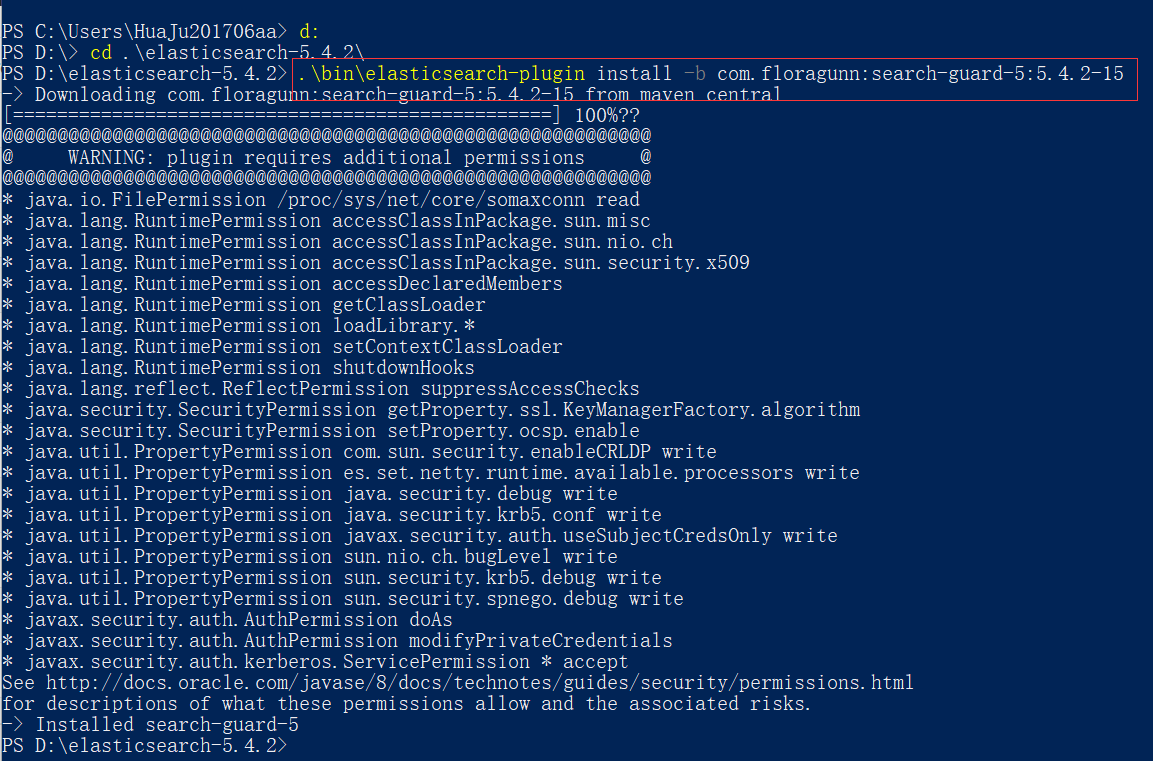
如果在服务器上没有网络,可以使用离线安装方式:
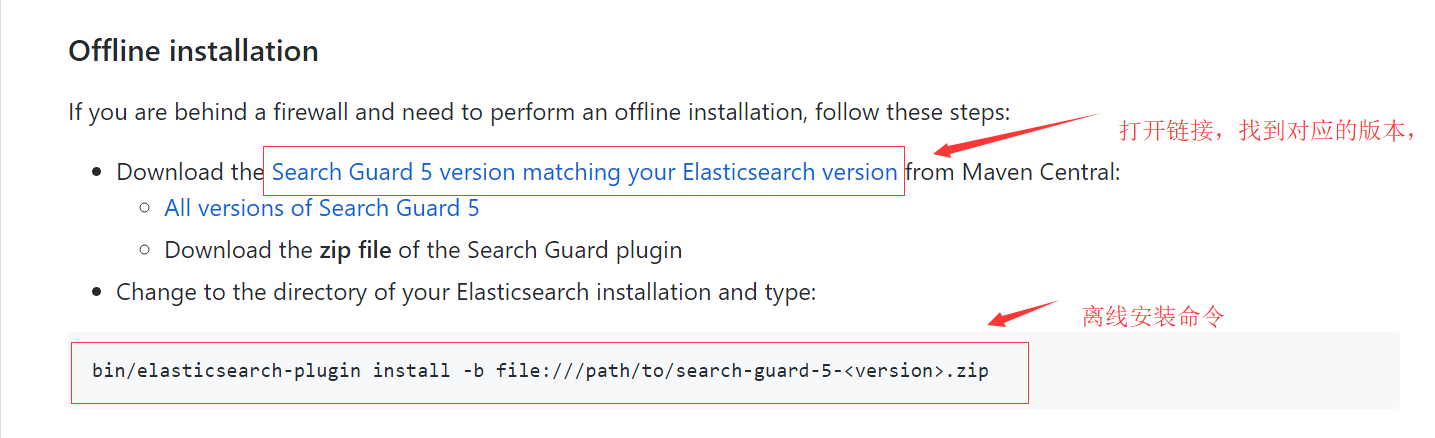
离线安装步骤:
1、下载对应版本的Search Guard,版本对照表
2、Search Guard 5 下载地址
3、search-guard-ssl 下载地址 ,后面要用到这个生成证书。
二、配置Search Guard
1、下载search-guard-ssl
git clone https://github.com/floragunncom/search-guard-ssl.git
2、切换到search guard ssl 源码目录,进入example-pki-scripts文件夹,修改example.sh文件,修改之后如下:
#!/bin/bash

OPENSSL_VER="$(openssl version)"

if [[ $OPENSSL_VER == *"0.9"* ]]; then

	echo "Your OpenSSL version is too old: $OPENSSL_VER"

	echo "Please install version 1.0.1 or later"

	exit -1

else

    echo "Your OpenSSL version is: $OPENSSL_VER"

fi

set -e

./clean.sh

./gen_root_ca.sh capass changeit

./gen_node_cert.sh 1 changeit capass

./gen_client_node_cert.sh spock changeit capass

./gen_client_node_cert.sh kirk changeit capass

./gen_client_node_cert.sh kibana changeit capass

rm -f ./*tmp*
3、生成证书:
sh example.sh
4、将example-pki-scripts文件夹中的node-1-keystore.jks和truststore.jks复制到elasticsearch的配置目录中(%ES_HOME%/config)
5、配置elasticsearch 基于 TLS 加密通讯,在 elasticsearch.yml 中增加以下内容:
searchguard.ssl.transport.keystore_filepath: node-1-keystore.jks

searchguard.ssl.transport.keystore_password: changeit

searchguard.ssl.transport.truststore_filepath: truststore.jks

searchguard.ssl.transport.truststore_password: changeit

searchguard.ssl.transport.enforce_hostname_verification: false
6、重启后访问:http://localhost:9200,发现会报错,提示没有初始化 Search Guard 索引。
7、初始化 Search Guard 索引,配置帐号,首先将example-pki-scripts文件夹中的kirk-keystore.jks和truststore.jks复制到%ES_HOME%\plugins\search-guard-5\sgconfig 文件夹中
8、在 elasticsearch.yml 中增加以下内容:
searchguard.authcz.admin_dn:

  - CN=kirk,OU=client,O=client,L=test, C=de
9、重启elasticsearch,在 \plugins\search-guard-5\ 目录打开终端,执行以下命令:
.\tools\sgadmin.bat -ts .\sgconfig\truststore.jks -tspass changeit -ks .\sgconfig\kirk-keystore.jks -kspass changeit -cd .\sgconfig\ -icl -nhnv -h 0.0.0.0
显示如下图,则执行成功:
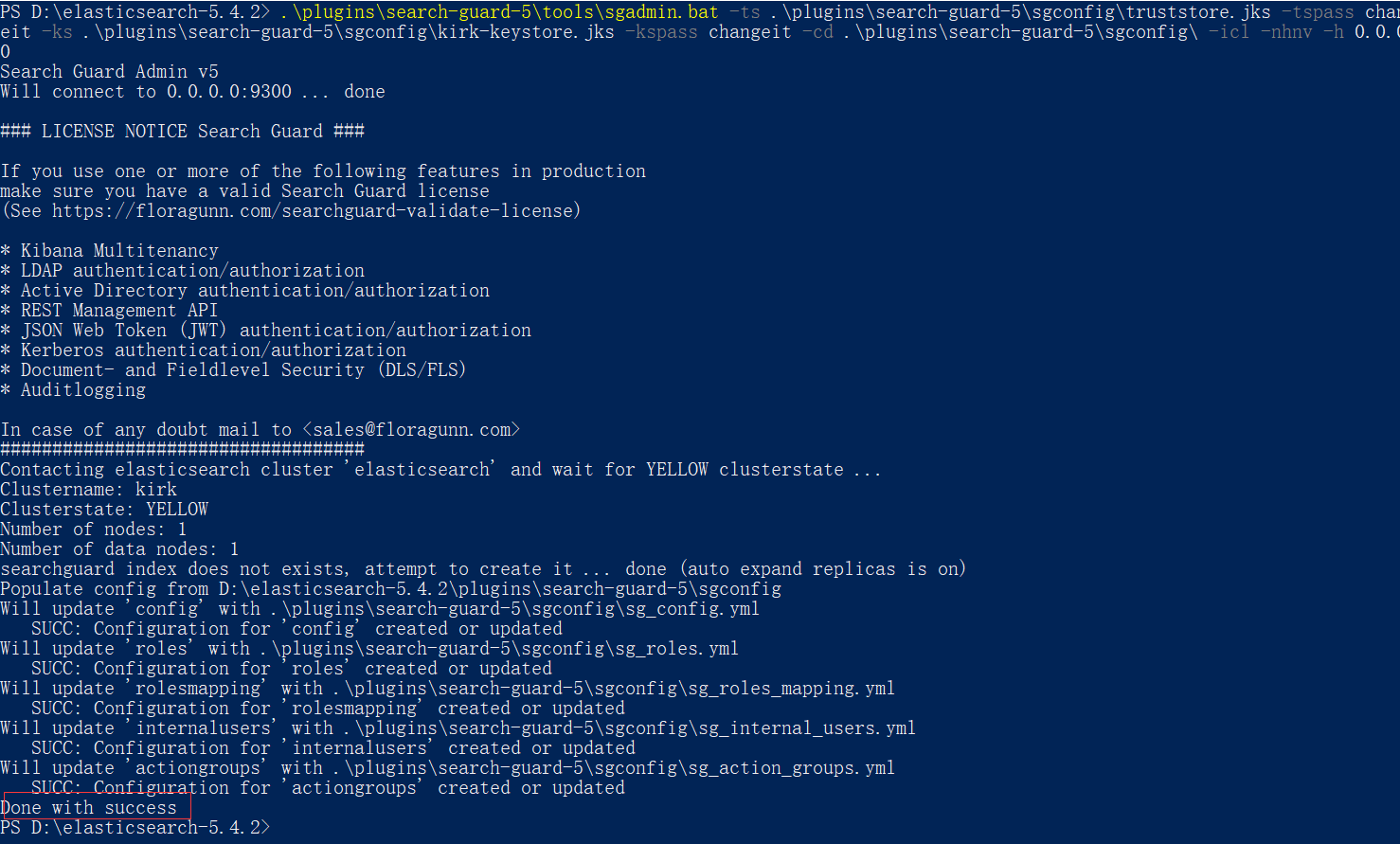
使用浏览器访问:http://localhost:9200 提示输入密码,输入默认用户: admin admin ,可登陆表示正常。
10、配置REST-API 基于https连接,在 elasticsearch.yml 中增加以下内容:
searchguard.ssl.http.enabled: true

searchguard.ssl.http.keystore_filepath: node-1-keystore.jks

searchguard.ssl.http.keystore_password: changeit

searchguard.ssl.http.truststore_filepath: truststore.jks

searchguard.ssl.http.truststore_password: changeit
重启后 ,使用浏览器访问:https://localhost:9200 提示输入密码,输入默认用户: admin admin ,可登陆表示正常
http://localhost:9200 无加密拒绝访问
参考文章:
http://m.blog.csdn.net/envinfo2012/article/details/76685818
http://blog.csdn.net/lulongzhou_llz/article/details/77099418
http://www.cnblogs.com/Orgliny/p/6168986.html
https://hacpai.com/article/1472803335867?p=1&m=0
http://www.cnblogs.com/ywcz060/p/6950404.html
http://www.cnblogs.com/shifu204/p/6376683.html
Elasticsearch5.X IN Windows 10 系列文章(4)的更多相关文章
- Elasticsearch5.X IN Windows 10 系列文章(2)
ElasticSearch版本: 5.5.1 (最新稳定版为5.5.2),由于用到IK中文分词插件,最新版本没有5.5.2 ,所以使用5.5.1 日期:2017-08-29 第二章:安装Kibana ...
- Elasticsearch5.X IN Windows 10 系列文章(1)
系统类型:windows10 64位家庭版 ElasticSearch版本: 5.5.1 (最新稳定版为5.5.2),由于用到IK中文分词插件,最新版本没有5.5.2 ,所以使用5.5.1 日期:2 ...
- Elasticsearch5.X IN Windows 10 系列文章(5)
ElasticSearch版本: 5.5.1 (最新稳定版为5.5.2),由于用到IK中文分词插件,最新版本没有5.5.2 ,所以使用5.5.1 日期:2017-08-31 第五章:Kibana 安装 ...
- Elasticsearch5.X IN Windows 10 系列文章(3)
系统类型:windows10 64位家庭版 ElasticSearch版本: 5.5.1 (最新稳定版为5.5.2),由于用到IK中文分词插件,最新版本没有5.5.2 ,所以使用5.5.1 日期:20 ...
- 不可或缺 Windows Native 系列文章索引
[源码下载] 不可或缺 Windows Native 系列文章索引 作者:webabcd 1.不可或缺 Windows Native (1) - C 语言: hello c 介绍不可或缺 Window ...
- 重新想象 Windows 8 Store Apps 系列文章索引
[源码下载][重新想象 Windows 8.1 Store Apps 系列文章] 重新想象 Windows 8 Store Apps 系列文章索引 作者:webabcd 1.重新想象 Windows ...
- 重新想象 Windows 8.1 Store Apps 系列文章索引
[源码下载] [重新想象 Windows 8 Store Apps 系列文章] 重新想象 Windows 8.1 Store Apps 系列文章索引 作者:webabcd 1.重新想象 Windows ...
- 与众不同 windows phone 8.0 & 8.1 系列文章索引
[源码下载] [与众不同 windows phone 7.5 (sdk 7.1) 系列文章索引] 与众不同 windows phone 8.0 & 8.1 系列文章索引 作者:webabcd ...
- 一步步实现windows版ijkplayer系列文章之四——windows下编译ijkplyer版ffmpeg
一步步实现windows版ijkplayer系列文章之一--Windows10平台编译ffmpeg 4.0.2,生成ffplay 一步步实现windows版ijkplayer系列文章之二--Ijkpl ...
随机推荐
- sql-server-linux 官网
https://docs.microsoft.com/en-us/sql/linux/sql-server-linux-overview
- 关于DNS,你应该知道这些
在互联网时代中,如果要问哪个应用层协议最重要的话,我想答案无疑是DNS.虽然我们每天都享受着DNS服务带来的便利, 却对它往往知之甚少.因此本文就来介绍一下DNS协议的工作流程,真正认识一下这个支撑着 ...
- Centos6.5搭建RHCS集群-实现GFS+iSCSI网络共享存储
RHCS集群配置 需要用到的各组件功能:RHCS(Red Hat Cluster Suite):能够提供高可用性.高可靠性.负载均衡.存储共享且经济廉价的集群工具集合.LUCI:是一个基于web的集群 ...
- HTC相关开发所需SDK等工具都在这里了。 【转】
OpenVR SDK https://github.com/ValveSoftware/openvr OpenVR SDK是由原本的SteamWorks SDK更新而来,新增对HTC VIVE开发者 ...
- Spark(四) -- Spark工作机制
一.应用执行机制 一个应用的生命周期即,用户提交自定义的作业之后,Spark框架进行处理的一系列过程. 在这个过程中,不同的时间段里,应用会被拆分为不同的形态来执行. 1.应用执行过程中的基本组件和形 ...
- 转:http2的资料与使用
https://imququ.com/post/http2-resource.html
- Charles的HTTPS抓包方法及原理,下载安装ssl/https证书
转自:https://zhubangbang.com/charles-https-packet-capture-method-and-principle.html 本文的Charles,适应windo ...
- hibernate 继承映射关系( SINGLE_TABLE)
三种继承映射关系. 1,SINGLE_TABLE person student teacher 在一个表中,student和teacher继承自person,通过一个Discriminato ...
- UITabBarController超强拓展
代码地址如下:http://www.demodashi.com/demo/11901.html 一.运行效果图 二.项目结构截图 三.主要API 我们主要关注的是TLTabBarController, ...
- asp.net 复习总结
1.asp.net页面上格式化时间是:<%# Eval("jsBianhao", "{0:yyyy/MM/dd}")%>