
iOS开发小技巧--自定义带有占位文字的TextView(两种方式)
自定义控件注意或框架注意:自己暴露在外面的属性,一定要重写setter,保证外界与内部的交互性
一.方案一:通过drawRect:方法将文字画到textView中,监听文字改变用的是通知中心(代理也可以监听文字改变,但是这种方式就成了自己作为自己的代理了,不推荐这种方法)发出的消息
UITextViewTextDidChangeNotification.自己监听通知.
- 对外界提供两个属性
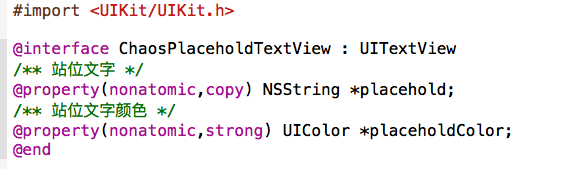
- 内部实现
 #import "ChaosPlaceholdTextView.h"

 @implementation ChaosPlaceholdTextView

 - (instancetype)initWithFrame:(CGRect)frame

 {

     if (self = [super initWithFrame:frame]) {

         [[NSNotificationCenter defaultCenter] addObserver:self selector:@selector(textChange) name:UITextViewTextDidChangeNotification object:nil];

         // 外界文字颜色不设置,默认为灰色

         self.placeholdColor = [UIColor grayColor];

     }

     return self;

 }

 - (void)dealloc

 {

     [[NSNotificationCenter defaultCenter] removeObserver:self];

 }

 - (void)textChange

 {

     [self setNeedsDisplay];

 }

 // 调用drawRect时,会将之前的图像擦除掉,重新绘制

 - (void)drawRect:(CGRect)rect {

     if ([self hasText]) return;

     rect.origin.y += ( + );

     rect.origin.x += ;

     rect.size.width -=  * rect.origin.x;

     NSMutableDictionary *attrs = [NSMutableDictionary dictionary];

     attrs[NSForegroundColorAttributeName] = self.placeholdColor;

     attrs[NSFontAttributeName] = [UIFont systemFontOfSize:];

     [self.placehold drawInRect:rect withAttributes:attrs];

 }

 // 设计框架需注意,给外界提供了属性后,一定重写出行的setter,这样既可以时时监听使用者对属性的更改,还可以跟好的与外界代码进行交互

 - (void)setPlacehold:(NSString *)placehold

 {

     _placehold = placehold;

     // 设置了站位文字后,需要重绘一遍

     [self setNeedsDisplay];

 }

 - (void)setPlaceholdColor:(UIColor *)placeholdColor

 {

     _placeholdColor = placeholdColor;

     [self setNeedsDisplay];

 }

 // 同时,也要考虑到

 - (void)setFont:(UIFont *)font

 {

     [super setFont:font];

     [self setNeedsDisplay];

 }

 - (void)setText:(NSString *)text

 {

     [super setText:text];

     [self setNeedsDisplay];

 }

 - (void)setAttributedText:(NSAttributedString *)attributedText

 {

     [super setAttributedText:attributedText];

     [self setNeedsDisplay];

 }

 @end
- 缺点:由于是画上去的,当设置了textView的alwaysBounceHorizontal属性后,不能跟随着scrollView的滑动而滑动,如下图

方案二:通过给TextView添加一个Label,也是通过监听文字改变的通知,修改label的hidden属性.
 #import "ChaosPlaceholdTextView.h"

 @interface ChaosPlaceholdTextView()

 /** 占位文字label */

 @property (nonatomic, weak) UILabel *placeholderLabel;

 @end

 @implementation ChaosPlaceholdTextView

 - (UILabel *)placeholderLabel

 {

     if (!_placeholderLabel) {

         // 添加一个用来显示占位文字的label

         UILabel *placeholderLabel = [[UILabel alloc] init];

         placeholderLabel.numberOfLines = ;

         placeholderLabel.x = ;

         placeholderLabel.y = ;

         [self addSubview:placeholderLabel];

         _placeholderLabel = placeholderLabel;

     }

     return _placeholderLabel;

 }

 - (instancetype)initWithFrame:(CGRect)frame

 {

     if (self = [super initWithFrame:frame]) {

         // 垂直方向上永远有弹簧效果

         self.alwaysBounceVertical = YES;

         // 默认字体

         self.font = [UIFont systemFontOfSize:];

         // 默认的占位文字颜色

         self.placeholderColor = [UIColor grayColor];

         // 监听文字改变

         [[NSNotificationCenter defaultCenter] addObserver:self selector:@selector(textDidChange) name:UITextViewTextDidChangeNotification object:nil];

     }

     return self;

 }

 - (void)dealloc

 {

     [[NSNotificationCenter defaultCenter] removeObserver:self];

 }

 /**

  * 监听文字改变

  */

 - (void)textDidChange

 {

     // 只要有文字, 就隐藏占位文字label

     self.placeholderLabel.hidden = self.hasText;

 }

 /**

  * 更新占位文字的尺寸

  */

 - (void)updatePlaceholderLabelSize

 {

     CGSize maxSize = CGSizeMake(ChaosScreenW -  * self.placeholderLabel.x, MAXFLOAT);

     self.placeholderLabel.size = [self.placeholder boundingRectWithSize:maxSize options:NSStringDrawingUsesLineFragmentOrigin attributes:@{NSFontAttributeName : self.font} context:nil].size;

 }

 #pragma mark - 重写setter

 - (void)setPlaceholderColor:(UIColor *)placeholderColor

 {

     _placeholderColor = placeholderColor;

     self.placeholderLabel.textColor = placeholderColor;

 }

 - (void)setPlaceholder:(NSString *)placeholder

 {

     _placeholder = [placeholder copy];

     self.placeholderLabel.text = placeholder;

     [self updatePlaceholderLabelSize];

 }

 - (void)setFont:(UIFont *)font

 {

     [super setFont:font];

     self.placeholderLabel.font = font;

     [self updatePlaceholderLabelSize];

 }

 - (void)setText:(NSString *)text

 {

     [super setText:text];

     [self textDidChange];

 }

 - (void)setAttributedText:(NSAttributedString *)attributedText

 {

     [super setAttributedText:attributedText];

     [self textDidChange];

 }

 @end
iOS开发小技巧--自定义带有占位文字的TextView(两种方式)的更多相关文章
- iOS开发小技巧 - label中的文字添加点击事件
Label中的文字添加点击事件 GitHub地址:https://github.com/lyb5834/YBAttributeTextTapAction 以前老师讲过类似的功能,自己懒得回头看了,找了 ...
- iOS开发小技巧 - UILabel添加中划线
iOS开发小技巧 遇到的问题: 给Label添加中划线,然后并没有效果 NSString *str = [NSString stringWithFormat:@"合计金额 ¥%.2f&quo ...
- iOS开发小技巧 - runtime适配字体
iOS开发小技巧 - runtime适配字体 版权声明:本文为博主原创文章,未经博主允许不得转载,有问题可联系博主Email: liuyongjiesail@icloud.com 一个iOS开发项目无 ...
- iOS开发实用技巧—Objective-C中的各种遍历(迭代)方式
iOS开发实用技巧—Objective-C中的各种遍历(迭代)方式 说明: 1)该文简短介绍在iOS开发中遍历字典.数组和集合的几种常见方式. 2)该文对应的代码可以在下面的地址获得:https:// ...
- iOS开发小技巧
1. 解析详情页(是webView)遇到的3个问题: 1.图片太大,超出屏幕范围 2.怎么在webView上面添加一行文字 3.文字太小 1.解决方法 webView.scalesPageToFit ...
- 简易封装一个带有占位文字的TextView
在实际iOS应用开发中我们经常会用到类似于下图所示的界面,即带有占位文字的文本框:
- 简单说 通过CSS实现 文字渐变色 的两种方式
说明 这次的重点就在于两个属性, background 属性 mask 属性 这两个属性分别是两种实现方式的关键. 解释 方式一 效果图 代码 <!DOCTYPE html> <ht ...
- iOS开发小技巧--TableView中headerView的循环利用,以及自定义的headerView
一.首先要搞清楚,tableView中有两种headerView,一个是tableHeaderView,另一个是headerView.前者就一个;后者根据session决定个数 headerView的 ...
- iOS开发中设置UITextField的占位文字的颜色,和光标的颜色
在iOS开发中,对于很多初学者而言,很有可能碰到需要修改UITextField的占位文字的颜色,以及当UITextField成为第一响应者后光标的颜色,那么下面小编就介绍一下修改占位文字和光标的颜色. ...
随机推荐
- HTML标签----图文详解(二)
HTML标签超详细的图文演示再来一波~~~ 如果还没有看过昨天的福利的,那可要抓紧喽,传送门:HTML标签----图文详解 本文主要内容 列表标签 表格标签 框架标签及内嵌框架<iframe&g ...
- BZOJ1864[ZJOI2006]三色二叉树[树形DP]
1864: [Zjoi2006]三色二叉树 Time Limit: 1 Sec Memory Limit: 64 MBSubmit: 773 Solved: 548[Submit][Status] ...
- 关于using关键字
使用C#访问数据库资源需要如下几步: SqlConnection con=new SqlConnection(str); try { con.Open(); //略 } catch(Exception ...
- Qt 静态编译后的exe太大, 可以这样压缩.
1. 下载PECompact 下载地址:http://download.csdn.net/download/sniper_bing/7669247 , 不行大家就去baidu搜索下载就可以了这个是绿 ...
- Java中的四套读写方案
一.字节流读写方案 FileInputStream:字节流方式读取文本文件 FileoutputStream:字节流写入硬盘 二.字符流读写方案 FileReader:字符流读取文本 FileWrit ...
- Android之监听手机软键盘弹起与关闭
背景: 在很多App开发过程中需要在Activity中监听Android设备的软键盘弹起与关闭,但是Android似乎没有提供相关的的监听API给我们来调用,本文提供了一个可行的办法来监听软键盘的弹起 ...
- 多线程进行http请求
昨天需要一个线下脚本进行单播推送,大约有1kw个用户,考虑到推送速度就临时搞了个请求线上的一个脚本 /** * 临时支持invoke单播推送 */ #include <stdio.h> # ...
- 【转】让Bootstrap 3兼容IE8浏览器
FROM : http://www.ijophy.com/2014/05/bootstrap3-compatible-with-ie8.html 最近在研究Bootstrap(官方,Github)这个 ...
- C#.NET 大型通用信息化系统集成快速开发平台 4.0 版本 - 独立子系统管理员功能实现
1: 由于公司一次性要开发10多个子系统,每个子系统都需要有相关的业务部门进行对应.2: 若用集中式管理方式,每个业务部门人员变动,权限变动时,都需要早IT信息中心进行调整,影响工作效率.及时性.3: ...
- bootstrap - typeahead自动补全插件
$('#Sale').typeahead({ ajax: { url: '@Url.Action("../Contract/GetSale")', //timeout: 300, ...