
apache activemq 学习笔记
0、activemq的概念
activemq实现了jms(java Message server),用于接收,发送,处理消息的开源消息总线。
1、activemq和jms的区别
jms说白了就是java message service,是J2EE规范的一部分,跟jdbc差不多,sun只提供了接口,由各个厂商(provider)来进行具体的实现,然后使用者使用他们的jar包进行开发使用即可。
另外在jms的API中,jms传递消息有两种方式,一种是点对点的Queue,还有一个是发布订阅的Topic方式。区别在于: 对于Queue模式,一个发布者发布消息,下面的接收者按队列顺序接收,比如发布了10个消息,两个接收者A,B那就是A,B总共会收到10条消息,不重复。 对于Topic模式,一个发布者发布消息,有两个接收者A,B来订阅,那么发布了10条消息,A,B各收到10条消息。
关于api的简单基础可以看下:http://www.javaeye.com/topic/64707,简单的参考!
2、activemq集群
activemq使用了master-slave的方式,其中分为三种模式分别是:pure master slave 、shared file system master slave、jdbc master slave。 shared file system master slave连接了activemq的默认数据库,二jdbc可以配置自己的数据库。当一个master宕机了,就会在众多slaver中选举出来一个master,接替宕机的master继续工作,以上三种方式的集群都不支持负载均衡,但可以解决单点故障的问题,以保证消息服务的可靠性。
3、activemq在什么时候用
访问第三方组件,异步处理消息,需要花费较长的时间的。
4、有哪些实现消息的开源组件,各自的优缺点以及比较
activemq相比较其他的消息机制,好在他是使用factory来管理连接,session的
5、在linux下写activemq简单的demo
可以自己写一个demo,(安装目录/home/hongye/hongyeConfig/Server/apache-activemq-5.6.0)
(1)、解压mq的文件
(2)、在bin下启动activemq:./activemq start
(3)、在activemq的官方web平台上验证是否启动成功,注意ip是指安装mq所在服务器的ip。比如http://192.168.9.107:8161/admin/queues.jsp(端口8161是管理mq的端口,端口61616是mq通信的的端口,不要搞错了)
(4)、写生产者和消费者的例子,注意url是指安装mq所在服务器的ip。端口是mq的默认端口号61616
此外可以部署mq的集群,在linux的conf目录下配置多个activemq.xml的文件。可以调整queue的大小、改变端口号和消息存在的时间和持久化到数据库的用户名密码
生产者例子-----Producer类:
 1 package com.wanghongye.activemq;

 2

 3 import javax.jms.Connection;

 4 import javax.jms.ConnectionFactory;

 5 import javax.jms.JMSException;

 6 import javax.jms.MessageProducer;

 7 import javax.jms.Queue;

 8 import javax.jms.Session;

 9 import javax.jms.TextMessage;

10

11 import org.apache.activemq.ActiveMQConnectionFactory;

12

13 public class Producer

14 {

15     private static String url = "failover://tcp://192.168.9.107:61616";

16     private static String queueName = "FirstQueue";

17

18     public static void main(String[] args) throws JMSException

19     {

20         // TODO Auto-generated method stub

21         ConnectionFactory connectionFactory = new ActiveMQConnectionFactory(url);

22         // create connection

23         Connection connection = connectionFactory.createConnection();

24         connection.start();

25

26         // create session

27         Session session = connection.createSession(false,

28             Session.AUTO_ACKNOWLEDGE);

29         Queue queue = session.createQueue(queueName);

30

31         // createproduct

32         MessageProducer messageProducer = session.createProducer(queue);

33         TextMessage textMessage = session.createTextMessage("go into queue !!");

34         messageProducer.send(textMessage);

35

36         connection.close();

37     }

38 }
消费者例子-----Consumer类:
 package com.wanghongye.activemq;

 import javax.jms.Connection;

 import javax.jms.ConnectionFactory;

 import javax.jms.JMSException;

 import javax.jms.MessageConsumer;

 import javax.jms.Queue;

 import javax.jms.Session;

 import org.apache.activemq.ActiveMQConnectionFactory;

 public class Consumer {

     private static String url = "failover://tcp://192.168.9.107:61616";

     private static String queueName = "FirstQueue";

     public static void main(String[] args) throws JMSException{

         //create connection

         ConnectionFactory connectionFactory = new ActiveMQConnectionFactory(url);

         Connection connection = connectionFactory.createConnection();

         connection.start();

         //create session

         Session session = connection.createSession(false, Session.AUTO_ACKNOWLEDGE);

         Queue destination = session.createQueue(queueName);

         //create consumer

         MessageConsumer messageConsumer = session.createConsumer(destination);

         messageConsumer.receive();

         //close

         connection.close();

     }

 }
配置文件activemq.xml:
 <!--

     Licensed to the Apache Software Foundation (ASF) under one or more

     contributor license agreements.  See the NOTICE file distributed with

     this work for additional information regarding copyright ownership.

     The ASF licenses this file to You under the Apache License, Version 2.0

     (the "License"); you may not use this file except in compliance with

     the License.  You may obtain a copy of the License at

     http://www.apache.org/licenses/LICENSE-2.0

     Unless required by applicable law or agreed to in writing, software

     distributed under the License is distributed on an "AS IS" BASIS,

     WITHOUT WARRANTIES OR CONDITIONS OF ANY KIND, either express or implied.

     See the License for the specific language governing permissions and

     limitations under the License.

 -->

 <!-- START SNIPPET: example -->

 <beans

   xmlns="http://www.springframework.org/schema/beans"

   xmlns:amq="http://activemq.apache.org/schema/core"

   xmlns:xsi="http://www.w3.org/2001/XMLSchema-instance"

   xsi:schemaLocation="http://www.springframework.org/schema/beans http://www.springframework.org/schema/beans/spring-beans-2.0.xsd

   http://activemq.apache.org/schema/core http://activemq.apache.org/schema/core/activemq-core.xsd">

     <!-- Allows us to use system properties as variables in this configuration file -->

     <bean class="org.springframework.beans.factory.config.PropertyPlaceholderConfigurer">

         <property name="locations">

             <value>file:${activemq.conf}/credentials.properties</value>

         </property>

     </bean>

     <!--

         The <broker> element is used to configure the ActiveMQ broker.

     -->

     <broker xmlns="http://activemq.apache.org/schema/core" brokerName="localhost" dataDirectory="${activemq.data}">

         <!--

             For better performances use VM cursor and small memory limit.

             For more information, see:

             http://activemq.apache.org/message-cursors.html

             Also, if your producer is "hanging", it's probably due to producer flow control.

             For more information, see:

             http://activemq.apache.org/producer-flow-control.html

         -->

         <destinationPolicy>

             <policyMap>

               <policyEntries>

                 <policyEntry topic=">" producerFlowControl="true" memoryLimit="1mb">

                   <pendingSubscriberPolicy>

                     <vmCursor />

                   </pendingSubscriberPolicy>

                 </policyEntry>

                 <policyEntry queue=">" producerFlowControl="true" memoryLimit="1mb">

                   <!-- Use VM cursor for better latency

                        For more information, see:

                        http://activemq.apache.org/message-cursors.html

                   <pendingQueuePolicy>

                     <vmQueueCursor/>

                   </pendingQueuePolicy>

                   -->

                 </policyEntry>

               </policyEntries>

             </policyMap>

         </destinationPolicy>

         <!--

             The managementContext is used to configure how ActiveMQ is exposed in

             JMX. By default, ActiveMQ uses the MBean server that is started by

             the JVM. For more information, see:

             http://activemq.apache.org/jmx.html

         -->

         <managementContext>

             <managementContext createConnector="false"/>

         </managementContext>

         <!--

             Configure message persistence for the broker. The default persistence

             mechanism is the KahaDB store (identified by the kahaDB tag).

             For more information, see:

             http://activemq.apache.org/persistence.html

         -->

         <persistenceAdapter>

             <kahaDB directory="${activemq.data}/kahadb"/>

         </persistenceAdapter>

           <!--

             The systemUsage controls the maximum amount of space the broker will

             use before slowing down producers. For more information, see:

             http://activemq.apache.org/producer-flow-control.html

             If using ActiveMQ embedded - the following limits could safely be used:

         <systemUsage>

             <systemUsage>

                 <memoryUsage>

                     <memoryUsage limit="20 mb"/>

                 </memoryUsage>

                 <storeUsage>

                     <storeUsage limit="1 gb"/>

                 </storeUsage>

                 <tempUsage>

                     <tempUsage limit="100 mb"/>

                 </tempUsage>

             </systemUsage>

         </systemUsage>

         -->

           <systemUsage>

             <systemUsage>

                 <memoryUsage>

                     <memoryUsage limit="64 mb"/>

                 </memoryUsage>

                 <storeUsage>

                     <storeUsage limit="100 gb"/>

                 </storeUsage>

                 <tempUsage>

                     <tempUsage limit="50 gb"/>

                 </tempUsage>

             </systemUsage>

         </systemUsage>

         <!--

             The transport connectors expose ActiveMQ over a given protocol to

             clients and other brokers. For more information, see:

             http://activemq.apache.org/configuring-transports.html

         -->

         <transportConnectors>

             <transportConnector name="openwire" uri="tcp://0.0.0.0:61616"/>

         </transportConnectors>

     </broker>

     <!--

         Enable web consoles, REST and Ajax APIs and demos

         Take a look at ${ACTIVEMQ_HOME}/conf/jetty.xml for more details

     -->

     <import resource="jetty.xml"/>

 </beans>

 <!-- END SNIPPET: example -->
其中transportConnectors节点可以更改mq的端口号。如果是集群的话,拷贝几个xml(activemq-broker01.xml)文件,更改端口号即可。
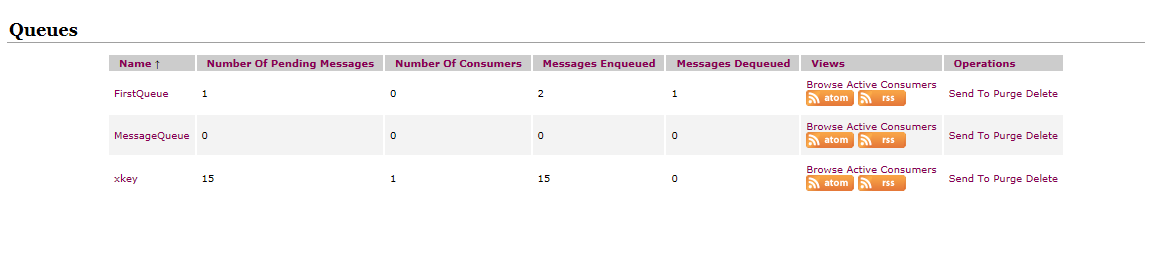
运行生产者,等待数量增加1,进队列的数量增加1
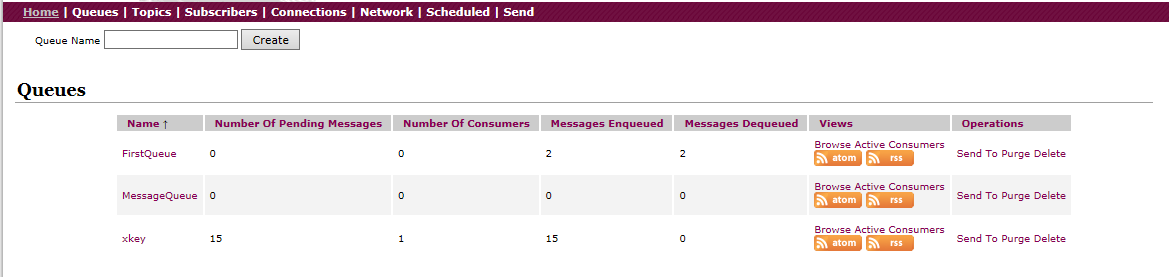
运行消费者,等待数量减1,出队列的数量增加1:
6、室内组件如何使用 activeMQ
(1)、封装了建立工厂,建立connection,建立session,关闭connection的流程,作为mqconf类
(2)、创建了生产者,初始化使用单例的模式,把消息放进queue或者topic
(3)、创建了消费者,初始化使用单例的模式,使用retrive方法消费
(4)、创建mq.xml,里面配置用户名,密码,队列名,mq服务所在的ip地址
以上的封装成为一个组件,调用即可。
7、关于 activeMQ的讨论
多翻阅官方文档。http://activemq.apache.org/clustering.html
多练习使用。
多积累常见的QA
apache activemq 学习笔记的更多相关文章
- ActiveMQ学习笔记(5)——使用Spring JMS收发消息
摘要 ActiveMQ学习笔记(四)http://my.oschina.net/xiaoxishan/blog/380446 中记录了如何使用原生的方式从ActiveMQ中收发消息.可以看出,每次 ...
- Apache Flink学习笔记
Apache Flink学习笔记 简介 大数据的计算引擎分为4代 第一代:Hadoop承载的MapReduce.它将计算分为两个阶段,分别为Map和Reduce.对于上层应用来说,就要想办法去拆分算法 ...
- Apache OFBiz 学习笔记 之 服务引擎 二
加载服务定义文件 ofbiz-component.xml:所有的服务定义文件在每个组件的ofbi-component.xml文件中 加载服务定义 例:framework/common/ofbi ...
- Apache Ignite 学习笔记(一): Ignite介绍、部署安装和REST/SQL客户端使用
Apache Ignite 介绍 Ignite是什么呢?先引用一段官网关于Ignite的描述: Ignite is memory-centric distributed database, cachi ...
- ActiveMQ 学习笔记
http://somebody-hjh.iteye.com/blog/726050 一.概述 Message,即消息.人与人之间通过消息传递信息.言语.眼神.肢体动作都可被视为消息体.当然还有我们经常 ...
- ActiveMQ学习笔记(二) JMS与Spring
上文可见,JMS Native API使用起来不是特别方便.好在Spring提供了很好的JMS支持. (一)配置ConnectionFactory 如果使用连接池的话,不要忘记activemq-poo ...
- ActiveMQ学习笔记(一) JMS概要
(一)什么是JMS jms即Java消息服务(Java Message Service)应用程序接口是一个Java平台中关于面向消息中间件(MOM)的API,用于在两个应用程序之间,或分布式系统中发送 ...
- ActiveMQ学习笔记1
1.接口 JMS 公共 点对点域 发布/订阅域 ConnectionFactory QueueConnectionFactory TopicConnectionFactory Connection Q ...
- Apache ActiveMQ 学习一
Apache ActiveMQ 5.8.0 Java 7 support (compiled with jdk6 and validated with jdk7) apache-activemq-5. ...
随机推荐
- Qt5_简易画板_详细注释
代码下载链接: http://pan.baidu.com/s/1hsc41Ek 密码: 5hdg 显示效果如下: 代码附有详细注释(代码如下) /*** * 先新建QMainWindow, 项目名称 ...
- XMPP框架下微信项目总结(3)获取点子名片信息(个人资料)更新电子名片
思路:1 调用方法,添加点子名片模块(名片信息含电话,头像,单位个人信息)等 开启ps:APP发送请求到服务器openfire,服务器返回个人信息,app存储到数据库,app界面需要数据通过数据库获取 ...
- 与你相遇好幸运,Sail.js新建模型控制器
sails generate api user 创建了user的controller和models sails generate api user index 创建了user的controller和 ...
- 【Python】 用python实现定时数据解析服务(前言)
一.Why do it? 背景:项目里上传上来的数据都是未解析的数据,而且数据量还算挺庞大的,每天上传的数据有5kw左右,如果用数据库自带的作业来解析的话,数据库会造成严重的阻塞.因此打算把数据读到外 ...
- mysql5.7.11安装配置
1.下载安装包. mysql-5.7.11版本: http://cdn.mysql.com//Downloads/MySQL-5.7/mysql-5.7.11-winx64.zip 2.拷贝到任意盘: ...
- 解决postgresql -- ERROR: 42601: query has no destination for result data
I am learning Npgsql and PostgreSQL. I am unable to define the output parameter correctly. What am I ...
- Linux环境下使用shell编写CGI(httpd)
/var/www/cgi-bin/hello.sh #!/bin/bash echo "Content-type: text/html" echo "" ech ...
- 单链表带头结点&不带头结点
转自:http://blog.csdn.net/xlf13872135090/article/details/8857632 Node *head; //声明头结点 带头结点初始化 void I ...
- loj 1426(dfs + bfs)
题目链接:http://lightoj.com/volume_showproblem.php?problem=1426 思路:首先我们预处理出每一个"*"在某一方向上最终能到达的位 ...
- 以管理身份运行cmd
搜索出cmd程序,然后右键-以管理员身份运行