
CMake入门指南
通过编写CMakeLists.txt,可以控制生成的Makefile,从而控制编译过程。CMake自动生成的Makefile不仅可以通过make命令构建项目生成目标文件,还支持安装(make install)、测试安装的程序是否能正确执行(make test,或者ctest)、生成当前平台的安装包(make package)、生成源码包(make package_source)、产生Dashboard显示数据并上传等高级功能,只要在CMakeLists.txt中简单配置,就可以完成很多复杂的功能,包括写测试用例。
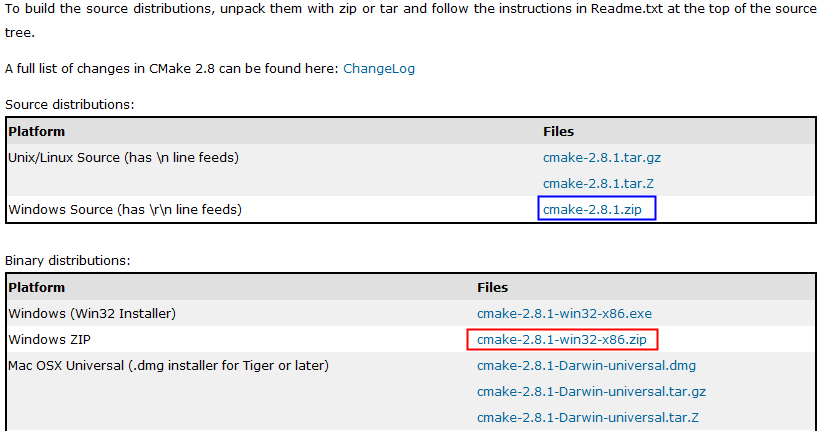
CMake使用步骤:
cmake-2.8.1-win32-x86\bin\cmake-gui.exe
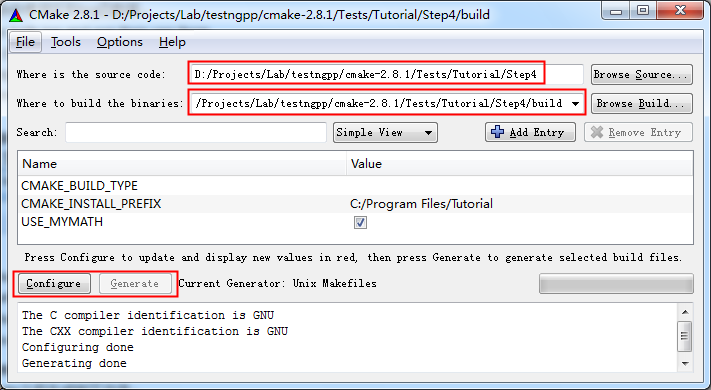
执行Configure:
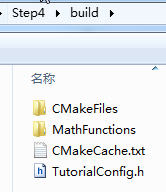
运行之后,生成了如下文件:
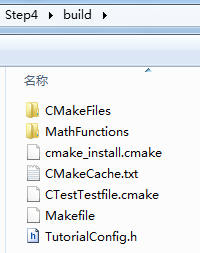
生成Makefile:
执行Generate之后生成如下文件:

http://www.cmake.org/cmake/help/cmake_tutorial.html
简单的程序编译。
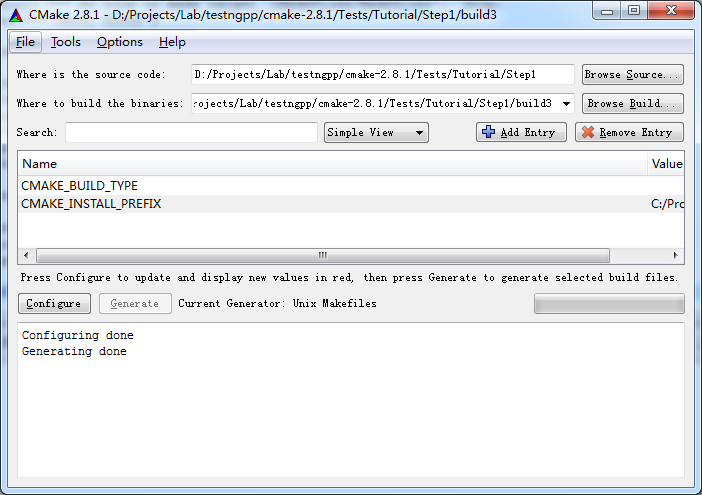
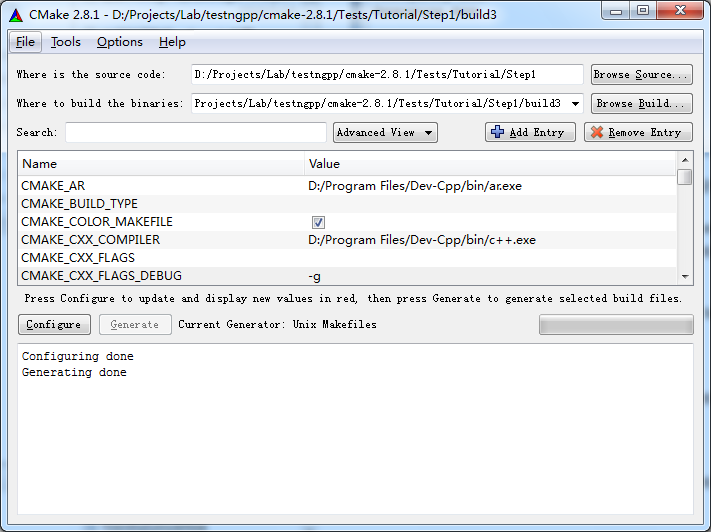
D:\Projects\Lab\testngpp\cmake-2.8.1\Tests\Tutorial\Step1\build3>make
Linking CXX executable Tutorial.exe
[100%] Built target Tutorial
D:\Projects\Lab\testngpp\cmake-2.8.1\Tests\Tutorial\Step1\build3>Tutorial.exe
Tutorial.exe Version 1.0
Usage: Tutorial.exe number
D:\Projects\Lab\testngpp\cmake-2.8.1\Tests\Tutorial\Step1\build3>Tutorial.exe 4
The square root of 4 is 2
2、Step2
把子目录编译为库,并且链接到最终的可执行文件。
add_subdirectory (MathFunctions) # 使得子目录MathFunctions也能被编译
# add the executable
add_executable (Tutorial tutorial.cxx)
target_link_libraries (Tutorial MathFunctions)
产生makefile:
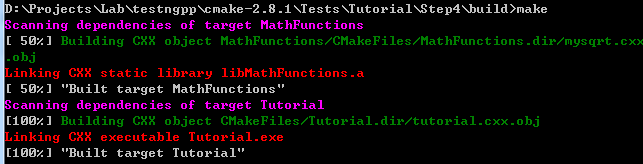
D:\Projects\Lab\testngpp\cmake-2.8.1\Tests\Tutorial\Step2\build>make
[ 50%] Building CXX object MathFunctions/CMakeFiles/MathFunctions.dir/mysqrt.cxx
.obj
Linking CXX static library libMathFunctions.a
[ 50%] Built target MathFunctions
Linking CXX executable Tutorial.exe
[100%] Built target Tutorial
3、Step3
macro (do_test arg result)
add_test (TutorialComp${arg} Tutorial ${arg})
set_tests_properties (TutorialComp${arg}
PROPERTIES PASS_REGULAR_EXPRESSION ${result})
endmacro (do_test)
do_test (25 "25 is 5")
do_test (-25 "-25 is 0")
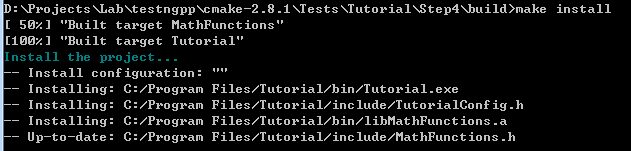
执行make install:
D:\Projects\Lab\testngpp\cmake-2.8.1\Tests\Tutorial\Step3\build>make install
[ 50%] "Built target MathFunctions"
[100%] "Built target Tutorial"
Install the project...
-- Install configuration: ""
-- Installing: C:/Program Files/Tutorial/bin/Tutorial.exe
-- Installing: C:/Program Files/Tutorial/include/TutorialConfig.h
-- Installing: C:/Program Files/Tutorial/bin/libMathFunctions.a
-- Installing: C:/Program Files/Tutorial/include/MathFunctions.h
安装结果:
C:\Program Files\Tutorial>tree /f
C:.
├─bin
│ libMathFunctions.a
│ Tutorial.exe
│
└─include
MathFunctions.h
TutorialConfig.h
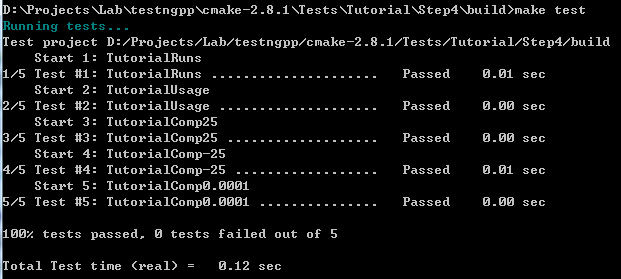
执行make test:
D:\Projects\Lab\testngpp\cmake-2.8.1\Tests\Tutorial\Step3\build>make test
Running tests...
Test project D:/Projects/Lab/testngpp/cmake-2.8.1/Tests/Tutorial/Step3/build
Start 1: TutorialRuns
1/5 Test #1: TutorialRuns ..................... Passed 0.01 sec
Start 2: TutorialComp25
2/5 Test #2: TutorialComp25 ................... Passed 0.01 sec
Start 3: TutorialNegative
3/5 Test #3: TutorialNegative ................. Passed 0.01 sec
Start 4: TutorialSmall
4/5 Test #4: TutorialSmall .................... Passed 0.00 sec
Start 5: TutorialUsage
5/5 Test #5: TutorialUsage .................... Passed 0.00 sec
修改一个测试用例,让它不过:
修改顶层CMakeLists.txt,然后重新Configure和Generate,然后make test即可看到结果。
D:\Projects\Lab\testngpp\cmake-2.8.1\Tests\Tutorial\Step3\build>make test
Running tests...
Test project D:/Projects/Lab/testngpp/cmake-2.8.1/Tests/Tutorial/Step3/build
Start 1: TutorialRuns
1/5 Test #1: TutorialRuns ..................... Passed 0.01 sec
Start 2: TutorialComp25
2/5 Test #2: TutorialComp25 ...................***Failed Required regular expre
ssion not found.Regex=[25 is 3
] 0.01 sec
Start 3: TutorialNegative
3/5 Test #3: TutorialNegative ................. Passed 0.01 sec
Start 4: TutorialSmall
4/5 Test #4: TutorialSmall .................... Passed 0.01 sec
Start 5: TutorialUsage
5/5 Test #5: TutorialUsage .................... Passed 0.01 sec
2 - TutorialComp25 (Failed)
Errors while running CTest
make: *** [test] Error 8
4、Step4
检查方法:
# does this system provide the log and exp functions?
include (CheckFunctionExists.cmake)
check_function_exists (log HAVE_LOG)
check_function_exists (exp HAVE_EXP)
(2)修改.in文件,定义宏。(修改TutorialConfig.h.in,cmake执行中会把宏定义为合适的值,生成TurorialConfig.h,供编译时使用)
// does the platform provide exp and log functions?
#cmakedefine HAVE_LOG
#cmakedefine HAVE_EXP
#if defined (HAVE_LOG) && defined (HAVE_EXP)
result = exp(log(x)*0.5);
#else // otherwise use an iterative approach
D:\Projects\Lab\testngpp\cmake-2.8.1\Tests\Tutorial\Step5\build>make
Scanning dependencies of target MakeTable
[ 25%] Building CXX object MathFunctions/CMakeFiles/MakeTable.dir/MakeTable.cxx.
obj
Linking CXX executable MakeTable.exe
[ 25%] "Built target MakeTable"
[ 50%] Generating Table.h
'.' 不是内部或外部命令,也不是可运行的程序
或批处理文件。
make[2]: *** [MathFunctions/Table.h] Error 1
make[1]: *** [MathFunctions/CMakeFiles/MathFunctions.dir/all] Error 2
make: *** [all] Error 2
问题分析:
MakeTable: cmake_check_build_system
$(MAKE) -f CMakeFiles/Makefile2 MakeTable
.PHONY : MakeTable
再看Makefile2文件,找到出错时正在编译的目标。
MathFunctions/CMakeFiles/MakeTable.dir/all:
$(MAKE) -f MathFunctions/CMakeFiles/MakeTable.dir/build.make MathFunctions/CMakeFiles/MakeTable.dir/depend
$(MAKE) -f MathFunctions/CMakeFiles/MakeTable.dir/build.make MathFunctions/CMakeFiles/MakeTable.dir/build
$(CMAKE_COMMAND) -E cmake_progress_report D:/Projects/Lab/testngpp/cmake-2.8.1/Tests/Tutorial/Step5/build/CMakeFiles 1
@echo "Built target MakeTable"
.PHONY : MathFunctions/CMakeFiles/MakeTable.dir/all
Make规则的执行顺序是按照命令的先后顺序:
echo "First line."
echo "Second line."
那么make结果:
D:\Users\Desktop>make
echo "First line."
First line.
echo "Second line."
Second line.
D:\Projects\Lab\testngpp\cmake-2.8.1\Tests\Tutorial\Step6\build>make package
[ 50%] "Built target MathFunctions"
[100%] "Built target Tutorial"
Run CPack packaging tool...
CPack Error: Cannot find NSIS registry value. This is usually caused by NSIS not
being installed. Please install NSIS from http://nsis.sourceforge.net
CPack Error: Cannot initialize the generator NSIS
make: *** [package] Error 1
D:\Projects\Lab\testngpp\cmake-2.8.1\Tests\Tutorial\Step6\build>make package
[ 50%] "Built target MathFunctions"
[100%] "Built target Tutorial"
Run CPack packaging tool...
CPack: Create package using NSIS
CPack: Install projects
CPack: - Run preinstall target for: Tutorial
CPack: - Install project: Tutorial
CPack: Compress package
CPack: Finalize package
CPack: Package D:/Projects/Lab/testngpp/cmake-2.8.1/Tests/Tutorial/Step6/build/T
utorial-1.0.1-win32.exe generated.

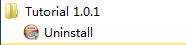
D:\Projects\Lab\testngpp\cmake-2.8.1\Tests\Tutorial\Step6\build>make package_sou
rce
Run CPack packaging tool for source...
CPack Error: Cannot find a suitable ZIP program
CPack Error: Cannot initialize the generator ZIP
make: *** [package_source] Error 1
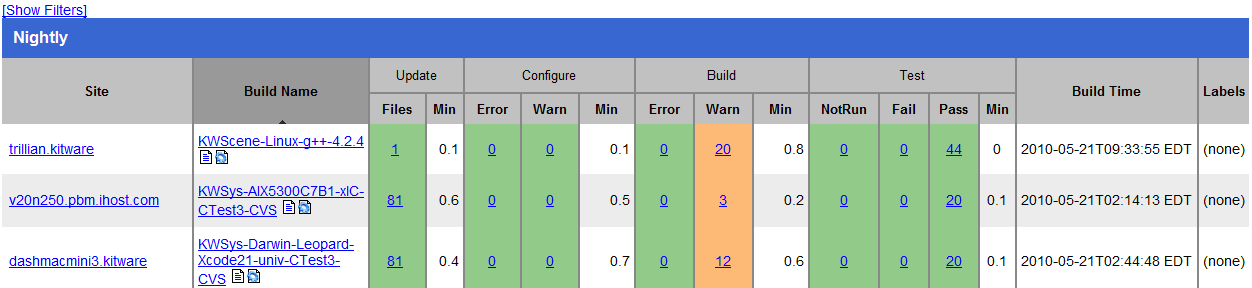

ental
Site: JELLY-PC2
Build name: Win32-make
Create new tag: 20100521-1833 - Experimental
Configure project
Each . represents 1024 bytes of output
. Size of output: 0K
Build project
Each symbol represents 1024 bytes of output.
'!' represents an error and '*' a warning.
. Size of output: 0K
0 Compiler errors
0 Compiler warnings
Test project D:/Projects/Lab/testngpp/cmake-2.8.1/Tests/Tutorial/Step7/build
Start 1: TutorialRuns
1/9 Test #1: TutorialRuns ..................... Passed 0.01 sec
Start 2: TutorialUsage
2/9 Test #2: TutorialUsage .................... Passed 0.01 sec
Start 3: TutorialComp4
3/9 Test #3: TutorialComp4 .................... Passed 0.01 sec
Start 4: TutorialComp9
4/9 Test #4: TutorialComp9 .................... Passed 0.01 sec
Start 5: TutorialComp5
5/9 Test #5: TutorialComp5 .................... Passed 0.01 sec
Start 6: TutorialComp7
6/9 Test #6: TutorialComp7 .................... Passed 0.01 sec
Start 7: TutorialComp25
7/9 Test #7: TutorialComp25 ................... Passed 0.01 sec
Start 8: TutorialComp-25
8/9 Test #8: TutorialComp-25 .................. Passed 0.01 sec
Start 9: TutorialComp0.0001
9/9 Test #9: TutorialComp0.0001 ............... Passed 0.01 sec
100% tests passed, 0 tests failed out of 9
Total Test time (real) = 0.19 sec
Performing coverage
Cannot find any coverage files. Ignoring Coverage request.
Submit files (using http)
Using HTTP submit method
Drop site:http://
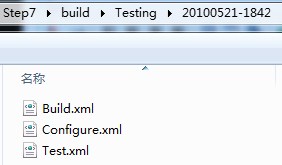
Error when uploading file: D:/Projects/Lab/testngpp/cmake-2.8.1/Tests/Tutoria
l/Step7/build/Testing/20100521-1833/Build.xml
Error message was: couldn't connect to host
Problems when submitting via HTTP
Errors while running CTest
CMake入门指南的更多相关文章
- CMake入门指南-编译教程
CMake是一个比make更高级的编译配置工具,它可以根据不同平台.不同的编译器,生成相应的Makefile或者vcproj项目.通过编写CMakeLists.txt,可以控制生成的Makefile, ...
- Web API 入门指南 - 闲话安全
Web API入门指南有些朋友回复问了些安全方面的问题,安全方面可以写的东西实在太多了,这里尽量围绕着Web API的安全性来展开,介绍一些安全的基本概念,常见安全隐患.相关的防御技巧以及Web AP ...
- Vue.js 入门指南之“前传”(含sublime text 3 配置)
题记:关注Vue.js 很久了,但就是没有动手写过一行代码,今天准备入手,却发现自己比菜鸟还菜,于是四方寻找大牛指点,才终于找到了入门的“入门”,就算是“入门指南”的“前传”吧.此文献给跟我一样“白痴 ...
- yii2实战教程之新手入门指南-简单博客管理系统
作者:白狼 出处:http://www.manks.top/document/easy_blog_manage_system.html 本文版权归作者,欢迎转载,但未经作者同意必须保留此段声明,且在文 ...
- 【翻译】Fluent NHibernate介绍和入门指南
英文原文地址:https://github.com/jagregory/fluent-nhibernate/wiki/Getting-started 翻译原文地址:http://www.cnblogs ...
- ASP.NET MVC 5 入门指南汇总
经过前一段时间的翻译和编辑,我们陆续发出12篇ASP.NET MVC 5的入门文章.其中大部分翻译自ASP.NET MVC 5 官方教程,由于本系列文章言简意赅,篇幅适中,从一个web网站示例开始讲解 ...
- 一起学微软Power BI系列-官方文档-入门指南(1)Power BI初步介绍
我们在前一篇文章微软新神器-Power BI,一个简单易用,还用得起的BI产品中,我们初步介绍了Power BI的基本知识.由于Power BI是去年开始微软新发布的一个产品,虽然已经可以企业级应用, ...
- 一起学微软Power BI系列-官方文档-入门指南(2)获取源数据
我们在文章: 一起学微软Power BI系列-官方文档-入门指南(1)Power BI初步介绍中,我们介绍了官方入门文档的第一章.今天继续给大家介绍官方文档中,如何获取数据源的相关内容.虽然是英文,但 ...
- 一起学微软Power BI系列-官方文档-入门指南(3)Power BI建模
我们前2篇文章:一起学微软Power BI系列-官方文档-入门指南(1)Power BI初步介绍 和一起学微软Power BI系列-官方文档-入门指南(2)获取源数据 中,我们介绍了官方入门文档与获取 ...
随机推荐
- [用UpdateLayeredWindow实现任意异形窗口]
前面提到,我们可以用SetWindowRgn或SetLayeredWindowAttributes实现不规则以及半透明的效果 对于SetWindowRgn,它通过一个Rgn来设置区域,这个Rgn一般可 ...
- poj 2051 Argus(优先队列)
题目链接: http://poj.org/problem?id=2051 思路分析: 优先级问题,使用优先队列求解:当执行某个任务后,再增加一个任务到队列中, 该任务的优先级为执行任务的时间加上其时间 ...
- JAVA中List、Map、Set的区别与选用
类层次关系如下: Collection ├List│├LinkedList│├ArrayList│└Vector│ └Stack└SetMap├Hashtable├HashMap └WeakHashM ...
- HDU 1796 容斥原理 How many integers can you find
题目连接 http://acm.hdu.edu.cn/showproblem.php?pid=1796 处男容斥原理 纪念一下 TMD看了好久才明白DFS... 先贴代码后解释 #includ ...
- block 解析 - 成员变量
回顾 在 上一篇 中我们讲了截获变量特性,对于局部变量,变量不加__block修饰符,在block内部是无法修改变量的值.而且 对值类型的修改,如果block初始化后,无法同步到block内部 对于指 ...
- js 精美倒计时
精美倒计时*{ padding:0; margin:0;}.colockbox{width:250px;height:30px;background:url(/jscss/demoimg/201312 ...
- [LeetCode]题解(python):009-Palindrome Number
题目来源: https://leetcode.com/problems/palindrome-number/ 题意分析: 这题是要判断一个int是否一个回文数,要求不能申请额外的空间. 题目思路: 这 ...
- Controller.RedirectToAction 方法
此成员被重载.有关此成员的完整信息,包括语法.用法和示例,请单击重载列表中的名称.
- 一个ShellExecute的超全说明(www.phidels.com这个网站很多内容)
I. Introduction / Déclaration ShellExecute fait partie des innombrables fonctions de l'API Windows ; ...
- MFC内部结构剖析
//////////////////////////////////////////////////////////////////////////////////////////MFC程序的执行顺序 ...