
客户端持久化解决方案:indexedDB
客户端持久化解决方案:indexedDB
indexedDB适合大量的结构化的数据存储;打开数据库和获取数据对象都是异步的;
需要开启事务,访问的objectStore都要是在开启的事务中。
数据库结构: db->transaction->objectStore->data
Web SQL Database实际上已经被废弃,而HTML5支持的本地存储实际上变成了 Web Storage(Local Storage和Session Storage)与 IndexedDB。
Web Storage使用简单字符串键值对在本地存储数据,方便灵活,但是对于大量结构化数据存储力不从心,IndexedDB是为了能够在客户端存储大量的结构化数据,并且使用索引高效检索的API。
indexedDB最显著的特点: 异步API
在IndexedDB大部分操作(如:打开数据库和获取数据)并不是同步的,如:
var request=window.indexedDB.open('testDB');
这条指令并不会返回一个DB对象的句柄,我们得到的是一个IDBOpenDBRequest对象,而我们希望得到的DB对象在IDBOpenDBRequest.result属性中.
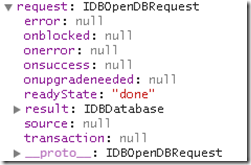
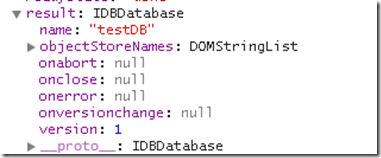
indexedDB的常用操作
创建/打开数据库
function openDB (name) {

    var idbRequest=window.indexedDB.open(name);

    idbRequest.onerror=function(e){

        console.log('OPen Error!');

    };

    idbRequest.onsuccess=function(e){

        var db=e.target.result;

        console.log('db: %o', db);

    };

}

openDB(dbName);
除了onerror和onsuccess,IDBOpenDBRequest还有一个类似回调函数句柄 onupgradeneeded。这个句柄在我们请求打开的数据库的版本号和已经存在的数据库版本号不一致的时候调用。
// indexedDB.open(dbName, version);

function openDB (name, version) {

    version = version || 1;

    //打开或创建数据库

    var idbRequest = window.indexedDB.open(name, version);

    idbRequest.onerror = function(e){

        console.warn('error: %s', e.currentTarget.error.message);

    };

    idbRequest.onsuccess = function(e){

        db = e.target.result; //这里才是 indexedDB对象

        console.log('idbRequest === e.target: %o', idbRequest === e.target);

        console.log('db: %o, idbRequest: %o', db, idbRequest);

    };

    // 注意: 只能请求>=当前数据库版本号的版本

    //  大于当前版本号, 则触发 onupgradeneeded,

    //  小于当前版本号,则触发 onerror

    idbRequest.onupgradeneeded = function(e){

        console.log('DB version change to ' + version);

        var db = e.target.result;

        console.log('onupgradeneeded: db->', db);

    };

}
删除数据库
window.indexedDB.deleteDatabase(dbName);
关闭数据库
db.onclose = function(){

    //do sth..

};

db.close();
创建 objectStore
有了数据库后我们自然希望创建一个表用来存储数据,但indexedDB中没有表的概念,而是叫 objectStore ,一个数据库中可以包含多个objectStore,objectStore是一个灵活的数据结构,可以存放多种类型数据。也就是说一个objectStore相当于一张表,里面存储的每条数据和一个键相关联。
我们可以使用每条记录中的某个指定字段作为键值(keyPath 如: {keyPath: 'id'} ),也可以使用自动生成的递增数字作为键值(keyGenerator 如: {autoincrement: true} kk:很像mysql autoincrement字段),也可以不指定。
| 键类型 | 存储数据 |
|---|---|
| 不使用 | 任意值,但是每添加一条数据的时候,需指定键参数 |
| keyPath | 对象,eg: {keyPath: 'id'} |
| keyGenerator | 任意值 eg: {autoincrement: true} |
| keyPath and KeyGenerator 都使用 | 对象,如果对象中有keyPath指定的属性则不生成新的键值,如果没有自动生成递增键值,填充keyPath指定的属性 |
事务
在对新数据库做任何事情之前,需要开始一个事务。事务中需要指定该事务跨越哪些 objectStore.
事务具有三种模式:
只读:read,不能修改数据库数据,可以并发执行
读写:readwrite,可以进行读写操作
版本变更:verionchange
//打开一个事务,使用students 和teacher objectStore
var transaction=db.transaction([students','taecher']);
//获取students objectStore
var objectStore=transaction.objectStore('students');//创建objectStore
db.createObjectStore(storeName, keyPath);
因为对新数据的操作都需要在transaction中进行,而transaction又要求指定objectStore,所以我们只能在创建数据库的时候初始化objectStore以供后面使用,这正是onupgradeneeded的一个重要作用。
function openDB (name,version) {

    var version=version || 1;

    var idbRequest=window.indexedDB.open(name,version);

    idbRequest.onerror=function(e){

        console.log(e.currentTarget.error.message);

    };

    idbRequest.onsuccess=function(e){

        myDB.db=e.target.result;

    };

    idbRequest.onupgradeneeded=function(e){

        var db=e.target.result;

        if(!db.objectStoreNames.contains('students')){

            //db.createObjectStore('students',{autoIncrement: true});//keyGenerator

            db.createObjectStore('students',{keyPath:"id"});

        }

        console.log('DB version changed to '+version);

    };

}
删除objectStore
db.deleteObjectStore(storeName); //注意:需在onupgradeneeded钩子中执行
保存数据到objectStore
function saveData (dbName, version, storeName, data) {

    var idbRequest = indexedDB.open(dbName, version);

    idbRequest.onsuccess = function (e) {

        var db = idbRequest.result;

        var transaction = db.transaction(storeName, 'readwrite');//需先创建事务

        var store = transaction.objectStore(storeName); //访问事务中的objectStore

        data.forEach(function (item) {

            store.add(item);//保存数据

        });

        console.log('save data done..');

    }

}
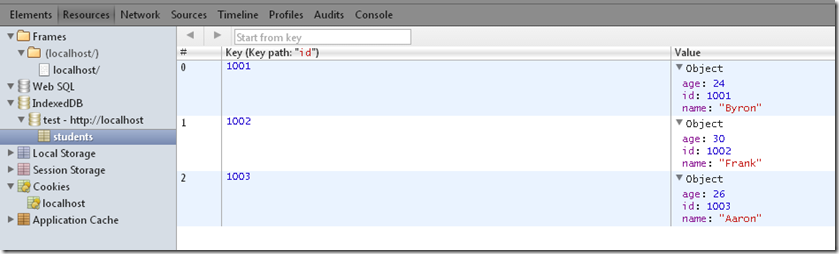
查找数据
function getDataByKey(db,storeName,key){

    var transaction=db.transaction(storeName,'readwrite');

    var store=transaction.objectStore(storeName);

    var dataRequest=store.get(key);

    dataRequest.onsuccess=function(e){//异步的

        var student=e.target.result;

        console.log(student.name);

    };

}
更新数据
可以调用objectStore的put方法更新数据,会自动替换键值相同的记录,达到更新目的,没有相同的则添加。
function updateDataByKey(db,storeName,student){

    var transaction=db.transaction(storeName,'readwrite');

    var store=transaction.objectStore(storeName);

    store.put(student);

}
删除数据
function deleteDataByKey(db,storeName,key){

    var transaction=db.transaction(storeName,'readwrite');

    var store=transaction.objectStore(storeName);

    store.delete(key);

}
清空数据
function clearObjectStore(db,storeName){

    var transaction=db.transaction(storeName,'readwrite');

    var store=transaction.objectStore(storeName);

    store.clear();

}
indexedDB的索引
熟悉数据库的同学都知道索引的一个好处就是可以迅速定位数据,提高搜索速度,在indexedDB中有两种索引,一种是自增长的int值,一种是keyPath:自己指定索引列,我们重点来看看keyPath方式的索引使用.
创建索引
我们可以在db.createObjectStore(storeName, keyPath)时用 store.createIndex(indexName, key, opts) 来指明索引。
function openDB (name,version) {

    var version=version || 1;

    var request=window.indexedDB.open(name,version);

    request.onerror=function(e){

        console.log(e.currentTarget.error.message);

    };

    request.onsuccess=function(e){

        myDB.db=e.target.result;

    };

    request.onupgradeneeded=function(e){

        var db=e.target.result;

        if(!db.objectStoreNames.contains('students')){

            var store=db.createObjectStore('students',{keyPath: 'id'});

            //在students 上创建了两个索引

            store.createIndex('nameIndex','name',{unique:true});

            store.createIndex('ageIndex','age',{unique:false});

        }

        console.log('DB version changed to '+version);

    };

}
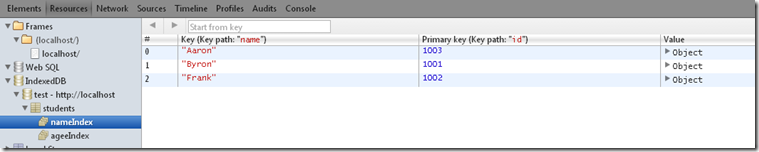
利用索引快速获取数据,name的索引是唯一的没问题,但是对于age索引只会取到第一个匹配值,要想得到所有age符合条件的值就需要使用游标了
function getDataByIndex(db,storeName){

    var transaction=db.transaction(storeName);

    var store=transaction.objectStore(storeName);

    var index = store.index("nameIndex");//获取索引

    index.get('Byron').onsuccess=function(e){//通过索引获取数据

        var student=e.target.result;

        console.log(student.id);

    }

}
游标
在indexedDB中使用索引和游标是分不开的,对数据库熟悉的同学很好理解游标是什么东东,有了数据库objectStore的游标,我们就可以利用游标遍历objectStore了。
objectStore.openCursor(); //打开游标

function fetchStoreByCursor(db,storeName){

    var transaction=db.transaction(storeName);

    var store=transaction.objectStore(storeName);

    var request=store.openCursor();

    request.onsuccess=function(e){

        var cursor=e.target.result;

        if(cursor){

            console.log(cursor.key);

            var currentStudent=cursor.value;

            console.log(currentStudent.name);

            cursor.continue();

        }

    };

}
index与游标结合
要想获取age为26的student,可以结合游标使用索引
function getMultipleData(db,storeName){

    var transaction=db.transaction(storeName);

    var store=transaction.objectStore(storeName);

    var index = store.index("ageIndex");

    var request=index.openCursor(IDBKeyRange.only(26))

    request.onsuccess=function(e){

        var cursor=e.target.result;

        if(cursor){

            var student=cursor.value;

            console.log(student.id);

            cursor.continue();

        }

    }

}
这样我们可是使用索引打开一个游标,在成功的句柄内获得游标遍历age为26的student,也可以通过index.openKeyCursor()方法只获取每个对象的key值。
指定游标范围
index.openCursor()/index.openKeyCursor() 方法在不传递参数的时候会获取objectStore所有记录,像上面例子一样我们可以对搜索进行筛选
可以使用 IDBKeyRange 限制游标中值的范围,把它作为第一个参数传给 openCursor() 或是 openKeyCursor()
IDBKeyRange.only(value):只获取指定数据
IDBKeyRange.lowerBound(value,isOpen):获取最小是value的数据,第二个参数用来指示是否排除value值本身,也就是数学中的是否是开区间
IDBKeyRange.upperBound(value,isOpen):和上面类似,用于获取最大值是value的数据
IDBKeyRange.bound(value1,value2,isOpen1,isOpen2):不用解释了吧
// 获取名字首字母在B-E的student
function getMultipleData(db,storeName){
var transaction=db.transaction(storeName);
var store=transaction.objectStore(storeName);
var index = store.index("nameIndex");
var request=index.openCursor(IDBKeyRange.bound('B','F',false, true ));
request.onsuccess=function(e){
var cursor=e.target.result;
if(cursor){
var student=cursor.value;
console.log(student.name);
cursor.continue();
}
}
}
有了游标和索引才能真正发挥indexedDB威力
客户端持久化解决方案:indexedDB的更多相关文章
- 客户端持久化解决方案: Web SQL
客户端持久化解决方案: Web SQL Web SQL 提供了一组使用 SQL 操作客户端数据库的 APIs, 不是 HTML5 规范的一部分,是一个独立的规范. 核心方法 openDatabase: ...
- 客户端持久化数据库---indexedDB使用
_ 阅读目录 一:什么是indexedDB数据库? 二:IndexedDB数据库操作 2.1 打开或创建数据库 2.2 创建对象仓库(或叫创建表) 2.3 创建索引 2.4 新增数据 2.5 读取数据 ...
- 客户端数据持久化解决方案: localStorage
客户端数据持久化解决方案: localStorage localStorage主要用来替代cookie,解决cookie读写困难.容量有限的问题. localStorage有以下几个特点 localS ...
- web API简介(四):客户端储存之IndexedDB API
概述 前篇:web API简介(三):客户端储存之Web Storage API 客户端储存从某一方面来说和动态网站差不多.动态网站是用服务端来储存数据,而客户端储存是用客户端来储存数据. Index ...
- Spring Quartz 持久化解决方案
Quartz是实现了序列化接口的,包括接口,所以可以使用标准方式序列化到数据库. 而Spring2.5.6在集成Quartz时却未能考虑持久化问题. Spring对JobDetail进行了封装,却未实 ...
- Web数据持久化存储IndexedDB(不常用)
IndexedDB是在浏览器中保存结构化数据的一种数据库,为了替换WebSQL(标准已废弃,但被广泛支持)而出现.IndexedDB使用NoSQL的形式来操作数据库,保存和读取是JavaScript对 ...
- HT for Web嵌入QtWebKit的客户端解决方案
HTML5已经足够强大,但很多应用还是需要独立桌面客户端的解决方案,毕竟能操作本地文件等功能还是很多工具类软件短期内无法完全采用云方案替代. 最近Adobe发布的http://brackets.io也 ...
- JavaScript+IndexedDB实现留言板:客户端存储数据
之前看到贴友有问:用js怎么实现留言板效果.当时也写了一个,但是没有实现数据存储:http://www.ido321.com/591.html 现在将之前的改写一下,原来的HTML布局不变,为了防止G ...
- 使用IndexedDB缓存给WebGL三维程序加速
前言 使用webgl开发三维应用的时候,经常会发现三维场景加载比较慢,往往需要等待挺长时间,这样用户的体验就很不友好. 造成加载慢的原因,主要是三维应用涉及到的资源文件会特别多,这些资源文件主要是模型 ...
随机推荐
- PHP返回JSON和XML类
<?php class Reponse{ //private $result = array('code'=null,'message'=null,'data'=>null); /** * ...
- uva 10304 - Optimal Binary Search Tree 区间dp
题目链接 给n个数, 这n个数的值是从小到大的, 给出个n个数的出现次数. 然后用他们组成一个bst.访问每一个数的代价是这个点的深度*这个点访问的次数. 问你代价最小值是多少. 区间dp的时候, 如 ...
- cocos2d-x中的Tiled地图
cocos2d-x中的瓦片地图是通过tiledMap软件制作的,存档格式是.tmx格式.此软件的使用步骤简单总结如下: (1)制作瓦片地图 1 打开软件,软件界面如下图. 2. 新建地图(文件-> ...
- ASP.NET 短路由配置
1. 首先在项目新建文件叫App_Code或者App_Start 在文件中新建WebFromRouteHandler.cs 文件. WebFromRouteHandler中的代码如下, public ...
- 做为一个Java程序员,你需要哪些傍身的技能?
最近总有些断断续续的思考,想想从我入行以来,我到底学会了什么,做成过什么,以后要做什么,如何提升自己······· 工作3年了,常听人说3年,5年,10年是程序员的坎,每过一个都会有新的想法,新的改变 ...
- 【python】中文的输出,打印,文件编码问题解决方法
直接在python中输入中文的字符串会报编译错误SyntaxError: Non-ASCII character,因为python文件默认编码方式是ASCII.如果想要打印中文字符,有两种方式: 1. ...
- NDEF-NFC数据交换格式
为实现NFC标签.NFC设备以及NFC设备之间的交互通信,NFC论坛(NFC FROUM)定义了称为NFC数据交换格式(NDEF)的通用数据格式.NDEF是轻量级的紧凑的二进制格式,可带有URL,vC ...
- Chapter 13. Miscellaneous PerlTk Methods PerlTk 方法杂项:
Chapter 13. Miscellaneous PerlTk Methods PerlTk 方法杂项: 到目前为止,这本书的大部分章节 集中在特定的几个部件, 这个章节覆盖了方法和子程序 可以被任 ...
- Asp.Net构架(Http请求处理流程)、Asp.Net 构架(Http Handler 介绍)、Asp.Net 构架(HttpModule 介绍)
转载: HttpHaddler,HttpModule http://blog.csdn.net/jiuqiyuliang/article/details/18713451 http://www.cnb ...
- POJ 3321 Apple Tree (DFS + 树状数组)
题意: 一棵苹果树有N个分叉,编号1---N(根的编号为1),每个分叉只能有一颗苹果或者没有苹果. 现在有两种操作: 1.某个分叉上的苹果从有变无或者从无边有. 2.需要统计以某个分叉为根节点时,它的 ...