
gitlab fatal: Authentication failed for 'http://10.2.80.17:8090/yeyichao/201904041026PROj.git/'
fatal: Authentication failed for 'http://10.2.80.17:8090/yeyichao/201904041026PROj.git/'
git config --system --unset credential.helper
Push failed: Failed with error: Authentication failed for 血泪史
原因:git 登录时用了一个没有权限的账号
解决: git config --global user.name 新的Name
git config --global user.email 新的email
仍然无法解决
崩溃……
最终解决方案
控制面板 凭据管理器
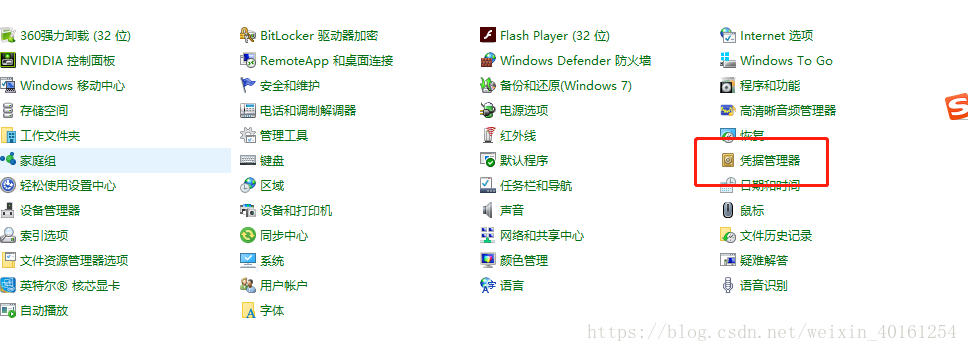
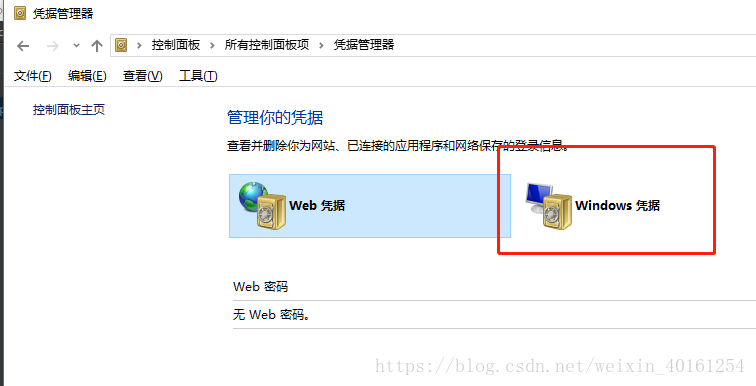
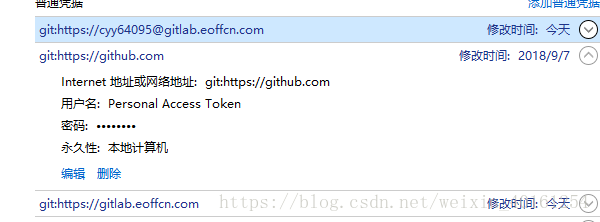
删除登录记录后,会重新输入账号密码
完美解决!
gitlab fatal: Authentication failed for 'http://10.2.80.17:8090/yeyichao/201904041026PROj.git/'的更多相关文章
- fatal: Authentication failed for “someurl”
一.前言 我们在公司做项目,很多时候会遇到这个问题:Git failed with a fatal error. Authentication failed for ‘ http// xxx..... ...
- TortoiseGit拉取或推送,输入账号密码后提示 HTTP Basic: Access denied fatal: Authentication failed 解决方案
TortoiseGit拉取或推送项目,输入账号密码后,提示 HTTP Basic: Access denied fatal: Authentication failed. 大体意思是,HTTP基本认证 ...
- git [command line] fatal: Authentication failed for
fatal: Authentication failed for https://www.jianshu.com/p/8a7f257e07b8 git.exe fetch -v --progress ...
- (诊断)解决GitHub使用双因子身份认证“Two-Factor Athentication”后无法git push 代码的“fatal: Authentication failed for ...”错误
在GitHub上采取双因子身份认证后,在git push 的时候将会要求填写用户的用户名和密码,用户名就是用户在GitHub上申请的用户名,但是密码不是普通登录GitHub的密码. 一旦采取双因子身份 ...
- fatal: Authentication failed for又不弹出用户名和密码 解决办法
各位,如果能弹出来,一定是你账号密码搞错了,就别继续看了. image.png 切换命令行: image.png 依然报错, 说到这个问题,又可以长篇大论了, 我使用的是tortoisegit ...
- 解决$ git clone fatal: Authentication failed
今天在使用git clone克隆项目的时候报如下错误: $ git clone XXXXXX Cloning into 'XXXX'... fatal: Authentication failed f ...
- fatal: Authentication failed (二)
一.前言 前面一段时间写了一篇解决 git 上传代码出现的权限验证问题,还是没有很好的解决.现在还了方式,具体步骤如下: 二.操作流程 我们在上传代码到服务器,我们都需要安装 Git 版本控制.在安装 ...
- remote: Incorrect username or password ( access token ) fatal: Authentication failed for
gitee推送到远程仓库时提示错误remote: Incorrect username or password ( access token )fatal: Authentication failed ...
- 码云 fatal: Authentication failed for
最近push代码到码云时,push失败,提示fatal: Authentication failed for,解决方法就是: 在git命令行中输入 git config --system --unse ...
随机推荐
- 浅谈XML涉及到的常见技术(编写+解析)
xml:即可扩展标记语言,用于描述关系型数据,也经常用作软件的配置文件: 1,编写xml文档一般基于一个约束文档,该文档用于规定xml的书写规范,常用的约束技术有 (1)XML ...
- C# 引用类型的深度拷贝帮助类
using System; using System.Collections.Generic; using System.IO; using System.Linq; using System.Lin ...
- Java 8实战之读书笔记一:内容简介
本书的主要内容如下: 如何使用Java 8新增的强大特性 如何编写能有效利用多核架构的程序 重构.测试和调试 怎样高效地应用函数式编程 目录: 第一部分 基础知识 第1 章 为什么要关心Jav ...
- 测试微信小程序页面的生命周期
前言:本人是一个初学者,也是第一次写博客,敲键盘的时候还不知道发布后是什么效果,希望内容给其他初学的同学一点帮助,同时加深自己的理解.这篇随笔讲的是Page页面的生命周期,在开发中是基础中的基础,很容 ...
- linux系统部署war包,查看tomcat日志
1.部署war包app/tomcat/bin在tomcat/bin 目录下启动 .startup.sh,在启动过程中tomcat会对war包进行解压,形成相应的项目目录 执行命令:./startup. ...
- linux--mysql的安装与配置
linux centos下,mysql安装有三种方式:二进制tar包安装,rpm安装,yum安装(最简单) 查看有没有安装过: yum list installed mysql* rpm -qa | ...
- struts2的作用是什么
struts2是一种重量级的框架,位于MVC架构中的controller,可以分析出来,它是用于接受页面信息然后通过内部处理,将结果返回. 同时struts2也是一个web层的MVC框架,那么什么是s ...
- ISO C 字符串创建算符 “#”
使用用途: #define doit(name) pr_limits(#name, name) doit(RLIMIT_CORE); 这将由C预处理程序扩展为: pr_limits("RLI ...
- springboot2集成redis5报错:io.lettuce.core.RedisException: io.lettuce.core.RedisConnectionException: DENIED Redis is running in protected
报错信息如下: Caused by: io.lettuce.core.RedisException: io.lettuce.core.RedisConnectionException: DENIED ...
- mybatis用distinct进行查询的问题
一:mybatis进行distinct进行查询的时候,数据库中可能有值为null的. 如果直接这样写,这个null的都给计算出来了. select DISTINCT b.b_city from bui ...