
springboot2集成redis5报错:io.lettuce.core.RedisException: io.lettuce.core.RedisConnectionException: DENIED Redis is running in protected
报错信息如下:
Caused by: io.lettuce.core.RedisException: io.lettuce.core.RedisConnectionException: DENIED Redis is running in protected mode because protected mode is enabled, no bind address was specified, no authentication password is requested to clients. In this mode connections are only accepted from the loopback interface. If you want to connect from external computers to Redis you may adopt one of the following solutions: 1) Just disable protected mode sending the command 'CONFIG SET protected-mode no' from the loopback interface by connecting to Redis from the same host the server is running, however MAKE SURE Redis is not publicly accessible from internet if you do so. Use CONFIG REWRITE to make this change permanent. 2) Alternatively you can just disable the protected mode by editing the Redis configuration file, and setting the protected mode option to 'no', and then restarting the server. 3) If you started the server manually just for testing, restart it with the '--protected-mode no' option. 4) Setup a bind address or an authentication password. NOTE: You only need to do one of the above things in order for the server to start accepting connections from the outside.
at io.lettuce.core.LettuceFutures.awaitOrCancel(LettuceFutures.java:129)
at io.lettuce.core.FutureSyncInvocationHandler.handleInvocation(FutureSyncInvocationHandler.java:69)
at io.lettuce.core.internal.AbstractInvocationHandler.invoke(AbstractInvocationHandler.java:80)
at com.sun.proxy.$Proxy84.setex(Unknown Source)
at org.springframework.data.redis.connection.lettuce.LettuceStringCommands.setEx(LettuceStringCommands.java:230)
... 72 more
报错说得很详细,说明redis是以受保护的模式在运行,没有指定地址,也没有设置密码,只能使用环回接口。 如果想连接外部的计算机,可以采用以下措施之一:
1. 使用 "CONFIG SET protected-mode no" 设置
2. 修改redis.conf 配置文件,然后重启服务
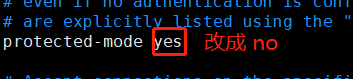
3. 如果仅是为了测试,在启动redis服务时,加上 “--protected-mode no ”
./redis-server ./redis.conf --protected-mode no
4. 绑定明确的地址,或者设计密码
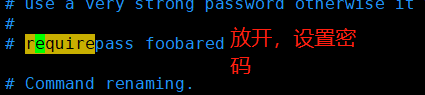
经过测试,确实可以!!!
springboot2集成redis5报错:io.lettuce.core.RedisException: io.lettuce.core.RedisConnectionException: DENIED Redis is running in protected的更多相关文章
- redis问题解决 Caused by: io.lettuce.core.RedisException: io.lettuce.core.RedisConnectionException: DENIED Redis is running in protected mode because protected mode is enabled, no bind address was specifie
1找到redis的配置文件 redis.conf vim redis.conf 修改 protected-mode yes 改为 protected-mode no 注释掉 #bin 127.0.0 ...
- error) DENIED Redis is running in protected mode because protected mode is enabled报错
官网地址:https://redis.io/download 官方安装文档如下: Installation Download, extract and compile Redis with: $ wg ...
- 2017.7.10 Redis报错:DENIED Redis is running in protected mode
参考来自: java 客户端链接不上redis解决方案 DENIED Redis is running in protected mode 完整错误信息: Caused by: redis.clien ...
- 【Redis】【报错】redis.exceptions.ResponseError: DENIED Redis is running in protected mode
(一)报错前提 写flask 项目的时候,因为连接了私有云中的redis地址指定了IP host,启动项目的时候报错 (二)解决方法 首先要切换到root用户 root@:/etc/redis# pw ...
- Redis报错:DENIED Redis is running in protected mode
转:Redis使用认证密码登录 Redis默认配置是不需要密码认证的,也就是说只要连接的Redis服务器的host和port正确,就可以连接使用.这在安全性上会有一定的问题,所以需要启用Redis ...
- 解决使用jedis连接是报DENIED Redis is running in protected mode错误
DENIED Redis is running in protected mode because protected mode is enabled, no bind address was spe ...
- SpringBoot2整合Shiro报错 UnavailableSecurityManagerException: No SecurityManager accessible to the calling code 【已解决】
SpringBoot集成Shiro报错 UnavailableSecurityManagerException: No SecurityManager accessible to the callin ...
- eclipse连接远程Hadoop报错,Caused by: java.io.IOException: 远程主机强迫关闭了一个现有的连接。
eclipse连接远程Hadoop报错,Caused by: java.io.IOException: 远程主机强迫关闭了一个现有的连接.全部报错信息如下: Exception in thread & ...
- Ambari集成Kerberos报错汇总
Ambari集成Kerberos报错汇总 作者:尹正杰 版权声明:原创作品,谢绝转载!否则将追究法律责任. 一.查看报错的配置信息步骤 1>.点击Test Kerberos Client,查看相 ...
随机推荐
- jmeter之2种方法录制脚本
有时候候录制脚本比写脚本且快,这时候我们可以采用录制的方法完成jmeter脚本工作 目录 1.badboy录制 2.代理服务器录制 1.badboy录制 第一步:下载安装 badboy2.2下载:链接 ...
- 使用eclipse制作war包方法 web项目打包到tomcat
打开eclipse在左侧右击项目名选择“Export” 在导出画面点击 “Web”->“WAR file”点击“Next” 点击“Browse…”选择文件的导出位置,Target run ...
- Unity 指定参数
构造函数参数初始化 InjectionConstructor IContainer.RegisterType<T, Class>(new InjectionConstructor(&quo ...
- Gradient Vanishing Problem in Deep Learning
在所有依靠Gradient Descent和Backpropagation算法来学习的Neural Network中,普遍都会存在Gradient Vanishing Problem.Backprop ...
- C#获取本地路径
/// <summary> /// 本地路径 /// </summary> /// <param name="path"></param& ...
- python3 -tensorflow-dataset 之map函数 lambda隐函数的应用
###隐函数lanbda及map函数的应用实例 ''' lambda 参数1,参数2,参数3,...:表达式 ''' f = lambda x,y :x+y print(f(1,2)) ###输出3 ...
- 06:(h5*)Vue第六天
目录 1:iView 2: element 3: vuex 正文 1:i-view 1:装包 npm install view-design --save 2:导包 import ViewUI f ...
- eclipse或者myeclipse的代码提示功能
第一步:打开eclipse,在菜单栏选择window-->preferences 第二步:在左边tree菜单栏选择General-->keys 第三步:在右边的文本框中输入content, ...
- Java-多线程第一篇多线程相关认识(1)
1.单线程进程 如果程序执行某行代码时遇到了阻塞,则程序将会停滞在该处. 2.进程代表着一个程序,程序是静态的,进程是动态的程序. 进程是系统进行资源分配和调度的一个独立单位.关于进程有如下3个特征: ...
- [Codeforces712D] Memory and Scores(DP+前缀和优化)(不用单调队列)
[Codeforces712D] Memory and Scores(DP+前缀和优化)(不用单调队列) 题面 两个人玩游戏,共进行t轮,每人每轮从[-k,k]中选出一个数字,将其加到自己的总分中.已 ...