
Coherence代理节点在离开集群时的恢复
Coherence的架构参考
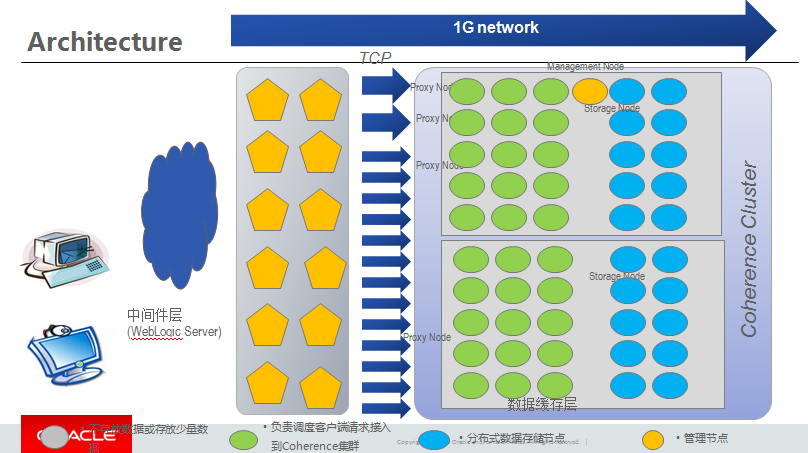
在极端压力之下,有时候代理节点会忙于处理请求而不响应其他的心跳,同步,导致其他节点传输的报文没有回应,而被认为是离开集群,从而影响业务。
写了一段代码,能让进程在监听到有节点离开时关闭节点,同时通过命令自动重起,实现恢复功能。
其中有几个要点问题解决如下:
1.Coherence Server可能是多台机器,这样任何proxy离开都会发送消息到监听程序,监听程序需要判断是否是本地进程才能操作。
2.如果通过ip来判断,java在获取本地ip时更多时候是一个list列表,所以程序中通过hostname进行判断
3.hostname和ip的映射,因为只涉及2台coherence server,所以直接把这种关系固定在程序中,当然也可以放到数据库,coherence或者文件。
4.通过proxy离开的消息能够获取processid,但通过pid如何可以获取proxy监听的端口,这里是通过
netstat -nap |grep "+processid +" | grep tcp | grep "+ ip+ ":9"的操作,也就是约定监听在以9开头的端口,然后把特定的行取出来后再进行解析。
5.获取port后再根据port和程序的映射关系去运行相关的启动命令。
6.测试可以分开测试,比如先是获取进程号的测试,然后再进行有进程号后如何kill和重新启动的测试. main下面好多都是调试的脚本。
代码如下:
|
package coherencetest; import com.tangosol.net.CacheFactory; import java.io.InputStreamReader; import java.io.LineNumberReader; import java.net.InetAddress; import java.util.ArrayList; class ProxyListenerNotification implements MemberListener { public void memberJoined (MemberEvent e) { System.out.println(e.getMember()); String processId = e.getMember().getProcessName(); try { InetAddress addr = InetAddress.getLocalHost(); System.out.println("=============*======="+ip); if (totalstring.indexOf(localhostname) != 0) { String shStr; if ( port =="9099") { String killStr = "kill -9 "+processId; try { process = Runtime.getRuntime().exec(killStr); process = Runtime.getRuntime().exec(new String[]{"/bin/sh","-c",shStr},null,null); } catch(Exception e1) { } public String getPort(int processid,String ip) { Process process; int index=line.indexOf(":9"); } public class ProxyListener { public static void main(String[] args) { public void entryUpdated(MapEvent arg0) { public void entryInserted(MapEvent arg0) { } String processId = "6458"; try { InetAddress addr = InetAddress.getLocalHost(); System.out.println("=============*======="+localhostname); String ip = "192.168.0.150"; String shStr; ProxyListenerNotification pl = new ProxyListenerNotification(); //cache.getCacheService().addMemberListener(new ProxyListenerNotification()); if ( port.equals("9099")) { String killStr = "kill -9 "+processId; try { process = Runtime.getRuntime().exec(new String[]{"/bin/sh","-c",shStr},null,null); while(true){ |
Coherence代理节点在离开集群时的恢复的更多相关文章
- 监控Coherence成员的加入和离开集群事件
对server事件的监控主要是实现MemberListener类,对Cache事件的监控主要通过MapListener 参考代码 package coherencetest; import com.t ...
- 沉淀,再出发——手把手教你使用VirtualBox搭建含有三个虚拟节点的Hadoop集群
手把手教你使用VirtualBox搭建含有三个虚拟节点的Hadoop集群 一.准备,再出发 在项目启动之前,让我们看一下前面所做的工作.首先我们掌握了一些Linux的基本命令和重要的文件,其次我们学会 ...
- Apache shiro集群实现 (八) web集群时session同步的3种方法
Apache shiro集群实现 (一) shiro入门介绍 Apache shiro集群实现 (二) shiro 的INI配置 Apache shiro集群实现 (三)shiro身份认证(Shiro ...
- 为什么PPIO要设计支付代理节点?
PPIO是我和姚欣发起的去中心化存储项目(https://pp.io),这是为开发者提供的存储和分发网络平台,使得比云存储更廉价,更高速,更隐私. 我在设计PPIO的时候,设计了一个商业角色——支 ...
- Spark程序提交到Yarn集群时所遇异常
Exception 1:当我们将任务提交给Spark Yarn集群时,大多会出现以下异常,如下: 14/08/09 11:45:32 WARN component.AbstractLifeCycle: ...
- 构建hadoop集群时遇到的问题
在构建hadoop集群时,出现过主节点中的namenode或datanode启动不成功的问题.在日志文件中往往会显示namenode和datanode中clusterID不相同的问题,这个问题往往都是 ...
- redis 创建集群时 出现的错误解决方式
1. 创建集群时报以下错误 (1)错误1 ./redis-trib.rb create --replicas 1 XXXXXX:5301 XXXXXX:5302 XXXXXX:5303 XXXXXX: ...
- Kibana安装(图文详解)(多节点的ELK集群安装在一个节点就好)
对于Kibana ,我们知道,是Elasticsearch/Logstash/Kibana的必不可少成员. 前提: Elasticsearch-2.4.3的下载(图文详解) Elasticsearch ...
- PXC 避免加入集群时发生SST
环境 现有集群节点: 192.168.99.210:3101 新加入节点: 192.168.99.211:3101 通过xtrabackup备份还原实例,并通过同步方式追数据: 已有节点情况: roo ...
随机推荐
- Docker原理 -- namespace与CGroup
命名空间 PID(Process ID) 进程隔离 NET(Network) 管理网络隔离 IPC(InterProcess Communication) 管理跨进程通信的访问 MNT(Mount) ...
- 【洛谷 P1437】 [HNOI2004]敲砖块 (DP)
题目链接 毒瘤DP题 因为\((i,j)\)能不能敲取决于\((i-1,j)\)和\((i-1,j+1)\),所以一行一行地转移显然是有后效性的. 于是考虑从列入手.我们把这个三角形"左对齐 ...
- equestAnimationFrame
export const requestAnimationFrame = (() => { /* istanbul ignore next */ if (!inBrowser) { return ...
- Linux 之test expr命令
test指令(使用指令man查询) 功能:检查文件类型,值比较. test的各种参数和使用. test EXPRESSION1 –a EXPRESSION2 当表达式1和表达式2同时为真时值为真 te ...
- Codeforces 362E Petya and Pipes 费用流建图
题意: 给一个网络中某些边增加容量,增加的总和最大为K,使得最大流最大. 费用流:在某条边增加单位流量的费用. 那么就可以2个点之间建2条边,第一条给定边(u,v,x,0)这条边费用为0 同时另一条边 ...
- Python3 安装xlrd、xlwt、xlutils
Python版本3.4,装xlrd和xlwt和xlutils的时间:2017-09-07. 安装xlrd.xlwt.xlutils很简单,直接[pip install xlrd].[pip insta ...
- JQ面向对象
静态方法:某种类型才有的方法,这个方法干的事情只有类型本身有关,不受具体实例对象的影响,在C#语言中,它用static表示,VB中用share表示,而在jq中我们一般用$或者JQuery表示JQ类型, ...
- LNMP的基本配置
LNMP的基本配置cd /usr/local/nginx_php/etc/ > php-fpm.conf //清空php-fpm.conf vim ph ...
- 使用 mybatis和oracle 数据库出现的问题
mybatis 官网教程 http://www.mybatis.org/mybatis-3/zh/dynamic-sql.html 出现 Could not set parameters for ma ...
- 【转】Android循环滚动广告条的完美实现,封装方便,平滑过渡,从网络加载图片,点击广告进入对应网址
Android循环滚动广告条的完美实现,封装方便,平滑过渡,从网络加载图片,点击广告进入对应网址 关注finddreams,一起分享,一起进步: http://blog.csdn.net/finddr ...