
HorizontalScrollView水平滚动控件
HorizontalScrollView水平滚动控件
一、简介
用法ScrollView大致相同
二、方法
1)HorizontalScrollView水平滚动控件使用方法
1、在layout布局文件的最外层建立一个HorizontalScrollView控件
2、在HorizontalScrollView控件中加入一个LinearLayout控件,并且把它的orientation设置为horizontal
3、在LinearLayout控件中放入多个装有图片的ImageView控件
2)HorizontalScrollView和ScrollView混合使用方法
以先垂直后水平为例
1、在layout布局文件的最外层建立一个ScrollView控件
2、在ScrollView控件中加入一个LinearLayout控件,并且把它的orientation设置为vertical
3、在这个LinearLayout中添加多个已经弄好的HorizontalScrollView水平滚动控件
三、代码实例
HorizontalScrollView水平滚动控件使用方法
1、水平滚动效果图:

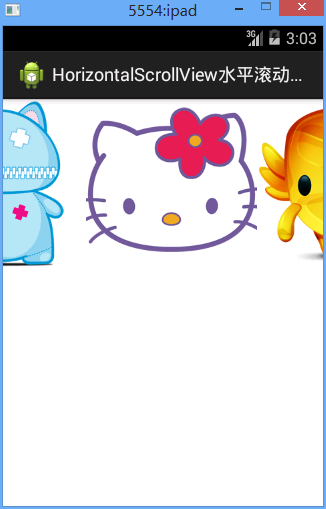
2、水平滚动代码:
/Ex27ScrollView/res/layout/activity02.xml
 <?xml version="1.0" encoding="utf-8"?>

 <HorizontalScrollView xmlns:android="http://schemas.android.com/apk/res/android"

     android:layout_width="match_parent"

     android:layout_height="match_parent"

     android:scrollbars="none"

     >

     <LinearLayout

         android:layout_width="match_parent"

         android:layout_height="match_parent"

         android:orientation="horizontal"

         >

         <ImageView

             android:layout_width="wrap_content"

             android:layout_height="wrap_content"

             android:src="@drawable/item1"

             />

         <ImageView

             android:layout_width="wrap_content"

             android:layout_height="wrap_content"

             android:src="@drawable/item2"

             />

         <ImageView

             android:layout_width="wrap_content"

             android:layout_height="wrap_content"

             android:src="@drawable/item3"

             />

         <ImageView

             android:layout_width="wrap_content"

             android:layout_height="wrap_content"

             android:src="@drawable/item4"

             />

         <ImageView

             android:layout_width="wrap_content"

             android:layout_height="wrap_content"

             android:src="@drawable/item5"

             />

     </LinearLayout>

 </HorizontalScrollView>
3、水平竖直混合滚动效果图
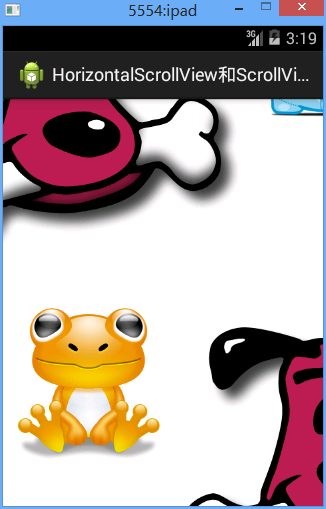
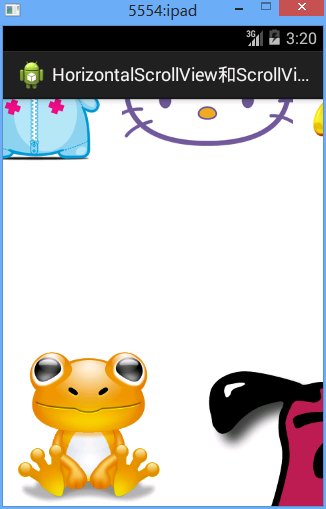
3、水平竖直混合滚动效果代码
/Ex27ScrollView/res/layout/activity03.xml
 <?xml version="1.0" encoding="utf-8"?>

 <ScrollView xmlns:android="http://schemas.android.com/apk/res/android"

     android:layout_width="match_parent"

     android:layout_height="match_parent"

     android:scrollbars="none" >

     <LinearLayout

         android:layout_width="match_parent"

         android:layout_height="match_parent"

         android:orientation="vertical" >

         <HorizontalScrollView

             android:layout_width="match_parent"

             android:layout_height="match_parent"

             android:scrollbars="none" >

             <LinearLayout

                 android:layout_width="match_parent"

                 android:layout_height="match_parent"

                 android:orientation="horizontal" >

                 <ImageView

                     android:layout_width="wrap_content"

                     android:layout_height="wrap_content"

                     android:src="@drawable/item1" />

                 <ImageView

                     android:layout_width="wrap_content"

                     android:layout_height="wrap_content"

                     android:src="@drawable/item2" />

                 <ImageView

                     android:layout_width="wrap_content"

                     android:layout_height="wrap_content"

                     android:src="@drawable/item3" />

                 <ImageView

                     android:layout_width="wrap_content"

                     android:layout_height="wrap_content"

                     android:src="@drawable/item4" />

                 <ImageView

                     android:layout_width="wrap_content"

                     android:layout_height="wrap_content"

                     android:src="@drawable/item5" />

             </LinearLayout>

         </HorizontalScrollView>

         <HorizontalScrollView

             android:layout_width="match_parent"

             android:layout_height="match_parent"

             android:scrollbars="none" >

             <LinearLayout

                 android:layout_width="match_parent"

                 android:layout_height="match_parent"

                 android:orientation="horizontal" >

                 <ImageView

                     android:layout_width="wrap_content"

                     android:layout_height="wrap_content"

                     android:src="@drawable/item1" />

                 <ImageView

                     android:layout_width="wrap_content"

                     android:layout_height="wrap_content"

                     android:src="@drawable/item2" />

                 <ImageView

                     android:layout_width="wrap_content"

                     android:layout_height="wrap_content"

                     android:src="@drawable/item3" />

                 <ImageView

                     android:layout_width="wrap_content"

                     android:layout_height="wrap_content"

                     android:src="@drawable/item4" />

                 <ImageView

                     android:layout_width="wrap_content"

                     android:layout_height="wrap_content"

                     android:src="@drawable/item5" />

             </LinearLayout>

         </HorizontalScrollView>

         <HorizontalScrollView

             android:layout_width="match_parent"

             android:layout_height="match_parent"

             android:scrollbars="none" >

             <LinearLayout

                 android:layout_width="match_parent"

                 android:layout_height="match_parent"

                 android:orientation="horizontal" >

                 <ImageView

                     android:layout_width="wrap_content"

                     android:layout_height="wrap_content"

                     android:src="@drawable/item1" />

                 <ImageView

                     android:layout_width="wrap_content"

                     android:layout_height="wrap_content"

                     android:src="@drawable/item2" />

                 <ImageView

                     android:layout_width="wrap_content"

                     android:layout_height="wrap_content"

                     android:src="@drawable/item3" />

                 <ImageView

                     android:layout_width="wrap_content"

                     android:layout_height="wrap_content"

                     android:src="@drawable/item4" />

                 <ImageView

                     android:layout_width="wrap_content"

                     android:layout_height="wrap_content"

                     android:src="@drawable/item5" />

             </LinearLayout>

         </HorizontalScrollView>

         <HorizontalScrollView

             android:layout_width="match_parent"

             android:layout_height="match_parent"

             android:scrollbars="none" >

             <LinearLayout

                 android:layout_width="match_parent"

                 android:layout_height="match_parent"

                 android:orientation="horizontal" >

                 <ImageView

                     android:layout_width="wrap_content"

                     android:layout_height="wrap_content"

                     android:src="@drawable/item1" />

                 <ImageView

                     android:layout_width="wrap_content"

                     android:layout_height="wrap_content"

                     android:src="@drawable/item2" />

                 <ImageView

                     android:layout_width="wrap_content"

                     android:layout_height="wrap_content"

                     android:src="@drawable/item3" />

                 <ImageView

                     android:layout_width="wrap_content"

                     android:layout_height="wrap_content"

                     android:src="@drawable/item4" />

                 <ImageView

                     android:layout_width="wrap_content"

                     android:layout_height="wrap_content"

                     android:src="@drawable/item5" />

             </LinearLayout>

         </HorizontalScrollView>

         <HorizontalScrollView

             android:layout_width="match_parent"

             android:layout_height="match_parent"

             android:scrollbars="none" >

             <LinearLayout

                 android:layout_width="match_parent"

                 android:layout_height="match_parent"

                 android:orientation="horizontal" >

                 <ImageView

                     android:layout_width="wrap_content"

                     android:layout_height="wrap_content"

                     android:src="@drawable/item1" />

                 <ImageView

                     android:layout_width="wrap_content"

                     android:layout_height="wrap_content"

                     android:src="@drawable/item2" />

                 <ImageView

                     android:layout_width="wrap_content"

                     android:layout_height="wrap_content"

                     android:src="@drawable/item3" />

                 <ImageView

                     android:layout_width="wrap_content"

                     android:layout_height="wrap_content"

                     android:src="@drawable/item4" />

                 <ImageView

                     android:layout_width="wrap_content"

                     android:layout_height="wrap_content"

                     android:src="@drawable/item5" />

             </LinearLayout>

         </HorizontalScrollView>

     </LinearLayout>

 </ScrollView>
四、注意点
1、始终注意HorizontalScrollView和ScrollView的直接儿子只有一个,一般都是LinearOut,保证了这个,怎么用也不会错
五、易错点
HorizontalScrollView水平滚动控件的更多相关文章
- UI控件之 ScrollView垂直滚动控件 和 HorizontalScrollView水平滚动控件的使用
1. ScrollView 垂直滚动控件的使用 ScrollView控件只是支持垂直滚动,而且在ScrollView中只能包含一个控件,通常是在< ScrollView >标签中定义了一个 ...
- 自己定义View实现水平滚动控件
前几天项目中须要使用到一个水平可滚动的选择条,类似下图效果(图片是从简书上一位作者那儿找来的,本篇也是在这位作者的文章的基础上改动的,站在大神的肩膀上,哈哈,因为原文没有提供demo,并且实现的效果跟 ...
- ScrollView垂直滚动控件
ScrollView垂直滚动控件 一.简介 二.方法 1)ScrollView垂直滚动控件使用方法 1.在layout布局文件的最外层建立一个ScrollView控件 2.在ScrollView控件中 ...
- Android文字跑马灯控件(文本自动滚动控件)
最近在开发一个应用,需要用到文本的跑马灯效果,图省事,在网上找,但老半天都找不到,后来自己写了一个,很简单,代码如下: import android.content.Context; import a ...
- Android自定义View,高仿QQ音乐歌词滚动控件!
最近在以QQ音乐为样板做一个手机音乐播放器,源码下篇博文放出.今天我想聊的是这个QQ音乐播放器中歌词显示控件的问题,和小伙伴们一起来探讨怎么实现这个歌词滚动的效果.OK,废话不多说,先来看看效果图: ...
- Android高级图片滚动控件,编写3D版的图片轮播器
转载请注明出处:http://blog.csdn.net/guolin_blog/article/details/17482089 大家好,好久不见了,最近由于工作特别繁忙,已经有一个多月的时间没写博 ...
- [android] 手机卫士自定义滚动控件
TextView控件设置单行显示 android:singleLine=”true” 设置TextView开始的位置显示省略号,android:ellipsize=”start” 设置滚动属性,and ...
- Android实现图片滚动控件,含页签功能,让你的应用像淘宝一样炫起来
首先题外话,今天早上起床的时候,手滑一下把我的手机甩了出去,结果陪伴我两年半的摩托罗拉里程碑一代就这么安息了,于是我今天决定怒更一记,纪念我死去的爱机. 如果你是网购达人,你的手机上一定少不了淘宝客户 ...
- 【Android】HorizontalScrollView内子控件横向拖拽
前言 网上ListView上下拖动的例子有,效果也很好,但是项目要横着拖的,只要硬着头皮自己写(主要是没找到合适的),参考文章1修改而来,分享一下. 声明 欢迎转载,但请保留文章原始出处:) 博客园 ...
随机推荐
- coursera 《现代操作系统》 -- 第八周 存储模型(2)
名词解释 页面: 页面大小: 页表: 页表项: 以上名词解释见: coursera <现代操作系统> -- 第七周 存储模型(1) 页表项大小: 问:以上是怎么计算出来的? 32位指什么? ...
- <2013 07 06> Future and Near Future
试图了解 量子力学 近现代基础物理学理论 量子计算机 脑科学 近现代生物学 遗传变异与进化 复杂工程学 系统工程 管理科学 人工智能 智能算法 机器学习 深度学习 大数据 云计算 ...
- Ubuntu 系统下可以做什么?
ubuntu和windows到底有什么不同呢?从大的方面讲,它们的设计理念不同.借用一位知乎前辈说的“windows为不知道自己正在做什么的人设计,linux为知道自己要做什么,正在做什么的人设计”. ...
- JavaWeb 之事务
什么是事务? 事务就是逻辑上的一组操作,组成事务的各个执行单元,操作要么全部成功,要么全部失败. 以转账为例: 张三给李四转账,张三扣1000,李四加1000; 加钱和扣钱两个操作组成了一个事务. 1 ...
- 【Java工程师之路】[1-2.2]Java10个面向对象设计原则
面向对象设计原则是OOPS(Object-Oriented Programming System,面向对象的程序设计系统)编程的核心,但大多数Java程序员追逐像Singleton.Decorator ...
- MDF损坏或LDF文件损坏
MDF损坏或LDF损坏 MDF丢失或LDF丢失 注意,这些情况必须要相同版本的sql server才能操作成功 当MDF损坏时 1.备份结尾日志 http://www.cnblogs.com/gere ...
- 004-RIP、OSPF【路由选择协议】
常见的路由选择协议有:RIP协议.OSPF协议. 1.RIP协议 路由信息协议(英语:Routing Information Protocol,缩写:RIP)是一种内部网关协议(IGP),为最早出现的 ...
- 20170421 F110 常见问题
F110常見問題以及處理方式 1. Vendor中沒有與F110中相同的Payment method 解決辦法: 在Vendor主檔中維護Payment method 2. 結報被Block 解決辦法 ...
- Python基础-shelve模块
shelve模块会生成test.txt.bak.test.txtdat.test.txt.dir三个文件 import shelve f = shelve.open(r'text.txt') f['} ...
- 【Network】DDoS攻击防御
DDoS(Distributed Denial of Service,分布式拒绝服务)攻击的主要目的是让指定目标无法提供正常服务,甚至从互联网上消失,是目前最强大,最难防御的攻击之一. 按照发起的方式 ...