
TeamViewer 软件完全卸载
TeamViewer 软件似乎用于商业环境中 - 彻底卸载 Windows
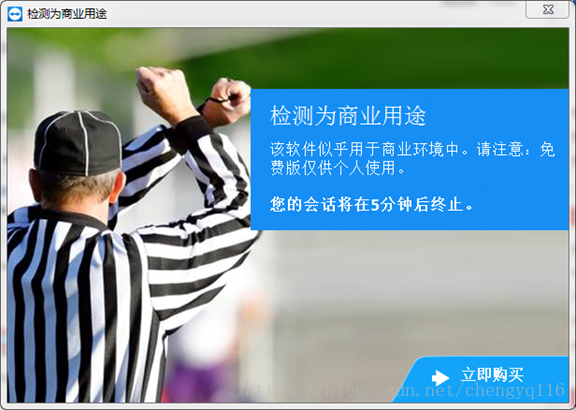
1. 检测为商业用途
该软件似乎用于商业环境中。请注意:免费版仅供个人使用。您的会话将在 5 分钟后终止。
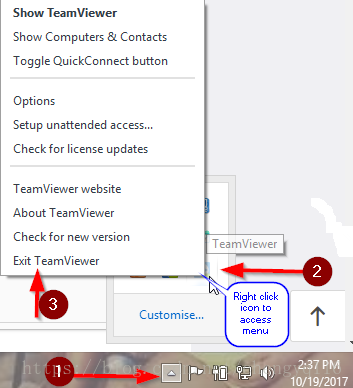
2.1 Close TeamViewer by locating the TeamViewer icon in the system tray, right click and Exit TeamViewer.
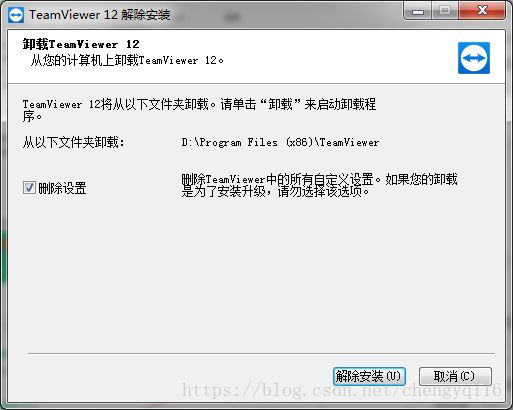
2.2 Right click Windows start menu then Control Panel --> Programs/features
2.3 Locate TeamViewer in the list of programs, then double click to start the uninstall process
2.4 开始 -> 控制面板 -> 程序 -> 卸载程序
You can select to remove settings as well, if you do not plan to install TeamViewer again on the same PC
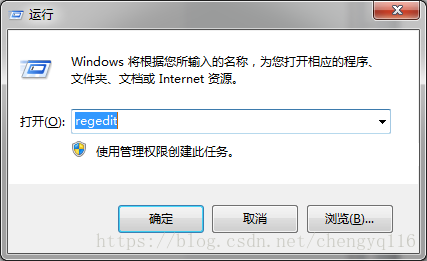
3. regedit (WIN + R)
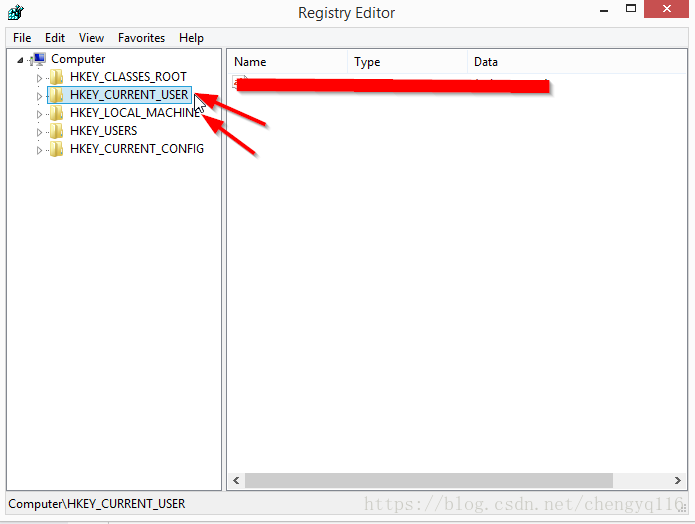
Right click Windows start menu --> select run --> type Regedit: Find and delete the full TeamViewer folder located in
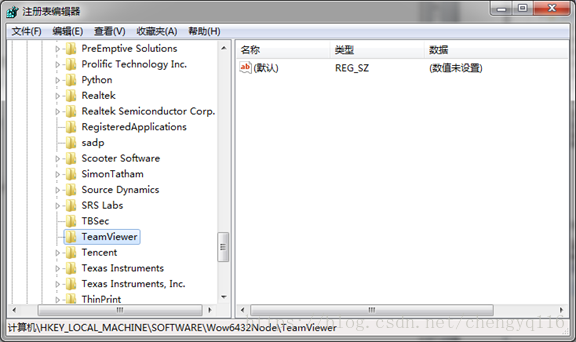
[HKEY_LOCAL_MACHINE\SOFTWARE\Wow6432Node\TeamViewer]
[HKEY_CURRENT_USER\SOFTWARE\TeamViewer]
Caution: Edit the Registry at your own risk. Incorrect changes to the Windows Registry can disable the operating system. To safeguard against such an accident, we recommend that you back up your existing registry by choosing Registry --> Export Registry File after launching the Registry Editor and before making any changes. By making these registry changes we are not liable for any actions that may proceed, you are making these changes at your own risk. (Note: To export the Registry, you need to use "regedit" to launch the Registry Editor. The steps below use "regedit".)
Right click Windows start menu --> select run -->type in: Regedit
4. 右键删除 teamviewer 文件夹
Find and delete the full TeamViewer folder
Please follow the path pictured below to remove the folders
4.1 HKEY_LOCAL_MACHINE\SOFTWARE\Wow6432Node\TeamViewer
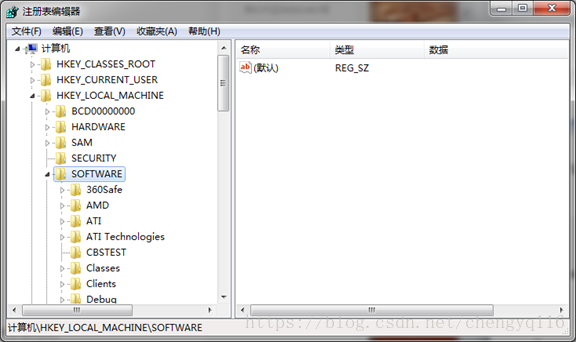
HKEY_LOCAL_MACHINE\SOFEWARE\Wow6432Node\TeamViewer
4.2 HKEY_CURRENT_USER\SOFTWARE\Teamviewer
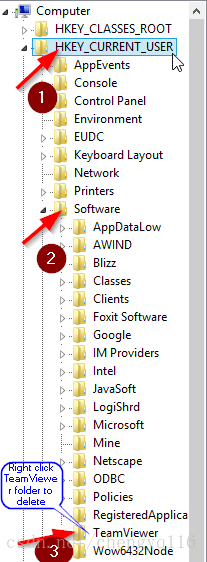
5. 删除本地安装文件夹 D:\Program Files (x86)\TeamViewer
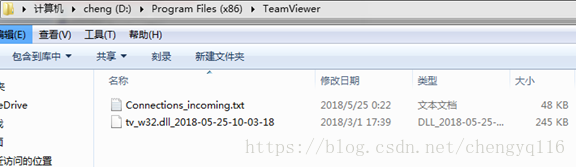
6. Restart the machine
TeamViewer 软件完全卸载的更多相关文章
- Linux软件的卸载
configure作用:是源码安装软件时配置环境用的 他根据你的配置选项和你的系统情况生成makefile文件 为make 做准备 最常用的参数: ./configure --prefix 作用: 不 ...
- ubuntu 下安装软件,卸载,查看已经安装的软件
参考网址:http://wiki.ubuntu.org.cn/UbuntuSkills 一般的安装程序用三种: .deb 和.rpm 这两种安装文件 .bundle 这是二进制的安装文件 而 tar. ...
- 安装AD15有问题多数是因为旧版本AD软件没有卸载干净,清理方法详解
论坛中总会看到有些朋友安装AD14.x,AD15.x后,使用不正常,多数情况是因为旧版本的AD软件没有卸载干净,安装新版本AD软件后,就会有问题.卸载和清理AD旧版本软件的方法如下(此方法只能解决卸载 ...
- linux下查看已安装的软件与卸载
转自:https://blog.csdn.net/qq_22075041/article/details/78855849 因为linux安装软件的方式比较多,所以没有一个通用的办法能查到某些软件是否 ...
- (转)linux下查看已安装的软件与卸载
因为linux安装软件的方式比较多,所以没有一个通用的办法能查到某些软件是否安装了.总结起来就是这样几类: 1.rpm包安装的,可以用rpm -qa看到,如果要查找某软件包是否安装,用 rpm -qa ...
- Linux 软件安装卸载命令
安装方式一: RPM 命令 rpm -qa|grep java 查看java 是否安装 rpm -e --nodeps 软件名 卸载已安装软件 rpm -ivh xxx.rpm 安装 安装 ...
- Ubuntu下安装软件、卸载
Ubuntu下安装软件.卸载 一般的安装程序有三种: .deb和.rpm这2中安装文件 .boudle这是二进制安装文件 .tar.gz文件是压缩包,与.rar和.zip压缩包一样,安装此类文件需要先 ...
- Ubuntu14.04 软件安装卸载
----常用软件安装 sudo apt-get install vim-gtk //安装vim软件 sudo apt-get install zip //安装解压软件和解压文件 sudo apt-ge ...
- Linux 软件安装卸载 (源码、rpm)
Linux下软件的安装主要有两种不同的形式.第一种安装为源码安装,文件名为xxx.tar.gz压缩包为主;以第一种方式发行的软件多为以源码形式发送的.第二种方式则是另一种安装文件名为xxx.i386. ...
随机推荐
- DP小题集
P2736 "破锣摇滚"乐队 Raucous Rockers 你刚刚继承了流行的"破锣摇滚"乐队录制的尚未发表的N(1 <= N <= 20)首歌的 ...
- SQL-Error-1
错误描述:String or binary data would be truncated. 原因:字段长度不够
- vue学习—组件的定义注册
组件的定义注册 效果: 方法一: <div id="box"> <v-header></v-header> <hr /> <b ...
- 停止mysql服务
停止mysql服务windowsnet stop mysql (service mysqld stop win10不能用) linux /etc/init.d/mysqld stop
- 缓冲区 粘包 029 send 和sendall 的区别 find 和 findall 的区别
一.tcp : 属于长连接 与客户端连接了之后 其他客户端需要等待 要连接另外一个 必须优雅的断开前面这个客户的连接. 二.缓冲区 :为了避免网络传输信号不通畅而是程序一直停留在消息发送状态而不向下进 ...
- STL之set(唯一且有顺序)
set作为一个容器也是用来存储同一数据类型的数据类型,并且能从一个数据集合中取出数据, 在set中每个元素的值都唯一,而且系统能根据元素的值自动进行排序.应该注意的是set中数元素的值不能直接被改变. ...
- 【ACM】阶乘因式分解(二)
阶乘因式分解(二) 时间限制:3000 ms | 内存限制:65535 KB 难度:3 描述 给定两个数n,m,其中m是一个素数. 将n(0<=n<=2^31)的阶乘分解质因数,求 ...
- Win10家庭版组策略gpedit.msc的问题
大家都认为,Windows家庭版中并不包含组策略,其实不然,它是有相关文件的,只是不让你使用而已.那么我们让系统允许你使用就好了.首先你需要在桌面上新建一个txt文本文档.然后将以下代码复制到这个新建 ...
- Android中当前Activity跳转到当前Activity页面
步骤:先关闭自己,在跳转 case R.id.btn_copy:// 复制 Toast.makeText(mContext, "正在复制", Toast.LENGTH_SHORT) ...
- vue-cli生成的重要代码详解
安装好vue-cli之后,我们可以在package.json中看到下面所示: { // 项目名称 "name": "myvue", // 项目版本 " ...