
hbase数据库操作
.实验内容与完成情况:(实验具体步骤和实验截图说明)

(一)编程实现以下指定功能,并用 Hadoop 提供的 HBase Shell 命令完成相同任务:

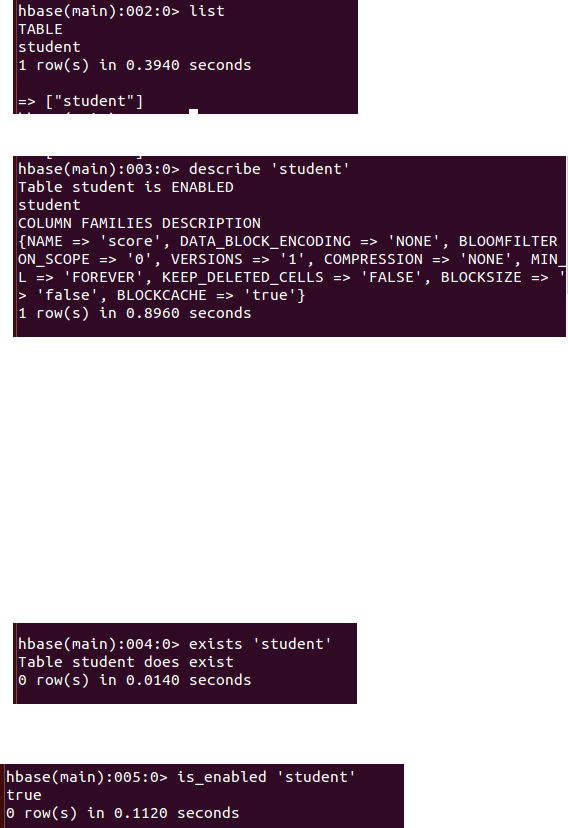
() 列出 HBase 所有的表的相关信息,例如表名;

列出所有数据表:

列出表的结构

查询表是否存在

查询表是否可用
packagecn.wl.edu.hbase;

import java.io.IOException;

public class ListTables {

    public static Configuration configuration;

    public static Connection connection;

    public static Admin admin;

    public static void listTables() throws IOException {

        init();

        HTableDescriptor[] hTableDescriptors = admin.listTables();

        for (HTableDescriptor hTableDescriptor : hTableDescriptors) {

            System.out.println("table name:"

                    + hTableDescriptor.getNameAsString());

        }

               close();

    }

    public static void init() {

        configuration = HBaseConfiguration.create();

        configuration.set("hbase.rootdir", "hdfs://localhost:9000/hbase");

        try {

            connection = ConnectionFactory.createConnection(configuration);

            admin = connection.getAdmin();

        } catch (IOException e) {

            e.printStackTrace();

        }

    }

    public static void close() {

        try {

            if (admin != null) {

                admin.close();

            }

            if (connection != null) {

                connection.close();

            }

        } catch (IOException e) {

            e.printStackTrace();

        }

    }

    public static void main(String[] args) {

        try {

            listTables();

        } catch (IOException e) {

            e.printStackTrace();

        }

    }

}

()在终端打印出指定的表的所有记录数据;

源代码:

package cn.wl.edu.hbase;

import org.apache.hadoop.conf.Configuration;

import org.apache.hadoop.hbase.Cell;

import org.apache.hadoop.hbase.CellUtil;

import org.apache.hadoop.hbase.HBaseConfiguration;

import org.apache.hadoop.hbase.TableName;

import org.apache.hadoop.hbase.client.*;

import java.io.IOException;

public class ListTableData {

    public static Configuration configuration;

    public static Connection connection;

    public static Admin admin;

    public static void getData(String tableName)throws IOException{

        init();

        Table table=connection.getTable(TableName.valueOf(tableName));

        Scan scan=new Scan();

        ResultScanner scanner=table.getScanner(scan);

        for(Result result:scanner){

            printRecoder(result);

        }

System.out.println(“finish!”);

        close();

    }

    public static void printRecoder(Result result)throws IOException{

        for(Cell cell:result.rawCells()){

            System.out.println("行键:"+new String(CellUtil.cloneRow(cell)));

              System.out.print("列簇: " + new String(CellUtil.cloneFamily(cell)));

                System.out.print(" 列: " + new String(CellUtil.cloneQualifier(cell)));

                System.out.print(" 值: " + new String(CellUtil.cloneValue(cell)));

                System.out.println("时间戳: " + cell.getTimestamp());

        }

    }

    public static void init() {

        configuration = HBaseConfiguration.create();

        configuration.set("hbase.rootdir", "hdfs://localhost:9000/hbase");

        try {

            connection = ConnectionFactory.createConnection(configuration);

            admin = connection.getAdmin();

        } catch (IOException e) {

            e.printStackTrace();

        }

    }

    public static void close() {

        try {

            if (admin != null) {

                admin.close();

            }

            if (connection != null) {

                connection.close();

            }

        } catch (IOException e) {

            e.printStackTrace();

        }

    }

    public static void main(String[] args) {

        try {

        getData("person");

        } catch (IOException e) {

            e.printStackTrace();

        }

    }

}

() 向已经创建好的表添加和删除指定的列族或列;

添加数据

源代码:

package cn.wl.edu.hbase;

import java.io.IOException;

import org.apache.hadoop.conf.Configuration;

import org.apache.hadoop.hbase.HBaseConfiguration;

import org.apache.hadoop.hbase.TableName;

import org.apache.hadoop.hbase.client.Admin;

import org.apache.hadoop.hbase.client.Connection;

import org.apache.hadoop.hbase.client.ConnectionFactory;

import org.apache.hadoop.hbase.client.Put;

import org.apache.hadoop.hbase.client.Table;

public class InsertRow {

    public static Configuration configuration;

    public static Connection connection;

    public static Admin admin;

    public static void insertRow(String tableName,String rowKey,String colFamily,String col,String val)throws IOException{

        init();

        Table table=connection.getTable(TableName.valueOf(tableName));

        Put put=new Put(rowKey.getBytes());

        put.addColumn(colFamily.getBytes(),col.getBytes() ,val.getBytes());

        table.put(put);

       System.out.println("insert finish!");

       table.close();

    }

    public static void init() {

        configuration = HBaseConfiguration.create();

        configuration.set("hbase.rootdir", "hdfs://localhost:9000/hbase");

        try {

            connection = ConnectionFactory.createConnection(configuration);

            admin = connection.getAdmin();

        } catch (IOException e) {

            e.printStackTrace();

        }

    }

    public static void close() {

        try {

            if (admin != null) {

                admin.close();

            }

            if (connection != null) {

                connection.close();

            }

        } catch (IOException e) {

            e.printStackTrace();

        }

    }

    public static void main(String[] args) {

        try {

        insertRow("student","s002","score","math","");

        } catch (IOException e) {

            e.printStackTrace();

        }

    }

}

删除数据

源代码:

package cn.wl.edu.hbase;

import java.io.IOException;

import org.apache.hadoop.conf.Configuration;

import org.apache.hadoop.hbase.HBaseConfiguration;

import org.apache.hadoop.hbase.TableName;

import org.apache.hadoop.hbase.client.*;

import org.apache.hadoop.hbase.util.Bytes;

public class DeleteRow {

      public static Configuration configuration;

        public static Connection connection;

        public static Admin admin;

        public static void deleteRow(String tableName, String rowKey, String colFamily, String col) throws IOException {

            init();

            Table table = connection.getTable(TableName.valueOf(tableName));

            Delete delete = new Delete(rowKey.getBytes());

            delete.addFamily(Bytes.toBytes(colFamily));

            delete.addColumn(Bytes.toBytes(colFamily), Bytes.toBytes(col));

            table.delete(delete);

            System.out.println("delete successful!");

            table.close();

            close();

        }

        public static void init() {

            configuration = HBaseConfiguration.create();

            configuration.set("hbase.rootdir", "hdfs://localhost:9000/hbase");

            try {

                connection = ConnectionFactory.createConnection(configuration);

                admin = connection.getAdmin();

            } catch (IOException e) {

                e.printStackTrace();

            }

        }

        public static void close() {

            try {

                if (admin != null) {

                    admin.close();

                }

                if (null != connection) {

                    connection.close();

                }

            } catch (IOException e) {

                e.printStackTrace();

            }

        }

        public static void main(String[] args) {

            try {

                deleteRow("student", "s002", "score", "math");

            } catch (IOException e) {

                e.printStackTrace();

            }

        }

}

()清空指定的表的所有记录数据;

源代码:

package cn.wl.edu.hbase;

import org.apache.hadoop.conf.Configuration;

import org.apache.hadoop.hbase.HBaseConfiguration;

import org.apache.hadoop.hbase.TableName;

import org.apache.hadoop.hbase.client.Admin;

import org.apache.hadoop.hbase.client.Connection;

import org.apache.hadoop.hbase.client.ConnectionFactory;

import java.io.IOException;

public class TruncateTable {

     public static Configuration configuration;

        public static Connection connection;

        public static Admin admin;

        public static void clearRows(String tableName) throws IOException {

            init();

            TableName tablename = TableName.valueOf(tableName);

            admin.disableTable(tablename);

            admin.truncateTable(tablename, false);

            System.out.println("delete table successful!");

            close();

        }

        public static void init() {

            configuration = HBaseConfiguration.create();

            configuration.set("hbase.rootdir", "hdfs://localhost:9000/hbase");

            try {

                connection = ConnectionFactory.createConnection(configuration);

                admin = connection.getAdmin();

            } catch (IOException e) {

                e.printStackTrace();

            }

        }

        public static void close() {

            try {

                if (admin != null) {

                    admin.close();

                }

                if (null != connection) {

                    connection.close();

                }

            } catch (IOException e) {

                e.printStackTrace();

            }

        }

        public static void main(String[] args) {

            try {

                clearRows("student");

            } catch (IOException e) {

                e.printStackTrace();

            }

        }

}

() 统计表的行数。
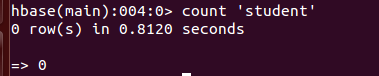
源程序:

package cn.wl.edu.hbase;

import org.apache.hadoop.conf.Configuration;

import org.apache.hadoop.hbase.HBaseConfiguration;

import org.apache.hadoop.hbase.TableName;

import org.apache.hadoop.hbase.client.*;

import java.io.IOException;

public class CountTable {

     public static Configuration configuration;

        public static Connection connection;

        public static Admin admin;

        public static void countTable(String tableName) throws IOException {

            init();

            Table table = connection.getTable(TableName.valueOf(tableName));

            Scan scan = new Scan();

            ResultScanner scanner = table.getScanner(scan);

            int num = ;

            for (Result result = scanner.next(); result != null; result = scanner

                    .next()) {

                num++;

            }

            System.out.println("行数:" + num);

            scanner.close();

            close();

        }

        public static void init() {

            configuration = HBaseConfiguration.create();

            configuration.set("hbase.rootdir", "hdfs://localhost:9000/hbase");

            try {

                connection = ConnectionFactory.createConnection(configuration);

                admin = connection.getAdmin();

            } catch (IOException e) {

                e.printStackTrace();

            }

        }

        public static void close() {

            try {

                if (admin != null) {

                    admin.close();

                }

                if (null != connection) {

                    connection.close();

                }

            } catch (IOException e) {

                e.printStackTrace();

            }

        }

        public static void main(String[] args) {

            try {

                countTable("student");

            } catch (IOException e) {

                e.printStackTrace();

            }

        }

}

(二) HBase 数据库操作

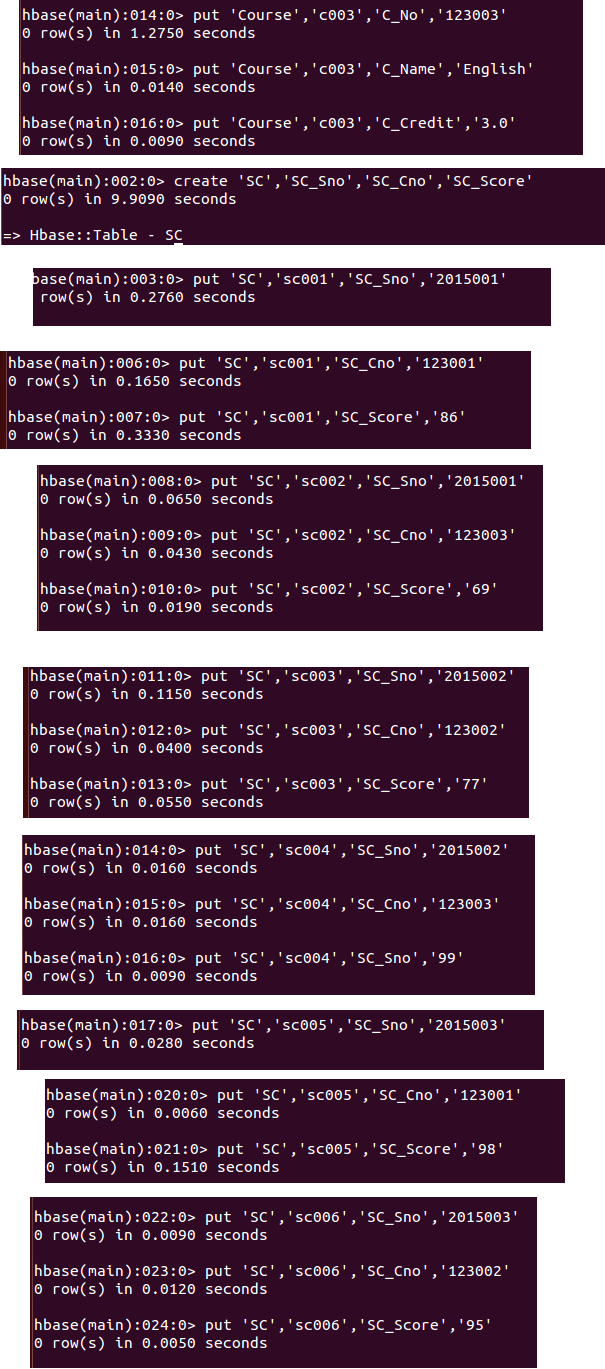
. 现有以下关系型数据库中的表和数据,要求将其转换为适合于 HBase 存储的表并插入数据:

学生表(Student)

学号(S_No)     姓名(S_Name)     性别(S_Sex)     年龄(S_Age)

     Zhangsan     male

     Mary     female

     Lisi     male

课程表(Course)

课程号(C_No)     课程名(C_Name)     学分(C_Credit)

     Math     2.0

     Computer Science     5.0

     English     3.0

选课表(SC)

学号(SC_Sno)     课程号(SC_Cno)     成绩(SC_Score)
.请编程实现以下功能:

() createTable(String tableName, String[] fields)

创建表,参数 tableName 为表的名称,字符串数组 fields 为存储记录各个字段名称的数组。

要求当 HBase 已经存在名为 tableName 的表的时候,先删除原有的表,然后再创建新的表。

package cn.wl.edu.hbase;

import org.apache.hadoop.conf.Configuration;

import org.apache.hadoop.hbase.HBaseConfiguration;

import org.apache.hadoop.hbase.HColumnDescriptor;

import org.apache.hadoop.hbase.HTableDescriptor;

import org.apache.hadoop.hbase.TableName;

import org.apache.hadoop.hbase.client.Admin;

import org.apache.hadoop.hbase.client.Connection;

import org.apache.hadoop.hbase.client.ConnectionFactory;

import java.io.IOException;

public class CreateTable {

    public static Configuration configuration;

    public static Connection connection;

    public static Admin admin;

    public static void createTable(String tableName, String[] fields)

            throws IOException {

        init();

        TableName tablename = TableName.valueOf(tableName);

        if (admin.tableExists(tablename)) {

            System.out.println("table is exists!");

        }

        HTableDescriptor hTableDescriptor = new HTableDescriptor(tablename);

        for (String str : fields) {

            HColumnDescriptor hColumnDescriptor = new HColumnDescriptor(str);

            hTableDescriptor.addFamily(hColumnDescriptor);

        }

        admin.createTable(hTableDescriptor);

        close();

    }

    public static void init() {

        configuration = HBaseConfiguration.create();

        configuration.set("hbase.rootdir", "hdfs://localhost:9000/hbase");

        try {

            connection = ConnectionFactory.createConnection(configuration);

            admin = connection.getAdmin();

        } catch (IOException e) {

            e.printStackTrace();

        }

    }

    public static void close() {

        try {

            if (admin != null) {

                admin.close();

            }

            if (null != connection) {

                connection.close();

            }

        } catch (IOException e) {

            e.printStackTrace();

        }

    }

    public static void main(String[] args) {

        String[] fields = { "Score" };

        try {

            createTable("person", fields);

        } catch (IOException e) {

            e.printStackTrace();

        }

    }

}

()addRecord(String tableName, String row, String[] fields, String[] values

向表 tableName、行 row(用 S_Name 表示)和字符串数组 fields 指定的单元格中添加对

应的数据 values。其中, fields 中每个元素如果对应的列族下还有相应的列限定符的话,用

“columnFamily:column”表示。例如,同时向“Math”、 “Computer Science”、 “English”三列添加

成绩时,字符串数组 fields 为{“Score:Math”, ”Score:Computer Science”, ”Score:English”},数组

values 存储这三门课的成绩。

源代码:

package cn.wl.edu.hbase;

import org.apache.hadoop.conf.Configuration;

import org.apache.hadoop.hbase.HBaseConfiguration;

import org.apache.hadoop.hbase.TableName;

import org.apache.hadoop.hbase.client.*;

import java.io.IOException;

public class addRecord {

    public static Configuration configuration;

    public static Connection connection;

    public static Admin admin;

    public static void addRecord(String tableName, String row, String[] fields, String[] values) throws IOException {

        init();

        Table table = connection.getTable(TableName.valueOf(tableName));

        for (int i = ; i != fields.length; i++) {

            Put put = new Put(row.getBytes());

            String[] cols = fields[i].split(":");

            put.addColumn(cols[].getBytes(), cols[].getBytes(), values[i].getBytes());

            table.put(put);

        }

        table.close();

        close();

    }

    public static void init() {

        configuration = HBaseConfiguration.create();

        configuration.set("hbase.rootdir", "hdfs://localhost:9000/hbase");

        try {

            connection = ConnectionFactory.createConnection(configuration);

            admin = connection.getAdmin();

        } catch (IOException e) {

            e.printStackTrace();

        }

    }

    public static void close() {

        try {

            if (admin != null) {

                admin.close();

            }

            if (null != connection) {

                connection.close();

            }

        } catch (IOException e) {

            e.printStackTrace();

        }

    }

    public static void main(String[] args) {

        String[] fields = {"Score:Math", "Score:Computer Science", "Score:English"};

        String[] values = {"", "", ""};

        try {

            addRecord("person", "Score", fields, values);

        } catch (IOException e) {

            e.printStackTrace();

        }

    System.out.println("finish!");

    }

}

() scanColumn(String tableName, String column)

浏览表 tableName 某一列的数据,如果某一行记录中该列数据不存在,则返回 null。要求

当参数 column 为某一列族名称时,如果底下有若干个列限定符,则要列出每个列限定符代表

的列的数据;当参数 column 为某一列具体名称(例如“Score:Math”)时,只需要列出该列的

数据。

源代码:

package cn.wl.edu.hbase;

import org.apache.hadoop.conf.Configuration;

import org.apache.hadoop.hbase.Cell;

import org.apache.hadoop.hbase.CellUtil;

import org.apache.hadoop.hbase.HBaseConfiguration;

import org.apache.hadoop.hbase.TableName;

import org.apache.hadoop.hbase.client.*;

import org.apache.hadoop.hbase.util.Bytes;

import java.io.IOException;

public class ScanColumn {

     public static Configuration configuration;

        public static Connection connection;

        public static Admin admin;

        public static void scanColumn(String tableName, String column) throws IOException {

            init();

            Table table = connection.getTable(TableName.valueOf(tableName));

            Scan scan = new Scan();

            scan.addFamily(Bytes.toBytes(column));

            ResultScanner scanner = table.getScanner(scan);

            for (Result result = scanner.next(); result != null; result = scanner.next()) {

                showCell(result);

            }

           System.out.println("finish!");

            table.close();

            close();

        }

        public static void showCell(Result result) {

            Cell[] cells = result.rawCells();

            for (Cell cell : cells) {

                System.out.println("RowName:" + new String(CellUtil.cloneRow(cell)) + " ");

                System.out.println("Timetamp:" + cell.getTimestamp() + " ");

                System.out.println("column Family:" + new String(CellUtil.cloneFamily(cell)) + " ");

                System.out.println("row Name:" + new String(CellUtil.cloneQualifier(cell)) + " ");

                System.out.println("value:" + new String(CellUtil.cloneValue(cell)) + " ");

            }

        }

        public static void init() {

            configuration = HBaseConfiguration.create();

            configuration.set("hbase.rootdir", "hdfs://localhost:9000/hbase");

            try {

                connection = ConnectionFactory.createConnection(configuration);

                admin = connection.getAdmin();

            } catch (IOException e) {

                e.printStackTrace();

            }

        }

        // 关闭连接

        public static void close() {

            try {

                if (admin != null) {

                    admin.close();

                }

                if (null != connection) {

                    connection.close();

                }

            } catch (IOException e) {

                e.printStackTrace();

            }

        }

        public static void main(String[] args) {

            try {

                scanColumn("person", "Score");

            } catch (IOException e) {

                e.printStackTrace();

            }

        }

}

() modifyData(String tableName, String row, String column)

修改表 tableName,行 row(可以用学生姓名 S_Name 表示),列 column 指定的单元格的

数据。

源代码:

package cn.wl.edu.hbase;

import org.apache.hadoop.conf.Configuration;

import org.apache.hadoop.hbase.Cell;

import org.apache.hadoop.hbase.HBaseConfiguration;

import org.apache.hadoop.hbase.TableName;

import org.apache.hadoop.hbase.client.*;

import java.io.IOException;

public class ModifyData {

    public static long ts;

    public static Configuration configuration;

    public static Connection connection;

    public static Admin admin;

    public static void modifyData(String tableName, String row, String column, String val) throws IOException {

        init();

        Table table = connection.getTable(TableName.valueOf(tableName));

        Put put = new Put(row.getBytes());

        Scan scan = new Scan();

        ResultScanner resultScanner = table.getScanner(scan);

        for (Result r : resultScanner) {

            for (Cell cell : r.getColumnCells(row.getBytes(), column.getBytes())) {

                ts = cell.getTimestamp();

            }

        }

        put.addColumn(row.getBytes(), column.getBytes(), ts, val.getBytes());

        table.put(put);

        System.out.println("modify successful!");

        table.close();

        close();

    }

    public static void init() {

        configuration = HBaseConfiguration.create();

        configuration.set("hbase.rootdir", "hdfs://localhost:9000/hbase");

        try {

            connection = ConnectionFactory.createConnection(configuration);

            admin = connection.getAdmin();

        } catch (IOException e) {

            e.printStackTrace();

        }

    }

    public static void close() {

        try {

            if (admin != null) {

                admin.close();

            }

            if (null != connection) {

                connection.close();

            }

        } catch (IOException e) {

            e.printStackTrace();

        }

    }

    public static void main(String[] args) {

        try {

            modifyData("person", "Score", "Math", "");

        } catch (IOException e) {

            e.printStackTrace();

        }

    }

}

() deleteRow(String tableName, String row)

删除表 tableName 中 row 指定的行的记录。

源代码:

package cn.wl.edu.hbase;

import java.io.IOException;

import org.apache.hadoop.conf.Configuration;

import org.apache.hadoop.hbase.HBaseConfiguration;

import org.apache.hadoop.hbase.TableName;

import org.apache.hadoop.hbase.client.*;

import org.apache.hadoop.hbase.util.Bytes;

public class DeleteRow {

      public static Configuration configuration;

        public static Connection connection;

        public static Admin admin;

        public static void deleteRow(String tableName, String rowKey, String colFamily, String col) throws IOException {

            init();

            Table table = connection.getTable(TableName.valueOf(tableName));

            Delete delete = new Delete(rowKey.getBytes());

            delete.addFamily(Bytes.toBytes(colFamily));

            delete.addColumn(Bytes.toBytes(colFamily), Bytes.toBytes(col));

            table.delete(delete);

            System.out.println("delete successful!");

            table.close();

            close();

        }

        public static void init() {

            configuration = HBaseConfiguration.create();

            configuration.set("hbase.rootdir", "hdfs://localhost:9000/hbase");

            try {

                connection = ConnectionFactory.createConnection(configuration);

                admin = connection.getAdmin();

            } catch (IOException e) {

                e.printStackTrace();

            }

        }

        public static void close() {

            try {

                if (admin != null) {

                    admin.close();

                }

                if (null != connection) {

                    connection.close();

                }

            } catch (IOException e) {

                e.printStackTrace();

            }

        }

        public static void main(String[] args) {

            try {

                deleteRow("student", "s002", "score", "math");

            } catch (IOException e) {

                e.printStackTrace();

            }

        }

}

.实验中出现问题:(说明和截图)

Eclipse运行大多数程序,运行时间特别长,既不报错也不显示结果。

.解决方案:(列出遇到的问题和解决办法,列出没有解决的问题):

再次对照查看hbase的安装配置教程,发现自己少了一个步骤。

 在hbase-env.sh文件中添加了这些路径之后就好了。
hbase数据库操作的更多相关文章
- linux中mysql,mongodb,redis,hbase数据库操作
.实验内容与完成情况:(实验具体步骤和实验截图说明) (一) MySQL 数据库操作 学生表 Student Name English Math Computer zhangsan lisi 根据上面 ...
- hbase简单操作
hbase有hbase shell以及hbase 客户端api两种方式进行hbase数据库操作: 首先,hbase shell是在linux命令行进行操作,输入hbase shell命令,进入shel ...
- HBase数据库增删改查常用命令操作
最近测试用到了Hbase数据库,新建一个学生表,对表进行增删改查操作,把常用命令贴出来分享给大家~ 官方API:https://hbase.apache.org/book.html#quickstar ...
- HBase数据库集群配置
0,HBase简介 HBase是Apache Hadoop中的一个子项目,是一个HBase是一个开源的.分布式的.多版本的.面向列的.非关系(NoSQL)的.可伸缩性分布式数据存储模型,Hbase依托 ...
- HBase Shell操作
Hbase 是一个分布式的.面向列的开源数据库,其实现是建立在google 的bigTable 理论之上,并基于hadoop HDFS文件系统. Hbase不同于一般的关系型数据库(RDBMS ...
- 【转载】HBase 数据库检索性能优化策略
转自:http://www.ibm.com/developerworks/cn/java/j-lo-HBase/index.html 高性能 HBase 数据库 本文首先介绍了 HBase 数据库基本 ...
- HBase 数据库检索性能优化策略--转
https://www.ibm.com/developerworks/cn/java/j-lo-HBase/index.html HBase 数据表介绍 HBase 数据库是一个基于分布式的.面向列的 ...
- HBase数据库相关基本知识
HBase数据库相关知识 1. HBase相关概念模型 l 表(table),与关系型数据库一样就是有行和列的表 l 行(row),在表里数据按行存储.行由行键(rowkey)唯一标识,没有数据类 ...
- HBase数据库集群配置【转】
https://www.cnblogs.com/ejiyuan/p/5591613.html HBase简介 HBase是Apache Hadoop中的一个子项目,是一个HBase是一个开源的.分布式 ...
随机推荐
- schedule与scheduleAtFixedRate比较
schedule与scheduleAtFixedRate: 不延时: schedule(TimerTask, Date runDate, long period)方法任务不延时----Date类型 i ...
- 友善之臂smart210 3G网卡配置说明
1.命令行输入 3g-ppp /etc/3g-modem/12d1.1446.12d1.1001 2.call-ppp wcdma 3. 你到etc目录里grep一下192.168.1.1 sant ...
- CF321E Ciel and Gondolas & BZOJ 5311 贞鱼
一眼可以看出$O(kn^{2})$的$dp$方程,然后就不会了呜呜呜. 设$f_{i, j}$表示已经选到了第$i + 1$个数并且选了$j$段的最小代价,那么 $f_{i, j} = f_{p, j ...
- Luogu 3172 [CQOI2015]选数
考虑枚举$k$的倍数$dk$,容易知道$\left \lceil \frac{L}{K} \right \rceil\leq d\leq \left \lfloor \frac{H}{k} \righ ...
- backstop bsg6
- Fiddler系统监控参数解读
转自:https://blog.csdn.net/txj236/article/details/38872855 在对系统监控的过程中,发现ClientConnected和ClientBeginReq ...
- UCOSIII优先级
优先级 0:中断服务管理任务 OS_IntQTask() 优先级 1:时钟节拍任务 OS_TickTask() 滴答定时器任务 优先级 2:定时任务 OS ...
- Oracle数据库网闸配置注意事项
1.数据库用户需要的权限 grant select any dictionary to coss; grant alter any procedure to coss; grant create tr ...
- C++: STL迭代器及迭代器失效问题
转载至:http://blog.csdn.net/wangshihui512/article/details/9791517 迭代器失效: 典型的迭代器失效. 首先对于vector而言,添加和删除操作 ...
- .NET 反射
反射是.NET很强大的一个机制. 它就像照妖镜一般的存在.它能调用你的任意私有成员,如:私有构造函数.私有方法.私有字段. 类的构造函数声明为了private,别人无法实例化对象出来?No,No,No ...