
linux中mysql,mongodb,redis,hbase数据库操作
.实验内容与完成情况:(实验具体步骤和实验截图说明)

(一) MySQL 数据库操作

学生表 Student

Name     English     Math     Computer

zhangsan

lisi

根据上面给出的 Student 表,在 MySQL 数据库中完成如下操作:

()在 MySQL 中创建 Student 表,并录入数据;

()用 SQL 语句输出 Student 表中的所有记录;

()查询 zhangsan 的 Computer 成绩;

()修改 lisi 的 Math 成绩, 改为 。
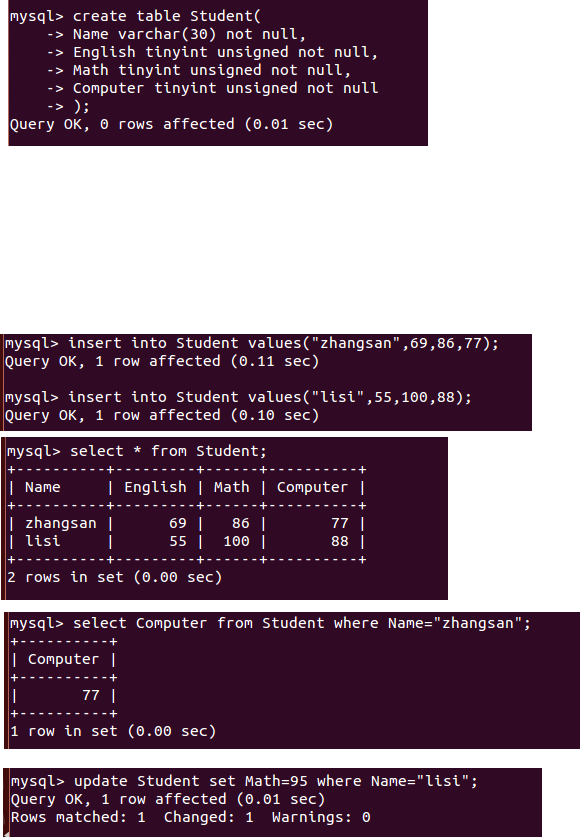
根据上面已经设计出的 Student 表,使用 MySQL 的 JAVA 客户端编程实现以下操作:

(1)向 Student 表中添加如下所示的一条记录:

scofield

源代码:

package com.mysql;

import java.sql.*;

public class MysqlTest {

   static final String driver="com.mysql.jdbc.Driver";

   static final String DB="jdbc:mysql://localhost/test1";

   static final String user="root";

   static final String password="wangli";

   public static void main(String[] args) {

       Connection conn=null;

       Statement stmt=null;

       try {

           Class.forName(driver);

           conn=DriverManager.getConnection(DB,user,password);

           stmt=conn.createStatement();

           String sql="insert into Student values('scofied',45,89,100)";

           stmt.executeUpdate(sql);

           System.out.println("插入成功!");

       } catch (SQLException | ClassNotFoundException e) {

        // TODO Auto-generated catch block

        e.printStackTrace();

    }finally {

        if(stmt!=null) {

                try {

                    stmt.close();

                } catch (SQLException e) {

                    // TODO Auto-generated catch block

                    e.printStackTrace();

                }

        }

        if(conn!=null) {

            try {

                conn.close();

            } catch (SQLException e) {

                e.printStackTrace();

            }

        }

    }

   }

}

(2) 获取 scofield 的 English 成绩信息

源代码:

package com.mysql;

import java.sql.*;

public class MysqlTest {

   static final String driver="com.mysql.jdbc.Driver";

   static final String DB="jdbc:mysql://localhost/test1";

   static final String user="root";

   static final String password="wangli";

   public static void main(String[] args) {

       Connection conn=null;

       Statement stmt=null;

       ResultSet rs=null;

       try {

           Class.forName(driver);

           conn=DriverManager.getConnection(DB,user,password);

           stmt=conn.createStatement();

           String sql="select Name,English from Student where Name='scofied' ";

           rs=stmt.executeQuery(sql);

           System.out.println("name"+"\t\t"+"English");

           while(rs.next()) {

               System.out.print(rs.getString()+"\t\t");

               System.out.println(rs.getString());

           }

           System.out.println("输出完成!");

       } catch (SQLException | ClassNotFoundException e) {

        // TODO Auto-generated catch block

        e.printStackTrace();

    }finally {

        if(stmt!=null) {

                try {

                    stmt.close();

                } catch (SQLException e) {

                    // TODO Auto-generated catch block

                    e.printStackTrace();

                }

        }

        if(conn!=null) {

            try {

                conn.close();

            } catch (SQLException e) {

                e.printStackTrace();

            }

        }

    }

   }

}

(二) HBase 数据库操作

学生表 Student

name     score

English     Math     Computer

zhangsan

lisi

根据上面给出的学生表 Student 的信息, 执行如下操作:

() 用 Hbase Shell 命令创建学生表 Student;

()用 scan 命令浏览 Student 表的相关信息;

()查询 zhangsan 的 Computer 成绩;

()修改 lisi 的 Math 成绩, 改为 。
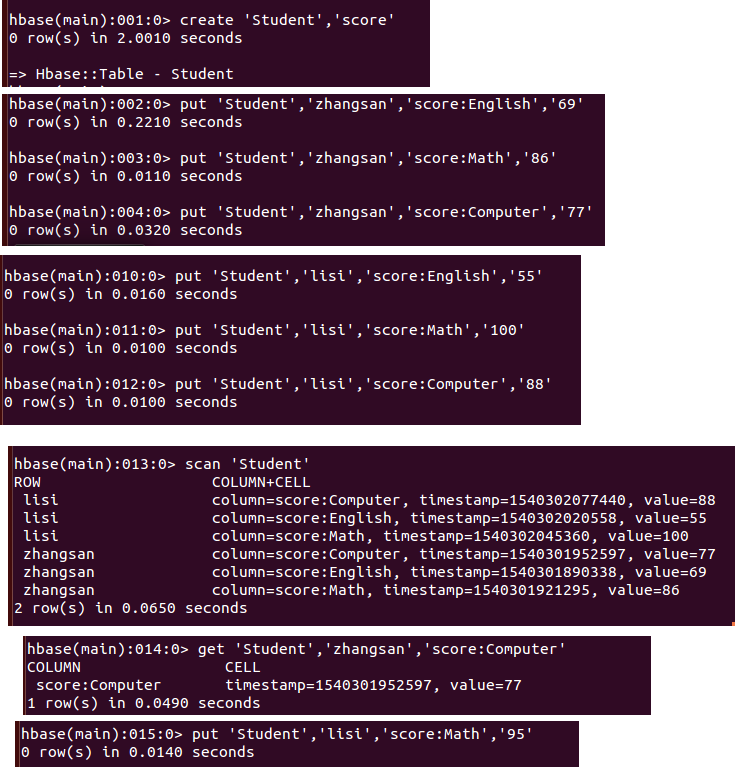
.根据上面已经设计出的 Student 表, 用 HBase API 编程实现以下操作:

()添加数据: English: Math: Computer:

scofield

源代码:

package hbase_test;

import java.io.IOException;

import org.apache.hadoop.conf.Configuration;

import org.apache.hadoop.hbase.HBaseConfiguration;

import org.apache.hadoop.hbase.TableName;

import org.apache.hadoop.hbase.client.Admin;

import org.apache.hadoop.hbase.client.Connection;

import org.apache.hadoop.hbase.client.ConnectionFactory;

import org.apache.hadoop.hbase.client.Put;

import org.apache.hadoop.hbase.client.Table;

public class HBaseTest {

    public static Configuration configuration;

    public static Connection connection;

    public static Admin admin;

    public static void main(String[] args) {

        configuration=HBaseConfiguration.create();

        configuration.set("hbase.rootdir", "hdfs://localhost:9000/hbase");

        try {

            connection=ConnectionFactory.createConnection(configuration);

            admin=connection.getAdmin();

            insertRow("Student","scofield","score","English","");

            insertRow("Student","scofield","score","Math","");

            insertRow("Student","scofield","score","Computer","");

            System.out.println("插入成功!");

        } catch (IOException e) {

            // TODO Auto-generated catch block

            e.printStackTrace();

        }

        close();

    }

    public static void insertRow(String tableName, String rowKey, String colFamily, String col, String val) {

        try {

            Table table = connection.getTable(TableName.valueOf(tableName));

            Put put = new Put(rowKey.getBytes());

            put.addColumn(colFamily.getBytes(), col.getBytes(), val.getBytes());

            table.put(put);

            table.close();

        } catch (IOException e) {

            // TODO Auto-generated catch block

            e.printStackTrace();

        }

    }

    public static void close() {

        try {

            if (admin != null) {

                admin.close();

            }

            if(null!=connection) {

                connection.close();

            }

        } catch (IOException e) {

            // TODO Auto-generated catch block

            e.printStackTrace();

        }

    }

}

(2)获取 scofield 的 English 成绩信息。

源代码:

package hbase_test;

import java.io.IOException;

import org.apache.hadoop.conf.Configuration;

import org.apache.hadoop.hbase.Cell;

import org.apache.hadoop.hbase.CellUtil;

import org.apache.hadoop.hbase.HBaseConfiguration;

import org.apache.hadoop.hbase.TableName;

import org.apache.hadoop.hbase.client.Admin;

import org.apache.hadoop.hbase.client.Connection;

import org.apache.hadoop.hbase.client.ConnectionFactory;

import org.apache.hadoop.hbase.client.Get;

import org.apache.hadoop.hbase.client.Put;

import org.apache.hadoop.hbase.client.Result;

import org.apache.hadoop.hbase.client.Table;

public class HBaseTest2 {

    public static Configuration configuration;

    public static Connection connection;

    public static Admin admin;

    public static void main(String[] args) {

        configuration=HBaseConfiguration.create();

        configuration.set("hbase.rootdir", "hdfs://localhost:9000/hbase");

        try {

            connection=ConnectionFactory.createConnection(configuration);

            admin=connection.getAdmin();

            getData("Student","scofield","score","English");

            System.out.println("输出完成!");

        } catch (IOException e) {

            // TODO Auto-generated catch block

            e.printStackTrace();

        }

        close();

    }

    public static void getData(String tableName, String rowKey, String colFamily, String col) {

        try {

            Table table = connection.getTable(TableName.valueOf(tableName));

            Get get=new Get(rowKey.getBytes());

            get.addColumn(colFamily.getBytes(), col.getBytes());

            Result result=table.get(get);

            showCell(result);

            table.close();

        } catch (IOException e) {

            // TODO Auto-generated catch block

            e.printStackTrace();

        }

    }

    private static void showCell(Result result) {

        Cell[] cells=result.rawCells();

        for(Cell cell:cells) {

            System.out.println("RowName:"+new String(CellUtil.cloneRow(cell))+"     ");

            System.out.println("Timetamp:"+cell.getTimestamp()+"     ");

            System.out.println("column Family"+new String(CellUtil.cloneFamily(cell))+"     ");

            System.out.println("row Name:"+new String(CellUtil.cloneValue(cell))+"     ");

            System.out.println("value"+new String(CellUtil.cloneValue(cell))+"     ");

        }

    }

    public static void close() {

        try {

            if (admin != null) {

                admin.close();

            }

            if(null!=connection) {

                connection.close();

            }

        } catch (IOException e) {

            // TODO Auto-generated catch block

            e.printStackTrace();

        }

    }

}

(三) Redis 数据库操作

Student 键值对如下:

zhangsan:{

English:

Math:

Computer:

}

lisi:{

English:

Math:

Computer:

}

. 根据上面给出的键值对, 完成如下操作:

()用 Redis 的哈希结构设计出学生表 Student (键值可以用 student.zhangsan 和 student.lisi来表示两个键值属于同一个表);

() 用 hgetall 命令分别输出 zhangsan 和 lisi 的成绩信息;

() 用 hget 命令查询 zhangsan 的 Computer 成绩;

()修改 lisi 的 Math 成绩, 改为 。

.根据上面已经设计出的学生表 Student, 用 Redis 的 JAVA 客户端编程(jedis),实现如下

操作:

()添加数据: English: Math: Computer:

该数据对应的键值对形式如下:

scofield:{

English:

Math:

Computer:

}

(四) MongoDB 数据库操作

Student 文档如下:

{

“name”: “zhangsan”,

“score”: {

“English”: ,

“Math”: ,

“Computer”:

} } {

“name”: “lisi”,

“score”: {

“English”: ,

“Math”: ,

“Computer”:

} }

.根据上面给出的文档,完成如下操作:

() 用 MongoDB Shell 设计出 student 集合;

()用 find()方法输出两个学生的信息;

()用 find()方法查询 zhangsan 的所有成绩(只显示 score 列);

()修改 lisi 的 Math 成绩, 改为 。
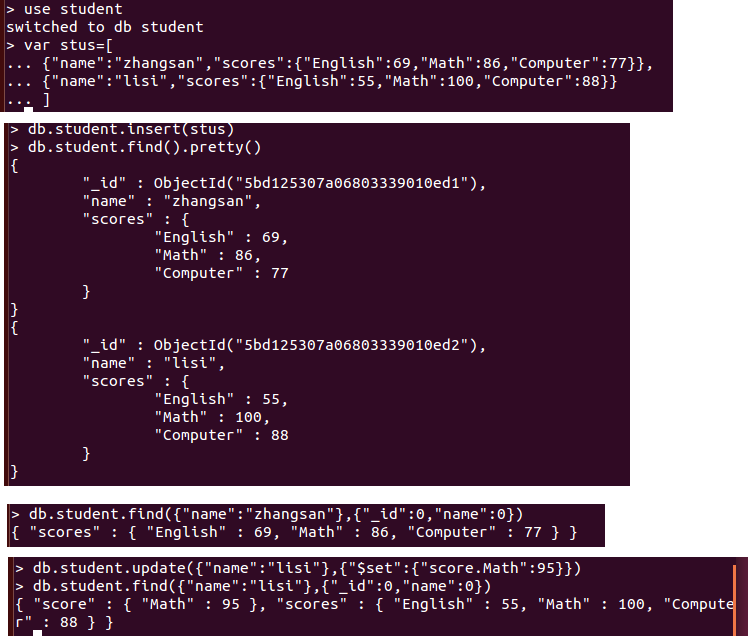
.根据上面已经设计出的 Student 集合,用 MongoDB 的 Java 客户端编程,实现如下操作:

() 添加数据: English: Math: Computer:

与上述数据对应的文档形式如下:

{

“name”: “scofield”,

“score”: {

“English”: ,

“Math”: ,

“Computer”:

} }

源代码:

package com.mongo;

import java.util.ArrayList;

import java.util.List;

import org.bson.Document;

import com.mongodb.MongoClient;

import com.mongodb.client.MongoCollection;

import com.mongodb.client.MongoDatabase;

public class MongoTest {

    public static void main(String[] args) {

        MongoClient mongoClient=new MongoClient("localhost",);

        MongoDatabase mongoDatabase=mongoClient.getDatabase("student");

        MongoCollection<Document> collection=mongoDatabase.getCollection("student");

        Document document=new Document("name","scofield").append("score",

                new Document("English",).append("Math", ).append("Computer",

                        ));

        List<Document> documents=new ArrayList<Document>();

        documents.add(document);

        collection.insertMany(documents);

        System.out.println("文档插入成功!");

    }

}

实验截图:

(2)获取 scofield 的所有成绩成绩信息(只显示 score 列)

源代码:

package com.mongo;

import org.bson.Document;

import com.mongodb.MongoClient;

import com.mongodb.client.MongoCollection;

import com.mongodb.client.MongoCursor;

import com.mongodb.client.MongoDatabase;

public class MongoTest2 {

    public static void main(String[] args) {

        MongoClient mongoClient=new MongoClient("localhost",);

        MongoDatabase mongoDatabase=mongoClient.getDatabase("student");

        MongoCollection<Document> collection=mongoDatabase.getCollection("student");

        MongoCursor<Document> cursor=collection.find(new Document("name","scofield")).

                projection(new Document("score",).append("_id", )).iterator();

        while(cursor.hasNext())

            System.out.println(cursor.next().toJson());

    }

}
linux中mysql,mongodb,redis,hbase数据库操作的更多相关文章
- Scrapy连接到各类数据库(SQLite,Mysql,Mongodb,Redis)
如何使用scrapy连接到(SQLite,Mysql,Mongodb,Redis)数据库,并把爬取的数据存储到相应的数据库中. 一.SQLite 1.修改pipelines.py文件加入如下代码 # ...
- 数据库们~MySQL~MongoDB~Redis
mysql基础 mysql进阶 python操作mysql MongoDB Redis
- Linux中python3,django,redis以及mariab的安装
1. Linux中python3,django,redis以及mariab的安装 2. CentOS下编译安装python3 编译安装python3.6的步骤 1.下载python3源码包 wget ...
- linux中MySQL主从配置(Django实现主从读写分离)
一 linux中MySQL主从配置原理(主从分离,主从同步) mysql主从配置的流程大体如图: 1)master会将变动记录到二进制日志里面: 2)master有一个I/O线程将二进制日志发送到sl ...
- 转载-清除Linux中MySQL的使用痕迹~/.mysql_history
原文地址:清除Linux中MySQL的使用痕迹~/.mysql_history 作者:RogerZhuo 原贴:http://bbs.chinaunix.net/thread-3676498-1-1. ...
- 回顾:Linux环境 Mysql新建用户和数据库并授权
回顾:Linux环境 Mysql新建用户和数据库并授权 一.新建用户 //登录Mysql @>mysql -u root -p @>密码 //创建用户 mysql> insert i ...
- hbase数据库操作
.实验内容与完成情况:(实验具体步骤和实验截图说明) (一)编程实现以下指定功能,并用 Hadoop 提供的 HBase Shell 命令完成相同任务: () 列出 HBase 所有的表的相关信息,例 ...
- Python交互数据库(Mysql | Mongodb | Redis)
数据库 Mysql Mysql MySQL是一个关系型数据库管理系统,由瑞典MySQL AB公司开发,后来被Sun公司收购,Sun公司后来又被Oracle公司收购,目前属于Oracle旗下产品 MyS ...
- Linux中mysql的操作
一.mysql服务操作 二.数据库操作 三.数据表操作 四.修改表结构 五.数据备份和恢复 六.卸载数据库
随机推荐
- css 层叠式样式表(3)
样式分类 大小 -- 调整div大小,长 width,高 height.长可以直接100%横向沾满屏幕,高不可以. 背景 background-color 背景色 background-image ...
- Windows 安装 Microsoft Visual Studio 2010
Windows 安装 VS2010 我的电脑系统:Windows 10 x64位 我要安装的Microsoft Visual Studio 是:VS2010 注意: VS2010 没有专门的64位版. ...
- 【Boost】boost库中timer定时器 2
博客转载自:http://blog.csdn.net/yockie/article/details/40386145 先跟着boost文档中asio章节的指南中的几个例子学习一下使用: 所有的Asio ...
- R: 关于文件 文件夹的处理:file.show() dir.create().....
文件管理主要函数: setwd( ):设定R软件当前工作目录.getwd( ):查看R软件当前工作目录.list.files( ): 查看当前目录下文件.file.show( ): 显示文件.file ...
- tarjan进阶
一.边双连通分量 定义 若一个无向图中的去掉任意一条边都不会改变此图的连通性,即不存在桥,则称作边双连通图.一个无向图中的每一个极大边双连通子图称作此无向图的边双连通分量. 实际求法和强连通分量差不多 ...
- React 和 Redux理解
学习React有一段时间了,但对于Redux却不是那么理解.网上看了一些文章,现在把对Redux的理解总结如下 从需求出发,看看使用React需要什么 1. React有props和state pro ...
- 终极解决傻X阿里钱盾新手开店及老卖家复核身份证照片模糊无法对焦问题
我小米3阿里钱盾认证拍照无法对焦,后来咨询客服,客服让买新的或借朋友的.然后百度了一下发现模糊现象不是个例,好多比较新的小米5,华为手机什么的也都模糊.真是幸庆,,差点就被客服带坑里去买新手机了. 然 ...
- C#之Socket断线重连
一.网上常用方法 1.当Socket.Conneted == false时,调用如下函数进行判断 /// /// 当socket.connected为false时,进一步确定下当前连接状态 /// / ...
- 哈雷监控设备的操作及升级NSG9k6G
哈雷监控设备的操作及升级NSG9k6G 一.下载升级包: http://pan.baidu.com/s/1kTmw9sr 如连接不可以用可以直接私聊我.QQ1841031740 二.升级: 下载完后, ...
- eclise远程调试
配置很简单,如下: 1. tomcat在bin/catalina.sh中添加如下:declare -x CATALINA_OPTS="-server -Xdebug -Xnoagent -D ...