
LwIP的SNMP学习笔记
关于这方面的资料网上非常少,做一下笔记。
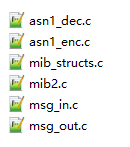
在LwIP中,在\lwip-1.4.1\src\core\snmp目录下有SNMP相关的c文件,
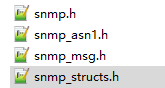
在lwip-1.4.1\src\include\lwip目录下有SNMP相关的h文件,
在\lwip-1.4.1\doc目录下有一个snmp代理的说明,这是LwIP最直接的说明文档:

snmp_init(void)中会设置UDP接收的回调函数,这样,所有发往本机161端口的udp包都会由snmp_recv处理
/**

 * Starts SNMP Agent.

 * Allocates UDP pcb and binds it to IP_ADDR_ANY port 161.

 */

void

snmp_init(void)

{

  struct snmp_msg_pstat *msg_ps;

  u8_t i;

  snmp1_pcb = udp_new();

  if (snmp1_pcb != NULL)

  {

    udp_recv(snmp1_pcb, snmp_recv, (void *)SNMP_IN_PORT);

    udp_bind(snmp1_pcb, IP_ADDR_ANY, SNMP_IN_PORT);

  }
snmp_recv函数中会调用snmp_pdu_header_check函数,检查SNMP PDU的头部是否正确
/* lwIP UDP receive callback function */

static void

snmp_recv(void *arg, struct udp_pcb *pcb, struct pbuf *p, ip_addr_t *addr, u16_t port)
  /* check total length, version, community, pdu type */

  err_ret = snmp_pdu_header_check(p, payload_ofs, payload_len, &varbind_ofs, msg_ps);
在snmp_pdu_header_check函数中,先检测type,什么type?PDU类型?但后面判断type有效性里面又不是,为什么?
/**

 * Checks and decodes incoming SNMP message header, logs header errors.

 *

 * @param p points to pbuf chain of SNMP message (UDP payload)

 * @param ofs points to first octet of SNMP message

 * @param pdu_len the length of the UDP payload

 * @param ofs_ret returns the ofset of the variable bindings

 * @param m_stat points to the current message request state return

 * @return

 * - ERR_OK SNMP header is sane and accepted

 * - ERR_ARG SNMP header is either malformed or rejected

 */

static err_t

snmp_pdu_header_check(struct pbuf *p, u16_t ofs, u16_t pdu_len, u16_t *ofs_ret, struct snmp_msg_pstat *m_stat)

{

  ofs_base = ofs;

  snmp_asn1_dec_type(p, ofs, &type);

  derr = snmp_asn1_dec_length(p, ofs+, &len_octets, &len);

  if ((derr != ERR_OK) ||

      (pdu_len != ( + len_octets + len)) ||

      (type != (SNMP_ASN1_UNIV | SNMP_ASN1_CONSTR | SNMP_ASN1_SEQ)))

  {

    snmp_inc_snmpinasnparseerrs();

    return ERR_ARG;

  }
SNMPv1 agent for lwIP
SNMPv1 agent for lwIP

Author: Christiaan Simons

This is a brief introduction how to use and configure the SNMP agent.

Note the agent uses the raw-API UDP interface so you may also want to

read rawapi.txt to gain a better understanding of the SNMP message handling.

0 Agent Capabilities

====================

SNMPv1 per RFC1157

  This is an old(er) standard but is still widely supported.

  For SNMPv2c and v3 have a greater complexity and need many

  more lines of code. IMHO this breaks the idea of "lightweight IP".

v1简单,v2和v3虽然更多功能,但需要更多代码,违背了轻量级的初衷

  Note the S in SNMP stands for "Simple". Note that "Simple" is

  relative. SNMP is simple compared to the complex ISO network

  management protocols CMIP (Common Management Information Protocol)

  and CMOT (CMip Over Tcp).

SNMP的S本意为简单,但这是相对的(与OSI的相比),其实并不简单

MIB II per RFC1213

  The standard lwIP stack management information base.

  This is a required MIB, so this is always enabled.

  When builing lwIP without TCP, the mib-2.tcp group is omitted.

  The groups EGP, CMOT and transmission are disabled by default.

  MIB II,RFC1213是必须的MIB

  Most mib-2 objects are not writable except:

  sysName, sysLocation, sysContact, snmpEnableAuthenTraps.

  Writing to or changing the ARP and IP address and route

  tables is not possible.

 不能写IP地址和路由表???

  Note lwIP has a very limited notion of IP routing. It currently

  doen't have a route table and doesn't have a notion of the U,G,H flags.

  Instead lwIP uses the interface list with only one default interface

  acting as a single gateway interface (G) for the default route.

  The agent returns a "virtual table" with the default route 0.0.0.0

  for the default interface and network routes (no H) for each

  network interface in the netif_list.

  All routes are considered to be up (U).

Loading additional MIBs

  MIBs can only be added in compile-time, not in run-time.

  There is no MIB compiler thus additional MIBs must be hand coded.

MIB只能通过代码实现,不能通过命令行添加

Large SNMP message support

  The packet decoding and encoding routines are designed

  to use pbuf-chains. Larger payloads then the minimum

  SNMP requirement of 484 octets are supported if the

  PBUF_POOL_SIZE and IP_REASS_BUFSIZE are set to match your

  local requirement.

1 Building the Agent

====================

First of all you'll need to add the following define

to your local lwipopts.h:

#define LWIP_SNMP               1

and add the source files in lwip/src/core/snmp

and some snmp headers in lwip/src/include/lwip to your makefile.

Note you'll might need to adapt you network driver to update

the mib2 variables for your interface.

2 Running the Agent

===================

The following function calls must be made in your program to

actually get the SNMP agent running.

Before starting the agent you should supply pointers

to non-volatile memory for sysContact, sysLocation,

and snmpEnableAuthenTraps. You can do this by calling

mib2.c文件中

snmp_set_syscontact()

snmp_set_syslocation()

snmp_set_snmpenableauthentraps()

Additionally you may want to set

snmp_set_sysdescr()

snmp_set_sysobjid() (if you have a private MIB)

snmp_set_sysname()

Also before starting the agent you need to setup

one or more trap destinations using these calls:

msg_out.c文件中

snmp_trap_dst_enable();

snmp_trap_dst_ip_set();

In the lwIP initialisation sequence call snmp_init() just after

the call to udp_init().

Exactly every 10 msec the SNMP uptime timestamp must be updated with

snmp_inc_sysuptime(). You should call this from a timer interrupt

or a timer signal handler depending on your runtime environment.

An alternative way to update the SNMP uptime timestamp is to do a call like

snmp_add_sysuptime(100) each 1000ms (which is bigger "step", but call to

a lower frequency). Another one is to not call snmp_inc_sysuptime() or

snmp_add_sysuptime(), and to define the SNMP_GET_SYSUPTIME(sysuptime) macro.

This one is undefined by default in mib2.c. SNMP_GET_SYSUPTIME is called inside

snmp_get_sysuptime(u32_t *value), and enable to change "sysuptime" value only

when it's queried (any function which need "sysuptime" have to call

snmp_get_sysuptime).

3 Private MIBs

==============

If want to extend the agent with your own private MIB you'll need to

add the following define to your local lwipopts.h:

#define SNMP_PRIVATE_MIB        1

You must provide the private_mib.h and associated files yourself.

Note we don't have a "MIB compiler" that generates C source from a MIB,

so you're required to do some serious coding if you enable this!

Note the lwIP enterprise ID (26381) is assigned to the lwIP project,

ALL OBJECT IDENTIFIERS LIVING UNDER THIS ID ARE ASSIGNED BY THE lwIP

MAINTAINERS!

If you need to create your own private MIB you'll need

to apply for your own enterprise ID with IANA: http://www.iana.org/numbers.html

You can set it by passing a struct snmp_obj_id to the agent

using snmp_set_sysobjid(&my_object_id), just before snmp_init().

Note the object identifiers for thes MIB-2 and your private MIB

tree must be kept in sorted ascending (lexicographical) order.

This to ensure correct getnext operation.

An example for a private MIB is part of the "minimal Unix" project:

contrib/ports/unix/proj/minimal/lwip_prvmib.c

The next chapter gives a more detailed description of the

MIB-2 tree and the optional private MIB.

4 The Gory Details

==================

4.0 Object identifiers and the MIB tree.

We have three distinct parts for all object identifiers:

The prefix

  .iso.org.dod.internet

the middle part

  .mgmt.mib-2.ip.ipNetToMediaTable.ipNetToMediaEntry.ipNetToMediaPhysAddress

and the index part

  .1.192.168.0.1

Objects located above the .internet hierarchy aren't supported.

Currently only the .mgmt sub-tree is available and

when the SNMP_PRIVATE_MIB is enabled the .private tree

becomes available too.

Object identifiers from incoming requests are checked

for a matching prefix, middle part and index part

or are expanded(*) for GetNext requests with short

or inexisting names in the request.

(* we call this "expansion" but this also

resembles the "auto-completion" operation)

The middle part is usually located in ROM (const)

to preserve precious RAM on small microcontrollers.

However RAM location is possible for an dynamically

changing private tree.

The index part is handled by functions which in

turn use dynamically allocated index trees from RAM.

These trees are updated by e.g. the etharp code

when new entries are made or removed form the ARP cache.

/** @todo more gory details */
LwIP的SNMP学习笔记的更多相关文章
- SNMP学习笔记之SNMP TRAP简介、流程以及使用Python实现接受Trap信息
0x00 SNMP TRAP简介 SNMP(Simple Network Management Protocol) trap是一种很有用,但是也容易让人难以理解的协议. 虽然名字叫做简单网络管理协议, ...
- SNMP学习笔记之SNMP 原理与实战详解
原文地址:http://freeloda.blog.51cto.com/2033581/1306743 原创作品,允许转载,转载时请务必以超链接形式标明文章 原始出处 .作者信息和本声明.否则将追究法 ...
- SNMP学习笔记之SNMP介绍,OID及MIB库
1.1. SNMP概览 SNMP的基本知识介绍简单网络管理协议(SNMP-Simple Network Management Protocol)是一个与网络设备交互的简单方法.该规范是由IETF ...
- snmp学习笔记
snmp5.5 client 包含头文件 #include <net-snmp/net-snmp-config.h> #include <net-snmp/net-snmp-incl ...
- SNMP学习笔记之SNMPv3的配置和认证以及TroubleShooting
0x00 增加snmp v3用户 增加用户的时候,必须要停止SNMP服务. # service snmpd stop # net-snmp-config --create-snmpv3-user -r ...
- SNMP学习笔记之SNMP树形结构介绍
Basic command of SNMP: GET: The GET operation is a request sent by the manager to the managed device ...
- SNMP学习笔记之iReasoning MIB Browser
0x00 MIB Browser iReasoning MIB浏览器是一个强大和易于使用的工具由iReasoning SNMP API提供支持. MIB浏览器是工程师管理启用SNMP的网络设备和应用程 ...
- SNMP学习笔记之Python的netsnmp和pysnmp的性能对比
0x00 概览 用python获取snmp信息有多个现成的库可以使用,其中比较常用的是netsnmp和pysnmp两个库.网上有较多的关于两个库的例子. 本文重点在于如何并发的获取snmp的数据,即同 ...
- SNMP学习笔记之SNMP的安装及Python的调用
0x00 概述 本文是介绍SNMP在Windows和Linux(Ubuntu)下的安装,以及通过Python调用其接口的文章. 0x01 开发环境 Python 3.5.1 Windows 10 64 ...
随机推荐
- Java 用链表实现栈和队列
栈 是一种基于后进先出(LIFO)策略的集合类型.当邮件在桌上放成一叠时,就能用栈来表示.新邮件会放在最上面,当你要看邮件时,会一封一封从上到下阅读.栈的顶部称为栈顶,所有操作都在栈顶完成. 前面提到 ...
- Windows10内嵌Ubuntu子系统初始化设置
第一次启动 重启ubuntu Since Windows 10 version 1803, closing all WSL terminal windows won't kill background ...
- Vue 组件复用性和slot
1.组件可复用 2.slot元素作为组件模板之中的内容分发插槽,元素自身可以被替换 <!DOCTYPE html> <html lang="en"> < ...
- maven-assembly-plugin入门
愿文地址:https://www.jianshu.com/p/e8585a991e8e 当你使用 Maven 对项目打包时,你需要了解以下 3 个打包 plugin,它们分别是 plugin func ...
- 【java面试】IO流
一.IO 1.IO概念 ·输入流:把能够读取一个字节序列的对象称为输入流(百度百科) ·输出流:把能够写一个字节序列的对象称为输出流(百度百科) 从定义上看可能会让你感到困惑,这里解释一下:]; ...
- 分层有限状态机的C++实现
为了方便我的游戏开发,写了这么一个通用的分层有限状态机.希望在其稳定以后,可以作为一个组件加入到我的游戏引擎当中. 目前使用了std::function来调用回调函数,在未来可能会用委托机制代替. 第 ...
- RainbowPlan-Alpha版本发布2
博客介绍 这个作业属于哪个课程 https://edu.cnblogs.com/campus/xnsy/GeographicInformationScience/ 这个作业要求在哪里 https:// ...
- 创建dynamics CRM client-side (十一) - 管理和关联所有的JS文件
代码管理是一个无法避免的问题. 前面我也建议了大家每一个entity都应该拥有自身的js. 但是如果我们有一些global的function, 我们应该怎样去部署到每一个entity中呢? 我这里使用 ...
- python输出结果后面带着一个“None”
执行代码的时候,输出的结果中含有一个“None” 只要将最后一行代码的print() 去掉即可 改成 my_range.get_range() 或者是将 函数中的print(range) 改成 r ...
- SparkSQL 如何自定义函数
1. SparkSql如何自定义函数 2. 示例:Average 3. 类型安全的自定义函数 1. SparkSql如何自定义函数? spark中我们定义一个函数,需要继承 UserDefinedAg ...