
vue 计算属性实现过滤关键词
效果
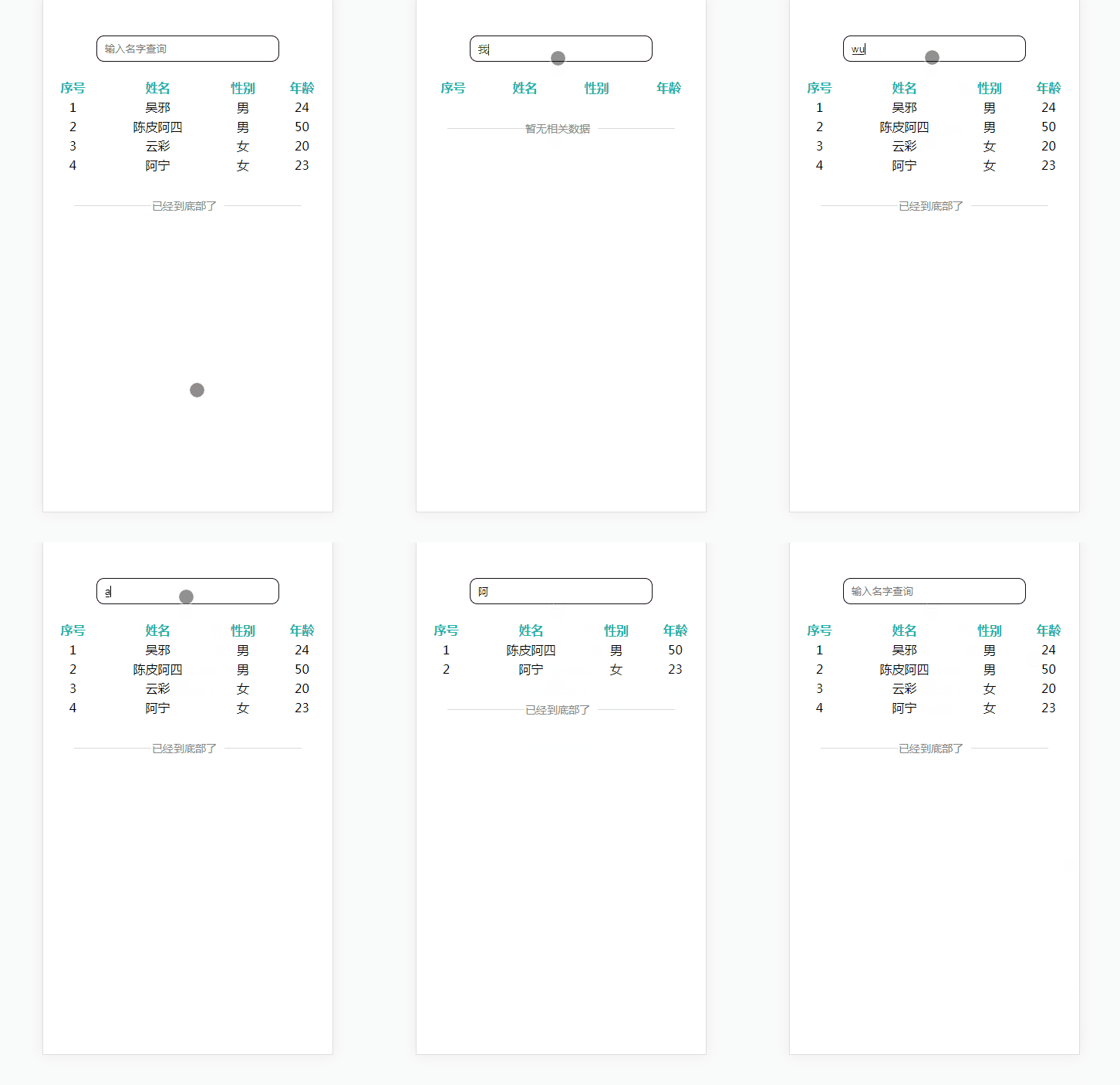
html
<!DOCTYPE html>

<html>

    <head>

        <meta charset="utf-8">

        <meta name="viewport" content="width=device-width, initial-scale=1.0, maximum-scale=1.0, user-scalable=0">

        <title>Vue计算属性-过滤</title>

        <link rel="stylesheet" href="css/1.css">

        <script type="text/javascript" src="js/jquery.js"></script>

        <script src="https://cdn.staticfile.org/vue/2.4.2/vue.min.js"></script>

        <script src="https://cdn.staticfile.org/vue-router/2.7.0/vue-router.min.js"></script>

        <script src="js/1.js"></script>

    </head>

    <body>

        <div id="app">

            <keep-alive>

                <router-view class="child-view" v-if="$route.meta.keepAlive"></router-view>

            </keep-alive>

            <router-view class="child-view" v-if="!$route.meta.keepAlive"></router-view>

        </div>

        <script type="text/x-template" id="page1">

            <div>

                <input type='text' class='searchInput' placeholder='输入名字查询' v-model='searchTxt'>

                <table >

                    <tr class="blue">

                        <th>序号</th>

                        <th>姓名</th>

                        <th>性别</th>

                        <th>年龄</th>

                    </tr>

                    <tr v-for='(list,index) in filteredArticles'>

                        <td>{{index+1}}</td>

                        <td>{{list.name}}</td>

                        <td>{{list.sex}}</td>

                        <td>{{list.year}}</td>

                    </tr>

                </table >

                <div class='NoMore'>

                    <span class='NoMoreTxt' id='NoMoreTxt'>已经到底部了</span>

                </div>

            </div>

        </script>

    </body>

</html>
1.js
$(document).ready(function() {

    Vue.use(VueRouter);

    // Page1  start

    var Page1 = Vue.extend({

        data() {

            return {

                searchTxt: '',

                list: [{

                        name: '吴邪',

                        sex: '男',

                        year: '24'

                    },

                    {

                        name: '陈皮阿四',

                        sex: '男',

                        year: '50'

                    },

                    {

                        name: '云彩',

                        sex: '女',

                        year: '20'

                    },

                    {

                        name: '阿宁',

                        sex: '女',

                        year: '23'

                    }

                ],

            }

        },

        computed: {

            // 计算数学,匹配搜索

            filteredArticles: function() {

                var articles_array = this.list,

                    searchString = this.searchTxt;

                if (!searchString) {

                    return articles_array;

                }

                searchString = searchString.trim().toLowerCase();

                articles_array = articles_array.filter(function(item) {

                    if (item.name.toLowerCase().indexOf(searchString) !== -1) {

                        return item;

                    }

                })

                // 返回过来后的数组

                return articles_array;;

            }

        },

        template: "#page1",

        watch: {

            filteredArticles(newVal, oldVal) { //监控单个变量

                var arr = newVal;

                if (arr.length <= 0) {

                    $('#NoMoreTxt').text('暂无相关数据');

                } else {

                    $('#NoMoreTxt').text('已经到底部了');

                }

            }

        }

    })

    //Page1  end

    var router = new VueRouter({

        routes: [{

            path: '/',

            name: 'Page1',

            meta: {

                index: 0,

                keepAlive: true,

                title: '页面1'

            },

            component: Page1

        }]

    })

    var app = new Vue({

        el: '#app',

        router

    }).$mount('#app')

})
1.css
@CHARSET "UTF-8";

body {

    width: 100%;

    height: 100%;

}

body,

div,

p {

    margin: 0;

    padding: 0;

    text-align: center;

}

.blue {

    color: lightseagreen;

    font-weight: bold;

}

table,

tr {

    width: 100%;

}

.searchInput {

    width: 60%;

    height: 30px;

    margin: 50px 0 20px 0;

    border-radius: 10px;

    padding-left: 10px;

    outline: none;

    border: 1px solid #111;

}

.p_list {

    width: 100%;

    display: flex;

    margin: 20px 0;

}

.p_list span {

    width: 25%;

    display: inline-block;

}

.NoMore {

    font-size: 14px;

    color: #888;

    margin-top: 30px;

    text-align: center

}

.NoMoreTxt:before {

    content: "";

    width: 100px;

    height: 1px;

    display: inline-block;

    margin-bottom: 5px;

    margin-right: 1px;

    background-color: #dadada;

}

.NoMoreTxt:after {

    content: "";

    width: 100px;

    height: 1px;

    display: inline-block;

    background-color: #dadada;

    margin-bottom: 5px;

    margin-left: 10px;

}
vue 计算属性实现过滤关键词的更多相关文章
- Vue计算属性
github地址:https://github.com/lily1010/vue_learn/tree/master/lesson06 一 计算属性定位 当一些数据需要根据其它数据变化时,这时候就需要 ...
- 在做vue计算属性,v-for处理数组时遇到的一个bug
bug: You may have an infinite update loop in a component render function 无限循环 需要处理的数组(在 ** ssq **里): ...
- vue教程2-03 vue计算属性的使用 computed
vue教程2-03 vue计算属性的使用 computed computed:{ b:function(){ //默认调用get return 值 } } ---------------------- ...
- vue 计算属性 实例选项 生命周期
vue 计算属性: computed:{} 写在new vue()的属性,只要参与运算,数据不发生变化时,次计算只会执行一次,结果缓存,之后的计算会直接从缓存里去结果.如果其中的值发生变化(不管几个) ...
- Vue计算属性缓存(computed) vs 方法
Vue计算属性缓存(computed) vs 方法 实例 <div id="example"> <p>Original message: "{{ ...
- Vue 计算属性 && 监视属性
1 <!DOCTYPE html> 2 <html> 3 <head> 4 <meta charset="UTF-8" /> 5 & ...
- Vue计算属性和监听属性
一.计算属性 计算属性关键词: computed.计算属性在处理一些复杂逻辑时是很有用的. 可以看下以下反转字符串的例子: <div id="app"> {{ mess ...
- 第三节:Vue计算属性
计算属性就是当其依赖的属性的值发生变化的时候,这个属性的值就会自动更新. 例子: <!DOCTYPE html> <html> <head> <meta ch ...
- Vue#计算属性
在模板中表达式非常便利,但是它们实际上只用于简单的操作.模板是为了描述视图的结构.在模板中放入太多的逻辑会让模板过重且难以维护.这就是为什么 Vue.js 将绑定表达式限制为一个表达式.如果需要多于一 ...
随机推荐
- Oozie安装
Oozie的安装与部署 1.解压Oozie $ tar -zxf /opt/softwares/oozie-4.0.0-cdh5.3.6.tar.gz -C /opt/modules/cdh/ 2.H ...
- NX二次开发-UFUN工程图表格注释获取某一行某一列的tag函数UF_TABNOT_ask_cell_at_row_col
NX9+VS2012 #include <uf.h> #include <uf_tabnot.h> #include <NXOpen/Part.hxx> #incl ...
- px2rem-loader(Vue:将px转化为rem,适配移动端)
转载:https://www.cnblogs.com/WQLong/p/7798822.html 1.下载lib-flexible 使用的是vue-cli+webpack,通过npm来安装的 npm ...
- [NOI.AC] count
思路: 考虑组合数学. 当所求中没有重复的时候,方案数就是\(C_{n + 1}^{k}\) 当有重复的时候... 设相等的数字之间的距离为\(len\) 当取0个数时,方案数就是\(C_{n - 1 ...
- 秦曾昌人工智能课程---7、决策树集成学习Tree Ensembles
秦曾昌人工智能课程---7.决策树集成学习Tree Ensembles 一.总结 一句话总结: 其实机器模型减少variance的比较好的方式就是 多个模型取平均值 1.CART是什么? classi ...
- 2.RabbitMQ Window环境安装
RabbitMQ环境的安装分别介绍在Window和Linux下两个环境的安装过程. Window安装RabbitMQ,RabbitMQ安装文件是64位的,所以Window系统必须是64位的.安装R ...
- Spring随笔-核心知识DI与AOP
DI 依赖注入,使得相互依赖的组件松耦合. AOP 面向切面编程,使各种功能分离出来,形成可重用的组件.
- 6. 第一个jmeter脚本开发-测试百度首页
需求:可以承受5个用户同时访问百度解题思路:我们可以从这短短的一句话中提取3个点:同时.5个并发.百度服务器解题方法:方法一:录制请求录制方法会在下一篇进行讲解,本篇不做过多介绍. 方法二:自定义添加 ...
- 本地 win7 与虚拟机Centos7 ping互通和Centos7 上网设置
VM 12 安装虚拟机我就不表示了 很简单网上找找 一 .虚拟机设置 1.修改使用了 VMWare 12 虚拟机,Oracle VM 用得有点晕 2.配置VM 的NET环境 3.在VMware虚拟机任 ...
- USACO 2004 Open The Cow Lineup /// oj25965
题目大意: 输入n k,n头牛 k个品种 接下来n行描述每头牛的品种 输出无法找出的最短子序列的长度 Sample Input 14 515325134425123 Sample Output 3 H ...