
DEVOPS技术实践_23:判断文件下载成功作为执行条件
在实际生产中,我们经常会需要通过判断一个结果作为一个条件去执行另一个内容,比如判断一个文件是否存在,判官一个命令是否执行成功等等
现在我们选择其中一个场景进行实验,当某个目录下存在,则执行操作
1. 下载一个文件
[root@node1 ~]# cd /opt/
[root@node1 opt]# wget https://www.python.org/ftp/python/3.7.1/Python-3.7.1.tgz
[root@node1 opt]# ll
-rw-r--r-- 1 root root 22802018 Oct 20 2018 Python-3.7.1.tgz
就判断这个文件是否存在
2 Jenkinsfile文件
import hudson.model.*;

println env.JOB_NAME

println env.BUILD_NUMBER

pipeline{

    agent any

    stages{

        stage("git checkout") {

            steps{

                script {

                checkout([$class: 'GitSCM',

                branches: [[name: '*/master']],

                doGenerateSubmoduleConfigurations: false,

                extensions: [],

                submoduleCfg: [],

                userRemoteConfigs: [[credentialsId: 'e3e48ed7-dbce-4642-bb18-28e0c71ab962',

                url: 'http://192.168.132.132/root/hello-world-greeting.git']]])

                }

            }

        }

        stage("Check file download") {

            steps {

                script {

                    out = sh(script: "ls /opt ", returnStdout: true).toString().trim()

                        println out

                        if(out.contains("Python-3.7.1.tgz")) {

                            println "file download successfully."

                        }else {

                            sh("exit 1")

                        }

                    }

                }

            }

        }

    }
把linux执行打印结果存在一个字符串中,通过字符串包含的方法去判断文件是否存在。这个思路有时候很好用,字符串操作在编程过程中经常被使用到。
3 构建执行
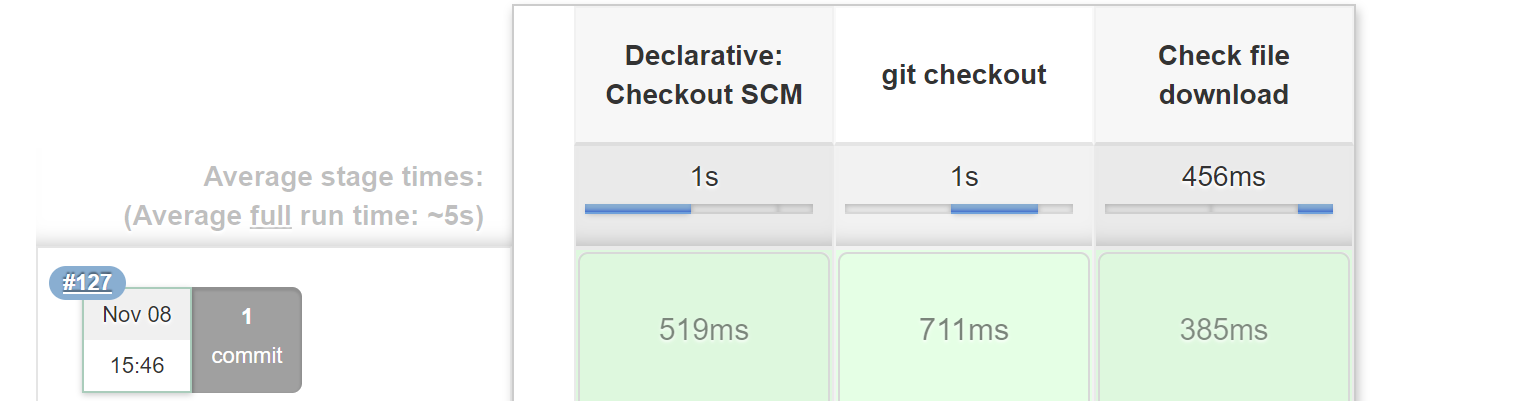
控制台输出
Started by user darren ning

Obtained pipeline.jenkinsfile from git http://192.168.132.132/root/pipeline-parameter-test.git

Running in Durability level: MAX_SURVIVABILITY

[Pipeline] Start of Pipeline

[Pipeline] echo

pipeline_parameter_project

[Pipeline] echo

127

[Pipeline] node

Running on Jenkins in /root/.jenkins/workspace/pipeline_parameter_project

[Pipeline] {

[Pipeline] stage

[Pipeline] { (Declarative: Checkout SCM)

[Pipeline] checkout

No credentials specified

 > git rev-parse --is-inside-work-tree # timeout=10

Fetching changes from the remote Git repository

 > git config remote.origin.url http://192.168.132.132/root/pipeline-parameter-test.git # timeout=10

Fetching upstream changes from http://192.168.132.132/root/pipeline-parameter-test.git

 > git --version # timeout=10

 > git fetch --tags --progress http://192.168.132.132/root/pipeline-parameter-test.git +refs/heads/*:refs/remotes/origin/*

 > git rev-parse refs/remotes/origin/master^{commit} # timeout=10

 > git rev-parse refs/remotes/origin/origin/master^{commit} # timeout=10

Checking out Revision 62425dd2e7881670ddad0294e22aa9a2427eb835 (refs/remotes/origin/master)

 > git config core.sparsecheckout # timeout=10

 > git checkout -f 62425dd2e7881670ddad0294e22aa9a2427eb835

Commit message: "Update pipeline.jenkinsfile"

 > git rev-list --no-walk 35d435ba12df03fb7b7c9b302a59511a19141c42 # timeout=10

[Pipeline] }

[Pipeline] // stage

[Pipeline] withEnv

[Pipeline] {

[Pipeline] stage

[Pipeline] { (git checkout)

[Pipeline] script

[Pipeline] {

[Pipeline] checkout

using credential e3e48ed7-dbce-4642-bb18-28e0c71ab962

 > git rev-parse --is-inside-work-tree # timeout=10

Fetching changes from the remote Git repository

 > git config remote.origin.url http://192.168.132.132/root/hello-world-greeting.git # timeout=10

Fetching upstream changes from http://192.168.132.132/root/hello-world-greeting.git

 > git --version # timeout=10

using GIT_ASKPASS to set credentials

 > git fetch --tags --progress http://192.168.132.132/root/hello-world-greeting.git +refs/heads/*:refs/remotes/origin/*

 > git rev-parse refs/remotes/origin/master^{commit} # timeout=10

 > git rev-parse refs/remotes/origin/origin/master^{commit} # timeout=10

Checking out Revision 50eaa401672536f50add4ba0e86d290b8ffafb3c (refs/remotes/origin/master)

 > git config core.sparsecheckout # timeout=10

 > git checkout -f 50eaa401672536f50add4ba0e86d290b8ffafb3c

Commit message: "Update Jenkinsfile"

 > git rev-list --no-walk 50eaa401672536f50add4ba0e86d290b8ffafb3c # timeout=10

[Pipeline] }

[Pipeline] // script

[Pipeline] }

[Pipeline] // stage

[Pipeline] stage

[Pipeline] { (Check file download)

[Pipeline] script

[Pipeline] {

[Pipeline] sh

+ ls /opt

[Pipeline] echo

Python-3.7.1.tgz

[Pipeline] echo

file download successfully.

[Pipeline] }

[Pipeline] // script

[Pipeline] }

[Pipeline] // stage

[Pipeline] }

[Pipeline] // withEnv

[Pipeline] }

[Pipeline] // node

[Pipeline] End of Pipeline

Finished: SUCCESS
4 改进实验
1.添加try catch语句块
2.如果发生错误,就把jenkinsjob标黄
jenkinsfile文件
import hudson.model.*;

println env.JOB_NAME

println env.BUILD_NUMBER

pipeline{

    agent any

    stages{

        stage("git checkout") {

            steps{

                script {

                checkout([$class: 'GitSCM',

                branches: [[name: '*/master']],

                doGenerateSubmoduleConfigurations: false,

                extensions: [],

                submoduleCfg: [],

                userRemoteConfigs: [[credentialsId: 'e3e48ed7-dbce-4642-bb18-28e0c71ab962',

                url: 'http://192.168.132.132/root/hello-world-greeting.git']]])

                }

            }

        }

        stage("Check file download") {

            steps {

                script {

                    try{

                    out = sh(script: "ls /opt ", returnStdout: true).toString().trim()

                        println out

                        if(out.contains("Python-3.7.1.tgz")) {

                            println "file download successfully."

                        }else {

                            sh("exit 1")

                        }

                    }

                    catch(Exception e) {

                        println "e"

                        error("fond error during check file download.")

                    }

                }

            }

        }

    }

}
构建
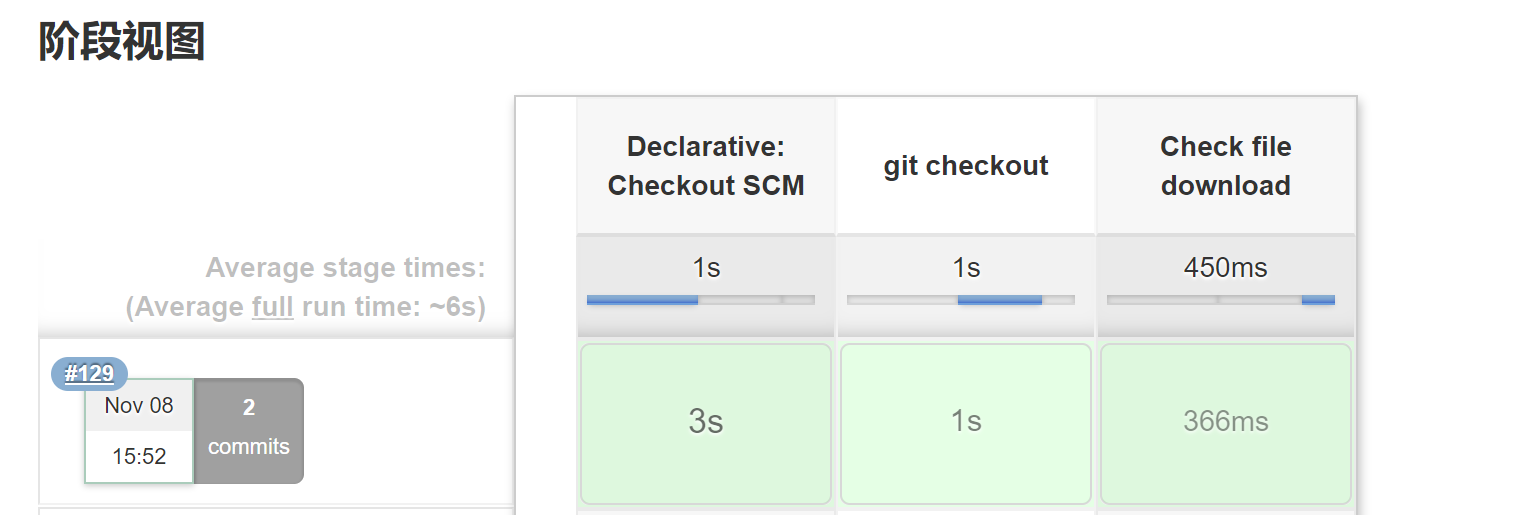
控制台输出
Started by user darren ning

Obtained pipeline.jenkinsfile from git http://192.168.132.132/root/pipeline-parameter-test.git

Running in Durability level: MAX_SURVIVABILITY

[Pipeline] Start of Pipeline

[Pipeline] echo

pipeline_parameter_project

[Pipeline] echo

129

[Pipeline] node

Running on Jenkins in /root/.jenkins/workspace/pipeline_parameter_project

[Pipeline] {

[Pipeline] stage

[Pipeline] { (Declarative: Checkout SCM)

[Pipeline] checkout

No credentials specified

 > git rev-parse --is-inside-work-tree # timeout=10

Fetching changes from the remote Git repository

 > git config remote.origin.url http://192.168.132.132/root/pipeline-parameter-test.git # timeout=10

Fetching upstream changes from http://192.168.132.132/root/pipeline-parameter-test.git

 > git --version # timeout=10

 > git fetch --tags --progress http://192.168.132.132/root/pipeline-parameter-test.git +refs/heads/*:refs/remotes/origin/*

 > git rev-parse refs/remotes/origin/master^{commit} # timeout=10

 > git rev-parse refs/remotes/origin/origin/master^{commit} # timeout=10

Checking out Revision 902f050f4a8d3a83a625f583b87f394d0fbad31f (refs/remotes/origin/master)

 > git config core.sparsecheckout # timeout=10

 > git checkout -f 902f050f4a8d3a83a625f583b87f394d0fbad31f

Commit message: "Update pipeline.jenkinsfile"

 > git rev-list --no-walk 62425dd2e7881670ddad0294e22aa9a2427eb835 # timeout=10

[Pipeline] }

[Pipeline] // stage

[Pipeline] withEnv

[Pipeline] {

[Pipeline] stage

[Pipeline] { (git checkout)

[Pipeline] script

[Pipeline] {

[Pipeline] checkout

using credential e3e48ed7-dbce-4642-bb18-28e0c71ab962

 > git rev-parse --is-inside-work-tree # timeout=10

Fetching changes from the remote Git repository

 > git config remote.origin.url http://192.168.132.132/root/hello-world-greeting.git # timeout=10

Fetching upstream changes from http://192.168.132.132/root/hello-world-greeting.git

 > git --version # timeout=10

using GIT_ASKPASS to set credentials

 > git fetch --tags --progress http://192.168.132.132/root/hello-world-greeting.git +refs/heads/*:refs/remotes/origin/*

 > git rev-parse refs/remotes/origin/master^{commit} # timeout=10

 > git rev-parse refs/remotes/origin/origin/master^{commit} # timeout=10

Checking out Revision 50eaa401672536f50add4ba0e86d290b8ffafb3c (refs/remotes/origin/master)

 > git config core.sparsecheckout # timeout=10

 > git checkout -f 50eaa401672536f50add4ba0e86d290b8ffafb3c

Commit message: "Update Jenkinsfile"

 > git rev-list --no-walk 50eaa401672536f50add4ba0e86d290b8ffafb3c # timeout=10

[Pipeline] }

[Pipeline] // script

[Pipeline] }

[Pipeline] // stage

[Pipeline] stage

[Pipeline] { (Check file download)

[Pipeline] script

[Pipeline] {

[Pipeline] sh

+ ls /opt

[Pipeline] echo

Python-3.7.1.tgz

[Pipeline] echo

file download successfully.

[Pipeline] }

[Pipeline] // script

[Pipeline] }

[Pipeline] // stage

[Pipeline] }

[Pipeline] // withEnv

[Pipeline] }

[Pipeline] // node

[Pipeline] End of Pipeline

Finished: SUCCESS
5 尝试失败构建
修改文件的名字
[root@node1 opt]# mv Python-3.7.1.tgz Python-3.7.1.tg
[root@node1 opt]# ll
-rw-r--r-- 1 root root 22802018 Oct 20 2018 Python-3.7.1.tg
再次构建

Started by user darren ning

Obtained pipeline.jenkinsfile from git http://192.168.132.132/root/pipeline-parameter-test.git

Running in Durability level: MAX_SURVIVABILITY

[Pipeline] Start of Pipeline

[Pipeline] echo

pipeline_parameter_project

[Pipeline] echo

135

[Pipeline] node

Running on Jenkins in /root/.jenkins/workspace/pipeline_parameter_project

[Pipeline] {

[Pipeline] stage

[Pipeline] { (Declarative: Checkout SCM)

[Pipeline] checkout

No credentials specified

 > git rev-parse --is-inside-work-tree # timeout=10

Fetching changes from the remote Git repository

 > git config remote.origin.url http://192.168.132.132/root/pipeline-parameter-test.git # timeout=10

Fetching upstream changes from http://192.168.132.132/root/pipeline-parameter-test.git

 > git --version # timeout=10

 > git fetch --tags --progress http://192.168.132.132/root/pipeline-parameter-test.git +refs/heads/*:refs/remotes/origin/*

 > git rev-parse refs/remotes/origin/master^{commit} # timeout=10

 > git rev-parse refs/remotes/origin/origin/master^{commit} # timeout=10

Checking out Revision 34338b984aa9c700e50fdbaf0b2a2a1cc7ba264b (refs/remotes/origin/master)

 > git config core.sparsecheckout # timeout=10

 > git checkout -f 34338b984aa9c700e50fdbaf0b2a2a1cc7ba264b

Commit message: "Update pipeline.jenkinsfile"

 > git rev-list --no-walk 64c00d7ecd3a420314e3950676835d9bb07b0e88 # timeout=10

[Pipeline] }

[Pipeline] // stage

[Pipeline] withEnv

[Pipeline] {

[Pipeline] stage

[Pipeline] { (git checkout)

[Pipeline] script

[Pipeline] {

[Pipeline] checkout

using credential e3e48ed7-dbce-4642-bb18-28e0c71ab962

 > git rev-parse --is-inside-work-tree # timeout=10

Fetching changes from the remote Git repository

 > git config remote.origin.url http://192.168.132.132/root/hello-world-greeting.git # timeout=10

Fetching upstream changes from http://192.168.132.132/root/hello-world-greeting.git

 > git --version # timeout=10

using GIT_ASKPASS to set credentials

 > git fetch --tags --progress http://192.168.132.132/root/hello-world-greeting.git +refs/heads/*:refs/remotes/origin/*

 > git rev-parse refs/remotes/origin/master^{commit} # timeout=10

 > git rev-parse refs/remotes/origin/origin/master^{commit} # timeout=10

Checking out Revision 50eaa401672536f50add4ba0e86d290b8ffafb3c (refs/remotes/origin/master)

 > git config core.sparsecheckout # timeout=10

 > git checkout -f 50eaa401672536f50add4ba0e86d290b8ffafb3c

Commit message: "Update Jenkinsfile"

 > git rev-list --no-walk 50eaa401672536f50add4ba0e86d290b8ffafb3c # timeout=10

[Pipeline] }

[Pipeline] // script

[Pipeline] }

[Pipeline] // stage

[Pipeline] stage

[Pipeline] { (Check file download)

[Pipeline] script

[Pipeline] {

[Pipeline] sh

+ ls /opt

[Pipeline] echo

Python-3.7.1.tg

[Pipeline] sh

+ exit 1

[Pipeline] echo

e

[Pipeline] error

[Pipeline] }

[Pipeline] // script

[Pipeline] }

[Pipeline] // stage

[Pipeline] }

[Pipeline] // withEnv

[Pipeline] }

[Pipeline] // node

[Pipeline] End of Pipeline

ERROR: fond error during check file download.

Finished: FAILURE
如果不成功,那么就执行exit 1代码,Linux就退出,这个是一个异常,被catch之后,打印了异常e,并执行了error()方法,error方法在jenkins中是中断运行并标记当前运行job为failed的功能。
参考文献:https://blog.csdn.net/u011541946/article/details/84945882
DEVOPS技术实践_23:判断文件下载成功作为执行条件的更多相关文章
- DEVOPS技术实践_20:串联多个job执行
在jenkins可能会有战役中场景,就是在一个job执行完之后,把这个执行结果作为另一个job的执行条件 比如A执行完,如果A执行成功,则执行B,如果失败则执行C 1 前期准备 A任务 import ...
- TestNG 判断文件下载成功
用WatchService写一个方法放在onTestStart()方法里监听文件夹的变化. 但是判断下载成功还需要写一个方法, 用来判断什么时候文件从.xlsx.rcdownload改成.xlsx才行 ...
- DEVOPS技术实践_19:Pipeline的多参数json调用
在上一篇学习了把参数写进Json文件,然后通过去Json文件,调用参数的方法 1. 三元运算符介绍 调用的方法是通过一个三元运算符实现的 gender = prop.GENDER? prop.GEND ...
- DEVOPS技术实践_06:sonar与Jenksin集成
代码质量管理平台 一.checkout和打包功能 1.1 gitlab在新建一个文件 后续在写入内容 1.2 Jenkins新建一个任务 两个参数 1.3 流水线配置 copy仓库地址: http:/ ...
- DEVOPS技术实践_03:Jenkins自动构建
一.提交代码自动构建 当开发人员在gitlab提交代码后,会自动触发jenkin构建 点击项目---->点击diy_maven-TEST----->点击配置--->构建触发器---- ...
- DEVOPS技术实践_17:Jenkins使用扩展邮件功能发送邮件
一 环境准备 1.1 安装插件Email Extension 系统管理-管理插件-安装Email Extension插件 1.2 配置 配置jenkins邮箱的全局配置:系统管理-系统设置-完成邮箱配 ...
- DEVOPS技术实践_13:使用Jenkins持续传送设计-CD基础
1. 分支策略 持续集成中使用的分支策略包括以下三个: The master branch The integration branch The feature branch 而CD只在Integra ...
- DEVOPS技术实践_12:创建持续集成的管道
持续集成不仅包含了Jenkins或者相关其它的CI工具,也包含了包含代码如何控制,采用的什么分支策略等.不同的组织可能采用不同的类型的策略来完成CI,策略类型和项目的类型的有很大的关系. 一 分支策略 ...
- DEVOPS技术实践_11:Jenkins集成Sonar
前言 前面已经有介绍sonar的安装,简单应用,下面在简答的研究一下sonar和jenkins集成的简单使用,对于sonar的安装不做介绍 一 sonar的简单介绍 持续检查避免了低质量的代码,比如S ...
随机推荐
- JS 的私有成员为什么钦定了 #?
翻译自 tc39/proposal-class-fields 译者按:社区一直以来有一个声音,就是反对使用 # 声明私有成员.但是很多质疑的声音过于浅薄.人云亦云.其实 TC39 早就对此类呼声做过回 ...
- 2018-8-10-win10-uwp-使用动画修改-Grid-column-的宽度
title author date CreateTime categories win10 uwp 使用动画修改 Grid column 的宽度 lindexi 2018-08-10 19:17:19 ...
- Flask学习之十 全文搜索
英文博客地址:blog.miguelgrinberg.com/post/the-flask-mega-tutorial-part-x-full-text-search 中文翻译地址:http://ww ...
- js获取本周日期
JS获取到本周的日期 <!DOCTYPE html> <html> <head> <meta charset="UTF-8"> &l ...
- AtCoder Beginner Contest 077 D Small Multiple(最短路)
水过前三道题之后,一直在写这个题,做不对.总有那么几组数据过不去... 看了看题解是最短路,这思路感觉很神奇.看了下唯一做出来这题的那人的代码,是搜索做的. 标程: 对每个数字x,向x+1建一条花费为 ...
- activiti 如何使用database前缀来区分activiti数据库和业务数据库
为什么80%的码农都做不了架构师?>>> 第一步是先集成好activiti,我使用的是5.22.0,使用springboot集成,pom文件如下: <parent> ...
- H3C ISDN BRI和PRI
- windows下检出项目和提交项目
1.git status:查看工作区的状态 2.git add 文件名:建立跟踪 3.git commit:提交变更 4.git push:发布本地操作 5.解决 The requested UR ...
- Java中的元注解
注解为我们在代码中添加信息提供了一种形式化的方法,使我们可以在稍后某个时刻非常方便地使用这些数据. 通过使用注解,我们可以将这些元数据保存在Java源代码中,并利用annotation API为自己的 ...
- 714 - Copying Books——[贪心、二分查找]
Before the invention of book-printing, it was very hard to make a copy of a book. All the contents h ...