
DEVOPS技术实践_19:Pipeline的多参数json调用
在上一篇学习了把参数写进Json文件,然后通过去Json文件,调用参数的方法
1. 三元运算符介绍
调用的方法是通过一个三元运算符实现的
gender = prop.GENDER? prop.GENDER.trim() : ""

is_marry = prop.IS_MARRY? prop.IS_MARRY.trim() : false
这种写法就是Java中三元运算符的写法,prop.GENDER?表示判断这个变量是否存在,如果存在我们就prop.GENDER.trim(), 如果不存在,我们设置默认值为空字符串。上面函的数trim(),就是去除变量值的前后的多余空格,这个写法还是很严谨,我们不可能保证用户就不一定带着多余空格进来。其实在groovy语法中,还有简写版的三元运算符:
GENDER = prop.GENDER?: "default"
上面意思还是一样,只不过是更加符合groovy的风格,意思性别字段存在吗,如果存在就是里面的值,如果不存在,就设置default这个值。这个缺点就是无法直接trim(),去除前后空格。
下面学习使用map方式传递参数
2. 写一个module.groovy文件
[root@node1 ~]# mkdir /root/.jenkins/moodlegroovy
[root@node1 ~]# vi /root/.jenkins/moodlegroovy/model.groovy
def getUserInfo(args) {

    def name = args.name

    def age = args.age

    def phone = args.phone

    def address = args.address

    def email = args.email

    def gender = args.gender

    def is_marry = args.is_marry

    // she or he

    def binge = (gender == "male")? "he" : "she"

    // if is marry

    def marry = (is_marry == true)? "is marry" : "is not marry yet"

    def userInfo = """

    ${name} come from ${address}, ${binge} is ${age} old. ${binge}'s phone number is

    ${phone}, or you can contact ${binge} via ${email}, ${binge} ${marry}.

    """

    println userInfo

}

return this;
在这里使用def重新定义了两个参数(bing和marry)
3. 重新写pipeline语法,在gitlab修改
import hudson.model.*;

    pipeline{

    agent any

    environment {

    INPUT_JSON = "/tmp/test.json"

    }

    stages{

        stage("Hello Pipeline") {

            steps {

                script {

                    println "Hello Pipeline!"

                    println env.JOB_NAME

                    println env.BUILD_NUMBER

                }

            }

        }

    stage("Init paramters in json") {

        steps {

            script {

                println "read josn input file"

                    json_file = INPUT_JSON? INPUT_JSON.trim() : ""

                    prop = readJSON file : json_file

                    name = prop.NAME? prop.NAME.trim() : ""

                    println "Name:" + name

                    age = prop.AGE? prop.AGE.trim() : ""

                    println "Age:" + age

                    phone = prop.PHONE_NUMBER? prop.PHONE_NUMBER.trim() : ""

                    println "Phone:" + phone

                    address = prop.ADDRESS? prop.ADDRESS.trim() : ""

                    println "Address:" + address

                    email = prop.EMAIL? prop.EMAIL.trim() : ""

                    println "Email:" + email

                    gender = prop.GENDER? prop.GENDER.trim() : ""

                    println "Gender:" + gender

                    is_marry = prop.IS_MARRY? prop.IS_MARRY.trim() : false

                    println "is_marry:" + is_marry

                }

            }

        }

    stage("call a method") {

            steps {

                script {

                    println "send the parameter as map type"

                    model_call = load env.JENKINS_HOME + "/moodlegroovy/model.groovy"

                    model_call.getUserInfo(name:name, age:age, phone:phone, address:address, email:email, gender:gender, is_marry:is_marry)

                }

            }

        }

     }

}
点击构建
4. 构建结果
Started by user darren ning

Obtained pipeline.jenkinsfile from git http://192.168.132.132/root/pipeline-parameter-test.git

Running in Durability level: MAX_SURVIVABILITY

[Pipeline] Start of Pipeline

[Pipeline] node

Running on Jenkins in /root/.jenkins/workspace/pipeline_parameter_project

[Pipeline] {

[Pipeline] stage

[Pipeline] { (Declarative: Checkout SCM)

[Pipeline] checkout

No credentials specified

 > git rev-parse --is-inside-work-tree # timeout=

Fetching changes from the remote Git repository

 > git config remote.origin.url http://192.168.132.132/root/pipeline-parameter-test.git # timeout=10

Fetching upstream changes from http://192.168.132.132/root/pipeline-parameter-test.git

 > git --version # timeout=

 > git fetch --tags --progress http://192.168.132.132/root/pipeline-parameter-test.git +refs/heads/*:refs/remotes/origin/*

 > git rev-parse refs/remotes/origin/master^{commit} # timeout=

 > git rev-parse refs/remotes/origin/origin/master^{commit} # timeout=

Checking out Revision edda078d67705019d7183dd7d1c4201003f682b1 (refs/remotes/origin/master)

 > git config core.sparsecheckout # timeout=

 > git checkout -f edda078d67705019d7183dd7d1c4201003f682b1

Commit message: "Update pipeline.jenkinsfile"

 > git rev-list --no-walk 0f09c80389aa181c2066555209110a2afa041b53 # timeout=

[Pipeline] }

[Pipeline] // stage

[Pipeline] withEnv

[Pipeline] {

[Pipeline] withEnv

[Pipeline] {

[Pipeline] stage

[Pipeline] { (Hello Pipeline)

[Pipeline] script

[Pipeline] {

[Pipeline] echo

Hello Pipeline!

[Pipeline] echo

pipeline_parameter_project

[Pipeline] echo

[Pipeline] }

[Pipeline] // script

[Pipeline] }

[Pipeline] // stage

[Pipeline] stage

[Pipeline] { (Init paramters in json)

[Pipeline] script

[Pipeline] {

[Pipeline] echo

read josn input file

[Pipeline] readJSON

[Pipeline] echo

Name:Lucy

[Pipeline] echo

Age:

[Pipeline] echo

Phone:

[Pipeline] echo

Address:Haidian Beijing

[Pipeline] echo

Email:lucy@demo.com

[Pipeline] echo

Gender:male

[Pipeline] echo

is_marry:false

[Pipeline] }

[Pipeline] // script

[Pipeline] }

[Pipeline] // stage

[Pipeline] stage

[Pipeline] { (call a method)

[Pipeline] script

[Pipeline] {

[Pipeline] echo

send the parameter as map type

[Pipeline] load

[Pipeline] { (/root/.jenkins/moodlegroovy/model.groovy)

[Pipeline] }

[Pipeline] // load

[Pipeline] echo

    Lucy come from Haidian Beijing, he is  old. he's phone number is

    , or you can contact he via lucy@demo.com, he is not marry yet.

[Pipeline] }

[Pipeline] // script

[Pipeline] }

[Pipeline] // stage

[Pipeline] }

[Pipeline] // withEnv

[Pipeline] }

[Pipeline] // withEnv

[Pipeline] }

[Pipeline] // node

[Pipeline] End of Pipeline

Finished: SUCCESS
构建成功,也按照原有方式传递进来
总结,上面模块方法的时候参数就写了一个args, 调用方法的时候传了7个map对象进去。然后模块方法中每个变量前面都加上def, 加上之后模块中的变量都变成了局部变量。这样和已经存在内存中的stage里面的全局变量不会被覆盖和重写
5. 测试一
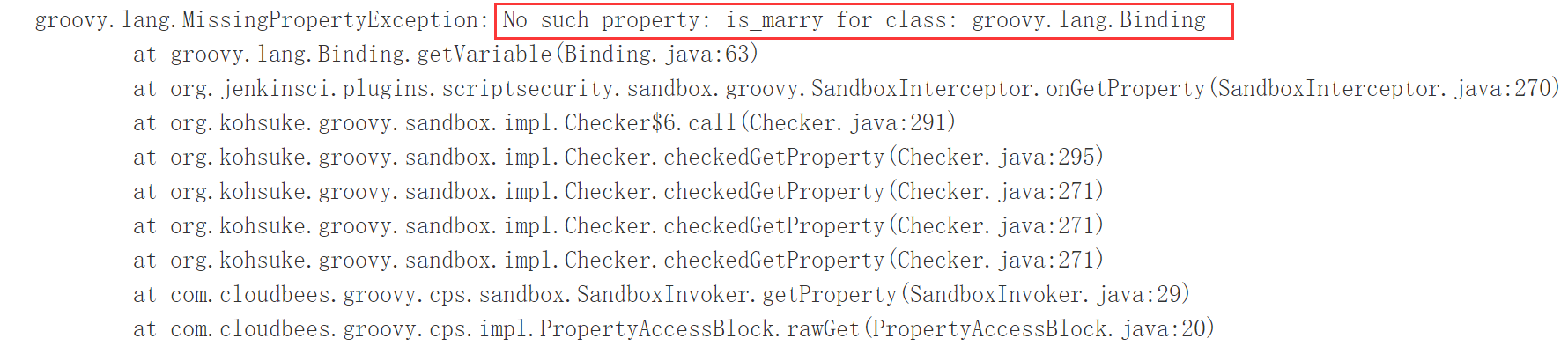
假如不适用三元运算符调用json文件的参数,但是依然把这个参数传递到model.groovy里
删掉:is_marry参数
import hudson.model.*;

    pipeline{

    agent any

    environment {

    INPUT_JSON = "/tmp/test.json"

    }

    stages{

        stage("Hello Pipeline") {

            steps {

                script {

                    println "Hello Pipeline!"

                    println env.JOB_NAME

                    println env.BUILD_NUMBER

                }

            }

        }

    stage("Init paramters in json") {

        steps {

            script {

                println "read josn input file"

                    json_file = INPUT_JSON? INPUT_JSON.trim() : ""

                    prop = readJSON file : json_file

                    name = prop.NAME? prop.NAME.trim() : ""

                    println "Name:" + name

                    age = prop.AGE? prop.AGE.trim() : ""

                    println "Age:" + age

                    phone = prop.PHONE_NUMBER? prop.PHONE_NUMBER.trim() : ""

                    println "Phone:" + phone

                    address = prop.ADDRESS? prop.ADDRESS.trim() : ""

                    println "Address:" + address

                    email = prop.EMAIL? prop.EMAIL.trim() : ""

                    println "Email:" + email

                    gender = prop.GENDER? prop.GENDER.trim() : ""

                    println "Gender:" + gender

                }

            }

        }

    stage("call a method") {

            steps {

                script {

                    println "send the parameter as map type"

                    model_call = load env.JENKINS_HOME + "/moodlegroovy/model.groovy"

                    model_call.getUserInfo(name:name, age:age, phone:phone, address:address, email:email, gender:gender, is_marry:is_marry)

                }

            }

        }

     }

}
点击构建,则会报错,没有这个参数
6. 测试二
加上这个参数,但是不传递到model.groovy中
jenkinsfile文件
import hudson.model.*;

    pipeline{

    agent any

    environment {

    INPUT_JSON = "/tmp/test.json"

    }

    stages{

        stage("Hello Pipeline") {

            steps {

                script {

                    println "Hello Pipeline!"

                    println env.JOB_NAME

                    println env.BUILD_NUMBER

                }

            }

        }

    stage("Init paramters in json") {

        steps {

            script {

                println "read josn input file"

                    json_file = INPUT_JSON? INPUT_JSON.trim() : ""

                    prop = readJSON file : json_file

                    name = prop.NAME? prop.NAME.trim() : ""

                    println "Name:" + name

                    age = prop.AGE? prop.AGE.trim() : ""

                    println "Age:" + age

                    phone = prop.PHONE_NUMBER? prop.PHONE_NUMBER.trim() : ""

                    println "Phone:" + phone

                    address = prop.ADDRESS? prop.ADDRESS.trim() : ""

                    println "Address:" + address

                    email = prop.EMAIL? prop.EMAIL.trim() : ""

                    println "Email:" + email

                    gender = prop.GENDER? prop.GENDER.trim() : ""

                    println "Gender:" + gender

                    is_marry = prop.IS_MARRY? prop.IS_MARRY.trim() : false

                    println "is_marry:" + is_marry

                }

            }

        }

    stage("call a method") {

            steps {

                script {

                    println "send the parameter as map type"

                    model_call = load env.JENKINS_HOME + "/moodlegroovy/model.groovy"

                    model_call.getUserInfo(name:name, age:age, phone:phone, address:address,gender:gender, is_marry:is_marry)
                }

            }

        }

     }

}
在此构建,看构建结果
Started by user darren ning

Obtained pipeline.jenkinsfile from git http://192.168.132.132/root/pipeline-parameter-test.git

Running in Durability level: MAX_SURVIVABILITY

[Pipeline] Start of Pipeline

[Pipeline] node

Running on Jenkins in /root/.jenkins/workspace/pipeline_parameter_project

[Pipeline] {

[Pipeline] stage

[Pipeline] { (Declarative: Checkout SCM)

[Pipeline] checkout

No credentials specified

 > git rev-parse --is-inside-work-tree # timeout=

Fetching changes from the remote Git repository

 > git config remote.origin.url http://192.168.132.132/root/pipeline-parameter-test.git # timeout=10

Fetching upstream changes from http://192.168.132.132/root/pipeline-parameter-test.git

 > git --version # timeout=

 > git fetch --tags --progress http://192.168.132.132/root/pipeline-parameter-test.git +refs/heads/*:refs/remotes/origin/*

 > git rev-parse refs/remotes/origin/master^{commit} # timeout=

 > git rev-parse refs/remotes/origin/origin/master^{commit} # timeout=

Checking out Revision 029b57783a597bb66636c932c6e45289317f6ce1 (refs/remotes/origin/master)

 > git config core.sparsecheckout # timeout=

 > git checkout -f 029b57783a597bb66636c932c6e45289317f6ce1

Commit message: "Update pipeline.jenkinsfile"

 > git rev-list --no-walk 732222f86b3bb78bfba7833a3a5a3ad00a60950a # timeout=

[Pipeline] }

[Pipeline] // stage

[Pipeline] withEnv

[Pipeline] {

[Pipeline] withEnv

[Pipeline] {

[Pipeline] stage

[Pipeline] { (Hello Pipeline)

[Pipeline] script

[Pipeline] {

[Pipeline] echo

Hello Pipeline!

[Pipeline] echo

pipeline_parameter_project

[Pipeline] echo

[Pipeline] }

[Pipeline] // script

[Pipeline] }

[Pipeline] // stage

[Pipeline] stage

[Pipeline] { (Init paramters in json)

[Pipeline] script

[Pipeline] {

[Pipeline] echo

read josn input file

[Pipeline] readJSON

[Pipeline] echo

Name:Lucy

[Pipeline] echo

Age:

[Pipeline] echo

Phone:

[Pipeline] echo

Address:Haidian Beijing

[Pipeline] echo

Email:lucy@demo.com

[Pipeline] echo

Gender:male

[Pipeline] echo

is_marry:false

[Pipeline] }

[Pipeline] // script

[Pipeline] }

[Pipeline] // stage

[Pipeline] stage

[Pipeline] { (call a method)

[Pipeline] script

[Pipeline] {

[Pipeline] echo

send the parameter as map type

[Pipeline] load

[Pipeline] { (/root/.jenkins/moodlegroovy/model.groovy)

[Pipeline] }

[Pipeline] // load

[Pipeline] echo

    Lucy come from Haidian Beijing, he is  old. he's phone number is

    , or you can contact he via null, he is not marry yet.        #邮件的内容显示为null

[Pipeline] }

[Pipeline] // script

[Pipeline] }

[Pipeline] // stage

[Pipeline] }

[Pipeline] // withEnv

[Pipeline] }

[Pipeline] // withEnv

[Pipeline] }

[Pipeline] // node

[Pipeline] End of Pipeline

Finished: SUCCESS
7. 总结参数的一个传递过程
- 把参数写进json文件
- 通过readJSON方法读取JSON文件内容
- 使用三元运算符把参数Pipeline中重新调用,变成Pipeline的全局变量
- 使用model_call加载model.groovy模块文件
- 使用model_call.getUserInfo括号后面的参数传递给model.groovy文件使用
- model.groovy文件获取参数,在使用args重新定义当下模块的变量,成为一个本模块可用的局部变量
- model.groovy文件调用参数,并做相应处理,返回
- Pipeline获得返回信息,形成一个完整的过程
参考文档:https://blog.csdn.net/u011541946/article/details/88956846,下面继续和作者学习
DEVOPS技术实践_19:Pipeline的多参数json调用的更多相关文章
- DEVOPS技术实践_21:Pipeline的嵌套以及流程控制的if和case语句
1 if控制语句 使用一个简单的If控制语句 pipeline { agent any stages { stage('flow control') { steps { script { == ) { ...
- DEVOPS技术实践_22:根据参数传入条件控制执行不同stage
前面学习了参数的传递和调用,下面研究一下根据参数作为条件执行不同的stage 使用叫when 和expression控制某一个stage的运行, 运行场景例如写了多个stage,这个pipeline脚 ...
- DEVOPS技术实践_18:Jenkins的Pinpeline对于参数的使用
因为最近使用Pipeline声明式语法构建项目,但是最近项目的参数设置较多,特地的来学习一下关于参数的调用和测试,主要式从一个大神那里学习的,结尾回贴上大神的博客链接 1 构建一个pipeline项目 ...
- DEVOPS技术实践_20:串联多个job执行
在jenkins可能会有战役中场景,就是在一个job执行完之后,把这个执行结果作为另一个job的执行条件 比如A执行完,如果A执行成功,则执行B,如果失败则执行C 1 前期准备 A任务 import ...
- DEVOPS技术实践_06:sonar与Jenksin集成
代码质量管理平台 一.checkout和打包功能 1.1 gitlab在新建一个文件 后续在写入内容 1.2 Jenkins新建一个任务 两个参数 1.3 流水线配置 copy仓库地址: http:/ ...
- DEVOPS技术实践_04:Jenkins参数化构建
一.参数化构建 1.1 各个参数的信息 凭据参数存储一个用户的账号密码信息,等等,运用最多的是选项参数 1.2 使用选项参数 构建已经变成参数化构建 1.3 获取这个值,修改Jenkinsfile文件 ...
- DEVOPS技术实践_12:创建持续集成的管道
持续集成不仅包含了Jenkins或者相关其它的CI工具,也包含了包含代码如何控制,采用的什么分支策略等.不同的组织可能采用不同的类型的策略来完成CI,策略类型和项目的类型的有很大的关系. 一 分支策略 ...
- DEVOPS技术实践_11:Jenkins集成Sonar
前言 前面已经有介绍sonar的安装,简单应用,下面在简答的研究一下sonar和jenkins集成的简单使用,对于sonar的安装不做介绍 一 sonar的简单介绍 持续检查避免了低质量的代码,比如S ...
- DEVOPS技术实践_08:声明式管道语法
简介 前面简单的做了管道的实验,看了一下的它的效果 声明式管道是Groovy语法中的一个更简单和结构化的语法.下面主要学习明式管道语法. 一 声明式管道的基本结构 以上节的代码为例 node { de ...
随机推荐
- Streamy 使用RDBMS
- K8s中Pod健康检查源代码分析
了解k8s中的Liveness和Readiness Liveness: 表明是否容器正在运行.如果liveness探测为fail,则kubelet会kill掉容器,并且会触发restart设置的策略. ...
- Linux系统服务及软件包的管理
要点回顾 free命令查看内存 整理buffer与cache的作用 1.buffer(缓冲) 是为了提高内存和硬盘(或其他I/O设备)之间的数据交换的速度而设计的. 2.cache(缓存) 从CPU ...
- 2011-04-21 运程连Oracle的方法
oracle无法远程连接重要原因,即使防火墙开放1521端口, 但是返回包可能是随机端口,所以仍有可能被防火墙阻止. 解决方法: 在注册表中增加一个字符串值如下.可解决 花费两天找到的方法 [HKEY ...
- H3C 无线覆盖原则-蜂窝式覆盖
- js实现方块的碰撞检测
文章地址:https://www.cnblogs.com/sandraryan/ 个人感觉.方块的碰撞检测比圆形麻烦~~ <!DOCTYPE html> <html lang=&qu ...
- 【原生JS】制作网页头部刷新进度条
之前的某次番啬看到油管上有这么一个进度条,当时觉得挺好玩,一直想着做一个试试,刚才弄了一下写了一个不算太好看的简陋版本,哈哈. (本博客刷新会头部会出现,因为并没有真正的参与到浏览器加载是否完整这个渲 ...
- 原生js实现最简单的瀑布流布局
文章地址 https://www.cnblogs.com/sandraryan/ 瀑布流:瀑布流,又称瀑布流式布局.是比较流行的一种网站页面布局,视觉表现为参差不齐的多栏布局,随着页面滚动条向下滚动, ...
- HTML静态网页---标签
一. 创建HTML: (一) body的属性: bgcolor 页面背景色 background 背景壁纸.图片 text 文字颜色 topmargin 上边距 leftmargin ...
- Python--day47--mysql执行计划
1,什么是mysql执行计划? 让mysql预估执行操作:在要执行的语句前面加explain,就不会真的执行sql语句,只是给出了要执行的数据的情况,如大约有多少条,查询类型.