
【iOS】Spring Animations (弹性动画)
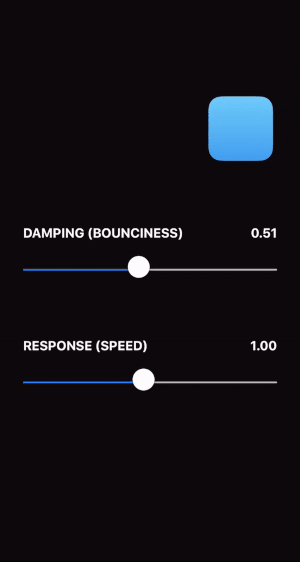
This interface shows how a spring animation can be created by specifying a “damping” (bounciness) and “response” (speed).
这个交互显示了如何通过指定“阻尼”(有弹性)和“响应”(速度)来创建spring动画。
Key Features(关键特性)
- Uses “design-friendly” parameters.(使用友好的参数)。
- No concept of animation duration.(没有动画持续时间的概念)。
- Easily interruptible.(容易中断)。
Design Theory(设计理论)
Springs make great animation models because of their speed and natural appearance. A spring animation starts incredibly quickly, spending most of its time gradually approaching its final state. This is perfect for creating interfaces that feel responsive—they spring to life!
弹性可以实现很好的动画模型,因为它们的速度和自然的外观。弹性动画的启动速度非常快,大部分时间都在逐渐接近其最终状态。这对于创建感觉有响应的界面来说是非常完美的。
A few additional reminders when designing spring animations:
设计spring动画时的一些额外提示:
- Springs don’t have to be springy. Using a damping value of 1 will create an animation that slowly comes to rest without any bounciness. Most animations should use a damping value of 1. 译:弹簧不一定有弹性。使用阻尼值1将创建一个动画,它会慢慢地停止,没有任何弹性,大多数动画应该使用阻尼值1.
Try to avoid thinking about duration. In theory, a spring never fully comes to rest, and forcing a duration on the spring can cause it to feel unnatural. Instead, play with the damping and response values until it feels right. 译:尽量避免考虑持续时间。从理论上讲,弹簧永远不会完全静止,强迫弹簧持续一段时间会让它感到不自然。相反,使用阻尼和响应值,直到感觉正确为止。
Interruption is critical. Because springs spend so much of their time close to their final value, users may think the animation has completed and will try to interact with it again.中断是至关重要的,因为弹性花费了如此多的时间来接近它们的最终价值,用户可能认为动画已经完成,并将再次尝试与它交互。
Critical Code(关键代码)
In UIKit, we can create a spring animation with a UIViewPropertyAnimatorand a UISpringTimingParameters object. Unfortunately, there is no initializer that just takes a damping and response. The closest we can get is the UISpringTimingParameters initializer that takes a mass, stiffness, damping, and initial velocity.
在UIKit中,我们可以用UIViewPropertyAnimator和UISpringTimingParameters对象创建一个spring动画。不幸的是,没有一个初始化器只接受阻尼和响应。我们能得到的最接近的值是UISpringTimingParameters初始化器,它具有质量、刚度、阻尼和初始速度。
UISpringTimingParameters(mass: CGFloat, stiffness: CGFloat, damping: CGFloat, initialVelocity: CGVector)
We would like to create a convenience initializer that takes a damping and response, and maps it to the required mass, stiffness, and damping.
我们希望创建一个方便的初始化器,它接受阻尼和响应,并将其映射到所需的质量、刚度和阻尼。
With a little bit of physics, we can derive the equations we need:
有了一点物理学知识,我们就可以推导出我们需要的方程:
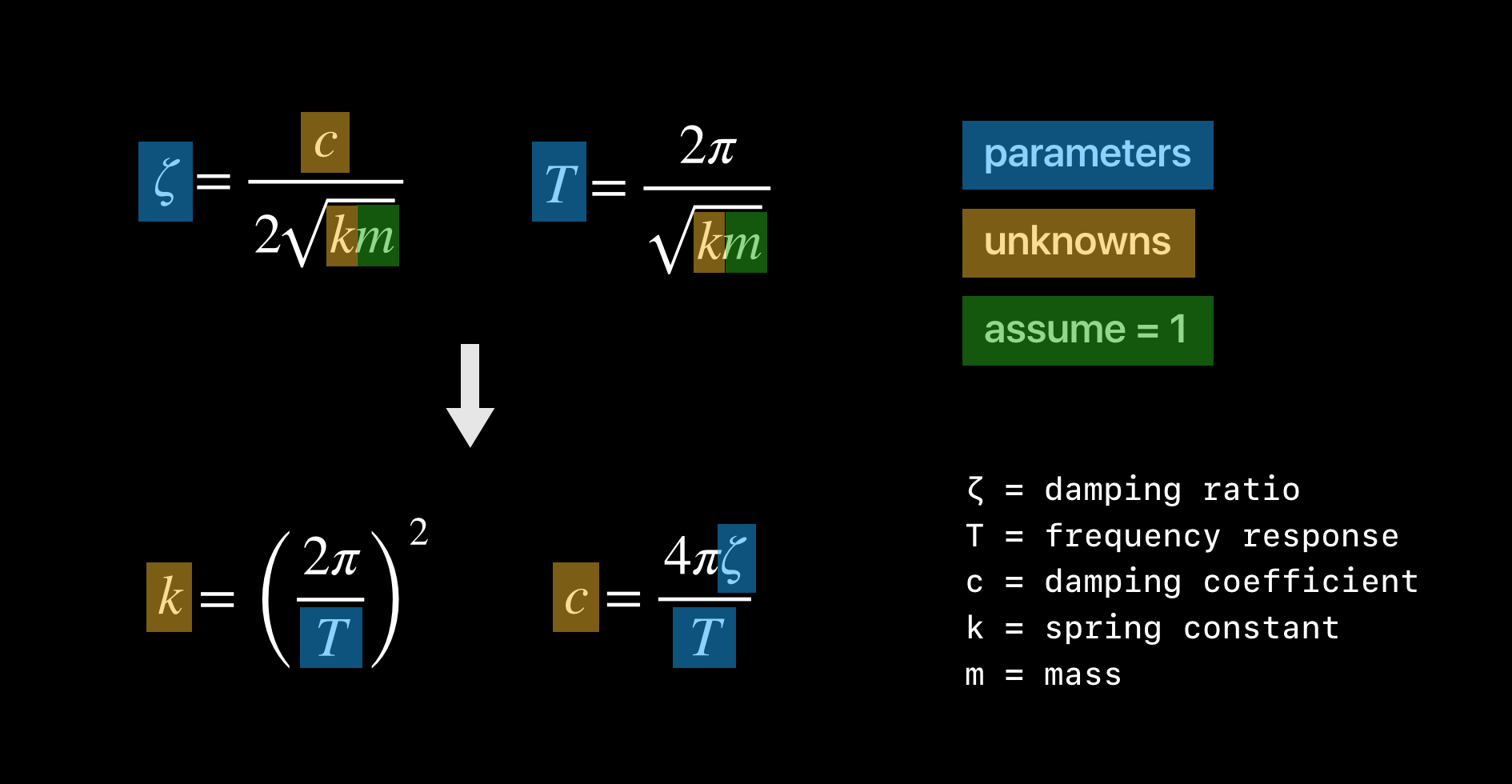
With this result, we can create our own UISpringTimingParameters with exactly the parameters we desire.
有了这个结果,我们就可以创建我们自己的UISpringTimingParameters,这些参数正是我们想要的。
extension UISpringTimingParameters {

    convenience init(damping: CGFloat, response: CGFloat, initialVelocity: CGVector = .zero) {

        let stiffness = pow( * .pi / response, )

        let damp =  * .pi * damping / response

        self.init(mass: , stiffness: stiffness, damping: damp, initialVelocity: initialVelocity)

    }

}
【iOS】Spring Animations (弹性动画)的更多相关文章
- IOS开发系列 --- 核心动画
原始地址:http://www.cnblogs.com/kenshincui/p/3972100.html 概览 在iOS中随处都可以看到绚丽的动画效果,实现这些动画的过程并不复杂,今天将带大家一窥i ...
- iOS学习笔记10-UIView动画
上次学习了iOS学习笔记09-核心动画CoreAnimation,这次继续学习动画,上次使用的CoreAnimation很多人感觉使用起来很繁琐,有没有更加方便的动画效果实现呢?答案是有的,那就是UI ...
- iOS自定义转场动画实战讲解
iOS自定义转场动画实战讲解 转场动画这事,说简单也简单,可以通过presentViewController:animated:completion:和dismissViewControllerA ...
- [Swift通天遁地]八、媒体与动画-(9)快速实现复合、Label、延续、延时、重复、缓冲、弹性动画
★★★★★★★★★★★★★★★★★★★★★★★★★★★★★★★★★★★★★★★★➤微信公众号:山青咏芝(shanqingyongzhi)➤博客园地址:山青咏芝(https://www.cnblogs. ...
- [iOS Animation]-CALayer 定时器动画
定时器的动画 我可以指导你,但是你必须按照我说的做. -- 骇客帝国 在第10章“缓冲”中,我们研究了CAMediaTimingFunction,它是一个通过控制动画缓冲来模拟物理效果例如加速或者减速 ...
- iOS CAReplicatorLayer 实现脉冲动画效果
iOS CAReplicatorLayer 实现脉冲动画效果 效果图 脉冲数量.速度.半径.透明度.渐变颜色.方向等都可以设置.可以用于地图标注(Annotation).按钮长按动画效果(例如录音按钮 ...
- iOS - Core Animation 核心动画
1.UIView 动画 具体讲解见 iOS - UIView 动画 2.UIImageView 动画 具体讲解见 iOS - UIImageView 动画 3.CADisplayLink 定时器 具体 ...
- iOS 自定义转场动画浅谈
代码地址如下:http://www.demodashi.com/demo/11612.html 路漫漫其修远兮,吾将上下而求索 前记 想研究自定义转场动画很久了,时间就像海绵,挤一挤还是有的,花了差不 ...
- iOS 实现启动屏动画(Swift实现,包含图片适配)
代码地址如下:http://www.demodashi.com/demo/12090.html 准备工作 首先我们需要确定作为宣传的图片的宽高比,这个一般是与 UI 确定的.一般启动屏展示会有上下两部 ...
随机推荐
- 19_08_26校内训练[Max]
题意 求$max_{l \leq r}{\{min{\{a_l,a_{l+1},...,a_r\}}*(r-l+1)\}}$ 思考 分治,考虑一个区间跨过某个点的贡献即可. 代码 #include&l ...
- CSS-17-页面布局
页面布局: 静态布局: 静态布局:元素不变的布局. 布局特点:缩小后内容被遮挡,拖动滚动条显示布局 设计方法: PC:居中布局,所有样式使用绝对宽度和高度 移动设备:另外建立移动网站,以m.域名为域名 ...
- CSS-01-引入css的三种方法
<!DOCTYPE html> <html> <head> <meta charset="UTF-8"> <title> ...
- Shoot the Bullet(有源汇带上下界最大流)
有源汇带上下界最大流 在原图基础上连一条汇点到源点流量为inf的边,将有源汇网络流转化为无源汇网络流用相同方法判断是否满流,如果满流再跑一边源点到汇点的最大流就是答案 例题:Shoot the Bul ...
- java 编程小知识点
--------------------------------- 时间不多了,抓紧做自己喜欢的事情 1. 使用位运算 & 来判断一个数是否是奇数.偶数的速度很快 (a & 1 ) = ...
- flask插件全家桶集成学习---持续更新ing
不得不说flask的设计要比django要小巧精妙的多了,没有那么臃肿,只保留核心功能,其他的都需要自己引入,即各种各样的插件来满足我们的需求,我这里记录一下自己学习项目中用的插件使用方法和一些技巧总 ...
- SQL 两个时间段 不能重复语句
DECLARE @BeginDate datetime; DECLARE @EndDate datetime; set @BeginDate='2015-03-2' set @EndDate='201 ...
- 解决python报错:ImportError: No module named shutil_get_terminal_size 的方法
我的环境:Ubuntu 16.04.5 LTS 修改这个文件: $HOME/.local/lib/python2.7/site-packages/IPython/utils/terminal.py 这 ...
- mybatis从数据库中取数据且分组,返回分组数据
mapper.xml文件 <?xml version="1.0" encoding="UTF-8"?> <!DOCTYPE mapper PU ...
- k8s-dashboard的部署与卸载
相对于枯燥的命令行管理,控制台的管理方式相对就显得更加直观便捷了,虽然官方的dashboard有点不太好用,但是作为免费的dashaboard还是可以体验一番的,下面开始部署这个难用的dashboar ...