
springboot 2 集成 redis 缓存 序列化
springboot 缓存
为了实现是在数据中查询数据还是在缓存中查询数据,在application.yml 中将mybatis 对应的mapper 包日志设置为debug 。
spring:

  datasource:

    username: root

    password: rootpassword

    url: jdbc:mysql://localhost:3306/springboot

    driver-class-name: com.mysql.jdbc.Driver

debug: true

logging:

  level:

    com:

      springbootmybatis:

         mapper: debug
然后在springboot的主类上添加 @EnableCaching 启动缓存。
然后在service 类中的方法上添加上缓存注解。
@Cacheable(value = "user")

public User selectUserById(Integer id) {

    User user = userMapper.selectUserById(id);

    return user;

}
@Cacheable
默认的是将传入参数(id)作为缓存的 key ,方法的返回值作为 value 存入缓存中 。
在方法 selectUserById(Integer id ) 执行之前 先去根据 key 去缓存中查询是否有该 key 的数据,如果有,则直接在缓存中查询数据,然后返回,不再执行 selectUserById 方法,如果没有在缓存中查到该 key 的数据,才回去执行 selectUserById 方法。
@CachePut
@CachePut(value = "user")

public User updateUser(User user) {

    userMapper.updateUser(user);

    return user;

}
默认的是将传入参数(id)作为缓存的 key ,@CachePut 在方法执行之后执行,将方法返回的结果写入缓存,
从缓存中查询到的仍然是旧的缓存数据,需要在 @CachePut(value = "user",key = "#result.id") 或者@CachePut(value = "user",key = "#user.id") 只要在 key 设置为 user 的 id ,然后根据id 去查询,就能从缓存中获取修改后的数据。
@CacheEvict
@CacheEvict(value = "user",key = "#id")
清除操作默认是在对应方法成功执行之后触发的,即方法如果因为抛出异常而未能成功返回时也不会触发清除操作 ,可以使用 beforeInvocation 改变删除缓存的时间,当将 beforeInvocation 设置为 true 时,会在执行方法之前删除缓存中指定的元素,不管方法执行是否存在异常,都会删除缓存。 删除指定 key 的缓存。allEntries 默认为 false ,当为 true 时,会忽略指定的 key ,删除所有缓存元素。不指定 key 时默认一方法的参数作为缓存的 key。
@Caching
@Caching注解可以让我们在一个方法或者类上同时指定多个Spring Cache相关的注解。其拥有三个属性:cacheable、put和evict,分别用于指定@Cacheable、@CachePut和@CacheEvict。
@Target({ElementType.METHOD, ElementType.TYPE})

@Retention(RetentionPolicy.RUNTIME)

@Inherited

@Documented

public @interface Caching {

    Cacheable[] cacheable() default {};

    CachePut[] put() default {};

    CacheEvict[] evict() default {};

}
@Caching(cacheable = @Cacheable("users"), evict = { @CacheEvict("cache2"),

          @CacheEvict(value = "cache3", allEntries = true) })

 public List<User> selectUser() {

        List<User> users = userMapper.selectUser();

        return users;

 }
使用redis 缓存:
导入对应的jar:使用fastjson 来序列化value
<dependency>

    <groupId>org.springframework.boot</groupId>

    <artifactId>spring-boot-starter-data-redis</artifactId>

</dependency>

<!-- https://mvnrepository.com/artifact/com.alibaba/fastjson -->

<dependency>

    <groupId>com.alibaba</groupId>

    <artifactId>fastjson</artifactId>

    <version>1.2.47</version>

</dependency>
在application.yml 添加配置:
spring:

    redis:

         host: #redis 安装的IP,其他的可以不用配置,默认的就可以满足测试需要
在springboot 1 中配置redis
import com.alibaba.fastjson.JSON;

import com.alibaba.fastjson.serializer.SerializerFeature;

import org.springframework.cache.CacheManager;

import org.springframework.cache.annotation.CachingConfigurerSupport;

import org.springframework.cache.annotation.EnableCaching;

import org.springframework.cache.interceptor.KeyGenerator;

import org.springframework.context.annotation.Bean;

import org.springframework.context.annotation.Configuration;

import org.springframework.data.redis.cache.RedisCacheManager;

import org.springframework.data.redis.connection.RedisConnectionFactory;

import org.springframework.data.redis.core.RedisTemplate;

import org.springframework.data.redis.core.StringRedisTemplate;

import org.springframework.data.redis.serializer.RedisSerializer;

import org.springframework.data.redis.serializer.SerializationException;

import java.lang.reflect.Method;

import java.nio.charset.Charset;

@EnableCaching

@Configuration

public class RedisConfig extends CachingConfigurerSupport {

    @Bean

    public KeyGenerator wiselyKeyGenerator() {

        return new KeyGenerator() {

            @Override

            public Object generate(Object target, Method method, Object... params) {

                StringBuilder sb = new StringBuilder();

                sb.append(target.getClass().getName());

                sb.append(method.getName());

                for (Object obj : params) {

                    sb.append(obj.toString());

                }

                return sb.toString();

            }

        };

    }

    @Bean

    public CacheManager cacheManager(

            @SuppressWarnings("rawtypes") RedisTemplate redisTemplate) {

        return new RedisCacheManager(redisTemplate);

    }

    @Bean

    public RedisTemplate<String, String> redisTemplate(

            RedisConnectionFactory factory) {

        StringRedisTemplate template = new StringRedisTemplate(factory);

        FastJsonRedisSerializer<Object> serializer = new FastJsonRedisSerializer<>(Object.class);

        template.setValueSerializer(serializer);

        template.afterPropertiesSet();

        return template;

    }

    private static class FastJsonRedisSerializer<T> implements RedisSerializer<T> {

        private static final Charset DEFAULT_CHARSET = Charset.forName("UTF-8");

        private Class<T> clazz;

        public FastJsonRedisSerializer(Class<T> clazz) {

            this.clazz = clazz;

        }

        @Override

        public byte[] serialize(T t) throws SerializationException {

            if (t == null) {

                return new byte[0];

            }

            return JSON.toJSONString(t, SerializerFeature.WriteClassName).getBytes(DEFAULT_CHARSET);

        }

        @Override

        public T deserialize(byte[] bytes) throws SerializationException {

            if (bytes == null || bytes.length <= 0) {

                return null;

            }

            String str = new String(bytes, DEFAULT_CHARSET);

            return (T) JSON.parseObject(str, clazz);

        }

    }

}
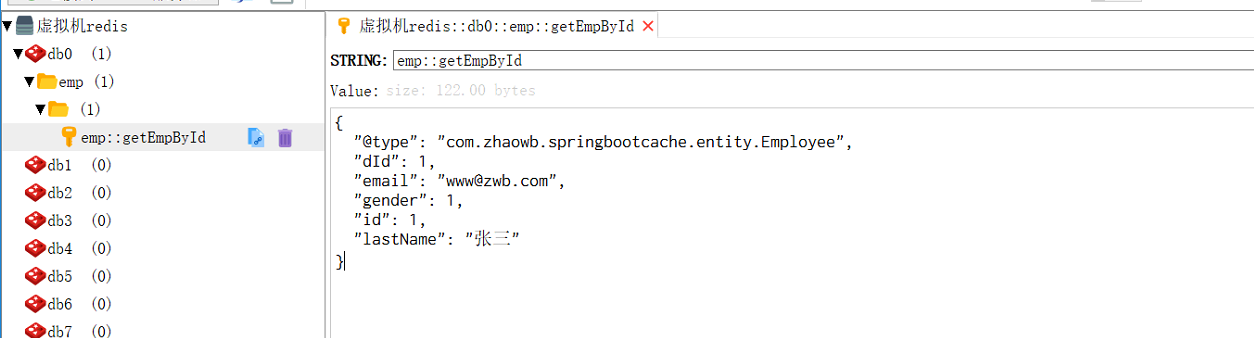
然后在测试类上加上缓存的注解就可以在redis中查看已经序列化成json格式的数据。
在springboot2 中配置redis
其他的配置不用动,需要修改RedisConfig.java 因为springboot2 中new RedisCacheManager(redisTemplate);被遗弃了
@Bean

    public CacheManager cacheManager(RedisConnectionFactory connectionFactory) {

        //初始化一个RedisCacheWriter

        RedisCacheWriter redisCacheWriter = RedisCacheWriter.nonLockingRedisCacheWriter(connectionFactory);

        //设置CacheManager的值序列化方式为 fastJsonRedisSerializer,但其实RedisCacheConfiguration默认使用StringRedisSerializer序列化key,

        ClassLoader loader = this.getClass().getClassLoader();

        FastJsonRedisSerializer fastJsonRedisSerializer = new FastJsonRedisSerializer<>(loader.getClass());

        RedisSerializationContext.SerializationPair<Object> pair = RedisSerializationContext.SerializationPair.fromSerializer(fastJsonRedisSerializer);

        RedisCacheConfiguration defaultCacheConfig=RedisCacheConfiguration.defaultCacheConfig().serializeValuesWith(pair);

        RedisCacheManager cacheManager = new RedisCacheManager(redisCacheWriter, defaultCacheConfig);

        return cacheManager;

    }
这样设置就可以正常使用了
springboot 2 集成 redis 缓存 序列化的更多相关文章
- 在springboot中使用redis缓存,将缓存序列化为json格式的数据
背景 在springboot中使用redis缓存结合spring缓存注解,当缓存成功后使用gui界面查看redis中的数据 原因 springboot缓存默认的序列化是jdk提供的 Serializa ...
- springboot集成redis缓存
1.pom.xml增加redis缓存起步依赖(spring-boot-starter-parent包含许多starter版本) <dependency> <groupId>or ...
- SpringBoot缓存管理(三) 自定义Redis缓存序列化机制
前言 在上一篇文章中,我们完成了SpringBoot整合Redis进行数据缓存管理的工作,但缓存管理的实体类数据使用的是JDK序列化方式(如下图所示),不便于使用可视化管理工具进行查看和管理. 接下来 ...
- 搞懂分布式技术14:Spring Boot使用注解集成Redis缓存
本文内容参考网络,侵删 本系列文章将整理到我在GitHub上的<Java面试指南>仓库,更多精彩内容请到我的仓库里查看 https://github.com/h2pl/Java-Tutor ...
- 集成Redis缓存
一.简介 1.场景 由于首页数据变化不是很频繁,而且首页访问量相对较大,所以我们有必要把首页数据缓存到redis中,减少数据库压力和提高访问速度. 2.RedisTemplate Jedis是Redi ...
- Redis缓存 序列化对象存储乱码问题
使用Redis缓存对象会出现下图现象: 键值对都是乱码形式. 解决以上问题: 如果是xml配置的 我们直接注入官方给定的keySerializer,valueSerializer,hashKeySer ...
- SpringBoot整合集成redis
Redis安装:https://www.cnblogs.com/zwcry/p/9505949.html 1.pom.xml <project xmlns="http://maven. ...
- Spring Boot2(三):使用Spring Boot2集成Redis缓存
前言 前面一节总结了SpringBoot实现Mybatis的缓存机制,但是实际项目中很少用到Mybatis的二级缓存机制,反而用到比较多的是第三方缓存Redis. Redis是一个使用ANSI C编写 ...
- 完整SpringBoot Cache整合redis缓存(二)
缓存注解概念 名称 解释 Cache 缓存接口,定义缓存操作.实现有:RedisCache.EhCacheCache.ConcurrentMapCache等 CacheManager 缓存管理器,管理 ...
随机推荐
- Python|读、写Excel文件(三种模块三种方式)
python读写excel的方式有很多,不同的模块在读写的讲法上稍有区别: 用xlrd和xlwt进行excel读写: 用openpyxl进行excel读写: 用pandas进行excel读写: imp ...
- leetcode-157周赛-5214-最长定差子序列
题目描述: class Solution: def longestSubsequence(self, arr: List[int], difference: int) -> int: dp = ...
- C# 调用 C#DLL
加载dll-添加引用 添加引用的意思是让程序生成时根据配置的路径去加载相应的dll.其引用的步骤如下图所示: 解决方案->引用-> 添加引用-> 浏览-> 选择dll所在的路径 ...
- 【未完成】Jmeter接口自动化测试:参数化设置
1. 从CSV文件读取参数 创建一个CVS文件,文件第一行不写参数名,直接从参数值开始,每一列代表一个参数 在测试计划或者线程组中,添加一个配置元件-->CSV 数据文件设置 Filename: ...
- thinkphp 控制器定义
控制器和操作 一般来说,ThinkPHP的控制器是一个类,而操作则是控制器类的一个公共方法. 下面就是一个典型的控制器类的定义: <?php namespace Home\Controller; ...
- System.Clollections.ICollection.cs
ylbtech-System.Clollections.ICollection.cs 1.程序集 mscorlib, Version=4.0.0.0, Culture=neutral, PublicK ...
- JS typeof() parseInt() parseFloat()
判断变量的数据类型:typeof() 使用一元运算符typeof(),可以测试一个变量的类型. typeof()测试的结果是一个类型字符串. typeof()的结果字符串有几种情况: “string” ...
- python函数使用易错举例
关于嵌套: 嵌套使用中, retrun inner ---> 返回的是函数的地址 retrun inner() : ---> 运行inner()函数 ---> 运行i ...
- typedef void (*funcptr)(void) typedef void (*PFV)(); typedef int32_t (*PFI)();
看到以下代码,不明白查了一下: /** Pointer to Function returning Void (any number of parameters) */ typedef void (* ...
- UVA-108-Maximum Sum-子矩阵最大和(最大连续子序列的变形)+降维处理+dp
A problem that is simple to solve in one dimension is often much more difficult to solve in more tha ...