
Black-White-Blocks
微信小程序黑白块游戏
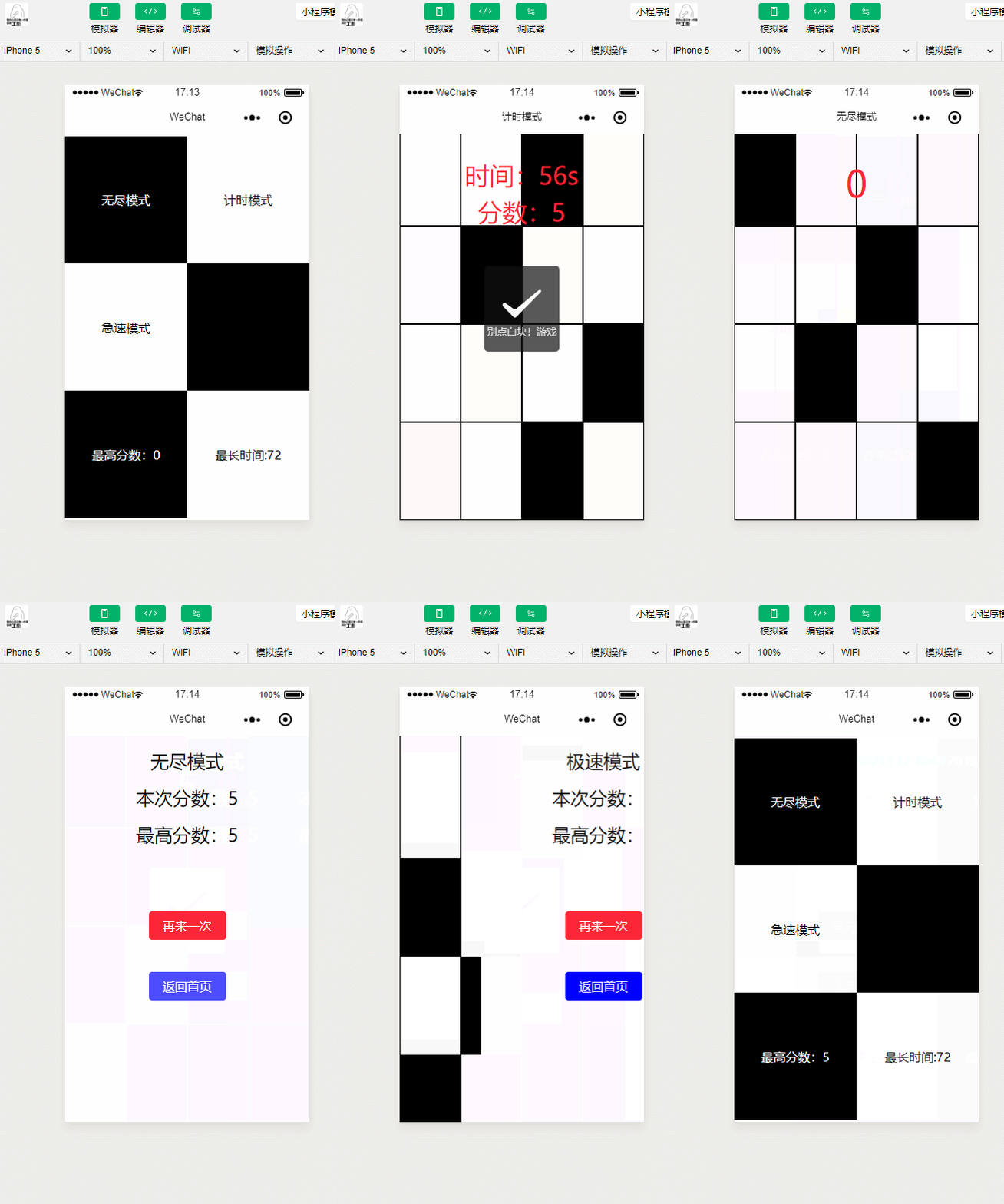
代码如下:

//play.js

// play

var app = getApp()

Page({

  data: {

    typeName: '计时模式',

    score: 0,

    time: 60,

    shouldStop: false,

    blockData:[]

  },

  onReady: function(){

      var array = [];

      // 先生成一个10个长度的数组

      for(var i = 0; i < 10; i++){

          // 生成一个随机位数为1的数组

          var orderArray = [0,0,0,0];

          var randomNum = Math.floor(Math.random() * 4);

          orderArray[randomNum] = 1;

          array.push({id: i, block: orderArray});

      }

      this.setData({

          blockData: array.reverse()

      });

  },

  handleClick: function(events){

      var id = events.currentTarget.id;

      var line = id.split("-")[1];

      var column = id.split("-")[2];

      var isBlack = id.split("-")[3];

      var blockData = this.data.blockData.reverse();

      var score = this.data.score;

      var orderArray = [0,0,0,0];

      // 判断是否是第一行

      if(line != blockData[0].id){

        this.handleWrong(0, score);

        return;

      }

      // 判断是否正确

      if(isBlack != 1){

        this.handleWrong(1, score);

        return;

      }

      // 正确下一个

      // 分数++

      // 最后一个小块的id为分数+10

      score++;

      orderArray[Math.floor(Math.random() * 4)] = 1;

      blockData.push({id: score+10, block: orderArray});

      blockData.shift();

      this.setData({

          silding: true,

          score: score,

          blockData: blockData.reverse()

      });

  },

  handleWrong: function( type , score){

      const titleArr = ["请点击第一个白块!游戏结束", "别点白块!游戏结束", "时间到"];

      var _this = this;

      wx.showToast({

            title: titleArr[type],

            icon: 'cancel',

            duration: 2000,

            complete: function(){

                // 将此分数存入全局变量

                app.globalData.currentScore = score;

                // 停止计数器

                _this.setData({

                  shouldStop: true

                });

                // 若此分数比最高分数还高 将其存入本地

                if(score > app.globalData.timeScore){

                    app.globalData.timeScore = score;

                    wx.setStorageSync('timeScore',score);

                }

                var timer = setTimeout(function(){

                        wx.redirectTo({

                            url: '../end/end?type=time&score=' + score

                        })

                        clearTimeout(timer);

                    }, 2000);

            }

        })

  },

  timeInterval: function(){

    var that = this;

    var timer = setInterval(function(){

        // 判断是否小于0

        var nowTime = that.data.time;

        if(that.data.shouldStop){

          clearInterval(timer);

        }

        if(nowTime > 1){

          that.setData({

            time: nowTime-1

          });

          return;

        }

        that.setData({

          time: nowTime-1

        });

        that.handleWrong(2, that.data.score);

        clearInterval(timer);

      }, 1000);

  },

  onLoad: function(){

      var that = this;

      wx.setNavigationBarTitle({

        title: that.data.typeName

      });

      this.timeInterval();

  }

})
急速模式

//play.js

// // play

var app = getApp()

Page({

  data: {

    typeName: '急速模式',

    score: 0,

    blockData:[],

    scrollHeight: 0,

    canRun: false

  },

  onLoad: function(){

      var that = this;

      // 设置title

      wx.setNavigationBarTitle({

        title: that.data.typeName

      });

  },

  onReady: function(){

      var array = [];

      // 先生成一个10个长度的数组

      for(var i = 0; i < 10; i++){

        array.push(this.getNewLine(i));

      }

      this.setData({

          blockData: array.reverse()

      });

  },

  handleClickWhite: function(events){

      // 点击白块一定会报错 差别在于报错文案

      // 判断是否是点击的第一行

      // 被点击的id

      var id = events.currentTarget.id;

      // 被点击的行

      var line = id.split("-")[1];

      // 数据

      var blockData = this.data.blockData.concat().reverse();

      // 当前分数

      var score = this.data.score;

      // 判断是否是第一行

      if(line != this.getClickableBlockLine(blockData)){

        this.handleWrong("请点击第一个黑块!游戏结束", score);

      } else {

        // 点击的第一行白块

        this.handleWrong("别点白块!游戏结束", score);

      }

  },

  handleClickBlack: function(events){

      // 黑块是应该点击的块

      // 判断是否是点击的第一行

      // 被点击的id

      var id = events.currentTarget.id;

      // 被点击的行

      var line = id.split("-")[1];

      // 数据

      var blockData = this.data.blockData.concat().reverse();

      // 当前分数

      var score = this.data.score;

      // 可点击的第一行

      var clickableLine = this.getClickableBlockLine(blockData);

      // 判断是否是第一行

      if(line == clickableLine){

        // 点击了第一行黑块

        // 判断是否是是第一次

        if(score == 0){

            // 启动滑动程序

            this.run();

        }

        score++;

        // 将黑块变灰块

        this.getBlockBlackToGray(line, blockData);

        // 分数++

        this.setData({

            score: score,

            blockData: blockData.concat().reverse()

        });

      } else {

        // 点击的不是第一行白块

        this.handleWrong("请点击第一个黑块!游戏结束", score);

      }

  },

  handleClickGray: function(events){

      // 灰块是指黑块点击之后的块

      // 其在显示是白块 并且同样不可点

      var score = this.data.score;

      this.handleWrong("别点白块!游戏结束", score);

  },

  run: function(){

      // 滑动方法

      var that = this;

      var speed = 10;

      this.setData({

          canRun: true

      });

      var timer = setInterval(function(){

          // 当前滑动距离

          if(!that.data.canRun){

              clearInterval(timer);

              return;

          }

          var currentScrollHeight = that.data.scrollHeight;

          // 当前分数

          var score = that.data.score;

          // 滑块数据

          var blockData = that.data.blockData.concat().reverse();

          if(Math.abs(currentScrollHeight) == 150){

              // 滑到临界点

              // 判断是否过期

              // 判断条件是 第一个滑块的状态是否为已点击

              if(that.checkFirstLineBlockClicked(blockData[0].block)){

                  // 没过期

                  // 继续 去除旧节点 插入新节点 scrolllHeight归0

                  var newId = blockData[blockData.length - 1].id + 1;

                  blockData.push(that.getNewLine(newId));

                  blockData.shift();

                  that.setData({

                      scrollHeight: 0,

                      blockData: blockData.concat().reverse()

                  });

                  return;

              }

              // 过期

              // 报错

              that.handleWrong("请点击白块!游戏结束", score);

              return;

          }

          currentScrollHeight = currentScrollHeight - speed;

          that.setData({

              scrollHeight: currentScrollHeight

          });

      }, 20);

  },

  checkFirstLineBlockClicked: function(blockDataLine){

      for(var i = 0; i < blockDataLine.length; i++){

          if(blockDataLine[i] == 2){

              return true;

          }

      }

      return false;

  },

  getBlockBlackToGray: function(line, blockData){

      for(var i = 0; i < blockData.length; i++){

          if(blockData[i].id == line){

              var currentArray = blockData[i].block;

              for(var j = 0; j < currentArray.length; j++){

                  if(currentArray[j] == 1){

                      currentArray[j] = 2;

                      return;

                  }

              }

          }

      }

  },

  getClickableBlockLine: function(blockData){

      var line = 0;

      for(var i = 0; i < blockData.length; i++){

          var block = blockData[i].block;

          for(var j = 0; j < block.length; j++){

            // 行内四个元素 有1即可

            if(block[j] == 1){

                return blockData[i].id;

            }

          }

      }

      return line;

  },

  getNewLine: function(i){

      // 生成一个标准的数据

      var orderArray = [0,0,0,0];

      // 生成一个随机数

      var randomNum = Math.floor(Math.random() * 4);

      // 赋值给对应的obj

      orderArray[randomNum] = 1;

      return {id: i, block: orderArray};

  },

  handleWrong: function(text, score){

      this.setData({

          canRun: false

      });

      wx.showToast({

            title: text,

            icon: 'cancel',

            duration: 2000,

            complete: function(){

                // 将此分数存入全局变量

                app.globalData.currentScore = score;

                // 若此分数比最高分数还高 将其存入本地

                if(score > app.globalData.speedScore){

                    app.globalData.speedScore = score;

                    wx.setStorageSync('speedScore',score);

                }

                var timer = setTimeout(function(){

                    wx.redirectTo({

                        url: '../end/end?type=speed&score=' + score

                    })

                    clearTimeout(timer);

                }, 2000);

            }

        })

  }

})
无尽模式
//play.js

// play

var app = getApp()

Page({

  data: {

    typeName: '无尽模式',

    silding: false,

    score: 0,

    blockData:[]

  },

  onReady: function(){

      var array = [];

      // 先生成一个10个长度的数组

      for(var i = 0; i < 10; i++){

          // 生成一个随机位数为1的数组

          var orderArray = [0,0,0,0];

          var randomNum = Math.floor(Math.random() * 4);

          orderArray[randomNum] = 1;

          array.push({id: i, block: orderArray});

      }

      this.setData({

          blockData: array.reverse()

      });

  },

  handleClick: function(events){

      var id = events.currentTarget.id;

      var line = id.split("-")[1];

      var column = id.split("-")[2];

      var isBlack = id.split("-")[3];

      var blockData = this.data.blockData.reverse();

      var score = this.data.score;

      var orderArray = [0,0,0,0];

      // 判断是否是第一行

      if(line != blockData[0].id){

        this.handleWrong(0, score);

        return;

      }

      // 判断是否正确

      if(isBlack != 1){

        this.handleWrong(1, score);

        return;

      }

      // 正确下一个

      // 分数++

      // 最后一个小块的id为分数+10

      score++;

      orderArray[Math.floor(Math.random() * 4)] = 1;

      blockData.push({id: score+10, block: orderArray});

      blockData.shift();

      this.setData({

          silding: true,

          score: score,

          blockData: blockData.reverse()

      });

  },

  handleWrong: function( type , score){

      const titleArr = ["请点击第一个白块!游戏结束", "别点白块!游戏结束"];

      wx.showToast({

            title: titleArr[type],

            icon: 'cancel',

            duration: 2000,

            complete: function(){

                // 将此分数存入全局变量

                app.globalData.currentScore = score;

                // 若此分数比最高分数还高 将其存入本地

                if(score > app.globalData.endlessScore){

                    app.globalData.endlessScore = score;

                    wx.setStorageSync('endlessScore',score);

                }

                var timer = setTimeout(function(){

                        wx.redirectTo({

                            url: '../end/end?type=endless&score=' + score

                        })

                        clearTimeout(timer);

                    }, 2000);

            }

        })

  },

  onLoad: function(){

      var that = this;

      wx.setNavigationBarTitle({

        title: that.data.typeName

      });

  }

})
//结束

var app = getApp()

Page({

  data: {

    currentScore: 0,

    gameType: "",

    heighestScore: 0,

    backUrl: ""

  },

  onLoad: function(options){

    var score = options.score;

    var gameType = options.type;

    var text = {endless: "无尽模式", time: "计时模式", speed: "极速模式"};

    // 从全局变量中获取分数

    this.setData({

      currentScore: app.globalData.currentScore,

      gameType: text[gameType],

      heighestScore: app.globalData[gameType + "Score"],

      backUrl: '../'+gameType+'/play'

    });

  }

})
本文感谢无私开源的程序员点击获取项目
Black-White-Blocks的更多相关文章
- Uva 1103 Ancient Messages
大致思路是DFS: 1. 每个图案所包含的白色连通块数量不一: Ankh : 1 ; Wedjat : 3 ; Djed : 5 ; Scarab : 4 ; Was : 0 ; Ak ...
- EOS.IO Technical White Paper v2
[EOS.IO Technical White Paper v2] Abstract: The EOS.IO software introduces a new blockchain architec ...
- Understanding Flash: Blocks, Pages and Program / Erases
https://flashdba.com/2014/06/20/understanding-flash-blocks-pages-and-program-erases/ In the last pos ...
- Ethereum White Paper
https://github.com/ethereum/wiki/wiki/White-Paper White Paper EditNew Page James Ray edited this pag ...
- VSX(翻译)Moving Code Blocks Among Code Regions using VS 2010 Extensions
Moving Code Blocks Among Code Regions using VS 2010 Extensions (翻译)使用VS 2010 扩展性将代码块移至Region区域中 Down ...
- [Codeforces #608 div2]1272B Blocks
Description There are nnn blocks arranged in a row and numbered from left to right, starting from on ...
- 从Script到Code Blocks、Code Behind到MVC、MVP、MVVM
刚过去的周五(3-14)例行地主持了技术会议,主题正好是<UI层的设计模式——从Script.Code Behind到MVC.MVP.MVVM>,是前一天晚上才定的,中午花了半小时准备了下 ...
- 【POJ-1390】Blocks 区间DP
Blocks Time Limit: 5000MS Memory Limit: 65536K Total Submissions: 5252 Accepted: 2165 Descriptio ...
- 开发该选择Blocks还是Delegates
前文:网络上找了很多关于delegation和block的使用场景,发现没有很满意的解释,后来无意中在stablekernel找到了这篇文章,文中作者不仅仅是给出了解决方案,更值得我们深思的是作者独特 ...
- poj 1390 Blocks
poj 1390 Blocks 题意 一排带有颜色的砖块,每一个可以消除相同颜色的砖块,,每一次可以到块数k的平方分数.问怎么消能使分数最大.. 题解 此题在徐源盛<对一类动态规划问题的研究&g ...
随机推荐
- Spring-session整合到Redis
闲来无事,学习一下spring的session管理,作为一个初学者,我了解到了如下内容: 1.为何要用Spring-session 在传统单机web应用中,一般使用tomcat/jetty等web容器 ...
- 第一个SpringBoot插件-捕获请求并且支持重新发起
SpringBoot 插件入门 简介 公司用的是SpringBoot,api框架用的是swagger-ui,确实用的不错,但是在使用过程中发现一个问题,就是当前端正式调用的时候,如果参数一多的话模拟请 ...
- 切换默认jdk版本执行
Java代码 # cd /usr/bin # ln -s -f /usr/java/jdk1.6.0_24/jre/bin/java # ln -s -f /usr/java/jdk1.6.0_24/ ...
- Trees in a Wood UVA - 10214 欧拉函数模板
太坑惹,,,没用longlong各种WA #include <iostream> #include <string.h> #include <cstdio> #in ...
- Data Lake Analytics,大数据的ETL神器!
0. Data Lake Analytics(简称DLA)介绍 数据湖(Data Lake)是时下大数据行业热门的概念:https://en.wikipedia.org/wiki/Data_lake. ...
- laravel--laravel的重定向类Redirector
laravel的重定向类Redirector 在laravel5中,重定向类可以直接通过redirect()方法直接获取,不需要声明,有几个常用的方法: redirect() -> to( “重 ...
- 做移动应用使用地图API时需要注意的问题
最近在做一个基于地点提醒的移动应用,当初考虑大家都心知肚明的原因,谨慎的选择了百度地图,现在想想其实完全没有必要,好的应用本来就不分国界的,最后可能还是得换回Google地图.毕竟Google地图在技 ...
- 区块链、云计算、大数据、人工智能、FinTech带来的挑战与机遇,中国技术开放日上海站精彩回顾
区块链.云计算.大数据.人工智能.FinTech带来的挑战与机遇,中国技术开放日上海站精彩回顾 | 作者 韩婷 发布于 2016年12月26日. 估计阅读时间: 不到一分钟 | 欲知区块链.VR.Te ...
- day 56
目录 聚合查询 分组查询 F与Q查询 ORM字段及参数 13个字段操作总结 自定义char字段 ORM中事物的操作 数据库三大范式 聚合查询 aggregate()是QuerySet()的一个终止子句 ...
- Neo4j系列-简介及应用场景
1.什么是Neo4j? Neo4j是一个高性能的NOSQL图形数据库,它将结构化数据存储在网络上而不是表中.它是一个嵌入式的.基于磁盘的.具备完全的事务特性的Java持久化引擎,但是它将结构化数据存储 ...