
Black-White-Blocks
微信小程序黑白块游戏
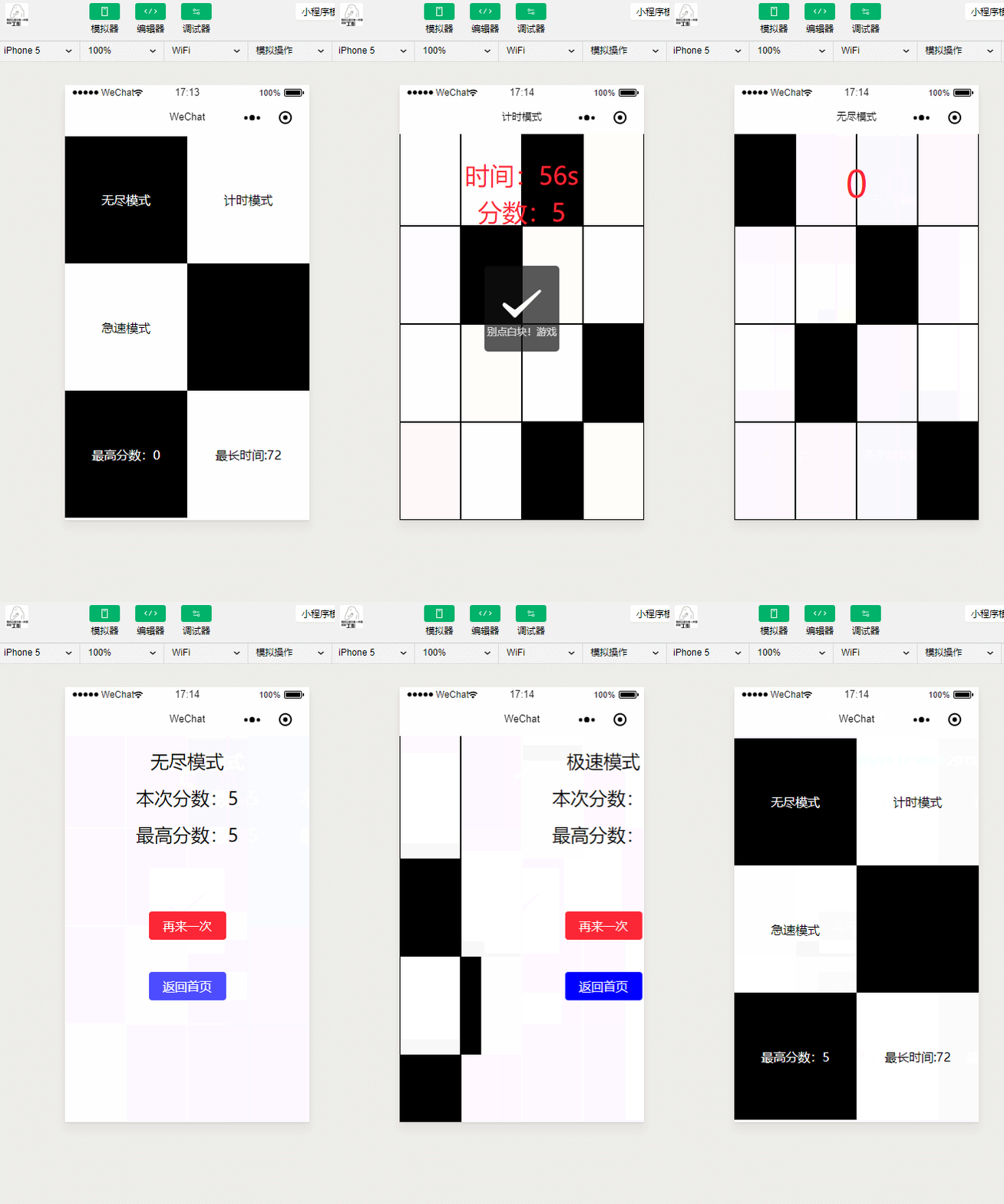
代码如下:

//play.js

// play

var app = getApp()

Page({

  data: {

    typeName: '计时模式',

    score: 0,

    time: 60,

    shouldStop: false,

    blockData:[]

  },

  onReady: function(){

      var array = [];

      // 先生成一个10个长度的数组

      for(var i = 0; i < 10; i++){

          // 生成一个随机位数为1的数组

          var orderArray = [0,0,0,0];

          var randomNum = Math.floor(Math.random() * 4);

          orderArray[randomNum] = 1;

          array.push({id: i, block: orderArray});

      }

      this.setData({

          blockData: array.reverse()

      });

  },

  handleClick: function(events){

      var id = events.currentTarget.id;

      var line = id.split("-")[1];

      var column = id.split("-")[2];

      var isBlack = id.split("-")[3];

      var blockData = this.data.blockData.reverse();

      var score = this.data.score;

      var orderArray = [0,0,0,0];

      // 判断是否是第一行

      if(line != blockData[0].id){

        this.handleWrong(0, score);

        return;

      }

      // 判断是否正确

      if(isBlack != 1){

        this.handleWrong(1, score);

        return;

      }

      // 正确下一个

      // 分数++

      // 最后一个小块的id为分数+10

      score++;

      orderArray[Math.floor(Math.random() * 4)] = 1;

      blockData.push({id: score+10, block: orderArray});

      blockData.shift();

      this.setData({

          silding: true,

          score: score,

          blockData: blockData.reverse()

      });

  },

  handleWrong: function( type , score){

      const titleArr = ["请点击第一个白块!游戏结束", "别点白块!游戏结束", "时间到"];

      var _this = this;

      wx.showToast({

            title: titleArr[type],

            icon: 'cancel',

            duration: 2000,

            complete: function(){

                // 将此分数存入全局变量

                app.globalData.currentScore = score;

                // 停止计数器

                _this.setData({

                  shouldStop: true

                });

                // 若此分数比最高分数还高 将其存入本地

                if(score > app.globalData.timeScore){

                    app.globalData.timeScore = score;

                    wx.setStorageSync('timeScore',score);

                }

                var timer = setTimeout(function(){

                        wx.redirectTo({

                            url: '../end/end?type=time&score=' + score

                        })

                        clearTimeout(timer);

                    }, 2000);

            }

        })

  },

  timeInterval: function(){

    var that = this;

    var timer = setInterval(function(){

        // 判断是否小于0

        var nowTime = that.data.time;

        if(that.data.shouldStop){

          clearInterval(timer);

        }

        if(nowTime > 1){

          that.setData({

            time: nowTime-1

          });

          return;

        }

        that.setData({

          time: nowTime-1

        });

        that.handleWrong(2, that.data.score);

        clearInterval(timer);

      }, 1000);

  },

  onLoad: function(){

      var that = this;

      wx.setNavigationBarTitle({

        title: that.data.typeName

      });

      this.timeInterval();

  }

})
急速模式

//play.js

// // play

var app = getApp()

Page({

  data: {

    typeName: '急速模式',

    score: 0,

    blockData:[],

    scrollHeight: 0,

    canRun: false

  },

  onLoad: function(){

      var that = this;

      // 设置title

      wx.setNavigationBarTitle({

        title: that.data.typeName

      });

  },

  onReady: function(){

      var array = [];

      // 先生成一个10个长度的数组

      for(var i = 0; i < 10; i++){

        array.push(this.getNewLine(i));

      }

      this.setData({

          blockData: array.reverse()

      });

  },

  handleClickWhite: function(events){

      // 点击白块一定会报错 差别在于报错文案

      // 判断是否是点击的第一行

      // 被点击的id

      var id = events.currentTarget.id;

      // 被点击的行

      var line = id.split("-")[1];

      // 数据

      var blockData = this.data.blockData.concat().reverse();

      // 当前分数

      var score = this.data.score;

      // 判断是否是第一行

      if(line != this.getClickableBlockLine(blockData)){

        this.handleWrong("请点击第一个黑块!游戏结束", score);

      } else {

        // 点击的第一行白块

        this.handleWrong("别点白块!游戏结束", score);

      }

  },

  handleClickBlack: function(events){

      // 黑块是应该点击的块

      // 判断是否是点击的第一行

      // 被点击的id

      var id = events.currentTarget.id;

      // 被点击的行

      var line = id.split("-")[1];

      // 数据

      var blockData = this.data.blockData.concat().reverse();

      // 当前分数

      var score = this.data.score;

      // 可点击的第一行

      var clickableLine = this.getClickableBlockLine(blockData);

      // 判断是否是第一行

      if(line == clickableLine){

        // 点击了第一行黑块

        // 判断是否是是第一次

        if(score == 0){

            // 启动滑动程序

            this.run();

        }

        score++;

        // 将黑块变灰块

        this.getBlockBlackToGray(line, blockData);

        // 分数++

        this.setData({

            score: score,

            blockData: blockData.concat().reverse()

        });

      } else {

        // 点击的不是第一行白块

        this.handleWrong("请点击第一个黑块!游戏结束", score);

      }

  },

  handleClickGray: function(events){

      // 灰块是指黑块点击之后的块

      // 其在显示是白块 并且同样不可点

      var score = this.data.score;

      this.handleWrong("别点白块!游戏结束", score);

  },

  run: function(){

      // 滑动方法

      var that = this;

      var speed = 10;

      this.setData({

          canRun: true

      });

      var timer = setInterval(function(){

          // 当前滑动距离

          if(!that.data.canRun){

              clearInterval(timer);

              return;

          }

          var currentScrollHeight = that.data.scrollHeight;

          // 当前分数

          var score = that.data.score;

          // 滑块数据

          var blockData = that.data.blockData.concat().reverse();

          if(Math.abs(currentScrollHeight) == 150){

              // 滑到临界点

              // 判断是否过期

              // 判断条件是 第一个滑块的状态是否为已点击

              if(that.checkFirstLineBlockClicked(blockData[0].block)){

                  // 没过期

                  // 继续 去除旧节点 插入新节点 scrolllHeight归0

                  var newId = blockData[blockData.length - 1].id + 1;

                  blockData.push(that.getNewLine(newId));

                  blockData.shift();

                  that.setData({

                      scrollHeight: 0,

                      blockData: blockData.concat().reverse()

                  });

                  return;

              }

              // 过期

              // 报错

              that.handleWrong("请点击白块!游戏结束", score);

              return;

          }

          currentScrollHeight = currentScrollHeight - speed;

          that.setData({

              scrollHeight: currentScrollHeight

          });

      }, 20);

  },

  checkFirstLineBlockClicked: function(blockDataLine){

      for(var i = 0; i < blockDataLine.length; i++){

          if(blockDataLine[i] == 2){

              return true;

          }

      }

      return false;

  },

  getBlockBlackToGray: function(line, blockData){

      for(var i = 0; i < blockData.length; i++){

          if(blockData[i].id == line){

              var currentArray = blockData[i].block;

              for(var j = 0; j < currentArray.length; j++){

                  if(currentArray[j] == 1){

                      currentArray[j] = 2;

                      return;

                  }

              }

          }

      }

  },

  getClickableBlockLine: function(blockData){

      var line = 0;

      for(var i = 0; i < blockData.length; i++){

          var block = blockData[i].block;

          for(var j = 0; j < block.length; j++){

            // 行内四个元素 有1即可

            if(block[j] == 1){

                return blockData[i].id;

            }

          }

      }

      return line;

  },

  getNewLine: function(i){

      // 生成一个标准的数据

      var orderArray = [0,0,0,0];

      // 生成一个随机数

      var randomNum = Math.floor(Math.random() * 4);

      // 赋值给对应的obj

      orderArray[randomNum] = 1;

      return {id: i, block: orderArray};

  },

  handleWrong: function(text, score){

      this.setData({

          canRun: false

      });

      wx.showToast({

            title: text,

            icon: 'cancel',

            duration: 2000,

            complete: function(){

                // 将此分数存入全局变量

                app.globalData.currentScore = score;

                // 若此分数比最高分数还高 将其存入本地

                if(score > app.globalData.speedScore){

                    app.globalData.speedScore = score;

                    wx.setStorageSync('speedScore',score);

                }

                var timer = setTimeout(function(){

                    wx.redirectTo({

                        url: '../end/end?type=speed&score=' + score

                    })

                    clearTimeout(timer);

                }, 2000);

            }

        })

  }

})
无尽模式
//play.js

// play

var app = getApp()

Page({

  data: {

    typeName: '无尽模式',

    silding: false,

    score: 0,

    blockData:[]

  },

  onReady: function(){

      var array = [];

      // 先生成一个10个长度的数组

      for(var i = 0; i < 10; i++){

          // 生成一个随机位数为1的数组

          var orderArray = [0,0,0,0];

          var randomNum = Math.floor(Math.random() * 4);

          orderArray[randomNum] = 1;

          array.push({id: i, block: orderArray});

      }

      this.setData({

          blockData: array.reverse()

      });

  },

  handleClick: function(events){

      var id = events.currentTarget.id;

      var line = id.split("-")[1];

      var column = id.split("-")[2];

      var isBlack = id.split("-")[3];

      var blockData = this.data.blockData.reverse();

      var score = this.data.score;

      var orderArray = [0,0,0,0];

      // 判断是否是第一行

      if(line != blockData[0].id){

        this.handleWrong(0, score);

        return;

      }

      // 判断是否正确

      if(isBlack != 1){

        this.handleWrong(1, score);

        return;

      }

      // 正确下一个

      // 分数++

      // 最后一个小块的id为分数+10

      score++;

      orderArray[Math.floor(Math.random() * 4)] = 1;

      blockData.push({id: score+10, block: orderArray});

      blockData.shift();

      this.setData({

          silding: true,

          score: score,

          blockData: blockData.reverse()

      });

  },

  handleWrong: function( type , score){

      const titleArr = ["请点击第一个白块!游戏结束", "别点白块!游戏结束"];

      wx.showToast({

            title: titleArr[type],

            icon: 'cancel',

            duration: 2000,

            complete: function(){

                // 将此分数存入全局变量

                app.globalData.currentScore = score;

                // 若此分数比最高分数还高 将其存入本地

                if(score > app.globalData.endlessScore){

                    app.globalData.endlessScore = score;

                    wx.setStorageSync('endlessScore',score);

                }

                var timer = setTimeout(function(){

                        wx.redirectTo({

                            url: '../end/end?type=endless&score=' + score

                        })

                        clearTimeout(timer);

                    }, 2000);

            }

        })

  },

  onLoad: function(){

      var that = this;

      wx.setNavigationBarTitle({

        title: that.data.typeName

      });

  }

})
//结束

var app = getApp()

Page({

  data: {

    currentScore: 0,

    gameType: "",

    heighestScore: 0,

    backUrl: ""

  },

  onLoad: function(options){

    var score = options.score;

    var gameType = options.type;

    var text = {endless: "无尽模式", time: "计时模式", speed: "极速模式"};

    // 从全局变量中获取分数

    this.setData({

      currentScore: app.globalData.currentScore,

      gameType: text[gameType],

      heighestScore: app.globalData[gameType + "Score"],

      backUrl: '../'+gameType+'/play'

    });

  }

})
本文感谢无私开源的程序员点击获取项目
Black-White-Blocks的更多相关文章
- Uva 1103 Ancient Messages
大致思路是DFS: 1. 每个图案所包含的白色连通块数量不一: Ankh : 1 ; Wedjat : 3 ; Djed : 5 ; Scarab : 4 ; Was : 0 ; Ak ...
- EOS.IO Technical White Paper v2
[EOS.IO Technical White Paper v2] Abstract: The EOS.IO software introduces a new blockchain architec ...
- Understanding Flash: Blocks, Pages and Program / Erases
https://flashdba.com/2014/06/20/understanding-flash-blocks-pages-and-program-erases/ In the last pos ...
- Ethereum White Paper
https://github.com/ethereum/wiki/wiki/White-Paper White Paper EditNew Page James Ray edited this pag ...
- VSX(翻译)Moving Code Blocks Among Code Regions using VS 2010 Extensions
Moving Code Blocks Among Code Regions using VS 2010 Extensions (翻译)使用VS 2010 扩展性将代码块移至Region区域中 Down ...
- [Codeforces #608 div2]1272B Blocks
Description There are nnn blocks arranged in a row and numbered from left to right, starting from on ...
- 从Script到Code Blocks、Code Behind到MVC、MVP、MVVM
刚过去的周五(3-14)例行地主持了技术会议,主题正好是<UI层的设计模式——从Script.Code Behind到MVC.MVP.MVVM>,是前一天晚上才定的,中午花了半小时准备了下 ...
- 【POJ-1390】Blocks 区间DP
Blocks Time Limit: 5000MS Memory Limit: 65536K Total Submissions: 5252 Accepted: 2165 Descriptio ...
- 开发该选择Blocks还是Delegates
前文:网络上找了很多关于delegation和block的使用场景,发现没有很满意的解释,后来无意中在stablekernel找到了这篇文章,文中作者不仅仅是给出了解决方案,更值得我们深思的是作者独特 ...
- poj 1390 Blocks
poj 1390 Blocks 题意 一排带有颜色的砖块,每一个可以消除相同颜色的砖块,,每一次可以到块数k的平方分数.问怎么消能使分数最大.. 题解 此题在徐源盛<对一类动态规划问题的研究&g ...
随机推荐
- 深入浅出 Java Concurrency (19): 并发容器 part 4 并发队列与Queue简介[转]
Queue是JDK 5以后引入的新的集合类,它属于Java Collections Framework的成员,在Collection集合中和List/Set是同一级别的接口.通常来讲Queue描述的是 ...
- 深入浅出 Java Concurrency (7): 锁机制 part 2 AQS[转]
在理解J.U.C原理以及锁机制之前,我们来介绍J.U.C框架最核心也是最复杂的一个基础类:java.util.concurrent.locks.AbstractQueuedSynchronizer. ...
- Shell 语法之信号与作业
Linux 使用信号与系统上运行的进程进行通信. Linux 编程中最常见的 Linux 系统信号 信号 值 描述 1 SIGHUP 挂起进程 2 SIGINT 中断进程 3 SIGQU ...
- 一、WebService基础概念
一.Web Service简介 1.1.Web Service基本概念 Web Service也叫XML Web Service WebService是一种可以接收从Internet或者Intrane ...
- storm-jdbc的使用
最近项目组分配到研究storm-jdbc用法 发现网上关于insert和query方法挺多的,但是自定义方法很少.而且用法上也挺多缺陷.在此自己总结记录一下 JdbcInsertBolt 的核心代码 ...
- numpy库数组属性查看:类型、尺寸、形状、维度
import numpy as np q = np.array([1,2,3,4],dtype=np.complex128) print("数据类型",type(q)) ...
- Eclipse:Eclipse插件开发全套教程
分享是美德,作者为Eclipse核心工程师之一,全英文版,有不明白的地方欢迎探讨和咨询. http://www.vogella.com/tutorials/eclipse.html
- CSS中position和header和overflow和background
<!DOCTYPE html> <!--CSS中position属性--> <html lang="en"> <head> < ...
- scrollbar 滚动条
滚动条样式:自定义元素的滚动条 <!DOCTYPE html> <html> <head lang="en"> <meta charset ...
- poj 2349 Arctic Network 最小生成树,求第k大条边
题目抽象出来就是有一些告诉坐标的通信站,还有一些卫星,这些站点需要互相通信,其中拥有卫星的任意两个站可以不用发射器沟通,而所有站点的发射器要都相同,但发射距离越大成本越高. 输入的数据意思: 实例个数 ...