
JEECG开发第一个菜单显示设备列表
一、新建设备表(t_base_device)
SET FOREIGN_KEY_CHECKS=0;

-- ----------------------------

-- Table structure for t_base_device

-- ----------------------------

DROP TABLE IF EXISTS `t_base_device`;

CREATE TABLE `t_base_device` (

  `deviceid` int(10) NOT NULL,

  `devicecode` varchar(50) DEFAULT NULL,

  `devicename` varchar(50) DEFAULT NULL,

  `deviceclassno` varchar(10) DEFAULT NULL,

  `status` varchar(10) DEFAULT NULL,

  `username` varchar(50) DEFAULT NULL,

  `userdept` varchar(200) DEFAULT NULL,

  PRIMARY KEY (`deviceid`)

) ENGINE=InnoDB DEFAULT CHARSET=utf8;

-- ----------------------------

-- Records of t_base_device

-- ----------------------------

INSERT INTO `t_base_device` VALUES ('', 'STPC201711001', '华硕X550', '', '使用中', '谢红卫', '软件研发部');

INSERT INTO `t_base_device` VALUES ('', 'STPC201711002', '联想T440P', '', '库存', null, null);
二、实体类(BaseDevice.java)
package net.xhw.device.entity;

import javax.persistence.Column;

import javax.persistence.Entity;

import javax.persistence.Id;

import javax.persistence.Table;

@SuppressWarnings("serial")

@Entity

@Table(name = "t_base_device")

public class BaseDevice implements java.io.Serializable{

    private int deviceid;

    private String devicecode;

    private String devicename;

    private String deviceclassno;

    private String status;

    private String username;

    private String userdept;

    @Id

    @Column(name = "deviceid", length = 10)

    public int getDeviceid() {

        return deviceid;

    }

    @Column(name = "devicecode", length = 50)

    public String getDevicecode() {

        return devicecode;

    }

    @Column(name = "devicename", length = 50)

    public String getDevicename() {

        return devicename;

    }

    @Column(name = "deviceclassno", length = 10)

    public String getDeviceclassno() {

        return deviceclassno;

    }

    @Column(name = "status", length = 10)

    public String getStatus() {

        return status;

    }

    @Column(name = "username", length = 50)

    public String getUsername() {

        return username;

    }

    @Column(name = "userdept", length = 200)

    public String getUserdept() {

        return userdept;

    }

    public void setDeviceid(int deviceid) {

        this.deviceid = deviceid;

    }

    public void setDevicecode(String devicecode) {

        this.devicecode = devicecode;

    }

    public void setDevicename(String devicename) {

        this.devicename = devicename;

    }

    public void setDeviceclassno(String deviceclassno) {

        this.deviceclassno = deviceclassno;

    }

    public void setStatus(String status) {

        this.status = status;

    }

    public void setUsername(String username) {

        this.username = username;

    }

    public void setUserdept(String userdept) {

        this.userdept = userdept;

    }

}
三、action控制类(DeviceController.java)
package net.xhw.device.ctrl;

import javax.servlet.http.HttpServletRequest;

import javax.servlet.http.HttpServletResponse;

import org.jeecgframework.core.common.controller.BaseController;

import org.jeecgframework.core.common.hibernate.qbc.CriteriaQuery;

import org.jeecgframework.core.common.model.json.DataGrid;

import org.jeecgframework.tag.core.easyui.TagUtil;

import org.jeecgframework.web.system.service.SystemService;

import org.springframework.beans.factory.annotation.Autowired;

import org.springframework.stereotype.Controller;

import org.springframework.web.bind.annotation.RequestMapping;

import org.springframework.web.servlet.ModelAndView;

import net.xhw.device.entity.BaseDevice;

@Controller

@RequestMapping("/deviceController")

public class DeviceController extends BaseController {

    private SystemService systemService;

    @Autowired

    public void setSystemService(SystemService systemService) {

        this.systemService = systemService;

    }

    @RequestMapping(params = "deviceList")

    public ModelAndView deviceList(HttpServletRequest request) {

        return new ModelAndView("device/deviceList");

    }

    @RequestMapping(params = "datagrid")

    public void datagrid(BaseDevice basedevice, HttpServletRequest request, HttpServletResponse response, DataGrid dataGrid) {

        CriteriaQuery cq = new CriteriaQuery(BaseDevice.class, dataGrid);

        this.systemService.getDataGridReturn(cq, true);

        TagUtil.datagrid(response, dataGrid);

    }

}
四、页面文件(deviceList.jsp)
<%@ page language="java" contentType="text/html; charset=UTF-8" pageEncoding="UTF-8"%>

<%@include file="/context/mytags.jsp"%>

<t:base type="jquery,easyui,tools,DatePicker"></t:base>

<t:datagrid name="deviceList" title="设备信息列表" actionUrl="deviceController.do?datagrid"

    fit="true" fitColumns="true" idField="deviceid" queryMode="group">

    <t:dgCol title="设备ID" field="deviceid" hidden="true"></t:dgCol>

    <t:dgCol title="设备编码" field="devicecode" query="false" width="100"></t:dgCol>

    <t:dgCol title="设备名称" field="devicename" query="false" width="100"></t:dgCol>

    <t:dgCol title="状态" field="status" query="false" width="100"></t:dgCol>

    <t:dgCol title="使用人" field="username" query="false" width="100"></t:dgCol>

</t:datagrid>
五、修改配置文件
1、修改spring-mvc.xml,添加扫描控制类包
<context:component-scan base-package="org.jeecgframework.web.*,com.jeecg.*,net.xhw.*">

  <context:exclude-filter type="annotation"

     expression="org.springframework.stereotype.Service" />

</context:component-scan>
2、修改spring-mvc-hibernate.xml,添加注解方式配置
<!-- 注解方式配置 -->

<property name="packagesToScan">

  <list>

     <value>org.jeecgframework.web.system.pojo.*</value>

     <value>org.jeecgframework.web.test.entity.*</value>
    <value>org.jeecgframework.web.autoform.*</value>
    <value>org.jeecgframework.web.cgform.entity.*</value>

    <value>org.jeecgframework.web.cgreport.entity.*</value>

    <value>org.jeecgframework.web.cgdynamgraph.entity.*</value>

    <value>org.jeecgframework.web.graphreport.entity.*</value>

    <value>org.jeecgframework.web.system.sms.*</value>

    <value>com.jeecg.*</value>

    <value>net.xhw.*</value>

   </list>

</property>
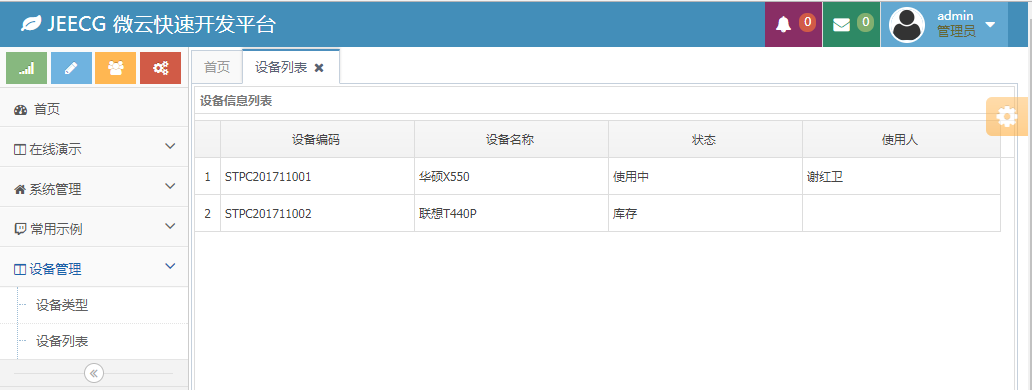
六、菜单配置及结果

JEECG开发第一个菜单显示设备列表的更多相关文章
- wxPython制作跑monkey工具(python3)-带显示设备列表界面
一. wxPython制作跑monkey工具(python3)-带显示设备列表界面 源代码 Run Monkey.py #!/usr/bin/env python import wx import ...
- 解决Genymotion无法创建新设备或无法显示设备列表问题
准备工作: 链接: https://pan.baidu.com/s/1i5v4IBN 密码: jc3m 用2.8的和最新VirtualBox-5.1.10-112026-Win 注意事项: 1.笔记本 ...
- Winform开发主界面菜单的动态树形列表展示
我在之前很多文章里面,介绍过Winform主界面的开发,基本上都是标准的界面,在顶部放置工具栏,中间区域则放置多文档的内容,但是在顶部菜单比较多的时候,就需要把菜单分为几级处理,如可以在顶部菜单放置一 ...
- (android 地图实战开发)2 创建MapActivity,根据设备当前位置,显示地图
(android 地图实战开发)2 创建MapActivity,根据设备当前位置,显示地图 http://www.cnblogs.com/macroxu-1982/archive/2011/09/13 ...
- odoo开发笔记--一个模块显示两个一级菜单
场景描述: 在已启动开发的模块中,odoo顶部一级菜单只有一个“会员管理”,需求是:在同一级顶部菜单,增加新菜单“产品管理”.举例如图: 处理方式: 按照odoo的机制,实现这种效果,可以 ...
- dedecms 列表 用分页标签 判断 当第一页则显示,第二页以上不显示 土办法!
arc.listview.class.php function GetPageListST($list_len,$listitem="index,end,pre,next,pageno,sp ...
- XE7 & IOS开发之开发账号(1):开发证书、AppID、设备、开发授权profile的申请使用,附Debug真机调试演示(XCode所有版本通用,有图有真相)
网上能找到的关于Delphi XE系列的移动开发的相关文章甚少,本文尽量以详细的图文内容.傻瓜式的表达来告诉你想要的答案. 原创作品,请尊重作者劳动成果,转载请注明出处!!! 注意,以下讨论都是以&q ...
- 【React Native开发】React Native应用设备执行(Running)以及调试(Debugging)(3)
),React Native技术交流4群(458982758),请不要反复加群.欢迎各位大牛,React Native技术爱好者加入交流!同一时候博客左側欢迎微信扫描关注订阅号,移动技术干货,精彩文章 ...
- HoloLens开发手记 - 使用Windows设备控制台 Using Windows Device Portal
Windows设备控制台允许你通过Wi-Fi或USB来远程控制你的HoloLens设备.设备控制台是HoloLens上的一个Web Server,你可以通过PC的浏览器来连接到它.设备控制台包含了很多 ...
随机推荐
- 添加右键新增.md文件
Windows下设置.md文件右键可新建 应用场景:Windows10, Typora(Markdown编辑器) 因为习惯用Markdown来写文档, 所以常常需要新建.md文档,但由于Windows ...
- 二分-E - Rikka with Mutex
E - Rikka with Mutex Sometimes, technical terms implicate some life philosophy. Mutex is one of them ...
- Java生鲜电商平台-生鲜电商订单结算系统的深入解析与反思总结
Java生鲜电商平台-生鲜电商订单结算系统的深入解析与反思总结 说明:最近疫情影响,生鲜电商这个行业被彻底的激活了,全中国人民都知道用小程序或者APP可以进行买菜了,但是可惜的是,我的生鲜电商在去年经 ...
- 网易云信融合CDN方案及实践
日前,网易云信视频云架构师席智勇在第七届GFIC全球家庭互联网大会进行了题为<网易云信融合CDN方案及实践>的分享,以下是演讲内容回顾. 图为 网易云信视频云架构师席智勇 CDN所面临的问 ...
- SaltStack之return与job管理
目录 1. SaltStack组件之return 1.1 return流程 1.2 使用mysql作为return存储方式 2. job cache 2.1 job cache流程 2.2 job管理 ...
- Cadence Allegro小技巧之指定Gerber生成路径
Allegro生成Gerber数据时,默认会保存在与pcb文件相同目录路径下,Gerber数据本身就会生成好几个文件,然后与pcb文件,log文件,临时文件等混杂在一起,不易整理打包Gerber数据, ...
- VSFTPD服务器
我虽然vsftpd服务器做了百遍以上,但是我觉的成功率不大.我要写下这篇日记,来让我分析自己曾经的过错!! vsftpd的原理我不多讲!!!请自行百度吧!! 我搭建的环境是 Linux6.4 IP(1 ...
- Python_内置函数和匿名函数
楔子 在讲新知识之前,我们先来复习复习函数的基础知识. 问:函数怎么调用? 函数名() 如果你们这么说...那你们就对了!好了记住这个事儿别给忘记了,咱们继续谈下一话题... 来你们在自己的环境里打印 ...
- Flink流处理(三)- 数据流操作
3. 数据流操作 流处理引擎一般会提供一组内置的操作,用于对流做消费.转换,以及输出.接下来我们介绍一下最常见的流操作. 操作分为无状态的(stateless)与有状态的(stateful).无状态的 ...
- servlet中的“/”代表当前项目,html中的“/”代表当前服务器
servlet中重定向或请求转发的路径如果用“/”开头,代表当前项目下的路径,浏览器转发这条路径时会自动加上当前项目的路径前缀,如果这个路径不是以“/”开头,那么代表这个路径和当前所在servlet的 ...