
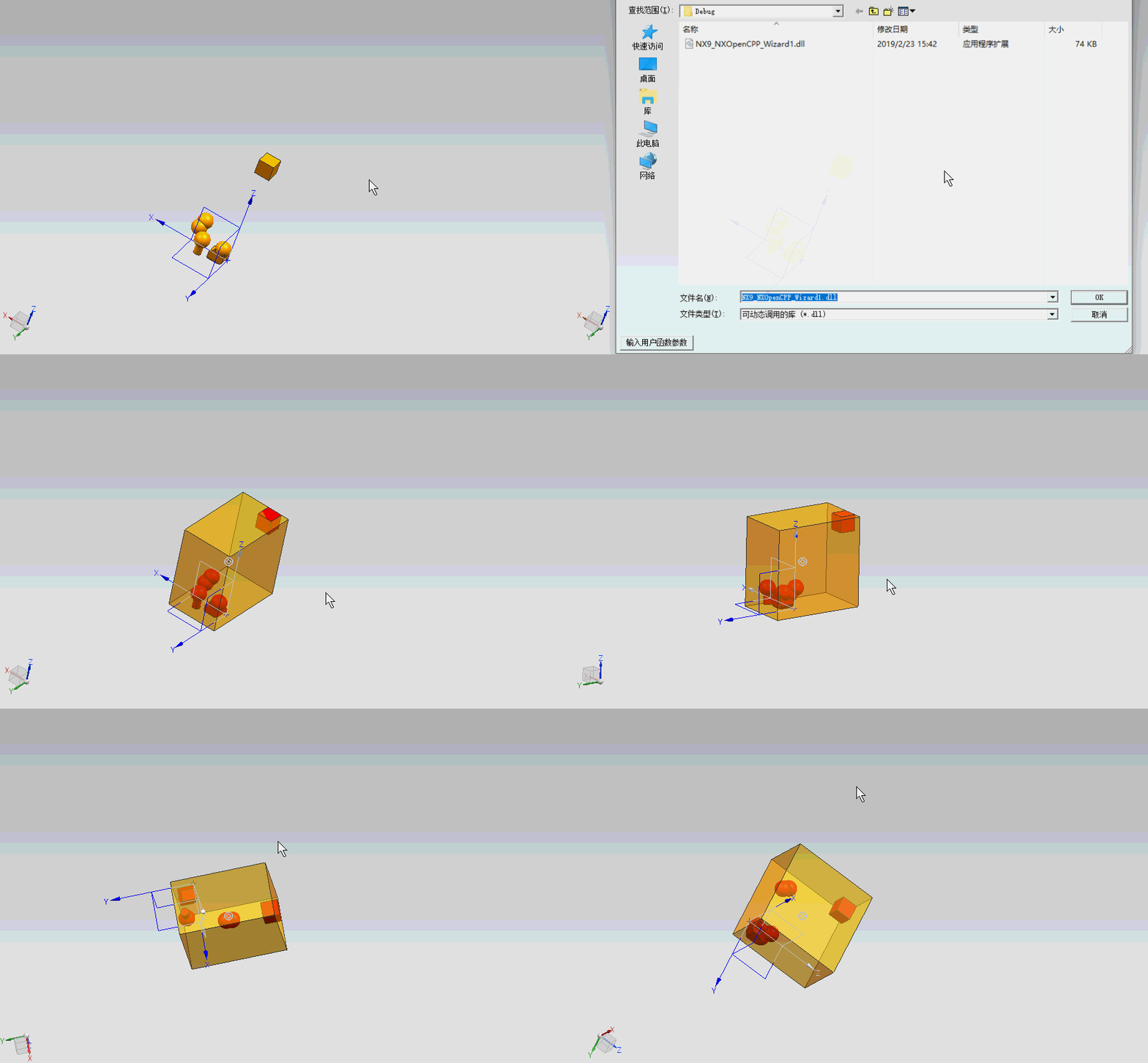
NX二次开发-UFUN求对象的最大边界框UF_MODL_ask_bounding_box
     NX9+VS2012

     #include <uf.h>

     #include <uf_obj.h>

     #include <uf_modl.h>

     #include <uf_part.h>

     UF_initialize();

     //遍历当前显示部件所有体

     std::vector<tag_t> SolidVector;

     tag_t ObjectTag = NULL_TAG;

     int Type, SubType, Body_Type;

     int Count = ;

     char msg[];

     UF_OBJ_cycle_objs_in_part(UF_PART_ask_display_part(), UF_solid_type, &ObjectTag);

     while (ObjectTag != NULL_TAG)

     {

         UF_OBJ_ask_type_and_subtype(ObjectTag, &Type, &SubType);

         if (SubType == UF_solid_body_subtype)

         {

             UF_MODL_ask_body_type(ObjectTag, &Body_Type);

             if (Body_Type == UF_MODL_SOLID_BODY)

             {

                 UF_OBJ_set_color(ObjectTag, );

                 SolidVector.push_back(ObjectTag);

                 Count++;

             }

         }

         UF_OBJ_cycle_objs_in_part(UF_PART_ask_display_part(), UF_solid_type, &ObjectTag);

     }

     //求所有体的最大边界

     double MaxBox[] = {, , , -, -, -};

     for (int i = ; i < Count; i++)

     {

         double Box[];

         UF_MODL_ask_bounding_box(SolidVector[i], Box);

         MaxBox[] = MaxBox[] < Box[]? MaxBox[]:Box[];

         MaxBox[] = MaxBox[] < Box[]? MaxBox[]:Box[];

         MaxBox[] = MaxBox[] < Box[]? MaxBox[]:Box[];

         MaxBox[] = MaxBox[] > Box[]? MaxBox[]:Box[];

         MaxBox[] = MaxBox[] > Box[]? MaxBox[]:Box[];

         MaxBox[] = MaxBox[] > Box[]? MaxBox[]:Box[];

     }

     //转换

     char Length[], Width[], Height[];

     sprintf(Length, "%f", MaxBox[] - MaxBox[]);

     sprintf(Width, "%f", MaxBox[] - MaxBox[]);

     sprintf(Height, "%f", MaxBox[] - MaxBox[]);

     char* Len[];

     Len[] = Length;

     Len[] = Width;

     Len[] = Height;

     //创建块

     double Ori[] = {MaxBox[], MaxBox[], MaxBox[]};

     tag_t BlkTag = NULL_TAG;

     UF_MODL_create_block1(UF_NULLSIGN, Ori, Len, &BlkTag);

     //特征找体

     tag_t BodyTag = NULL_TAG;

     UF_MODL_ask_feat_body (BlkTag,&BodyTag);

     //设置透明度

     UF_OBJ_set_translucency(BodyTag, );

     UF_terminate();
NX二次开发-UFUN求对象的最大边界框UF_MODL_ask_bounding_box的更多相关文章
- NX二次开发-UFUN求两个对象最短距离UF_MODL_ask_minimum_dist
NX9+VS2012 #include <uf.h> #include <uf_modl.h> #include <uf_ui.h> UF_initialize() ...
- NX二次开发-UFUN高亮显示对象UF_DISP_set_highlight
NX11+VS2013 #include <uf.h> #include <uf_modl.h> #include <uf_disp.h> UF_initializ ...
- NX二次开发-UFUN查询对象的类型和子类型UF_OBJ_ask_type_and_subtype
NX9+VS2012 #include <uf.h> #include <uf_obj.h> #include <uf_modl.h> #include <u ...
- NX二次开发-UFUN获取对象的显示属性(图层,颜色,空白状态,线宽,字体,高亮状态)UF_OBJ_ask_display_properties
NX9+VS2012 #include <uf.h> #include <uf_modl.h> #include <uf_obj.h> UF_initialize( ...
- NX二次开发-UFUN求两个向量的叉乘UF_VEC3_cross
NX9+VS2012 #include <uf.h> #include <uf_ui.h> #include <uf_vec.h> #include <uf_ ...
- NX二次开发-UFUN所有对象类型的宏定义
/**************************************************************************** Copyright (c) 2010 Sie ...
- NX二次开发-UFUN设置对象线型UF_OBJ_set_font
#include <uf.h> #include <uf_modl.h> #include <uf_obj.h> UF_initialize(); //创建块 UF ...
- NX二次开发-UFUN输入对象tag获得part名字UF_OBJ_ask_owning_part
NX11+VS2013 #include <uf.h> #include <uf_modl.h> #include <uf_part.h> #include < ...
- NX二次开发-UFUN获取图纸视图最大边界和视图中心点UF_DRAW_ask_view_borders
NX9+VS2012 //获得视图的最大边界 ]; UF_DRAW_ask_view_borders(view_tag[j], view_borders); //获得视图原点 ]; ViewOrigi ...
随机推荐
- 使用Git实现Laravel项目的自动化部署
简介 不知道大家一开始是怎么使用 git 进行开发的,反正我个人是先将代码提交到 github 仓库,然后用 SSH 登录到服务器,然后进行克隆或者版本更新.听起来就很麻烦,当然实际操作中也很麻烦,那 ...
- flutter进行自动编译操作步骤
环境: mac os 操作系统 xcode最新版本 10.2.1 flutter进行编译报错解决方案: (null): warning: (armv7) /Users/tommy/Desktop/Pr ...
- php高版本安装ecshop错误解决方法
1.Strict Standards: Non-static method cls_image::gd_version() should not be called statically in F:\ ...
- CF B. Planning The Expedition
题意:有n个人和m个食物,给出每一个食物的种类,每个人只会吃一种食物,每个人一天吃一个食物,问这n个人可以撑多少天. 分析:因为题目给出的天数范围比较小所以我们可以从1到100天开始枚举,我们判断如果 ...
- 获取客户端IP地址-----以及--------线上开启redis扩展
/** * 获取客户端IP地址 * @param integer $type 返回类型 0 返回IP地址 1 返回IPV4地址数字 * @return mixed */ function get_cl ...
- 18、webservice使用
1.将axis2.war文件拷到tomcat,webapp文件夹下,然后重启tomcat 访问
- python excel单元格及样式
python excel单元格及样式: #!/usr/bin/env python # -*- coding: utf-8 -*-” #只对当前文件的中文编码有效 # Filename : Write ...
- WIN7下怎么安装iis教程
点击开始→控制面板,然后再点击程序,勿点击卸载程序,否则到不了目标系统界面. 2 然后在程序和功能下面,点击打开和关闭windows功能. 3 进入Windows功能窗口,然后看到internet信息 ...
- caller.arguments.callee.eval
------------------------------------ 1.函数的调用方式,与this的指向问题,原型对象中的this 2.对象创建的几种方式! 3.str.replace 页面初始 ...
- JMeter AI图片识别接口并发量测试
由于临时接到一个性能测试任务,测试8个独立接口在实验室环境的TPS.响应时间以及服务器性能监控如CPU.内存.IO等,没有明确具体的响应时间与并发数,需求较模糊. 1.软件.硬件环境信息:JMeter ...