
IOS开发基础知识--碎片29
1:心跳效果,并可去除心跳
- (void)initScaleLayer

{

    self.view.backgroundColor=[UIColor blueColor];

    UIButton *myTelButtom=[[UIButton alloc]initWithFrame: CGRectMake(, , , )];

    UIImage *btnTelImage=[UIImage imageNamed:@"customer_tel_icon"];

    [myTelButtom setBackgroundImage:btnTelImage forState:UIControlStateNormal];

    [myTelButtom setBackgroundImage:[UIImage imageNamed:@"customer_tel_icon"] forState:UIControlStateHighlighted];

    [myTelButtom addTarget:self action:@selector(btnSave:) forControlEvents:UIControlEventTouchUpInside];

    [self.view addSubview:myTelButtom];

    //设定剧本

    CABasicAnimation *scaleAnimation = [CABasicAnimation animationWithKeyPath:@"transform.scale"];

    scaleAnimation.fromValue = [NSNumber numberWithFloat:1.0];

    scaleAnimation.toValue = [NSNumber numberWithFloat:1.2];

    scaleAnimation.autoreverses = YES;

    scaleAnimation.fillMode = kCAFillModeForwards;

    scaleAnimation.repeatCount = MAXFLOAT;

    scaleAnimation.duration = 0.8;

    //开演

    [myTelButtom.layer addAnimation:scaleAnimation forKey:@"scaleAnimation"];

}

-(void)btnSave:(id)sender

{

    UIButton *btn=(UIButton *)sender;

    [btn.layer removeAnimationForKey:@"scaleAnimation"];

}
2:启动动画效果实现
原理:启动页同样是放一张静态图,只是在启动时再创建一个图片视图把一张跟启动页的图片做动画;如下:
@interface AppDelegate ()

@property (strong,nonatomic) UIImageView *niceView;

@end

@implementation AppDelegate

@synthesize niceView;

- (BOOL)application:(UIApplication *)application didFinishLaunchingWithOptions:(NSDictionary *)launchOptions {

    self.window.rootViewController = [[ViewController alloc]init];;

    [self.window makeKeyAndVisible];

    //圖片擴大淡出的效果开始;

    //设置一个图片;

    niceView = [[UIImageView alloc] initWithFrame:[UIScreen mainScreen].bounds];

    niceView.tag=;

    niceView.image = [UIImage imageNamed:@"launch4.7.png"];

    //添加到场景

    [self.window addSubview:niceView];

    //放到最顶层;

    [self.window bringSubviewToFront:niceView];

    CABasicAnimation *animation=[CABasicAnimation animationWithKeyPath:@"transform.scale"];

    niceView.layer.anchorPoint = CGPointMake(.,.);

    animation.fromValue = @1.0f;

    animation.toValue = @1.3f;

    animation.fillMode=kCAFillModeForwards;

    animation.removedOnCompletion = NO;

    [animation setAutoreverses:NO];

    //动画时间

    animation.duration=0.9;

    animation.delegate=self;

    [niceView.layer addAnimation:animation forKey:@"scale"];

    //结束;

    return YES;

}

-(void)animationDidStop:(CAAnimation *)anim finished:(BOOL)flag

{

    [niceView removeFromSuperview];

}
3:计算标签的宽度并计算是否换行显示
-(void)creatUI:(NSMutableArray *)tagArr{

    self.tagArr = [NSMutableArray arrayWithArray:[tagArr mutableCopy]];

    if (self.is_can_addTag) {//如果可以添加标签,那么数组就多一个添加标签按钮

        [self.tagArr addObject:self.addTagStr.length>?self.addTagStr:@"添加标签"];

    }

    tagView_height = ;

    self.backgroundColor = self.tagViewBackgroundColor?self.tagViewBackgroundColor:[UIColor whiteColor];

    previousFrame = CGRectZero;

    [self.tagArr enumerateObjectsUsingBlock:^(id value, NSUInteger idx, BOOL *stop) {

        //Tag标题(看传入的是字典还是字符串)

        NSMutableString *titleStr = [NSMutableString stringWithString:self.tagStateType==?@"  ":@""];

        if ([value isKindOfClass:[NSString class]]) {

            [titleStr appendString:value];

        }else if([value isKindOfClass:[NSDictionary class]]){

            if (!self.tagArrkey) {

                //获取不到Value,因为没传入Key

                NSLog(@"获取不到Value,因为没传入Key");

                return ;

            }

            [titleStr appendString:[value valueForKey:self.tagArrkey]];

        }

        //创建Label

        UILabel*tagLabel = [[UILabel alloc]initWithFrame:CGRectZero];

        [self creatTagUI:tagLabel];

        tagLabel.text = titleStr;

        tagLabel.tag = KTapLabelTag+idx;

        //计算label的大小

        NSDictionary *attrs = @{NSFontAttributeName : [UIFont systemFontOfSize:self.tagFont?self.tagFont:KTagFont]};

        CGSize Size_str = [titleStr sizeWithAttributes:attrs];

        Size_str.width += K_Tag_Title_H_Marin*;

        Size_str.height += K_Tag_Title_V_Marin*;

        CGRect newRect = CGRectZero;

        if (previousFrame.origin.x + previousFrame.size.width + Size_str.width + K_Tag_Right_Margin > JF_Screen_Width) {

            newRect.origin = CGPointMake(, previousFrame.origin.y + Size_str.height + K_Tag_Bottom_Margin);

            tagView_height += Size_str.height + K_Tag_Bottom_Margin;

        }

        else {

            newRect.origin = CGPointMake(previousFrame.origin.x + previousFrame.size.width + K_Tag_Right_Margin, previousFrame.origin.y);

        }

        newRect.size = Size_str;

        [tagLabel setFrame:newRect];

        previousFrame=tagLabel.frame;

        //改变控件高度

        if (idx==self.tagArr.count-) {

            [self setHight:self andHight:tagView_height+Size_str.height + K_Tag_Bottom_Margin];

        }

        [self addSubview:tagLabel];

        //新增删除、添加功能

        if (self.is_can_addTag&&idx==self.tagArr.count-) {//能添加状态&&最后一个-->(进入添加tag界面不用显示删除图片)

        }else{

            if (self.tagStateType==) {

                //移除的图片

                UIImageView *removeImage = [[UIImageView alloc] initWithFrame:CGRectMake(tagLabel.jf_right-Image_Width*1.5, tagLabel.jf_top+(tagLabel.jf_height-Image_Height)/, Image_Width, Image_Height)];

                //删除图片可以换成自己的图片

                removeImage.image = [UIImage imageNamed:@"btn_removeTag"];

                [self addSubview:removeImage];

            }

        }

        //点击按钮

        UIButton *button = [[UIButton alloc] initWithFrame:CGRectMake(tagLabel.frame.origin.x, tagLabel.frame.origin.y, tagLabel.frame.size.width, tagLabel.frame.size.height)];

        [button setTag:KButtonTag+idx];

        [button addTarget:self action:@selector(clickTag:) forControlEvents:UIControlEventTouchUpInside];

        [self addSubview:button];

    }];

}
4:Fabric增加脚本KEY的操作内容
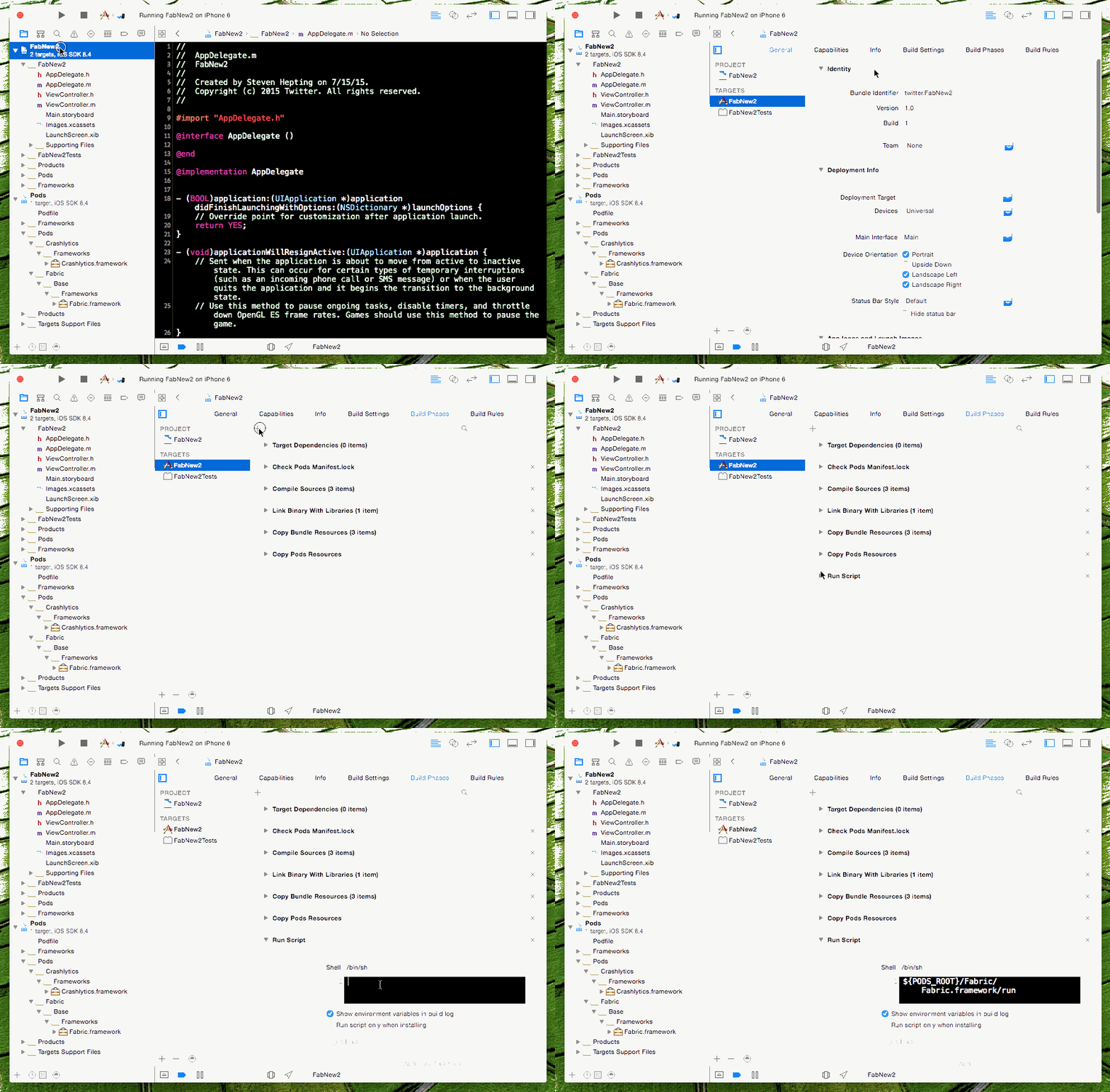
把相应的DSYM文件也上传到官网;
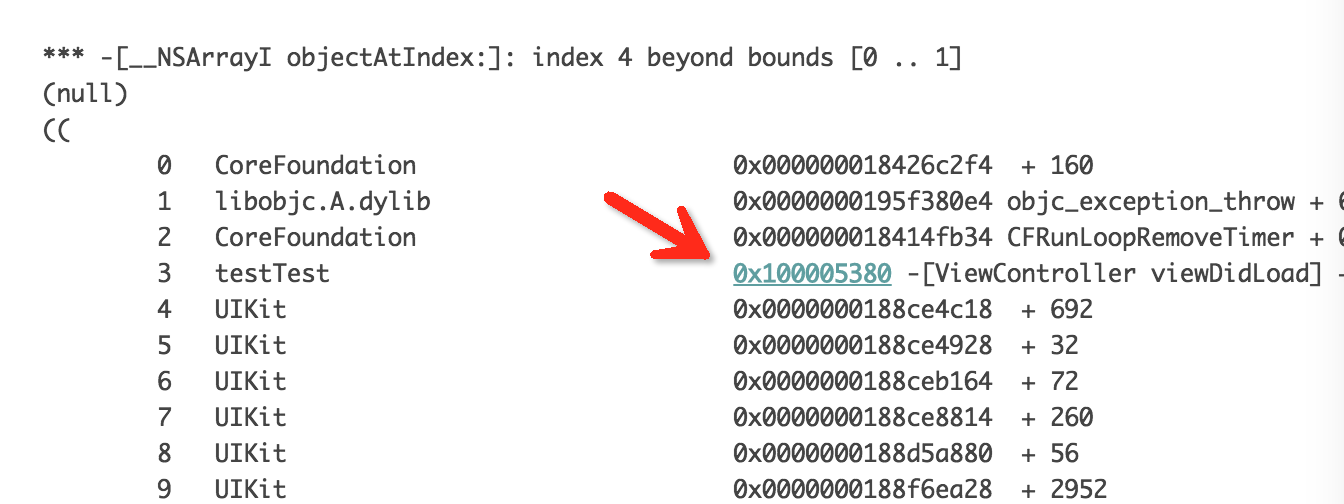
5:通过xcrun atos查看dsym报错的详细地址(每次打包时要把当前对应的.DSYM文件保存下来,为后期定位错误做准备)
进入到DSYM文件的文件地方,
使用xcrun atos命令
atos -o YourApp.app.dSYM/Contents/Resources/DWARF/YourApp 0x00062867
实例:

从友盟或者其它地方可以获得报错的编码,通过上面的命令就可以查看到错误地址;
IOS开发基础知识--碎片29的更多相关文章
- IOS开发基础知识碎片-导航
1:IOS开发基础知识--碎片1 a:NSString与NSInteger的互换 b:Objective-c中集合里面不能存放基础类型,比如int string float等,只能把它们转化成对象才可 ...
- IOS开发基础知识--碎片19
1:键盘事件顺序 UIKeyboardWillShowNotification // 键盘显示之前 UIKeyboardDidShowNotification // 键盘显示完成后 UIKeyboar ...
- IOS开发基础知识--碎片33
1:AFNetworking状态栏网络请求效果 直接在AppDelegate里面didFinishLaunchingWithOptions进行设置 [[AFNetworkActivityIndicat ...
- IOS开发基础知识--碎片42
1:报thread 1:exc_bad_access(code=1,address=0x70********) 闪退 这种错误通常是内存管理的问题,一般是访问了已经释放的对象导致的,可以开启僵尸对象( ...
- IOS开发基础知识--碎片50
1:Masonry 2个或2个以上的控件等间隔排序 /** * 多个控件固定间隔的等间隔排列,变化的是控件的长度或者宽度值 * * @param axisType 轴线方向 * @param fi ...
- IOS开发基础知识--碎片3
十二:判断设备 //设备名称 return [UIDevice currentDevice].name; //设备型号,只可得到是何设备,无法得到是第几代设备 return [UIDevice cur ...
- IOS开发基础知识--碎片11
1:AFNetwork判断网络状态 #import “AFNetworkActivityIndicatorManager.h" - (BOOL)application:(UIApplicat ...
- IOS开发基础知识--碎片14
1:ZIP文件压缩跟解压,使用ZipArchive 创建/添加一个zip包 ZipArchive* zipFile = [[ZipArchive alloc] init]; //次数得zipfilen ...
- IOS开发基础知识--碎片16
1:Objective-C语法之动态类型(isKindOfClass, isMemberOfClass,id) 对象在运行时获取其类型的能力称为内省.内省可以有多种方法实现. 判断对象类型 -(BOO ...
随机推荐
- SpringMVC那点事
一.SpringMVC返回json数据的三种方式 1.第一种方式是spring2时代的产物,也就是每个json视图controller配置一个Jsoniew. 如:<bean id=" ...
- ASP.NET Core的配置(1):读取配置信息
提到"配置"二字,我想绝大部分.NET开发人员脑海中会立马浮现出两个特殊文件的身影,那就是我们再熟悉不过的app.config和web.config,多年以来我们已经习惯了将结构化 ...
- 远程管理 KVM 虚机 - 每天5分钟玩转 OpenStack(5)
上一节我们通过 virt-manager 在本地主机上创建并管理 KVM 虚机.其实 virt-manager 也可以管理其他宿主机上的虚机.只需要简单的将宿主机添加进来 填入宿主机的相关信息,确定即 ...
- T-SQL:毕业生出门需知系列(二)
第2课 检索数据 2.1 SELECT 语句 用途:从一个或多个表中检索数据信息 关键字:作为SQL组成部分的保留字.关键字不能用作表或列的名字. 为了使用SELECT检索表数据,必须至少给出两条信息 ...
- 用脚本如何实现将Linux下的txt文件批量转化为Windows下的txt文件?
众所周知,Windows和Linux的文件换行回车格式不同,Windows下换行格式是\r\n(回车+换行),Linux下换行格式为\n(只是换行),因此,其中一个操作系统的文本文件若需要在另外一个中 ...
- 前端自动化构建工具gulp的使用总结
前端自动化构建工具gulp的使用总结 博主最近偶的空闲,在此对gulp的使用做一个总结,让小伙伴知道如何合理的使用gulp以及gulp的使用技巧. 谈到gulp,有人可能就会想到另外一个构建工具gru ...
- 【Java心得总结四】Java泛型下——万恶的擦除
一.万恶的擦除 我在自己总结的[Java心得总结三]Java泛型上——初识泛型这篇博文中提到了Java中对泛型擦除的问题,考虑下面代码: import java.util.*; public clas ...
- 1Z0-053 争议题目解析681
1Z0-053 争议题目解析681 考试科目:1Z0-053 题库版本:V13.02 题库中原题为: 681.The environmental variable ORACLE-BASE is set ...
- Easyui datagrid editor为combobox时指定数据源
当在datagrid行内部应用添加编辑操作时,引入combobox是非常方便的操作,我在引入combobox时对数据源这快做个总结,在做demo的过程中遇到个问题,就是当你选择了下拉框的值后点击保存, ...
- 通过一个模拟程序让你明白ASP.NET MVC是如何运行的
ASP.NET MVC的路由系统通过对HTTP请求的解析得到表示Controller.Action和其他相关的数据,并以此为依据激活Controller对象,调用相应的Action方法,并将方法返回的 ...