
selenium ide 录制回放link链接报错
回放是出现以下错误:
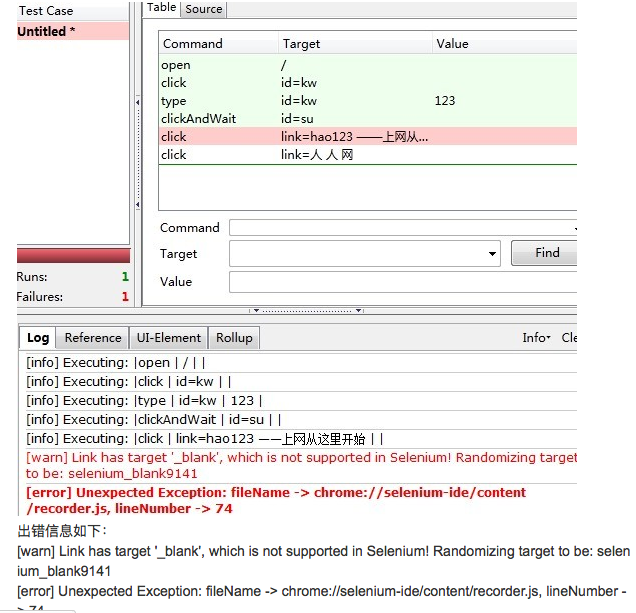
也就是回放点击打开新的链接时出现这个错误,
这个问题说的是 点击此链接会新打开一个窗口
selenium1是不支持多窗口切换的 因此会卡在这里,也就录制不支持这个操作,但是很多书都没有写出这个缺陷,都说又这个功能,真是很坑啊,我当时找到这个
原因时一万只羊驼飘过啊
selenium2 即 selenium1+webdriver 很好的解决了这个问题
selenium1 所以装再高版本也没用
selenium2 指的是 webdriver
webdriver是没有录制功能的 全凭手写
在stackoverflow我找到了最佳大答案
即通过放慢回放速度就可以正常打开连接了
|
I am executing a simple recorded script in Selenium , in which i just search a page in Google and then click it , but when Run that recorded script it is giving me the "Error [error] Element link not found". And following is the Script which i am running,any help would be very useful. New Test New Test open / type q Bill Gates click link=Bill Gates: Chairman click link=Bill Gates: Chairman |
|||

|
I got the same error message while going through the tutorials online. I found out that the scripts were running too fast for FF to load the links. If you slow down the playback by moving the green button on the Fast-Slow bar to somewhere in the middle the scripts run without any errors. |
||||


|
I guess I know the answer. It might be bcz of any javascript error(you can see that on the status bar at the Right corner(IE)) or that link element might not be placed correctly in the box(box model). Here you can use Selenium.focus("link=text") :selenium.keyPressNative("10") . It presses the enter key.but while selenium is executing this statement Do not change the focus from your AUT (don't touch the mouse). In IDE ,just paste the above statement on click(). |
|||||
|

|
Im assuming you are using Google instant as there is no "click search button" command, the link is probably not preset because selenium is not waiting for Google instant to respond or the javascript to render the link. If you manually add in a click command to search it should solve it. |
|||

|
My solution is almost the same as Cuongs. Though I change the speed by using a command and change it back afterwards. Before you click the link, you can set the speed to slow: Command: setSpeed Target: 3000 You can change the speed afterwards again to ~1000 |
|||

selenium ide 录制回放link链接报错的更多相关文章
- Selenium ide录制回放错误Timed out after 30000ms
[error] Timed out after 30000ms 该问题可能是速度控制条播放速度过快导致,调整播放速度至slow
- VS Code远程链接报错Could not establish connection to “hz.matpool.com”
VS Code远程链接报错Could not establish connection to "hz-t2.matpool.com" 输出的部分内容 安装Git git for w ...
- 1.2 selenium IDE录制脚本
1.打开Firefox浏览器中 selenium IDE
- Selenium IDE录制脚本时弹出窗口的完美处理
很多朋友录制脚本时新打开弹出窗口后无法定位元素,我也遇到同样的问题,国内没有什么好的资料,于是就阅读英文,不断尝试,感觉那个selectWindow(title)什么就是个坑,我用这种方法成功处理后得 ...
- selenium IDE录制脚本和自定义脚本-->Katalon Recorder(二)
selenium IDE提供了两种生成脚本的方式:录制脚本和自定义脚本 录制脚本:1.打开firefox空白标签,在标签上输入需要录制脚本的网址:2.打开selenium IDE界面中的录制按钮(圆形 ...
- selenium IDE录制
一. 安装 可以用Firefox打开https://addons.mozilla.org/en-US/firefox/addon/selenium-ide/,在这里边找到和当前firef ...
- Selenium IDE录制脚本
一.当Selenium IDE中Format没有转换格式时,操作:Options—Options...—勾选Enable experimental features
- SeleniumIDE从0到1 (Selenium IDE 录制)
seleniumIDE安装成功后下面我们用百度网址来简单录制下: 简介一:百度输入框录制操作 1.打开SeleniumIDE 2.SeleniumIDE地址栏中输入百度网址:[https://www. ...
- selenium ide脚本回放出现element not found
原因: 点击按钮,没有设置时间延迟,而页面加载,需要时间:当页面元素未加载完全,执行点击事件,就会报错:element... not found. 解决方案: 在点击事件前添加新的COMMAND.设置 ...
随机推荐
- java10-1 Object类
Object:类 Object 是类层次结构的根类.每个类都使用 Object 作为超类. 每个类都直接或者间接的继承自Object类. Object类的方法: public int has ...
- p点到(a,b)点两所在直线的垂点坐标及p点是否在(a,b)两点所在直线上
/// <summary> /// p点到(a,b)点两所在直线的垂点坐标 /// </summary> /// <p ...
- ArcGIS实现在线与线交叉处打断线(批量)
from:http://he1989.blog.163.com/blog/static/2052041092012631112459704/ 打开ArcgisDesktop中的ArcToolBox 找 ...
- python-基础案例
范例一: 练习:元素分类 有如下值集合 [11,22,33,44,55,66,77,88,99,90...],将所有大于 66 的值保存至字典的第一个key中,将小于 66 的值保存至第二个key的值 ...
- iOS之block
1. Block的声明和线程安全Block属性的声明,首先需要用copy修饰符,因为只有copy后的Block才会在堆中,栈中的Block的生命周期是和栈绑定的,可以参考之前的文章(iOS: 非ARC ...
- PHP版本VC6和VC9、Non Thread Safe和Thread Safe的区别
链接:http://www.cnblogs.com/neve/articles/1863853.html 想更新个PHP的版本,PHP的windows版本已经分离出来了,见http://windows ...
- HTML5新特性及详解
什么是HTML5:HTML5 是下一代的HTML,将成为 HTML.XHTML 以及 HTML DOM 的新标准. 为 HTML5 建立的一些规则: 新特性应该基于 HTML.CSS.DOM 以及 J ...
- openresty 前端开发进阶一之http后端
做前端开发,大多数情况下,都需要跟后端打交道,而最常见的方式则是通过http请求,进行通信. 在openresty中,通过http跟后端整合通信的方式又很多种,各有各的好处,可以根据情况交叉使用 1. ...
- es2自动发现插件
https://www.elastic.co/guide/en/elasticsearch/plugins/current/discovery-multicast-usage.html http:// ...
- MySQL初始化简单优化
1,yum 2,源码 3,二进制 4,源码+yum 不管哪种方式装完成数据库,都需要对数据库做一些优化. 优化数据库 mysql> select host,user from mysql.us ...