
c# winform 火狐浏览器 查看cookie
c# winform 火狐浏览器 查看cookie
Firefox的Cookie数据位于:%APPDATA%\Mozilla\Firefox\Profiles\ 目录中的xxx.default目录,名为cookies.sqlite的文件。
如:C:\Users\jay\AppData\Roaming\Mozilla\Firefox\Profiles\ji4grfex.default\cookies.sqlite
在Firefox中查看cookie, 可以选择”工具 > 选项 >” “隐私 > 显示cookie”。
1、先获取cookies.sqlite文件路径
2、SQLite数据库需要引用System.Data.SQLite
下载地址:http://system.data.sqlite.org/index.html/doc/trunk/www/downloads.wiki
得到System.Data.SQLite.dll添加到工程引用;
*可以使用SQLite Database Browser来查看数据:
下载地址:http://sourceforge.net/projects/sqlitebrowser/
3、SQLite.Interop.dll文件要复制到输出目录中
4、通过name和host字段查询返回value值,value带有中文要转译
HttpUtility.UrlDecode需要引用System.Web
好吧,SQLite确实也很强大,只不过在这里并不是很爽,原因是需要以上2个dll文件才可以正常使用。
那下面就用另一种办法实现下,虽然效率没有上面的高,但已足够用了。
首先使用记事本打开cookies.sqlite文件观察
得到格式:
站点(域名)+Cookie名称+内容+域+路径
实现通过指定名称+域,取中间的部分就是cookie值。
使用正则表达式:
(?<=jd.com_pst)(?'value'[\w%]+)(?=.jd.com)
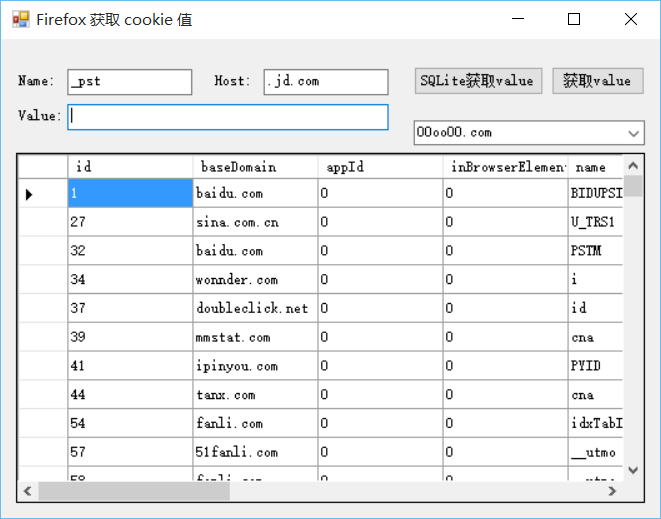
using System;

using System.Collections.Generic;

using System.ComponentModel;

using System.Data;

using System.Data.SQLite;

using System.Drawing;

using System.IO;

using System.Linq;

using System.Text;

using System.Text.RegularExpressions;

using System.Windows.Forms;

namespace FirefoxCookie

{

    public partial class Form1 : Form

    {

        public Form1()

        {

            InitializeComponent();

        }

        private string dbPath = string.Empty;  //cookies.sqlite文件路径

        private void Form1_Load(object sender, EventArgs e)

        {

            DirectoryInfo di = new DirectoryInfo(System.Environment.GetEnvironmentVariable("AppData") + @"\Mozilla\Firefox\Profiles\");

            DirectoryInfo[] dirs = di.GetDirectories();//获取子文件夹列表

            if (dirs != null)

            {

                dbPath = dirs[].FullName + "\\cookies.sqlite";

            }

            //所有cookie

            this.dataGridView1.DataSource = GetTable("select * from moz_cookies");

            //所有站点

            this.comboBox1.DataSource = GetTable("select Distinct baseDomain from moz_cookies");

            this.comboBox1.DisplayMember = "baseDomain";

            //注册事件 属性值更改时触发

            comboBox1.SelectedIndexChanged += new System.EventHandler(this.SelectedIndexChanged);

        }

        //通过指定站点查找

        private void SelectedIndexChanged(object sender, EventArgs e)

        {

            string txt = ((ComboBox)sender).Text;

            this.dataGridView1.DataSource = GetTable("select * from moz_cookies where baseDomain=@baseDomain", new SQLiteParameter("baseDomain", txt));

        }

        private void button1_Click(object sender, EventArgs e)

        {

            string name = this.txtName.Text.Trim();

            string host = this.txtHost.Text.Trim();

            string value = string.Empty;

            if (File.Exists(dbPath))

            {

                string sqlStr = "select value from moz_cookies where name=@name and host=@host";

                SQLiteParameter[] pms = new SQLiteParameter[]{

                    new SQLiteParameter("name", name),

                    new SQLiteParameter("host", host)

                };

                value = (string)ExecuteScalar(sqlStr, pms) ?? "未找到!";

            }

            value = System.Web.HttpUtility.UrlDecode(value);  //中文需要转码

            this.txtValue.Text = value;

        }

        private object ExecuteScalar(string sql, params SQLiteParameter[] pms)

        {

            using (SQLiteConnection conn = new SQLiteConnection("Data Source =" + dbPath))

            {

                using (SQLiteCommand com = new SQLiteCommand(sql, conn))

                {

                    if (pms != null)

                    {

                        com.Parameters.AddRange(pms);

                    }

                    conn.Open();

                    return com.ExecuteScalar();

                }

            }

        }

        private DataTable GetTable(string sql, params SQLiteParameter[] pms)

        {

            using (SQLiteConnection conn = new SQLiteConnection("Data Source =" + dbPath))

            {

                using (SQLiteDataAdapter adapter = new SQLiteDataAdapter(sql, conn))

                {

                    DataTable dt = new DataTable();

                    if (pms != null)

                    {

                        adapter.SelectCommand.Parameters.AddRange(pms);

                    }

                    conn.Open();

                    adapter.Fill(dt);

                    return dt;

                }

            }

        }

        private void button2_Click(object sender, EventArgs e)

        {

            string str = string.Empty;

            using (FileStream fs = new FileStream(dbPath, FileMode.Open, FileAccess.Read, FileShare.ReadWrite))

            {

                using (StreamReader sr = new StreamReader(fs, System.Text.Encoding.Default))

                {

                    str = sr.ReadToEnd();

                }

            }

            string pattern = string.Format(@"(?<={0})(?'value'[\w%]+)(?={1})", this.txtName.Text.Trim(), this.txtHost.Text.Trim());

            Match match = Regex.Match(str, pattern);

            if (match.Success)

            {

                string value = match.Groups["value"].Value;

                value = System.Web.HttpUtility.UrlDecode(value);  //中文需要转码

                this.txtValue.Text = value;

            }

        }

    }

}
下载地址:
http://download.csdn.net/detail/h_gxi/9059561
c# winform 火狐浏览器 查看cookie的更多相关文章
- 浏览器查看cookie
今天总结下,教你怎样查看一些浏览器的Cookie,比如IE.Firefox.Chrome的Cookies等.下面分块介绍,以后会关注一些没有讲到的浏览器获取Cookie的方法. 1.Firefox浏览 ...
- 怎么清除火狐浏览器的cookie?
火狐浏览器清除Cookie方法/步骤 1.打开火狐浏览器.并在火狐浏览器工具栏找到并单击“工具”下的“选项”. 2.在打开的“火狐浏览器选项”程序窗口中,找到工具栏中的“隐私”并单击,在隐私选项下找到 ...
- 关于火狐浏览器设置cookie的一个问题
最近发现我一个项目的网页,里面的cookie无法添加了,急的我瞪着我的PHP代码沉思了好久,我默认用的火狐浏览器,然而我默默的打开另一个叫360的浏览器,发现它的cookie是正常添加的. ... 难 ...
- Chrome浏览器查看cookie
原文:http://jingyan.baidu.com/article/6b18230954dbc0ba59e15960.html 1. 查看页面的cookie 方法: a). 点击地址栏前面的文档薄 ...
- 谷歌浏览器和火狐浏览器如何查看HTTP协议
谷歌浏览器和火狐浏览器如何查看HTTP协议 谷歌浏览器查看HTTP协议 火狐浏览器查看HTTP协议
- 删除浏览器浏览器删除cookie方法
上班之余抽点时光出来写写博文,希望对新接触的朋友有帮助.今天在这里和大家一起学习一下删除浏览器 文章目录导航 适用范围及演示工具 什么是cookie? cookie有什么作用? ie6/ie7/ie8 ...
- 火狐浏览器Firefox 如何下载网页的SWF视频,硅谷动力的网站视频怎么下载
1 使用火狐浏览器查看到底视频在哪里,我随便开了一段视频,发现这个SWF(外框套了一个Control.swf,内层才是真实的09-class.swf) 2 我们从下面这一段代码中进行分析 < ...
- 我给女朋友讲编程CSS系列(3) CSS如何设置字体的类型、大小、颜色,如何使用火狐浏览器的Firebug插件查看网页的字体
一.CSS如何设置字体的类型.大小.颜色 设计网页时,一般设置body的字体,让其他标签继承body的字体,这样设置特别方便,但是标题标签h1到h6和表单标签(input类型)是没有继承body的字体 ...
- 转:Chrome浏览器查看网站登录 Cookie 信息的方法
当我们使用自动签到等程序的时候一般都要用到网站Cookie,我们可以借助浏览器的扩展来获取Cookie信息,但其实通过浏览器本身的功能就可以查看Cookie信息.以Chrome类浏览器为例有以下三种方 ...
随机推荐
- zoj 3229 Shoot the Bullet(无源汇上下界最大流)
题目:Shoot the Bullet 收藏:http://www.tuicool.com/articles/QRr2Qb 把每一天看成一个点,每个女孩也看成一个点,增加源和汇s.t,源向每一天连上[ ...
- zabbix_server 已死,但是 subsys 被锁
一开始 grant all privileges on zabbix.* to zabbix@localhost identified by 'password'; 将localhost改为ip后恢 ...
- [译]OpenStack Object Storage Monitoring
注:翻译的不完整,主要是有些地方翻译后反而妨碍理解,有些不知道怎么翻,anyway,需要时拿来用用也是可行的,顺便共享啦.欢迎提意见. 一个OpenStack Object Storage(OSOS) ...
- [转]jQuery UI Dialog Modal Popup Yes No Confirm example in ASP.Net
本文转自:http://www.aspsnippets.com/Articles/jQuery-UI-Dialog-Modal-Popup-Yes-No-Confirm-example-in-ASPN ...
- JVM 类加载过程
类从加载到虚拟机到卸载,它的整个生命周期包括:加载(Loading),验证(Validation),准备(Preparation),解析(Resolution),初始化(Initialization) ...
- 怎样用ZBrush雕刻人体造型
之前我们通过学习使用ZBrush®中的Curves和Insert笔刷快速创建模型的躯干.四肢以及手指.经过老师耐心的讲解我们也收获了很多,知道了创建模型的流程和雕刻技巧.今天的ZBrush教程我们将结 ...
- HDU 5033 Building --离线+单调栈
题意:给一些建筑物,x表示横坐标,h表示高度,然后查询某些坐标x,问从该点看向天空的最大张角是多大. 解法:离线操作,读入所有数据,然后按x升序排序,对每一个查询的x,先从左到右,依次添加x坐标小于x ...
- Unity手机平台播放影片
播放视频方法 截止到目前的Unity4.2版本,要在手机平台上播放影片,有两种方法: 使用Unity自带的Move Texture http://docs.unity3d.com/Documentat ...
- MongoDB学习(三)数据导入导出及备份恢复
这几天想着公司要用MongoDB,自然就要用到数据导入导出,就自己学习了一下. 在Mongo学习(二)中就讲到了在bin目录下有一些工具,本篇就是使用这些工具进行数据的导入导出及备份恢复. 注意:以下 ...
- smarty插件开发代替注册插件方法registerPlugin