
GDI学习之俄罗斯方块
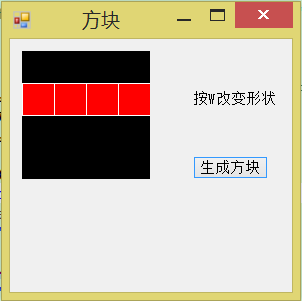
做个玩玩
public Form1()
{
InitializeComponent();
} #region 定义砖块int[i,j,y,x] Tricks:i为那块砖,j为状态,y为列,x为行
private int[, , ,] Tricks = {{
{
{,,,},
{,,,},
{,,,},
{,,,}
},
{
{,,,},
{,,,},
{,,,},
{,,,}
},
{
{,,,},
{,,,},
{,,,},
{,,,}
},
{
{,,,},
{,,,},
{,,,},
{,,,}
}
},
{
{
{,,,},
{,,,},
{,,,},
{,,,}
},
{
{,,,},
{,,,},
{,,,},
{,,,}
},
{
{,,,},
{,,,},
{,,,},
{,,,}
},
{
{,,,},
{,,,},
{,,,},
{,,,}
}
},
{
{
{,,,},
{,,,},
{,,,},
{,,,}
},
{
{,,,},
{,,,},
{,,,},
{,,,}
},
{
{,,,},
{,,,},
{,,,},
{,,,}
},
{
{,,,},
{,,,},
{,,,},
{,,,}
}
},
{
{
{,,,},
{,,,},
{,,,},
{,,,}
},
{
{,,,},
{,,,},
{,,,},
{,,,}
},
{
{,,,},
{,,,},
{,,,},
{,,,}
},
{
{,,,},
{,,,},
{,,,},
{,,,}
}
}}; #endregion private Color[] TrickColor = { Color.Red, Color.Blue, Color.Orange, Color.Green }; private int[,] CurrentTrick = new int[, ]; //当前的砖块
//CurrentTrickNum当前砖块的数目, CurrentStatusNum当前状态 CurrentColor当前颜色
private int CurrentTrickNum, CurrentStatusNum, CurrentColor;
private int TricksNum = ;//方块种类
private int StatusNum = ;//方块状态
private int ColorNum = ;//颜色种类
private Image myImage;
private Random rand = new Random(); private void Form1_Load(object sender, EventArgs e)
{
//初始化
myImage = new Bitmap(panel1.Width, panel1.Height);
for (int y = ; y < ; y++)
{
for (int x = ; x < ; x++)
{
CurrentTrick[y, x] = ;
}
}
Draw();
} protected override void OnPaint(PaintEventArgs e)
{
Draw();
base.OnPaint(e);
} private void Draw()
{
Graphics g = Graphics.FromImage(myImage);
g.Clear(Color.Black);
//绘制当前的图片
for (int y = ; y < ; y++)
{
for (int x = ; x < ; x++)
{
if (CurrentTrick[y, x] == )
{
g.FillRectangle(new SolidBrush(TrickColor[CurrentColor]), x * , y * , , );
g.DrawRectangle(Pens.White, x * , y * , , );
}
}
}
Graphics gg = panel1.CreateGraphics();
gg.DrawImage(myImage, , );
} //随机生成方块
private void BeginTricks()
{
//随机生成砖码和状态码和颜色
CurrentTrickNum = rand.Next(, TricksNum);
CurrentStatusNum = rand.Next(, StatusNum);
CurrentColor = rand.Next(, ColorNum);
//分配数组
for (int y = ; y < ; y++)
{
for (int x = ; x < ; x++)
{
CurrentTrick[y, x] = Tricks[CurrentTrickNum, CurrentStatusNum, y, x];
}
}
} //控制方向
private void Form1_KeyDown(object sender, KeyEventArgs e)
{
if (e.KeyCode == Keys.W)
{
ChangeTricks();
Draw();
}
} //变换方块
private void ChangeTricks()
{
if (CurrentStatusNum < )
{
CurrentStatusNum++;
}
else
{
CurrentStatusNum = ;
}
for (int y = ; y < ; y++)
{
for (int x = ; x < ; x++)
{
CurrentTrick[y, x] = Tricks[CurrentTrickNum, CurrentStatusNum, y, x];
}
}
} private void button1_Click(object sender, EventArgs e)
{
BeginTricks();
Draw();
}

GDI学习之俄罗斯方块的更多相关文章
- GDI学习之俄罗斯方块续
当前方块对象 #region 定义砖块int[i,j,y,x] Tricks:i为那块砖,j为状态,y为列,x为行 private int[, , ,] Tricks = {{ { {,,,}, {, ...
- C# GDI+学习笔记1
前言 本文是学习C# GDI+系列的第一篇文章,简单的介绍了GDI+的一些基本绘图内容,比较粗糙.但本文主要是让大家简单的回顾一下GDI+的基本概念.本篇文章的参考代码请在此下载 . GDIPTes ...
- Delphi7 GDI+学习
Delphi7自带的绘图有锯齿,所以要学习GDI+ 主要是从这个网站学习 http://www.bianceng.com/Programming/Delphi/201212/34691.htm 相关控 ...
- GDI+学习笔记(六)渐变画笔
刷,顾名思义,它是一样的刷.提请设备,还记得常唱歌曲,"我是一个画家.." 好吧.跑题了. 本系列博客希望尽可能简单的描写叙述每项功能,而不希望把每一个參数都介绍的详具体细,假设须 ...
- GDI+学习---2.GDI+编程模式及组成类
在使用GDI+的时候,您不必像在GDI中那样关心设备场景句柄,只需简单地创建一个Graphics对象,然后以您熟悉的面向对象的方式(如myGraphicsObject.DrawLine(paramet ...
- GDI+学习---1.初识GDI+
---恢复内容开始--- GDI+: GDI+由一组C++类实现,是对于GDI的继承,GDI+不仅优化了大部分GDI性能而且提供了更多特性.允许应用程序开发者将信息显示在显示器或者打印机上,而无需考虑 ...
- GDI+学习笔记
7.1.1 GDI+概述 GDI+是微软在Windows 2000以后操作系统中提供的新的图形设备接口,其通过一套部署为托管代码的类来展现, 这套类被称为GDI+的“托管类接口”,GDI+主要提供了以 ...
- GDI+学习笔记(九)带插件的排序算法演示器(MFC中的GDI+实例)
带插件的排序算法演示器 请尊重本人的工作成果,转载请留言.并说明转载地址,谢谢. 地址例如以下: http://blog.csdn.net/fukainankai/article/details/27 ...
- GDI+学习之------ 画线、区域填充、写字
<精通GDI编程>里的代码.在学习过程中对它加以总结,以防以后用到,全部代码都是在MFC 单文档中实现的,写在View::OnDraw(CDC */*pDC*/)中 画线/边框(Pen) ...
随机推荐
- .NET VS2012 将代码同步上传到 oschina.net 和 github
1.先首要注册两个账号 https://github.com/ http://git.oschina.net/ 2.下载 getextendions http://sourceforge.net/pr ...
- 查找表或其他对象在某个Server上的存在
EXEC sp_MSforeachdb 'use ? ; IF EXISTS(SELECT top 1 1 FROM sys.syscomments WHERE text LIKE ''%test% ...
- 如何将oc代码转换成运行时代码
// 运行时 其实就是oc的底层 平时写的代码 最终都是转成底层的运行时代码以下面程序为例子: 如果我们想要看我们的main.m文件底层转换成了怎样的运行时代码 ,我们可以这样做. 1.打开终端 ...
- 【WP8】扩展CM的WindowManager
14-09-09更新:修复AppBar冲突bug 关于WindowManager,一直都很想写一篇博客分享一下,一直在忙别的,今天抽空把这个分享一下 在弹窗在移动开发是一个很常见的交互,很多时候我们都 ...
- 有关CLR的初学小整理2(可能理解不深刻,望大牛指出)
针对原文有用的段落,写一写自己的理解,注释: 1. 托管exe文件被启动的时候,首先被PE Loader载入.PE Loader载入exe文件之后,会分析PE文件头的data directory ta ...
- .NET初学者推荐课程 asp.net错误代码大全
错误 CS0001 编译器内部错误错误 CS0003 内存溢出错误 CS0004 提升为错误的警告错误 CS0005 编译器选项后应跟正确的参数错误 CS0006 找不到动态链接的元数据文件错误 CS ...
- 从零开始学习Linux(mkdir and rmdir)
今天说mkdir 和 rmdir.因为mkdir 内容比较少.而且也很好理解. 对于mkdir来说,一般只用到 -p -m,我只用过-p参数,-m也是刚刚看的. 先说不带参数的: mkdir tes ...
- 那些教程没有的php1-基础知识补漏
php.net 字符串 heredoc结构 类似双引号,其中的变量会被解析.严格遵循下边的格式,结束标识符这行除了可能有一个分号(;)外,绝对不能包含其它字符. <?php $str = < ...
- Ahjesus获取自定义属性Attribute或属性的名称
1:设置自己的自定义属性 public class NameAttribute:Attribute { private string _description; public NameAttribut ...
- ASP.NET Web API 特性
ASP.NET MVC 4 包含了 ASP.NET Web API, 这是一个创建可以连接包括浏览器.移动设备等多种客户端的 Http 服务的新框架, ASP.NET Web API 也是构建 RES ...